Winter SaleEnds 1/19. Limited quantities. No rainchecks.Shop now

Main Content
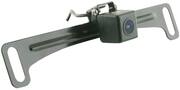
product image

EchoMaster - Universal License Plate Back-Up Camera with Dynamic Parking Lines - Black

Model: CAM-TGL
SKU: 6296145
This item is no longer available in new condition. See similar items below
  • Key Specs
    • Field of View: 170 degrees
    • G-Sensor: false
    • Compatibility: Universal
    • Wi-Fi Built-in: false (Able to connect directly to a wireless network without the use of an adapter.)
    • Camera Mounting Location: License plate
    • Vehicle Camera Type: Back-up
    • Professional Installation Recommended: true
  • General
    • Brand: EchoMaster
    • Model Number: CAM-TGL
    • Product Name: Universal License Plate Back-Up Camera with Dynamic Parking Lines
    • Color: Black
    • Vehicle Camera Type: Back-up
    • Professional Installation Recommended: true
  • Recording & Playback
    • Field of View: 170 degrees
    • G-Sensor: false
    • Image Sensor Type: CMOS (CCD and CMOS are the two main technologies used in image sensors. CCD, the older of the two types, turns analog light signals into digital pixels. This conversion happens without distortion, resulting in high-quality images. Newer CMOS sensors use transistors at each pixel to move electrical charges. CMOS sensors are typically less expensive, but also require more light to create distortion-free images.)
    • Camera Power Source: Vehicle battery
    • Expandable Memory Compatibility: None
    • Recording Feature: false
  • Compatibility
    • Compatibility: Universal
    • Wi-Fi Built-in: false (Able to connect directly to a wireless network without the use of an adapter.)
  • Features
    • Lane Guidance: true
    • Integrated Microphone: false
    • Night Vision: false
  • Display
    • Screen Included: false
  • Mounting
    • Camera Mounting Location: License plate
    • Mount Included: true
    • Mount Type: Screws
  • Input
    • Number Of Auxiliary Inputs: 0
    • Number of USB Port(s): 0
  • Dimensions
    • Product Height: 2.17 inches (The out of box height of the item. Height is measured as the vertical distance from the bottom of the item to the top as it would be primarily used or placed.)
    • Product Width: 8.66 inches (The out of box width of the item. Width is measured as the horizontal distance from one side of the item to the other as it would be primarily used or placed.)
    • Product Depth: 3.15 inches (The out of box depth of the item. Depth is measured as the distance from the front of the item to the back as it would be primarily used or placed.)
    • Product Weight: 1.1 pounds (The out of box weight of the item.)
  • Warranty
    • Warranty - Parts: 1 year
    • Warranty - Labor: None
  • Other
    • UPC: 609098828871

Make reversing safer and easier with this Universal License Plate Back-Up Camera with Dynamic Parking Lines by EchoMaster. The CAM-TGL features built-in motion sensors and dynamic parking lines that allow you to back into parking spaces and detect obstacles while in reverse. This durable license plate back-up camera also features a 170° wide viewing angle to eliminate blind spots and includes mounting brackets for installation.

  • Universal compatibility: Works with most factory or aftermarket radios and rear-view mirror monitors. Use the included harness and RCA cable to connect the camera to your monitor.
  • License plate mount style: Designed to mount behind or on the lip above the rear license plate. Includes both a license plate mount and butterfly mount for versatile installation.
  • 170° wide viewing angle: Delivers an expansive view of the area behind your vehicle.
  • IP67-rated water-resistant and debris-proof rear camera: Enables all weather use.
  • 1/3" CMOS image sensor: Ensures crisp, clear images.
  • Operates at 0.5 LUX: Offers additional visibility for drivers to see what's behind them even in low-light conditions.
  • Dynamic parking guidelines: Provide extra security and guidance while reversing.
  • Universal compatibility: Works with most factory or aftermarket radios and rear-view mirror monitors. Use the included harness and RCA cable to connect the camera to your monitor.
  • License plate mount style: Designed to mount behind or on the lip above the rear license plate. Includes both a license plate mount and butterfly mount for versatile installation.
  • 170° wide viewing angle: Delivers an expansive view of the area behind your vehicle.
  • IP67-rated water-resistant and debris-proof rear camera: Enables all weather use.
  • 1/3" CMOS image sensor: Ensures crisp, clear images.
  • Operates at 0.5 LUX: Offers additional visibility for drivers to see what's behind them even in low-light conditions.
  • Dynamic parking guidelines: Provide extra security and guidance while reversing.
Whats Included
  • EchoMaster Universal License Plate Back-Up Camera with Dynamic Parking Lines
  • License plate mounting bracket
  • Butterfly mount
  • Installation hardware
  • 39" wiring harness
  • 20' RCA cable
  • User manual
  • EchoMaster Universal License Plate Back-Up Camera with Dynamic Parking Lines
  • License plate mounting bracket
  • Butterfly mount
  • Installation hardware
  • 39" wiring harness
  • 20' RCA cable
  • User manual

Q: If the car (2007 Tundra) has no screen or monitor, what is a good solution? Recommendations?

A: You will need a dash unit or a mirror that can display it. The double din head units are not as pricey as you may think. I am very happy that i spent the money and got the rear camera and new head unit in my 2010 Silverado.

Q: Will this device work with Garmin GPS units that support backup cameras?

A: NO, this Camera "Will No" work with a Garmin GPS. I have 2 Garmins and can only use Garmin Camera accessories. I did try other ones like this one, but did not work.

Q: Yes did a self install does anyone know what I have to do my screen on my dash stero is stuck on the reverse screen everything is hooked up correctly am I missing something

A: More information might be helpful, specifically, what you're using as a trigger source and what display/headunit you have. For example, some Pioneer Headunits can set the reverse trigger input to negative or positive, so if you had a positive reverse input the image would display when NOT in reverse and vice versa. If you used Accessory or ignition to power the camera and used the red through lead coming out of the RCA to your radio's reverse input you would be telling the headunit to display reverse image anytime the vehicle is on.

Q: what is the process to install the devise. Is it difficult? Who can install it?

A: Difficulty depends on the vehicle. If it's older, then anyone with some basic 12v auto install experience and tools should be able to handle the job. It's a matter of running/connecting a video line to the monitor, and the most difficult part is power as you need to run a ground wire and a '+' power wire that ties into the reverse light '+' circuit somewhere. Requires some interior dis/reassembly. It can get a bit more complicated, including needing a diode wired in on reverse circuit, if you want to add a switched line to activate the camera and monitor whenever you want. If the vehicle is fairly new it gets more complicated as you need to be able to trace circuits, find ones that behave in certain ways, and be able to understand/wire in relays and run some extra lines. Still not rocket science, but a bit more involved than the old days of straight 12v circuitry! The alternative is having BB install it, which I'd guess is probably a fairly inexpensive job for an experienced team with all the right literature & tools. Good luck!

Q: This camera is causing my TPMS to lose communication which is indicated by a blinking TPMS light on my 2014 Toyota Prius. Tried running it down the right and left side of the vehicle. When unplugged from head unit the TPMS light goes off. How to fix it?

A: We've been troubleshooting this at my local Best Buy, they are out of ideas. Also the local Toyota dealer is the one that came up with the idea that it was the aftermarket camera. After installation the light comes on after about 30 minutes of driving and then comes on (flashes for 30 seconds first) every engine start after that.

Q: got a new head unit with apple carplay, got this camera and got it installed per the directions, I'm not getting video only see the parking lines? any ideas for trouble shooting this issue?

A: We are sorry you are having issues with your camera. You can reach out to the support team who will go over your connections in the vehicle with you. Information can be found in the included install instructions that came with the camera.