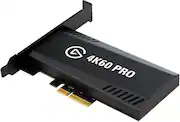
Record stunning, crystal-clear video from live streams with this Elgato Game Capture Pro MK.2 capture card. The multi-feed technology lets you capture video streams from multiple apps simultaneously, and ultralow latency provides precise captures. Multi-card support enables multiple Elgato Game Capture Pro MK.2 capture card units within a single PC.
Q: How is the Elgato Game Capture connected to a PC?
A: The Elgato Game Capture is a PCIe interface card.
Q: Which streaming software is this Elgato Game Capture compatible with?
A: This game capture card is compatible with most major broadcasting software, including OBS and XSplit.
Q: Does this capture card have local recording capabilities?
A: Yes, it allows for local recording of 4K HDR10 footage directly to your hard drive.
Q: What operating system is required for this capture card?
A: This capture card requires Windows 10 (64-bit).
Q: What does this game capture card allow you to capture?
A: This game capture card allows users to capture 4K HDR10 content at 60 fps.
Q: What is the maximum resolution supported for video capture?
A: The maximum resolution supported is 2160p (4K) @ 60 FPS.
Q: Can you use the Elgato camlink 4k and the 4k 60 pro 2 at the same time?
A: Hi Hustle, Depending on the use, they may both simultaneously function. I suggest getting in touch with support for clarification: support.elgato.com -Albert
Q: Will this capture 4K video if I have an AMD Vega 64 graphics cards?
A: Hi Dave, Assuming all other requirements are met, that shouldn't be a problem! If you have anything else we can help with, please reach out: help.elgato.com -Art

Record stunning, crystal-clear video from live streams with this Elgato Game Capture Pro MK.2 capture card. The multi-feed technology lets you capture video streams from multiple apps simultaneously, and ultralow latency provides precise captures. Multi-card support enables multiple Elgato Game Capture Pro MK.2 capture card units within a single PC.

8K60 passthrough, 4K60 capture! VRR and true 10-bit HDR. 4K Pro turns your high-end PC or dual PC setup into the ultimate streaming machine, and leaves your gameplay alone. Equipped with HDMI 2.1, you can even play in high resolutions at high frame rates, like 4K240, and capture ultra smooth 1080p240 footage of your performance – all while ultra-low latency circuitry keeps your gameplay and capture feed perfectly synced. From PC, PS5, and Xbox Series X to Nintendo Switch, Steam Deck, ROG Ally, even iPhone 15 – we’ve made sure 4K Pro plays beautifully with your beloved machine. Because you‘ve invested in high-end gear for the best gaming experience possible, and you shouldn’t have to compromise that.

Showcase your gameplay at its best with Elgato Game Capture 4K S. Play and capture in crisp 4K60, ultra-smooth 1440p120, or even 1080p240—all with near-zero latency. With VRR passthrough, HDR10 capture on Windows, and analog audio input, this external USB-C card delivers pro-level features in a plug-and-play form factor. Whether you’re streaming or recording, it works seamlessly on Windows, macOS, and iPadOS—no drivers needed. 4K S is compatible with OBS Studio, Streamlabs, Discord, Zoom, and more. Connect your PS5, Xbox, or docked Switch 2, and share your gameplay in cinematic detail.

Stream Deck gives you 15 LCD keys to control your apps and tools. Trigger actions, launch social posts, adjust audio, play sound clips, activate lights, and much more. Get visual feedback to confirm your commands. Set Stream Deck to automatically switch key configurations as you jump between apps. It’s the ultimate workflow hack, and it’s fully customizable. Personalize your Stream Deck with custom icons, screensavers, and a growing range of interchangeable faceplates. Use the app to configure keys with ease, and hit the Stream Deck Store for app plugins, icon packs, thousands of royalty free tracks, effects, and more.
| Pros for Elgato - Game Capture 4K60 Pro MK.2 - Black | |||
|---|---|---|---|
| Cons for Elgato - Game Capture 4K60 Pro MK.2 - Black | |||
| There were no cons for this product— | There were no cons for this product— |
Customers express satisfaction with the Game Capture 4K60 Pro MK.2's ease of use and video quality. Many appreciate its compatibility and passthrough capabilities. Some customers mention experiencing lag and suggest improvements to the software. The price is also a concern for some users.
The vast majority of our reviews come from verified purchases. Reviews from customers may include My Best Buy members, employees, and Tech Insider Network members (as tagged). Select reviewers may receive discounted products, promotional considerations or entries into drawings for honest, helpful reviews.
Does everything the website says! No latency, 4K options, everything! All you gotta do is plug it in an open PCIE slot that’s at least x4 - mine is in a x16 - download the Application AND download the drivers. Both are on separate paths on Elgato’s websites. Make sure you download the correct driver for the correct MK. This one is the MK.2. If you’re still receiving a “No capture devices found” message then restart your computer and during the restart, press F2 or Delete to open BIOS settings. Look for the Link Speed for the PCIE slot your card is plugged in and set the mode from AUTO/3RD GEN to 2ND GEN. Afterwards it should say “No Signal” until you plug in or turn on your console/device. Once all that is done it should be smooth sailing. Oh and btw, the HDMI cable that’s included is a 5-footer.
Posted by Slamairon
Excellent capture card. Work seem Owsley in the background. No skips. Get 60 frames per second with no problems in high definition 4K. Always in stock at Best Buy. Nice to know if you have any trouble you can always get it a replacement card. Recommend total tech membership. No questions asked. Got to love it.
Posted by WilliamT
The capture card works as intended. The only thing to worry about is whether you have an original 4K60 Pro or a MK.2 version. The latter can only use the 4K Capture Utility software and the former can still use Game Capture HD from Elgato.
Posted by Zhamir