Elgato - Game Capture Neo - 4K60 HDR Passthrough, 1080p60 Capture – For Nintendo Switch 2/PS4/PS5/Xbox/PC/Mac/iOS - White
Customers are saying
Customers have good things to say about the overall performance of this product. Users report that it functions flawlessly when handling its intended tasks.
Features
Tiny but mighty
Premium Elgato Capture hardware the size of a smartphone.
Easy setup
Just connect your console, gaming screen, and computer or iPad.
Super compatible
Capture PlayStation, Xbox, Switch, or any console.
4K60 HDR passthrough
No need to reduce your console resolution.
1080p60 capture
Record or stream stunning Full HD content.
Ultra-low latency
Play your favorite titles without lag.
Zero limitations
No time limits, no watermarks, no subscriptions.
Use any app
Elgato capture software, QuickTime, OBS Studio, Discord, Microsoft Teams, Zoom
Stream to any platform
YouTube, Twitch, TikTok, Facebook Gaming, etc.
Plug and play
Driverless setup on laptop, PC, Mac, iPad.
Specifications
- Video Input(s)HDMIVideo Output(s)HDMIMaximum Supported Resolution (Video Capture)1080p (Full HD) @ 60 FPSCompatible Platform(s)PlayStation 4, PlayStation 5, XBOX Series X, XBOX Series S, Nintendo Switch, Nintendo Switch 2, Mac, Windows, iOS
Reviews
Rating 4.7 out of 5 stars with 151 reviews
- Overall Performance (7)
Customer Images
The vast majority of our reviews come from verified purchases. Reviews from customers may include My Best Buy members, employees, and Tech Insider Network members (as tagged). Select reviewers may receive discounted products, promotional considerations or entries into drawings for honest, helpful reviews.





Compare similar products
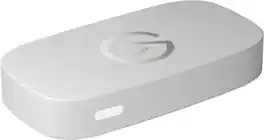
Great content made easy. Play stunning 4K60 HDR games without image quality loss or lag, and record or stream your adventures in beautiful Full HD 1080p60 resolution. Game Capture Neo sends two video signals from your console – one to your gaming screen and the other to your laptop, PC, Mac, or iPad. Capture everything you see and hear – gameplay, cutscenes, soundtrack – without watermarks or time limits, directly to your hard drive, YouTube, or Twitch. Stick to simple QuickTime recordings or develop your streaming expertise in OBS. As your skillset expands, Game Capture Neo evolves with your growing needs. So you can keep growing your community.

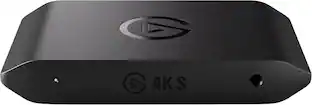
Showcase your gameplay at its best with Elgato Game Capture 4K S. Play and capture in crisp 4K60, ultra-smooth 1440p120, or even 1080p240—all with near-zero latency. With VRR passthrough, HDR10 capture on Windows, and analog audio input, this external USB-C card delivers pro-level features in a plug-and-play form factor. Whether you’re streaming or recording, it works seamlessly on Windows, macOS, and iPadOS—no drivers needed. 4K S is compatible with OBS Studio, Streamlabs, Discord, Zoom, and more. Connect your PS5, Xbox, or docked Switch 2, and share your gameplay in cinematic detail.

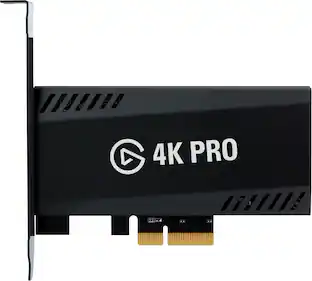
8K60 passthrough, 4K60 capture! VRR and true 10-bit HDR. 4K Pro turns your high-end PC or dual PC setup into the ultimate streaming machine, and leaves your gameplay alone. Equipped with HDMI 2.1, you can even play in high resolutions at high frame rates, like 4K240, and capture ultra smooth 1080p240 footage of your performance – all while ultra-low latency circuitry keeps your gameplay and capture feed perfectly synced. From PC, PS5, and Xbox Series X to Nintendo Switch, Steam Deck, ROG Ally, even iPhone 15 – we’ve made sure 4K Pro plays beautifully with your beloved machine. Because you‘ve invested in high-end gear for the best gaming experience possible, and you shouldn’t have to compromise that.

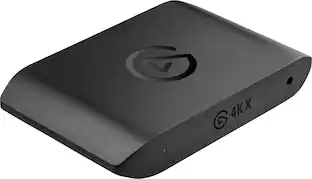
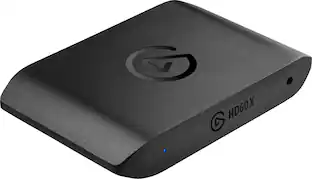
With HD60 X, capture PS5 or Xbox gameplay like a pro. Use your favorite broadcast app and create high resolution 1080p60 HDR10 or 4K30 HDR10 content for audiences on any video platform. Play high-fidelity games as intended with VRR support and up to 4K60 HDR10 passthrough. You can even enjoy high frame rate gameplay such as 1440p120 or 1080p120. HD60 X connects to your console and sends raw video in real time to both your gaming screen and computer, giving you the freedom to stream, record and edit on your terms. No subscriptions. Zero limitations.
| Pros for Elgato - Game Capture Neo - 4K60 HDR Passthrough, 1080p60 Capture – For Nintendo Switch 2/PS4/PS5/Xbox/PC/Mac/iOS - White | |||
|---|---|---|---|
| Overall Performance | Overall Performance, Latency, Functionality | Overall Performance, Ease of use, Video Quality | Overall Performance, Ease of use, Video Quality, Setup, Compatibility |
| Cons for Elgato - Game Capture Neo - 4K60 HDR Passthrough, 1080p60 Capture – For Nintendo Switch 2/PS4/PS5/Xbox/PC/Mac/iOS - White | |||
| There were no cons for this product— | Audio Quality, Setup Difficulty | Passthrough | Lag, Price, Software, VRR, HDMI |
Specs
Customers ultimately bought
Discover related products
 $149.99The price was $169.99
 $229.99The price was $249.99
 $249.00The price was $275.00








Keep exploring
 $159.99The price was $161.99