Rating 4.4 out of 5 stars with 2579 reviews
4.4- Print Quality (1188)
- Ease of use (509)
- Overall Performance (129)
- Setup (112)
- Size (93)
- Noise Level (40)
- Touch Screen (40)
- Connectivity (31)
- Scanning (18)
- ADF (14)
Customer Images
The vast majority of our reviews come from verified purchases. Reviews from customers may include My Best Buy members, employees, and Tech Insider Network members (as tagged). Select reviewers may receive discounted products, promotional considerations or entries into drawings for honest, helpful reviews.
- Rated 5 out of 5 stars
Great for homeschooling and household office
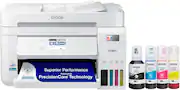
I purchased the Epson EcoTank ET-3850 printer to replace one that used ink very fast. A few years ago, I purchased a Canon for $20 on Black Friday at another store. That $20 printer cost me $50-60 in ink every 150 pages. So far with the Epson, I have printed about 100 pages with very little ink missing from the tanks. I like being able to see the ink in the tanks. I always wondered if the other ink cartridges actually contained much ink. I only use the printer for homeschooling and household office printing. The printer is perfect for my purposes. It is very fast compared to my old printer and also pretty quiet compared to the other, though not as quiet as some others might like. I was able to print double sided with the top copy master feed. I liked this feature, but I am not able to double side print when sending documents from my computer. If there were a way to do this, I would love it. Maybe I just need to figure out how to use the printer, but this is not as important to me as might be to some. I just print out the documents single sided then use the copy feature to double side print. The printer makes it easy. So far, I have used cardstock as well as regular paper. I have no use for printing pictures out on picture paper. I think the printer uses less ink on the paper than my previous printer which is another advantage because the double sided copies consequently do not stick or get jammed. There have been no jams so far, so another plus for the machine. Set up was easy. The software updated automatically. The buttons on the front are easy to navigate even intuitively. I would have preferred a touch screen, but I chose a more budget friendly model. The buttons are not hard to use, though. Everything makes sense. The printer prints well using the app from my phone or my laptop and desktop computers. I have had no difficulties connecting to my computers. We use Apple phones and computers. I really like the printer. It fit my needs perfectly. Though it is pricier than the $20 one, the Epson EcoTank 3850 will more than make up for it in savings on the cost of ink.
Posted by Faith
- Rated 5 out of 5 stars
Epson EcoTank is the one to buy!
This is my second Epson EcoTank purchased from Best Buy and I just love them (if you can love a printer...lol). I use one for normal printing and copy making, and the other I use for crafting. The set up is super easy and Epson walks you through it. I also like the smaller size of the printer as it saves space. The best thing is that the printer comes with a full charge of ink and saves you tons of money in not having to buy refill cartridges. If you are looking for a printer/copier/scanner for crafting, personal printing and copies, or for use in a small business, this is the one to buy!
Posted by LoriC
- Rated 5 out of 5 stars
Great printer, easy to set up
The printer arrived on schedule. It was very easy to set up. Connected to Wifi without any issues. No need to first connect using a USB cable like some other printers. Connection from different devices such as Linux workstation, windows Virtual machine, iPhone worked on first try. Easy to download drivers from Epsom site. The ink bottles were pretty big and had the ink tanks are huge as compared to cartridges. I am glad to not have to deal with the scam of ink cartridges. I tried the normal printing, scanning, and auto 2-side printing and it works flawlessly. The printer is compact and takes less space than my old error prone HP OfficeJet printer. Looks pretty cool as well. It is on the pricy side, but savings on cartridges makes it worth it.
Posted by Baba2022
- Rated 5 out of 5 stars
Compact and versatile all in one printer for home
I needed a compact all in one printer for my small apartment. I also wanted to get away from the huge expense of ink cartridges as I print a lot especially in color. I had never purchased an Epson printer before. My previous printer was a Brother which was fast and versatile but huge with costly ink cartridges. I love this Epson printer. It can fit on the same desk as my 27" iMac and I love the refillable ink which is easy to see when it needs to be refilled. The speed for printing isn't as fast as I am used to, but its acceptable. The only thing I would change would be that the home screen was a touch screen. Its not a touch screen - you have to use the arrow keys to use the menu which isn't as intuitive as I would like, but I can live with it. I believe the model above it has a touch screen but it also has a fax machine which I didn't need. The colors are great and I am very happy with my purchase.
Posted by Rosebird
- Rated 5 out of 5 stars
Amazing Value but with Poor Wi-Fi Connection
PROS: -Obviously more money up front, but the sheer amount of printing that you can do, quickly surpasses the cost of cartridges. Pretty much the second time you replace all the cartridges on a standard printer you would have spent far more. Even the cost of the refill bottles is low enough that there no temptation to purchase cheap alternatives. -Print quality is great, and even though this isn’t billed as a photo printer, it still does a pretty good job. Definitely great for casual photo printing. -Built in tray that holds A LOT of paper. -Print speed is fast for its price point. -First home printer I’ve had with a auto-document feeder, which makes scanning multiple documents very quick and easy. CONS: Initially set this up to connect to my home network wirelessly, but when the printer goes into low power mode, it disconnects from the network. Had to go wake the printer up manually, which gets old quickly. Especially if you’re printing from the other side of the house. This printer was in the exact same spot as my previous printer and I had no issues with that one. Fortunately I was able to connect a Ethernet cable to this printer and that pretty much solved everything (plus a direct connection spools print jobs so much quicker). Not convenient for those that need flexibility in where they need to place this. Overall very happy with printer. For those wondering the ET-3820, ET-3850, ET-4850 all share the exact same core components. The ET-3850 adds an auto-document feeder for the scanner (definitely worth it). Then the ET-4850 adds a modem for fax and a touch screen for operating the printer. My complaint on the ET-4850 is the touch screen is too small, they should of made it bigger.
Posted by UberRN