Everything for Back to School — and then someShop now

Skip to contentGo to Product Search
Main Content

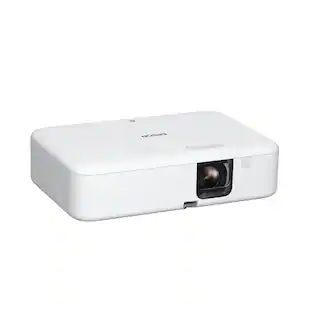
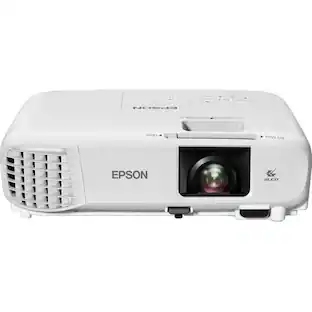
Epson - EF-30 Full HD 1080p Personal Lifestyle Projector, Dolby Audio, Google TV, HDR, 3LCD, 350 Lumens Color & White Brightness - Silver

Model: V11HC43920
SKU: 6673070
Sold byBest Buy

Customers are saying

Customers recognize the product for its surprisingly well-balanced image quality. They also appreciate its nearly silent operation and very portable design, which contributes to its ease of setup. Furthermore, the inclusion of Dolby Audio support is a positive aspect highlighted by users.

Generated by AI based on customer reviews.
Features
  • Big. Bold. Beautiful.

    Full HD with 350 Lumens Color Brightness (IDMS Rated) and 350 Lumens White Brightness (ISO Rated)¹ up to 100"

  • Entertainment at Your Fingertips

    Stream all your shows from Netflix, Disney+, YouTube, and more, with the convenience of built-in Google TV³

  • A Whole New Way to Play

    Create and share personalized videos on the big screen with the Epson Projection Studio app²

  • Impactful Audio

    High-quality internal stereo speakers with Dolby Audio for an impressive audio performance

  • More Memories. Less Setup.

    EpiqSense 2.0 auto-setup delivers perfect focus, color and alignment in seconds—so you can start the fun faster

  • Perfect for Game Night

    Enjoy smooth, responsive gameplay on a display up to 100'' for epic races, co-ops battles and more

  • Compact and Versatile

    A sleek, modern design lets you easily project almost anywhere with ease and style

  • Flexible Connectivity

    With an HDMI input, you can easily personalize your entertainment setup with various third-party options

  • Peace of Mind

    Backed by an Epson 1-year limited warranty, the EF-30 projector lets you host, play and stream with total confidence

  • Turn Your Smartphone into a Remote

    Control the projector using the Epson Projection Studio app² for volume control, playback and more

See all features
Specifications
  • Product Weight
    3.8 pounds
    Light Source
    LED
    Resolution
    Full HD (1080p)
    Color Brightness (IDMS)
    350 lumens
    White Brightness (ISO)
    350 lumens
    Projector Use
    Home Theater, Gaming
Sponsored

Reviews

Rating 4.8 out of 5 stars with 11 reviews

5 star rating. 9 reviews4 star rating. 2 reviews
100% would recommend to a friend
Customers are sayingCustomers recognize the product for its surprisingly well-balanced image quality. They also appreciate its nearly silent operation and very portable design, which contributes to its ease of setup. Furthermore, the inclusion of Dolby Audio support is a positive aspect highlighted by users.
This summary was generated by AI based on customer reviews.
  • Image Quality (8)
  • Noise Level (4)
  • Setup Ease (4)
  • Dolby Audio Performance (3)

Customer Images

The vast majority of our reviews come from verified purchases. Reviews from customers may include My Best Buy members, employees, and Tech Insider Network members (as tagged). Select reviewers may receive discounted products, promotional considerations or entries into drawings for honest, helpful reviews.

  • Rated 4 out of 5 stars

    Any room could be a theater or media room.

    The Epson EF-30 is an affordable projector from a good reliable projector brand. Has many more settings than expected for the price. The vibrant image can be wall filling or digitally zoomed in for realistic interior sized rooms and looks best if you have minimal ambient lights. Sound is good, but best when sent through surround setups or BT speakers. Fan noise is minimal and similar to how breathing through your nose sounds in your head. Setup: For me, plugged it in, did all the Google login/setup stuff. And then I added an SSD to the USB port for media content. Then added my preferred app for media player and it was ready. It does the focus and keystone automatically. At 10ft from the screen. My image was 10ft (120") and was too big for my bedroom. I used the zoom settings to scale image to my drop down screen of 72 inches diagonal. Image is bright and sharp. All in, took about 30min, but might take less if you have an existing setup. Image: Even though the lumen number is low. From dusk to total darkness the image is great. Daytime will require blackout curtains. But for late night bedroom or a dedicated room. Doubt anyone will complain the image is not bright or colorful enough. You can tweak the settings in as many ways as any modern TV from the basics up to more advanced features that require a bit more knowledge to tweak correctly. Sound: Maybe this is where a couple dollars were saved. My projector is mounted just above my headboard and it's fine for it's late night viewing location. Some shows can get moderately loud, but many can max out and not be enough if it was used in a room for movie night. It sound like stereo coming from the rear of each side. It's clean audio, but for any serious movie nights. Add a dedicated audio system or a Bluetooth speaker. While on sound, fan noise is very minimal as I mentioned above. It's easy to volume it away, but if trying to use lower volume levels to fall asleep, you might have to strike a balance or change it's location. Minor gripes: Smart Eye Protection needs to be off in settings. It is far too sensitive and any bump or thing crossing the light source path. Throws a black screen warning message about, Don't look into the projector light. Luckily there's a setting to disable. Thanks for the option Epson. The remote is decent and responsive. Although, no backlight and the volume is reversed from where I typically find it on many of my other remotes. Then because my projector is on one wall and the screen is on the opposite at 10ft. My 72" zoomed image still has a faint original 120" screen shadow outline. Not major, but would be nice if it could be blacked out if you zoom. Next, because it shows a bedroom setup in marketing pics. Disappointed the sleep timer is buried in far too many layers of the settings menu for a tv I want to use and fall asleep while it runs. You will want to set this before getting sleepy. Or if you have a set routine, you could also schedule a time off for specific time rather than a countdown timer that is in increments of 10min. Overall this tiny project puts out minimal heat, minimal fan noise and plenty of colorful, bright, and good contrasting images/video to make any darker room a home theater. Or like me, zoom in to a much smaller image, even at 10ft away. Which usually projectors at a lower prices would need to physically move much closer to get a smaller image like I have done. A wallpaper thin image at 72" in a bedroom is not just for the wealthy anymore. Epson EF-30 makes smaller or larger images possible at a price most name brand flat screens will never match. And the projector can be moved to almost anywhere. This was a Best Buy.

    Posted by JinOH

  • Rated 5 out of 5 stars

    Impressive

    I've had a projector in my family room since the '90s. It's a fairly large room (24'x 14') set up for my home theater(s) (with a 7.2 surround sound setup). My last 3 projectors were Epson's. My current projector is an Epson EL21; the prior was an 8350. I moved from the 8350 to the EL21 in November '24. I've been looking for a true native 4K laser projector (for a reasonable price) for quite some time. I have to say I really love Google TV on the EF21; it provides full access to the full Google Play store (including Netflix, Disney+, YouTube TV and Fandango), all missing from most Android based offerings. The EF30 has the same setup features that Epson EP21 has, with a few subtle improvements (EpiqSense 2.0). Their setup functionality is almost magic. They have added a companion​ smartphone tool tha​t​ called the Epson Setting Assistant (for mobile device adjustments)​. The EF30 weighs 3.8lbs (1.5 less than the EF21) and is only 2.8"h (vs 4.5"h); the footprint of both are 7.8"x7.5" The Google TV interface is almost identical, Epson's implementation is superb, especially if you use multiple streaming services. It takes time to set each up, but once done, it is so simple to find and use any of them. Both EF21 also support HDR10. The EF30 uses a 3-chip 3LCD display technology and the EL21 uses a 3-chip LCD laser projection system. They are both Native Full HD (1920 x 1080). The EF30 has a rated brightness of 350 ISO/IDMS lumens (color and white) and the EL21 is rated at: 1000 ISO/IDMS lumens. Getting the projector unboxed and set up was straight forward. Plug it in, point it at a wall or screen, turn it on and within about 2 seconds it displays a Google TV logo that it autofocus on, then it determines screen size and then auto adjusts for keystone changes and refocus'. Within 6s a bright Google TV menu is displayed. I then set up the WiFi connection (it lacks an Ethernet port which the EL21 has, that I've never needed to use as I've not had any high speed WiFi has issues). The projector automatically checks for a firmware update (which existed) but only took a few minutes to install. Like the EF21, the EF30; if you turn it on/off and don't move it, it restarts within 2-3s; if it detects that it's not positioned as it was previously (or its power is lost) it goes through its auto set-up. I still find its accuracy in doing this is amazing (superb accuracy). I can see some pixel separation in the 1920x1080 HD output but it is very crisp and clear. As a test I turned the projector off, moved it to the left about 3' and turned it back on. The projector auto adjusted for the change and made keystone corrections that were nearly perfect. I moved it further off center, now about 6' off center. I didn't expect to be able to correct this much. And I was right, it had a smaller screen image with a somewhat trapezoidal shape, but it was sharp. I went into the manual setup menu, and had the projector determine screen size. I then manually adjusted the keystone. The focus was a little softer but a really great picture. From 15' away the image looked exceptional. The projector will perform the best when it's about the same distance from the screen as the screen width, but with its auto adjust for screen size, it's perfectly happy with a 16:9, 16:10 or even a 4:3 screen. The adjustments it makes to deal with screen size causes the razor clear sharpness to be slightly compromised, but barely noticeable. My screen has 1.3 gain, which actually helps this slightly dimmer projector (vs EL21) project better whites. From the remote I found that the projector ships with brightness at 100%, which I found fine. I turned up the contrast and sharpness slightly (from 50 to 70) and I found it improved the display. I then hooked the projector up to my home theater via a 25' HDMI 2.1 HDR certified cable. I played a 'setup' Bluray to verify the screen setup (that I've always used to set up a new projector). The HD focus was spot on, the contrast needed to be turned down a bit, a brightness just fine. With the EF30 I could get the blacker than black to display perfectly (which I could not with the EL21). In fact I found the blacks and greys of the EF30 to be much more pleasing than the EL21 (in a fairly dark room). I did a comparison between the EF30 and the EF21 with the same source (EF30 on top of the EL21) with the screen setting being as identical as I could get them; sizes and position on the screen). The EF21's 1000 lumens (10' from screen) was brighter than the Epson EF30. The whites were a brighter white and the greens were greener. The reds from the EL21 had a bloom that the EF30 did not. And blues were pretty comparable. The gray scales both showed 64 discernible changes but the EF21's were somewhat lighter. I'd have to say EL21 had a slight sharper picture, with each pixel more clearly separated. The 8350's pixels with the longer throw distance, blended together more, the pixels having a visual separation, where the EL30's pixels better blended together. Seated from 16' away texts one the screen was nearly identical. Both with sharp black text. The EL21 had a bit of overlap with pure white text. When watching a baseball game the EP30 seemed a bit faster with quick motion. The green playing looked different, the green's were clearly different. The brighter green's on the EF21 made the grass look more artificial, the EL30 look more natural. But when moving from one to the other, both looked appropriate, both looked real, they were both great HD pictures (just ​exactly the same). I then put in a Bluray of "The Batman" in 4K Ultra HD. It's one of the darkest filmed movies I could recall. Here the EF30 was the clear winner, even the darkest shadowy scenes had more depth. It could be that the EF21 brighter projection just does not handle extreme darkness as well as the EF30's dimmer output. Both were fine to watch this dark movie. Switching back and forth, the EF30 seemed more accurate over the same range of colors. I also watched Top Gun: Maverick 2. I turned down my home theater to see the audio from the EF21; It was surprisingly well balanced. No real deep bass, but the voices were clear and reasonably loud (with the projectors built speakers). There was decent stereo separation. Very similar to the EL21's audio. Both are adequate for a small meeting room or bedroom. Not that I'd trade my 7.2 surround sound for the projector sound. It was just adequate. A decent sound bar would be preferable. Both projectors support Bluetooth 5.2 output for wireless speaker connection. I feel this is an important feature. I certainly like this as I have a set of wireless Denon speakers that work perfectly paired to the EF30. To be fair I also watched an afternoon baseball game, where the room was much brighter. Here the EF30 looked much more washed out than the EL21, a case for brighter being better. So for a very dark room the EF30 has the better picture. But with rooms with daylight and windows the EL21 excels. The real star of the both projectors is the smart TV functionality (Google TV). It is exceptionally easy to use, the extensibility that is offered via Google Play is off the chart. I have an older Sony TV as well as a fairly new Hisense both with Google TV. Neither offers as much functionality as the Google TV in the Epson EF30. This is what we were promised when Smart TV first came about. The menu switching speed is outstanding, the organization of the menus is largely up to the user (easily changeable). I was able to add dozens and dozens of streaming services that make this highly flexible. I added a number of services that my wife also subscribes to. Using different accounts for different services was straightforward. So I'm still in the market for a reasonably priced, native 4K projector. I was truly surprised that the smaller, less expensive EF30 held up as well as it did against the EF21. But comparing one against the other was enlightening. My old Epson 8350 consumed 272 watts in normal use. Both the EL21 and EF30 consume about 100 watts in normal mode, and they are nearly totally quiet. I can't hear the EF21 when it's on and just barely hear the EF30 (23db vs 28db). The EL21 has a dynamic contrast ratio of 5,000,000:1 and the EF30 is just quoted as having a 1000:1 contrast ratio, but I'd say in real life they are about the same. The EL21 wins the brightness contest, period. Both quote 20,000 hours of 'bulb' life. They both support Wi-Fi 2.4 GHz and 5 GHz, but the EF30 also supports the newer Wi-Fi 6. I did test outputting sound through my theater's BT input and it worked very well, but the audio sent via the eARC was far superior. I'm quite impressed by this new Epson projector. If you're mainly going to use it at night, I think you'll be impressed too.

    Posted by 3Tcubed

  • Rated 5 out of 5 stars

    Why Didn't I think of a projector before?

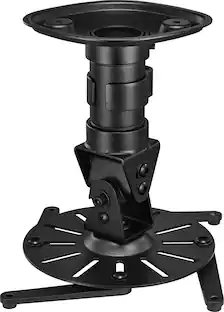
    My previous experience with projectors started around 2012, when I got an Epson business projector that worked well for what we needed. It was simple - only had 1 VGA (PC) connection and maxed out around 1024 × 600 (EF-30 is 1920 x 1080) and you had to manually adjust everything on it - the zoom, the focus, the shape adjustments - it was a lot of work. Over the years, I sometimes borrowed it as a 2nd screen but only a few times due to screen resolution and felt it was just too cumbersome for a quick 2nd screen setup. In 2026, I wondered how much Epson/technology has improved, now more than a decade later, and how difficult is it to move around/setup? Have we progressed enough to figure things out? The answer: a resounding YES. Outside of the initial setup (more on that later), I have started to use the projector in more ways I never even thought about. With MLS (Major League Soccer) in season, I wanted to have an additional 2nd screen to have 1-4 MLS matches at the same time, to avoid using the Multiview on my main tv, which would only allow me to watch either 1 match in small corner(no sound) and a movie/show of my choice, or go all 4 MLS games with only audio on 1 of them. This has been fine for a couple of years now, but having a separate video and audio for them would be an improvement - and the Epson EF-30 has solved this problem. Now I just move my indoor projection screen next to my TV, and either connect it to my laptop or iPad Pro, and use the projector screen as a 2nd screen on either device with just MLS matches playing on it, and having the sound come in low to not overtake the movie/TV show. As you can see in the pictures, the projected screen looks very bright (and washed out, as my camera can't focus both TV & screen), but what you don't see is how clear/clean the projector looks - and in varying lighted environments. My pics were taken with lights on and off. The fact that the projector is bright enough to even see with lights on is something I could not do with previous projectors! Mounts or stands are important!!! I wound up finding a mount that will secure to the bottom of the Epson, onto a plate that allows you to angle it up and down into a straight 90 angle for the ceiling. Why would you want to be able to project to ceiling? Well, I have a bad back, and there are days when I wake up and cannot move around, forced to stay lying down face up. With the mount on my nightstand next to the bed, I can angle it to the ceiling and watch TV/movies (or even technically work on a wireless keyboard) without further injuring my back. My biggest issue is they *really* want you to sign into a Gmail account on initial setup, not allowing you to go past it IF you connect to the internet. The only way around it is if you select you do NOT have internet, and that option is hidden at the end of the available Wi-Fi Networks screen. For most users, this is not a big deal, but I never planned on using the "smart" features/apps built in, because my sources have all that already. It also by default opens to the Google TV home screen, but if you go to settings you can change it to Last Used Source. Finally, the last problem this solved is my worry about my current tv, which is 5 years old. My concern has always been the downtime if the TV winds up breaking down, and then having to find a new tv, having it delivered, installing (mounting) it - it's a whole process that *I* would not be able to do same day. If the TV ever goes down now, I have a projector and a screen to use until I can get a new TV, and wouldn't mind a few days since I can still do everything on the Epson! Pros: Autofocus / Auto Shape correct! You can move it around and it'll fix itself to look flat! Sound is loud - I haven't used it outdoors, but the volume 60/100 is already very loud indoors, and way too loud over 60 Clear picture: It projects like my LED TV, I'm not losing detail Lightweight PC Mode/Gaming Mode: Once enabled, gaming off iPad/laptop works normally (no delay) Cons Google TV account is required if you connect it to Internet PC/Gaming mode: off by default, takes a few menu button clicks to find Requires internet to check for firmware updates (mine came with latest/current)

    Posted by MrPHD

  • Rated 5 out of 5 stars

    Perfect for summer movie nights

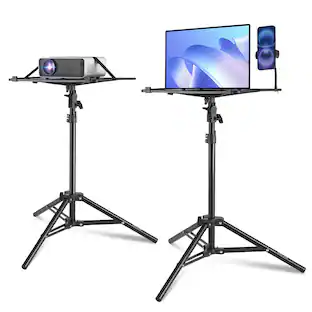
    Just in time for summer movie nights outdoors, the Epson EF-30 projector is loaded with super cool features. I already had a Gmail account, so the setup was very easy and smooth. Once that’s done, you’re pretty much good to go. Google TV has tons of TV shows, movies, and live TV. Most of it is free, and there’s still plenty of great content to watch. The Epson projector has one HDMI input, one USB-A input, and one headphone jack. I really love that apps like Netflix and Hulu are already preloaded, so signing in was quick and easy. The projector produces a very clean and clear image. It covered my entire room wall, and you can zoom in and out to your liking. The Epson projector automatically focuses and adjusts perfectly every time. The sound quality was loud and clear. You can connect Bluetooth speakers, but honestly, the built-in speakers were perfect for me. Another great feature is that the projector is pretty quiet and doesn’t make much noise while running, which makes the audio sound even better. I even used this projector on a pink wall, and surprisingly, I didn’t notice any difference in image quality. The Epson app also comes in handy if you ever lose the remote because you can use the app as a remote control and keep up with updates. I do recommend getting a mount for the projector. I have a tripod I use for my phone and that worked to rise up the projector and adjust it. Overall, this is a great projector to have at home for movie nights, parties, or just about any event

    Posted by Ivette0930

  • Rated 5 out of 5 stars

    Portable Streaming and Gaming Projector

    The Epson EF-30 Projector is really an Android TV without the built in screen. Since I already have another Android TV, it was very easy to set up. The projector easily connected to my wi-fi and I was quickly able download and set up the streaming apps that I use. Plus, many of the streaming apps work much better on the Epson EF-30 projector than they do on my Android TV. I think that the projector has more memory than my TV. Since it is a projector, it really works best in a well darkened room or at night. During the day with the window blinds open, the image quality is not great. The projector does an excellent job automatically adjusting the image quality and orientation. It starts up in just a few seconds and it takes only a few more seconds to adjust and focus before you are ready to go. I don't have a dedicated screen, but any empty wall works pretty well. The projector doesn't even have to be directly facing the wall/screen, it can automatically adjust the image at an angle. The picture quality is surprisingly good with crisp HD. Projecting on to the ceiling is challenging because the power cord plugs into the back of the unit and there are also vent fans and speakers on the back making that impractical. The projector comes with Dolby Audio, but honestly the sound is adequate but not great. There are not many options for adjusting the sound either, just 4 presets: Cinematic, Dialogue, Music, and Standard. It sounds a lot better through headphones. There is a 3.5mm stereo headphone jack on the back or you can connect your Bluetooth headphones. The projector is compact and lightweight, about the size of a thick textbook but significantly lighter at 3.8 pounds. So the projector is very portable. I was able to connect my Nintendo Switch console the projector with the HDMI port on the back, which worked great. There is even a low latency game mode in the display settings. This could be a lot of fun for gaming parties. I tried connecting a DVD drive to the usb port on the back, but it was not recognized, so it was not possible to play DVDs directly. If you have a DVD player with HDMI output, that should work fine. It was possible to play music and video files from a usb thumbdrive with many media player choices to download. There is an Epson Projection Studio App that you can use to make slideshows on your phone or tablet to view over the projector and you can even use your phone as a remote. The projector does come with a basic remote too. Overall, the Epson EF-30 Projector works very well and is portable enough to watch TV, movies, or play video games in all kinds of places.

    Posted by Mkru

From the Manufacturer

Compare similar products

Epson - EF-30 Full HD 1080p Personal Lifestyle Projector, Dolby Audio, Google TV, HDR, 3LCD, 350 Lumens Color & White Brightness - Silver
4.8(11)

Designed to move with you, the Epson EF-30 Smart Personal Projector delivers big-screen entertainment virtually anywhere. Whether it's a rooftop hangout or a backyard movie under the stars, this all-in-one projector makes every moment count—with built-in Dolby Audio and automatic picture adjustment, the memories start the second you press play. From casual hangouts to a cozy night in, the EF-30’s Full HD up to 100'' picture with 350 Lumens Color Brightness (IDMS Rated) and 350 Lumens White Brightness (ISO Rated)¹ makes every occasion feel bright, bold and larger than life. Featuring Epson exclusive 3-chip 3LCD Triple Core Engine technology and a sleek, modern design, you can project stunning visuals on nearly any flat surface—perfect for last-minute get togethers or perfectly planned events. Our unique Epson Projection Studio app² for iOS and Android is a whole new way to play. Liven up your next gathering with personalized videos that bring your favorite moments to the big screen. We can’t wait for you to see it. And finding something to watch has never been easier. Just power on your EF-30 personal projector and the built-in Google TV³ puts over 10,000 streaming apps at your fingertips⁴, including Netflix, Disney+, and Hulu. Plus, with Google Assistant you can use the included voice remote to search across all apps, including live TV and even YouTube to find exactly what you’re looking for.
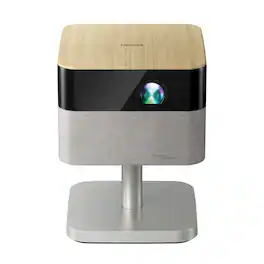
Epson - Lifestudio Flex Plus 4K PRO-UHD Portable Smart Projector, Sound by Bose, 1,000 Lumens Color & White Brightness, 3LCD,HDR - Oak
4.7(75)

The Lifestudio family of Epson projectors is designed to create moments that bring us together. They offer unique ways to connect with family and friends, helping you create, share, and relive the experiences that matter most. Put your personal devices aside and gather around the big screen. Whether it’s a family movie night under the stars, the ultimate birthday celebration, gaming with friends, or a cozy evening indoors, Lifestudio projectors make experiences feel bigger, brighter and more connected. Because memories aren’t just seen—they’re shared. Turn any gathering into an unforgettable event with the Lifestudio Flex Plus portable lifestyle projector. Delivering a sharp 4K PRO-UHD¹ picture up to 150", it transforms ordinary moments into extraordinary experiences. Powered by Epson-exclusive 3-chip 3LCD Triple Core Engine technology and designed with an adjustable stand, it projects stunning, vivid images on almost any flat surface with ease. Set the perfect vibe with built-in ambient lighting that casts a soft, colorful glow—bringing your space to life with immersive, cinematic charm. And it offers 1,000 Lumens of Color Brightness (IDMS Rated) and 1,000 Lumens of White Brightness (ISO Rated)² for a bright, balanced picture that feels true to life. Enjoy immersive sound that fills the room with the world’s first smart streaming projectors featuring Sound by Bose technology. The custom-designed stereo system creates audio you can feel, delivering rich, balanced sound, pulling you—and everyone around you—right into the action. Our unique Epson Projection Studio app³ for iOS and Android is a whole new way to play. Liven up your next event with personalized videos that bring your favorite moments to the big screen. We can’t wait for you to see it. Finding something to watch has never been easier. Just power on your Lifestudio portable lifestyle projector and the built-in Google TV⁴ puts over 10,000 streaming apps at your fingertips⁵, including Netflix, Disney+, and Hulu. Plus, with Google Assistant you can use the included voice remote to search across all apps, including live TV and even YouTube to find exactly what you’re looking for. Welcome to the Epson family of Lifestudio projectors. What unforgettable moments will you create?
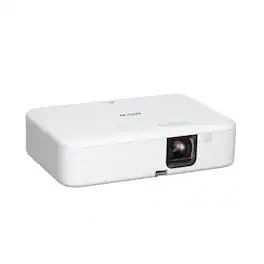
Epson - EpiqVision Flex CO-FH02 Smart Streaming Portable Projector, 3,000 Lumens Color & Brightness, 3LCD 1080p Android TV - White

Enjoy versatile projection for remote work, home entertainment and beyond with the Epson EpiqVision Flex CO-FH02 Smart Streaming Portable Projector. Designed to bring more ease and convenience to your workday, the Epson EpiqVision Flex CO-FH02 delivers a Full HD 1080p picture up to 300"—that’s four times larger than a 75" flat panel—for collaborative online meetings and detailed presentations. Perfect for engaging at-home learning, immersive movie watching and more, this 3,000-lumen projector1 offers Best-in-Class Color Brightness2 to deliver crisp, colorful images in virtually any lighting environment—even during the daytime. Sleek and compact, this portable projector can be easily carried in bags and backpacks for easy viewing virtually anywhere. It features a powerful, high-quality speaker system for a truly amazing viewing experience. And, with Android TV3 included, you can tune into all your favorite streaming channels, including Netflix, Apple TV+, Amazon Prime, Hulu, Disney+, HBO Max, YouTube and more4.
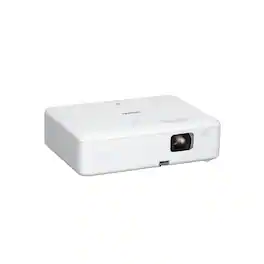
Epson - EpiqVision Flex CO-W01 Portable Projector, 3,000 Lumens Color & Brightness, 3LCD, Built-in Speaker, Home & Work - White

Enjoy versatile projection for remote work, home entertainment and beyond with the Epson EpiqVision Flex CO-W01 Portable Projector. Designed to bring more ease and convenience to your workday, the Epson EpiqVision Flex CO-W01 Portable Projector delivers a widescreen picture up to 300"—that’s four times larger than a 75" flat panel—for collaborative online meetings and detailed presentations. Perfect for engaging at-home learning, immersive movie watching and more, this 3,000-lumen projector1 offers Best-in-Class Color Brightness2 to deliver crisp, colorful images in virtually any lighting environment—even during the daytime. Sleek and compact, this portable projector can be easily carried in bags and backpacks for easy viewing virtually anywhere. And, with a built-in HDMI port and speaker, you can conveniently stream movies, TV shows and more using your favorite streaming device for a truly amazing viewing experience.

Pros for Epson - EF-30 Full HD 1080p Personal Lifestyle Projector, Dolby Audio, Google TV, HDR, 3LCD, 350 Lumens Color & White Brightness - Silver
Noise Level, Image Quality, Setup Ease, Dolby Audio PerformancePortability, Brightness, Sound Quality, Design, FocusBrightness, Picture Quality, Ease of use, Setup, SizePortability, Brightness, Noise Level, Overall Performance, Resolution
Cons for Epson - EF-30 Full HD 1080p Personal Lifestyle Projector, Dolby Audio, Google TV, HDR, 3LCD, 350 Lumens Color & White Brightness - Silver
There were no cons for this productThere were no cons for this productBluetooth, Fan Noise, Heat, FocusConnectivity, Heat Dissipation

Specs

Be the first to ask a question.

We’ll try to get your question answered within 24 hours by a Best Buy customer or brand representative.

No content
Sponsored

Finance Options

My Best Buy® Credit Card
Choose a benefit:Or
Buy Now, Pay Later
Lease to own

Finance Options

My Best Buy® Credit Card
Choose a benefit:Or
Buy Now, Pay Later
Lease to own