Rating 4.7 out of 5 stars with 49 reviews
4.7- Scanning Speed (38)
- Ease of use (16)
- Size (12)
- Software (8)
- Setup (5)
- WiFi Capability (5)
Customer Images
The vast majority of our reviews come from verified purchases. Reviews from customers may include My Best Buy members, employees, and Tech Insider Network members (as tagged). Select reviewers may receive discounted products, promotional considerations or entries into drawings for honest, helpful reviews.
- Rated 4 out of 5 stars
Fast Scanner but lacks Wireless Scanning Ability
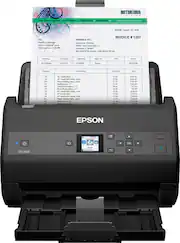
My initial impression of this scanner is that it is built really well. The scanner itself weighs a few pounds and feels built pretty solid. Setting up the scan is fairly easy. The physical part of setting up the scanner is really easy. The difficult part is the downloading and installing the drivers onto my computer. I am using a PC with Windows 10. My first attempt in installing the driver caused my whole computer to freeze so I had to do a force restart. When my computer restarted, I was able to reinstall the driver which this time it worked with no problems. This is one of the reasons why I give this product only 4 stars out of 5 stars. The scanner software is very easy to use once installed. You add your document to your scanner and you can initiate the scanning from your computer which is really nice or you can initiate it from the actual scanner. For the price point, I am very surprised that this scanner does not have the ability to do wireless scanning. This scanner does not have the ability to be wireless and can not connect to your wifi which really sucks because either I have to have the scanner on my desk by my computer or I have to have a really long usb cable for the scanner. A positive and cool thing about this scanner is that it scans super quick and I am super impressed with its ability to scan both sides of a document at once and can do it very quickly. If you have a ton of documents to scan, this scanner will make your life so much easier. You can also scan all sizes of papers from regular sheets or paper to receipts. It is so easy to use once it is set up. This is a review for the Epson WorkForce ES-865 Color Duplex Document scanner that I received free of charge to do a beta test and review.
Posted by moneybags14
- Rated 5 out of 5 stars
I love this scanner!
When I received and opened the box, I was surprised at how light and small it is. This is great since you are able to move it around, if needed, and it does not take up a lot of space on your desk. Taking it out of the box was easy, especially since it is so light. I don’t mean light as in flimsy, I mean that in weight, and it does feel quite durable. The quick start guide was great! It was so simple and walked me through the steps of setting it up. The setup was fairly quick, the only thing that took a while, I would say about 20 minutes or so, was downloading the software. I then went on to test it out. Boy, this thing is quick! I was so surprised. I have never used a scanner that was this fast. The page shoots right out in about a second and your scanned page is immediately on your screen. I then went on to try a double sided document. I was thinking I would need to turn it over, making sure it was the correct way so it didn’t end up upside down on the screen (a common problem I have had with other scanners in the past), but to my surprise, I looked up on the screen an both sides we already done in one scan! In order to try something besides a regular sheet of paper, I took out an old box of photos that I do not have any digital copies of. I adjusted the paper tray to the size of the photo and clicked the button. It scanned perfectly and also scans the other side of the photo. I saw on the computer screen that you can turn this option off, but I decided to keep it on, since most of my photos have names and dates and other important information on the back. How neat that you have the option to do this and can save all your important photo information. I plan on doing more old photos so that I can share online with friends and family, and also have plans to save a lot of digital copies of documents so that I can clear some clutter. I can’t wait to use it some more. It is also simple enough that my 9-year-old daughter can use it, and she is enjoying helping me with the photos. This is a review for the Epson Workforce ES-865 Color Duplex Document scanner that I received free of charge to do a beta test and review.
Posted by Akn1029
- Rated 5 out of 5 stars
Small but Mighty
The Epson WorkForce ES-865 is small but mighty for an at home scanner. You can easily set this up following the provided instructions in a matter of minutes. This scanner is compact but it gets the job done for sure. It scans at a quick pace and produces a very high quality picture in no time. I use mine mainly for work since I am now working mainly remotely now due to the pandemic and it has been a godsend. I have attached to emails to co-workers and I have had no issues and best of all no complaints. The scanner defaults to 200 dpi image but you can adjust this to your liking as well. The software you install, Epson ScanSmart is easy to learn so you can become better acquainted with your scanner so you can use it for more things such as a document archiver to reduce your paper in your home. It also has the capabilities to scan on both sides as well. All in all I am very happy with the Epson WorkForce ES-865 Color Scanner in my home office. This is a great addition to my Epson printer. It gets the job done and it hasn't let me down. This is a review for the Epson Workforce ES-865 Color Duplex Document scanner that I received free of charge to do a beta test and review.
Posted by ajlurie
- Rated 5 out of 5 stars
Blazing Fast Time Saver!
If you are looking for a way to quickly scan numerous documents, then the ES-865 Color Duplex Scanner is the absolute best on the market. I've owned other scanners and this is absolutely beyond fast. The ES-865 can scan 65 ppm at 300 dpi and can scan both sides in a single pass. Fully load the document feeder (100 pages) and then they are scanned in less than 2 minutes. You're able to scan business cards and ID cards. It also has a Slow Speed Mode for delicate scans. This a great addition for virtual schooling as it saves time by not having to take a picture of the work and then submit it. Easily scan and post. Time saver equals happy Dad! Epson has surpassed what I would have expected in a fast document scanner. It also has double-feed detection and Skew Correction to help with misfeeds. Output resolution from 50 to 1200 dpi. Small footprint scanner fits easily on my desk. Also handles most paper sizes for great quality scanning. It includes a LCD front panel with push buttons for operation. This is a review for the Epson WorkForce ES-865 Color Duplex Document scanner that I received free of charge to do a beta test and review.
Posted by KDUB
- Rated 5 out of 5 stars
amazing scanner!!!
I am SO happy with this scanner so far! First things first, the quality of this scanner is amazing. And, it's durable too! This scanner is built so well that I don't feel like I'm going to break it when I use it. It also uses the best software for a scanner, which makes it much easier to use. The first thing you are going to want to do, is plug in the scanner and then download the drivers from the internet, onto your computer. It is super easy to download the drivers, and the instructions that come with the scanner give you step by step instructions on how to do it. Once that's done, you plug in the USB cable and that completes the set up, and you are ready to use the scanner! Using this scanner has been a breeze too! It's SO easy to use. You just put the document you want into the scanner, press the scan button and VOILA! This scanner is also VERY fast! I can't believe how fast it scans a document! I've never had a scanner that can scan in 1 second. It shoots the document right through, and then the scanned document pops up on your computer screen instantly. You can also use this scanner to create PDF and editable excel or word files. I have never seen a scanner that can do that, so that was a nice bonus for me! This scanner can scan up to 100 pages at a time too, which is a LOT. It is lightning quick and intuitive. Another thing about this scanner that I love, is how easy it is to navigate. The buttons are super easy to use and respond fast. The LCD screen is also nice and each option on the screen is labeled clearly so it's easy to know what option you are using. There are a lot of buttons but each one is labeled so you don't get confused as to what they do. It's just a really well laid out scanner!! Once you are done using the scanner, you can just power it off until next time, or leave it on whatever you want to do! It boots up really quick too which is also really nice. All in all, I LOVE this scanner and don't have enough great things to say about it! If you are someone who is looking for a GREAT professional/personal scanner, this one is perfect! You will not regret trying it, so give it a shot!!!! This is a review for the Epson WorkForce ES-865 Color Duplex Document scanner that I received free of charge to do a beta test and review.
Posted by AmberM86