Rating 4.3 out of 5 stars with 102 reviews
4.3- Overall Performance (27)
- Versatility (19)
- Suction Power (15)
- Navigation (13)
- Noise Level (12)
- Design (3)
Customer Images
The vast majority of our reviews come from verified purchases. Reviews from customers may include My Best Buy members, employees, and Tech Insider Network members (as tagged). Select reviewers may receive discounted products, promotional considerations or entries into drawings for honest, helpful reviews.
- Rated 3 out of 5 stars
roller might burn if clogged with hair
The overall features, mapping, scheduling and cleaning are great. Two issues that have come up. we have a dog and her hair gets caught in the roller and since it spins so fast, it eventually burns and melts the roller parts. I came home today and it smelled like something was burning. Scary to think that the vacuum could catch on fire. Second is that it does not seem to empty into the home base. Eufy support has been great and I hope they send me a new roller part.
Posted by PatrickP
- Rated 5 out of 5 stars
Different versatile and amazing.
This little robot is actually really good I love the concept it also seems very futuristic. Not only does it do its job as a robotic vacuum but also the handheld feature is so amazing it works great I can use it in many different instances around my house I absolutely love it and absolutely recommended.
Posted by Samuel
- Rated 3 out of 5 stars
It's good if you get in on sale for cheap.
It's not a high end product. More like a budget/affordable model that is limited to strictly carpets. However, it does the job satisfactorily for one of my floors (which is completely carpet). I do have issues that pop up frequently, like the robot not being able to find the base station occasionally. It also takes a bit of time to complete cleaning and the battery life is not that great. It's convenient that you can disconnect and use it as a stick vacuum - although I rarely use it in that manner. Once in a while I will detach and use it as a handheld to pick something up real quick. I think 3 out 5 stars is fair. It has it's share of bugs and it's definitely not the best performer. But it's a solid budget pick if you only need something for well maintained carpets. I got it cheap with gift cards. Don't think I would ever purchase this at full price.
Posted by HNIC215
- Rated 5 out of 5 stars
A true 3-in-1 robot
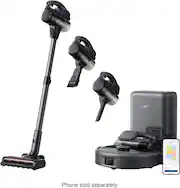
The Eufy E20 is not the robot vacuum of the past, offering the convenience of removing the vacuum module from the robot to be used as either a handheld or stick vacuum. Boasting 30,000 Pa max of suction power, five stage filtration and fast charging, the Eufy E20 is ready to replace your robot vacuum, your handheld vacuum and your versatile stick vacuum. The unboxing experience was refined, presenting the instructions for unboxing, setup and installation as the first experience after opening the box of the new E20. In the box there is one of everything that is needed to run the vacuum including a dust bag for the base station, a brush for sweeping debris toward the main roller head, the stick vac attachment, the wedge attachment and the brush attachment. The app was very easy to install and register the vacuum (it tracks run info in the cloud). I was happy to see that the app offers maintenance trackers to remind you when the roller, dust bag and other wear items need to be replaced, but I would have loved to see an extra dust bag in the box as a complimentary replacement (all of my other vacuums came with more than one). Since the unit uses the base station to collect dust in all modes, I could see the bag getting filled more often than a standard robot vacuum. Another part of the setup that needs to be mentioned; that the base station comes with a long cord to connect to a wall outlet, but also comes with a feature in the plastic housing to wrap excess cord out of sight. A very helpful feature considering the length of the cord. Using the E20 in Robot mode. After setting up the E20 with the app, the app prompted me to run a mapping sequence so the E20 could get acquainted with its surroundings. Moving around my first floor, the E20 robot used its millimeter-level obstacle avoidance through its three laser sensors. The whole process took about 5 minutes and finished by docking itself at the base station and pushing the map of my main level to the app. After naming the rooms I could set vacuum power, define a rectangular zone for cleaning, an individual room or the entire mapped area. I appreciated this flexibility as I could send the robot to clean the area near my cat’s litter box to sweep up instead of making it do the entire room. This is much more clever than most apps, as it allows you program areas to be avoided when doing the set up. Using the E20 in Handheld mode. There is a large red button on the robot to eject the vacuum from the robot and it can be removed with one hand. There is even a fine-detail wedge attachment built into the robot housing so it is harder to misplace. The handheld mode is where you can achieve the max suction power. There are marketing videos online that show people picking up small laptops and tablets with the suction power, but frankly once an attachment is installed it was hard for me to really notice much of a difference from other hand held-vacs; aside from the amount of suction when nearly covered. The sole user interface is a single “power” button that you have to press and hold to turn on and off, with momentary presses to change power. I find the hold time to be just a little too long, I would have preferred those functions to be flipped since the button is not easy to press accidentally. Using the E20 in stick vac mode. The E20 being able to be attached to a stick attachment allows for easy touch ups without dispatching the robot to clean automatically. I find that suction is good in this mode and the head could be articulated by twisting the grip just like any other stick vacuum. One thing that was disappointing was that the head of the vacuum did not have a lock into the stick to lock it at 90 degrees for transporting room to room. Most other stick vacs will lock the head if the stick gets pushed all the way forward and it allows for the brushes to be lifted off the ground when pulling the stick back. The E20 does not have this, and I found it disappointing. This would be an easy feature for Eufy to add. Final Thoughts I love this robot vac, I've used it every day since I got it. It's especially great to pick up after pets. It runs exceptionally quiet and I can easily watch TV while it is running. The E20 is easily the best robot vac I have ever had the pleasure of using. I wish the stick vac had the locking feature I mentioned, but it is a small inconvenience that is made up by the ease of use in the app.
Posted by 3Tcubed
- Rated 5 out of 5 stars
Innovative and Effective!
Normally I reserve 5-star reviews for products that don’t give me anything serious to complain about. With this new Eufy robot vacuum, I definitely see some areas for improvement, but I’m still giving it 5 stars because it’s blown me away with its innovative design. Overall, this is a decent robot vacuum. It’s got a lot of power, the brush system is quite effective at picking up debris including hair and sand tracked in on shoes, and it does a thorough job of mapping and cleaning complex floorplans. For me, there are three points where it really shines: 1. The obstacle avoidance technology is top-notch. I no longer have to be vigilant to pick up everything off the floor and tuck wires into their assigned spot. This vacuum is very cautious approaching obstacles and clearly recognizes a stray sock or a garment that fell out of the laundry basket in the bathroom. When it does bump into something, the front bumper usually hits softly and the robot responds appropriately. Amazing! 2. The suction power and brush system do a great job. This is definitely a more powerful than average robot vacuum, and everything seems carefully designed from the digitally-controlled vacuum motor to the brushes mounted on springs with seals that give optimum contact with the floor while providing excellent debris collection. Nothing to complain about here. 3. And the most impressive design feature is the fact that it’s not *just* a robot vacuum. The same high-powered vacuum motor turns into a stick vacuum to get into those nooks and corners where the robot can’t reach. This promises to be the only vacuum I’ll ever need! And all this at a price point that puts it in the middle of the pack for generic robot vacuums that don’t have these benefits! With that said, the rest of my review touches on some of the downsides. There are a few, but none of them are serious enough to make me stop loving this tool. As a handheld vac, this is a little bit awkward. It comes with a tiny crevice tool which is so tiny that when it’s mounted on the relatively bulky vacuum motor it’s a little hard to use properly. It has a brush attachment which is a little bit better and doubles as a detail tool when the brush itself is retracted. It also has a floor vacuum which is great for stairs or for rooms where you don’t want the robot to operate. Too bad the pole for the floor attachment isn’t compatible with the crevice tool to make it easier to get into corners. As with any robot vacuum, the dust bin is not very big—although I’d say it actually seems bigger than others I’ve seen. No matter, because it will auto-empty into the base (which works really well!). The downside, though, is that even the dust bag in the base is not very big. I don’t know how often it will need to be emptied or replaced, but I can see room for improvement here. It could easily be 2-3 times larger, and I would have preferred that. The first time I ran this robot on my floor, it wanted to map out the space without doing any cleaning. This was no big deal, it didn’t take that long. It did a good job, too, even sort of identifying some separate rooms. But then the first 3 or 4 the robot actually went out to clean, it kept changing its mind about how to divide up and label my space into rooms. Weird! Eventually, I went into the app and divided up the rooms the way I wanted, and gave them labels, and it seems to have stuck since then. A nice bonus is that I can manually add carpets to the map, including how thick they are. The robot will then adjust its cleaning technique to work best on each carpet. I’m not sure exactly what this means, but I can hear the vacuum motor increasing speed when it goes over a carpet. The vacuum motor has four settings: Eco, Normal, Turbo, and Max. The Max setting seems like it drains the battery *really* fast, and might also be overheating (?). Not sure, but on the Max setting it cut out on me for a second before starting again, a few times. Even so, it seems like most of the time it cleans just fine on the normal setting—and I would guess I’d get over 2 hours of cleaning with the robot out of a single charge while using the normal setting. Other than occasional rattling, this vacuum is relatively quiet (except for the dust collection at the base). Even though it is relatively heavy, it glides across the floor smoothly (even the uneven wooden floors of my antique home). Overall, I really like this robot vacuum. It seems thoughtfully designed, the app works well, and I expect that it will perform well for all my vacuuming needs into the future.
Posted by Kenneth