Outlet EventEnds Oct. 26. Limited quantities. No rainchecks.Shop now

Main Content
product image

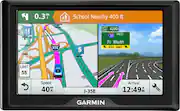
Garmin - Drive 51 LM 5" GPS with Map Updates - Black

Model: 010-01678-0B
SKU: 5715643
This item is no longer available in new condition. See similar items below
  • Key Specs
    • Screen Size: 5 inches (Size of the screen, measured diagonally from corner to corner.)
    • Touch Screen: true (Touch-screen devices make navigating more intuitive. Using a touch-screen display, you can do things such as tap to select, hold and drag to move items, swipe to scroll, and pinch to zoom.)
    • 3D-Map View: true
    • Topographic Maps: false
    • Programmable Routes: true
    • Alerts: Other
    • Integrated Camera: false
    • App Compatible: true (The product can be connected to a program or software application on a mobile device, which then receives collected data from the product.)
    • Wi-Fi Built-in: false (Able to connect directly to a wireless network without the use of an adapter.)
  • General
    • Brand: Garmin
    • Model Number: 010-01678-0B
    • Product Name: Drive 51 LM 5" GPS with Map Updates
    • Color: Black
    • Designed Usage: Car
    • Case Included: false
  • Display
    • Screen Size: 5 inches (Size of the screen, measured diagonally from corner to corner.)
    • Touch Screen: true (Touch-screen devices make navigating more intuitive. Using a touch-screen display, you can do things such as tap to select, hold and drag to move items, swipe to scroll, and pinch to zoom.)
    • Color Display: true
    • 3D-Map View: true
    • Resolution: 480 x 272 (Refers to the number of pixels, both horizontally and vertically, used to capture video/images. The higher the resolution the finer the detail that can be seen.)
    • Backlit Display: true (Integrated lights allow for visibility of the display in low-light conditions.)
  • Map
    • Integrated Base Maps: true
    • Map Coverage Area: U.S.
    • Map Sharing: false
    • Map Provider: Other
    • Number Of Waypoints: 1000
    • Geocaching Mode: false
    • Topographic Maps: false
    • Uploadable Maps: false
  • Navigation
    • Programmable Routes: true
    • Voice Prompts: true
    • Emergency Services Locator: false
    • Electronic Compass: false
  • Environmental
    • Water Resistant: false (Resists some degree of water penetration.)
    • Barometric Altimeter: false
    • Sun/Moon Information: false
    • Hunt/Fish Calendar: false
  • Features
    • Location Reporting: false
    • Alerts: Other
    • Integrated Camera: false
    • Pedestrian Mode: false
    • Text-To-Speech: true (A system that converts language text into speech.)
    • MP3 Playback: false
  • Storage
    • Expandable Storage: true
    • Memory Card Slot: true
    • Memory Card Included: false (Indicates whether a memory card is included.)
  • Compatibility
    • App Compatible: true (The product can be connected to a program or software application on a mobile device, which then receives collected data from the product.)
    • Computer Compatibility: Mac, Windows
    • Unit-To-Unit Transfer: false
    • Automatic Sync: false
  • Connectivity
    • Bluetooth Enabled: false (The device is capable of communicating with another device via Bluetooth, provided they are within the required range of each other. A Bluetooth-enabled device must also be the same Bluetooth version or higher than the accessory it is intended to pair with.)
    • Number Of USB Port(s): 1 (The total number of USB ports including all generations and versions.)
    • Wi-Fi Built-in: false (Able to connect directly to a wireless network without the use of an adapter.)
  • Dimensions
    • Product Height: 3.3 inches (The out of box height of the item. Height is measured as the vertical distance from the bottom of the item to the top as it would be primarily used or placed.)
    • Product Width: 5.5 inches (The out of box width of the item. Width is measured as the horizontal distance from one side of the item to the other as it would be primarily used or placed.)
    • Product Depth: 0.8 inches (The out of box depth of the item. Depth is measured as the distance from the front of the item to the back as it would be primarily used or placed.)
    • Product Weight: 0.4 pounds (The out of box weight of the item.)
  • Power
    • Rechargeable Battery: true
    • Battery Life: 1 hours (Battery life will vary depending on the product configuration, product model, applications loaded on the product, power management setting of the product and the product features used by the customer. As with all batteries, the maximum capacity of this battery will decrease with time and usage.)
    • Battery Chemistry: Lithium-ion
    • Interface(s): USB (Refers to the types of connections that devices use to interact and communicate with each other.)
    • Charging Method: USB
  • Warranty
    • Warranty - Parts: 1-year limited consumer
    • Warranty - Labor: 1-year limited consumer
  • Other
    • UPC: 753759169473

Eliminate the hassle of map use with this Garmin Drive 51 GPS. It has a 5-inch screen that produces alerts so that you know where you need to go and what lane you need to be in for easy navigation. This Garmin Drive 51 GPS also includes map updates so that you always have accurate information.

  • Update your maps for free: The pre-loaded maps of the U.S. (Lower 49) can always be updated for free.
  • 5" color touch screen offers a clear view: The large screen makes it simple to enter destinations and navigate functions and settings.
  • Customize your route options: You can set up three alternate routes so you're prepared to take advantage of the road ahead.
  • Connect to your computer using USB interface: Easily connect to your computer to get map updates and more.
  • Update your maps for free: The pre-loaded maps of the U.S. (Lower 49) can always be updated for free.
  • 5" color touch screen offers a clear view: The large screen makes it simple to enter destinations and navigate functions and settings.
  • Customize your route options: You can set up three alternate routes so you're prepared to take advantage of the road ahead.
  • Connect to your computer using USB interface: Easily connect to your computer to get map updates and more.
Whats Included
  • Garmin Drive 51 LM
  • USB cable, suction cup mount, car power cable
  • Garmin Drive 51 LM
  • USB cable, suction cup mount, car power cable

Q: What is the diffrence between the Garmin 51LM and the Garmin Nuvi 57LM?

A: The Garmin Drive™ 51 LM offers features not found on the nuvi 57LM, here are a few: • Driver alerts for dangerous curves, speed changes, speed cameras, railroad crossings, animal crossings and more • TripAdvisor® ratings for travel points of interest (POIs) such as hotels, restaurants and attractions • Garmin Real Directions™ feature guides like a friend, using recognizable landmarks, buildings and traffic lights

Q: What should the battery icon look like when it is fully charged? I can't tell if mine is almost full or almost empty. It has a yellow lightning bold then the battery with a small bit of red at the end. So is it almost full or almost empty?

A: The GPS battery indicator should have green bars to indicate it is fully charged. The lightning bolt means it is charging and the red means it's almost empty.

Q: How do you get Traffic Updates on this 51 LM 5...it says Lifetime Map updates are included, but, not Traffic ?

A: Down load map updates on internet 3 or 4 times a year. Highway traffic updates just show up as you're going down the road. Kind of updated automatically based on the route you are traveling at the time. Must be based on some traffic reports.

Q: Does this Garmin have a voice (audio) that directs you as you drive, or just the visuals?

A: Yes, this device provides audible turn by turn directions as well as onscreen visuals. Thanks, James

Q: I want to put into my Garmin the Route and roads I LIKE to take to Go from my home to Monterey, some 200 miles. My way is safer and faster and my Nuvi puts me into the boonies far too often. Which model should I purchase that can do this. Thanks.

A: This model includes the Trip Planner feature that can be used to create and save a trip with multiple destinations. Or if you only want to “shape” a custom route to go the way you prefer, the device has a Shaping Points feature also. Thanks, James

Q: Will the GPS go to the split screen on its own when you are on a highway? Or do you have to set it yourself. And how do you do that? Thanks

A: Yes, the Drive™ 51 LM includes the Active Lane Guidance, a feature that takes Lane Assist and Junction View to the next level. When on a route that contains an area compatible with Active Lane Guidance, the device will switch to split-screen view. The right half of the screen will display a moving lane animation with a purple line that will indicate the way the driver should navigate. Thanks, James

Q: What does a split screen on the right actually show....what is in front of you ? Thanks, Marshall

A: I find the split screen very useful when approaching a confusing busy route. The one side is magnified with your route in a bright color. It goes back to one screen after the confusion is over.

Q: DOES IT HAS ALL THE MAPS OF NORTH AMERICA? AND CANADA?

A: No, this GPS arrives pre-loaded with detailed maps of the lower 49 U.S. States only. Thanks, James