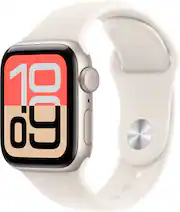
Apple Watch SE 3 is packed with health, fitness, connectivity, and safety essentials—all for a great value. Track your sleep score. Get richer health insights in the Vitals app. Stay active with a wide range of workouts. Save time with fast charging. See your info at a glance with the Always-On display. And still get all-day, 18-hour battery life.Geek Squad Certified Refurbished products have been restored to like-new condition. All vital parts and accessories that would have been included with the original product are present, and our thorough inspection process ensures that the product is clean and in working condition.
- Geek Squad Certified Refurbished: Includes Case, Band,1m Magnetic Charging Cable with 90 Days warranty.
Whats Included
- Case
- Band
- 1m Magnetic Charging Cable
- Case
- Band
- 1m Magnetic Charging Cable
Disclaimers
- ¹Apple Watch SE 3 requires iPhone 11 or later with iOS 26 or later.
- ²The Vitals app is for wellness purposes only and not for medical use.
- ³Fast charging is compatible with Apple Watch Series 7 and later, any Apple Watch Ultra model, and Apple Watch SE 3.
- ⁴Battery life varies by use and configuration. See apple.com/watch/battery for more information.
- ⁵The temperature sensing feature is not intended for medical use. Temperature sensing is available only on Apple Watch Series 8 and later and all Apple Watch Ultra models.
- ⁶Sleep apnea notifications are available on Apple Watch Series 9 and later, Ultra 2 and later, and SE 3. The feature is intended to detect signs of moderate to severe sleep apnea for people 18 years old or older without a diagnosis of sleep apnea.
- ⁷Irregular rhythm notification requires the latest versions of watchOS and iOS. It is not intended for use by people under 22 years old or those who have been previously diagnosed with atrial fibrillation (AFib).
- ⁸Testing conducted by Apple in July and August 2025 using preproduction Apple Watch SE 3 (GPS + Cellular) and Apple Watch SE 2 (GPS + Cellular), each paired with an iPhone; all devices tested with prerelease software, Apple Watch Magnetic Fast Charger to USB-C Cable (Model A2515), and Apple 20W USB-C Power Adapter (Model A2305). Charge time varies with adapter, region, settings, initial battery levels, usage, and environmental factors; actual results will vary.
- ⁹Requires an Apple Intelligence–enabled iPhone nearby and Bluetooth headphones with device and Siri language set to English. Apple Intelligence is available in beta. Some features may not be available in all regions or languages. For feature and language availability and system requirements, see support.apple.com/en-us/121115.
- ¹⁰Emergency SOS requires a cellular connection or Wi-Fi calling with an internet connection from your Apple Watch or nearby iPhone. You can use cellular models of Apple Watch to make an emergency call in many locations, provided that cellular service is available.
- Some cellular networks may not accept an emergency call from your Apple Watch if your Apple Watch isn’t activated, if it isn’t compatible with or configured to operate on a particular cellular network, if isn’t set up for cellular service, or if the cellular network does not support emergency calling over IMS. See support.apple.com/108374 and apple.com/watch/cellular for more information.
- ¹¹Not all features will be available if the Apple Watch is set up through Apple Watch For Your Kids. Check support.apple.com/en-us/109036 for details. Wireless service plan required for cellular service. Check apple.com/watch/cellular for participating wireless carriers and eligibility.
- ¹²Wireless service plan required for cellular service. Contact your service provider for more details. Connection may vary based on network availability. Check apple.com/watch/cellular for participating wireless carriers and eligibility. See support.apple.com/HT207578 for additional setup instructions.
- ¹³Data plan required. 5G is available in select markets and through select carriers. Speeds vary based on site conditions and carrier. For details on 5G support, contact your carrier and see apple.com/watch/cellular.
- ¹Apple Watch SE 3 requires iPhone 11 or later with iOS 26 or later.
- ²The Vitals app is for wellness purposes only and not for medical use.
- ³Fast charging is compatible with Apple Watch Series 7 and later, any Apple Watch Ultra model, and Apple Watch SE 3.
- ⁴Battery life varies by use and configuration. See apple.com/watch/battery for more information.
- ⁵The temperature sensing feature is not intended for medical use. Temperature sensing is available only on Apple Watch Series 8 and later and all Apple Watch Ultra models.
- ⁶Sleep apnea notifications are available on Apple Watch Series 9 and later, Ultra 2 and later, and SE 3. The feature is intended to detect signs of moderate to severe sleep apnea for people 18 years old or older without a diagnosis of sleep apnea.
- ⁷Irregular rhythm notification requires the latest versions of watchOS and iOS. It is not intended for use by people under 22 years old or those who have been previously diagnosed with atrial fibrillation (AFib).
- ⁸Testing conducted by Apple in July and August 2025 using preproduction Apple Watch SE 3 (GPS + Cellular) and Apple Watch SE 2 (GPS + Cellular), each paired with an iPhone; all devices tested with prerelease software, Apple Watch Magnetic Fast Charger to USB-C Cable (Model A2515), and Apple 20W USB-C Power Adapter (Model A2305). Charge time varies with adapter, region, settings, initial battery levels, usage, and environmental factors; actual results will vary.
- ⁹Requires an Apple Intelligence–enabled iPhone nearby and Bluetooth headphones with device and Siri language set to English. Apple Intelligence is available in beta. Some features may not be available in all regions or languages. For feature and language availability and system requirements, see support.apple.com/en-us/121115.
- ¹⁰Emergency SOS requires a cellular connection or Wi-Fi calling with an internet connection from your Apple Watch or nearby iPhone. You can use cellular models of Apple Watch to make an emergency call in many locations, provided that cellular service is available.
- Some cellular networks may not accept an emergency call from your Apple Watch if your Apple Watch isn’t activated, if it isn’t compatible with or configured to operate on a particular cellular network, if isn’t set up for cellular service, or if the cellular network does not support emergency calling over IMS. See support.apple.com/108374 and apple.com/watch/cellular for more information.
- ¹¹Not all features will be available if the Apple Watch is set up through Apple Watch For Your Kids. Check support.apple.com/en-us/109036 for details. Wireless service plan required for cellular service. Check apple.com/watch/cellular for participating wireless carriers and eligibility.
- ¹²Wireless service plan required for cellular service. Contact your service provider for more details. Connection may vary based on network availability. Check apple.com/watch/cellular for participating wireless carriers and eligibility. See support.apple.com/HT207578 for additional setup instructions.
- ¹³Data plan required. 5G is available in select markets and through select carriers. Speeds vary based on site conditions and carrier. For details on 5G support, contact your carrier and see apple.com/watch/cellular.