Rating 4.8 out of 5 stars with 12 reviews
4.8Top Mentions
- Size (4)
- Performance (3)
The vast majority of our reviews come from verified purchases. Reviews from customers may include My Best Buy members, employees, and Tech Insider Network members (as tagged). Select reviewers may receive discounted products, promotional considerations or entries into drawings for honest, helpful reviews.
- Rated 5 out of 5 stars
Powerful Little PC in a Beautiful Rose Gold Finish
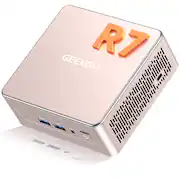
Really impressed with this Geekom A5 Mini PC! The AMD Ryzen 7 5825U runs fast and smooth — perfect for everyday tasks, streaming, and even light editing. The 16GB RAM and 512GB SSD make everything load quickly, and Windows 11 Pro being pre-installed is super convenient. I also love the compact size. It hardly takes up any space on my desk, but still performs like a full desktop. The Rose Gold color is gorgeous and adds a stylish touch — definitely more unique than the usual black or gray mini PCs. Setup was quick, it runs quietly, and it stays cool even after long use. Great value for the performance and perfect for home, office, or small workstations!
Posted by Eerouser
- Rated 5 out of 5 stars
Powerful Mini PC with Great Value for Daily Use
This mini PC has made my home setup much more convenient. It’s easy to start using right away and takes up very little space, keeping my desk neat and organized. It runs quietly, so I can focus whether I’m working or handling personal tasks. The system feels stable and dependable, and the simple design fits well into any room without being distracting. For the price, it offers great value and solid performance. It’s a practical and reliable choice for anyone looking for an affordable home computer that works smoothly. I’m very happy with this purchase and would gladly recommend it to anyone seeking a dependable and well-built desktop option.
Posted by KentL
- Rated 3 out of 5 stars
No warranty
The Geekom A5 is a beautiful and functional mini PC with an abundance of I/O ports, WIFI and Bluetooth, sound and even an SD card reader. Performance is fast and the price was well placed. It also has an internal SATA port. I installed the old Windows 10 SSD drive from the computer I was migrating from to the SATA connector in the A5 and, after finishing the Windows 11 update process, began transferring data files to the PCIe SSD the A5 comes with. That lasted about 15 minutes before the SATA function stopped working and "Drive D" disappeared. I had planned to leave the old (SATA) drive in the PC as reserve storage after the files were transferred to the new drive. I removed the SATA SSD from the A5 box, thinking that maybe the drive had failed. It was fine and I finished the file transfer using a USB-3 connection and SATA-to-USB interface cable. The A5 comes with a "three-year" warranty, so I assumed Geekom would replace the defective box. Geekom did respond to my queries, though not with positive results. They indicated that the warranty must be filled by BestBuy since I bought it from the BestBuy site. BestBuy says the warranty should be honored by Geekom. That makes sense, since the device was mailed directly from Geekom. Geekom said I needed to contact the "bestbuy geekom official store," whatever that is. BestBuy has a generous return policy, but then I would be back where I began, needing to find a new PC and lose all the work already completed in transitioning to a new PC. My ideal solution would be a replacement for the defective A5 while retaining the internal PCIe SDD that has been configured for our use. Since only the SATA connection has failed, it is less hassle to just live with it and hope the rest of the A5 is more durable. If the warranty was not such a hassle, I would easily give the Geekom A5 five stars.
Posted by TexChuck
- Rated 5 out of 5 stars
Great product!!
Small footprint, but lots of power. I was able to get my dual screens running without any issues or hiccup. Definitely recommend this to other users.
Posted by fftrilogy
- Rated 5 out of 5 stars
Awesome little pc good memory & storage.
Love its working ability. I hooked it up to my bedroom tv and am using a bt keyboard an mouse. I have a high speed scanner and an external hard drive attached. All works seamlessly. I really have no negative comments.
Posted by ROSSM