Rating 4.4 out of 5 stars with 1110 reviews
4.4- Overall Performance (271)
- Ease of Use (253)
- Print Quality (221)
- Setup (83)
- Size (77)
- Connectivity (62)
Customer Images
The vast majority of our reviews come from verified purchases. Reviews from customers may include My Best Buy members, employees, and Tech Insider Network members (as tagged). Select reviewers may receive discounted products, promotional considerations or entries into drawings for honest, helpful reviews.
- Rated 5 out of 5 stars
Outstanding Performance and Reliability
This printer delivers exceptional performance and produces high-quality prints with remarkable consistency. Its user-friendly interface, reliable functionality, and sleek design make it an excellent choice for both home and office environments.
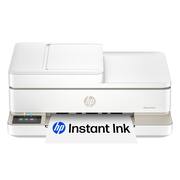
This review is from HP - Envy 6555e Wireless AI-Enabled All-in-One Inkjet Printer with 3 Months of Instant Ink - White
Posted by FranciscaB
- Rated 5 out of 5 stars
HP Envy 6555e printer
My printer was so simple to set up & connect to my Wifi. The print is clean & bold & prints in a reasonable time frame. Is fairly quiet when printing. Placing ink cartridges & paper is a simple task. I opted not to get free ink & join program, so have no comment about it.
This review is from HP - Envy 6555e Wireless AI-Enabled All-in-One Inkjet Printer with 3 Months of Instant Ink - White
Posted by DonnaH
- Rated 3 out of 5 stars
Disappointing, but usable
I bought this to take with me when I'm on the road for court proceedings, and to have a printer near my desk at the office. The printer output is great, and scanning produces quality .pdf's. The problem is connecting it to my computers, a desktop PC running Windows 11 Pro, and Lenovo ThinkPad X1, also running WIndows 11 Pro. Using WiFi, I can get it to print documents from both computers, although the desktop PC always pops up a message stating that the printer is offline. Scanning is difficult. The HP Smart App does not connect from either computer to the HP Envy. I have to use the scan function on the HP Envy itself, and then have it save to the HP cloud, and send it to my email address.
This review is from HP - Envy 6555e Wireless AI-Enabled All-in-One Inkjet Printer with 3 Months of Instant Ink - White
Posted by PasadenaLawyer
- Rated 5 out of 5 stars
Dependable Printer
A dependable printer with quality prints for home use. Easy set-up and connection to our network. would recommend this printer.
This review is from HP - Envy 6555e Wireless AI-Enabled All-in-One Inkjet Printer with 3 Months of Instant Ink - White
Posted by JohnM
- Rated 5 out of 5 stars
Hpprinter
Very nice printer prints fast and compact and quiet
This review is from HP - Envy 6555e Wireless AI-Enabled All-in-One Inkjet Printer with 3 Months of Instant Ink - White
Posted by JanetChp