Rating 4.5 out of 5 stars with 61 reviews
4.5- Print Quality (33)
- Ease of use (9)
- Wireless (6)
- Reliability (5)
- Price (3)
Customer Images
The vast majority of our reviews come from verified purchases. Reviews from customers may include My Best Buy members, employees, and Tech Insider Network members (as tagged). Select reviewers may receive discounted products, promotional considerations or entries into drawings for honest, helpful reviews.
- Rated 5 out of 5 stars
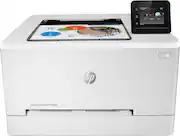
Best color laser printer
This the fastest laser color printer I’ve ever seen! It prints beautifully, as usual HP did NOT disappoint! Great price too!
Posted by MyShadeRoom
- Rated 5 out of 5 stars
Great color laser printer for the home
This was easy to set up, has about every feature one could ask for, wireless, remote printing via email, low power standby mode, quick output of first page, and best of all, excellent quality. Even photographs look great, When purchasing supplies, I recommend the 202X size for pure economics. I would buy this again.
Posted by octothorp
- Rated 4 out of 5 stars
Wonderful printer at a good price
It has connectivity through WiFi and Ethernet, plus a duplexor built in, so it prints both sides from the get-go. It is noisier than all our Laser printers, but it quiets down quickly. Being able to print from tablets and phones or from other locations is a plus.
Posted by EZnow
- Rated 5 out of 5 stars
Great Printer; Easy to Setup
Very easy to setup - less than 10 minutes once it was out of the box. Instructions were easy to follow. Thought the price was great - the printer had all the capabilities I wanted - wireless, color, laser, duplex printing. I'm interested in seeing how quickly it goes through toner but I won't know that til sometime down the road.
Posted by Frank
- Rated 4 out of 5 stars
Decent printer
I replaced an old HP inkjet printer with this laser printer since the amount of usage I was giving the old printer had started to wear it down and it was not printing like it used to. This printer prints a lot faster, usually instantly right after I press print, it is nice having the little touchscreen since you are able to print and do other things on there without having to use a computer. If you have a lot of heavy duty printing such as a small business and not for home usage, definetely buy a printer like this and not an inkjet printer.
Posted by isilvio