Rating 4.4 out of 5 stars with 268 reviews
4.4- Print Quality (112)
- Ease of use (82)
- Size (22)
- Bluetooth Connectivity (3)
- Performance (3)
- Price (6)
Customer Images
The vast majority of our reviews come from verified purchases. Reviews from customers may include My Best Buy members, employees, and Tech Insider Network members (as tagged). Select reviewers may receive discounted products, promotional considerations or entries into drawings for honest, helpful reviews.
- Rated 5 out of 5 stars
My best purchase yet
I got this for a day off r 2 because i was relocating a fm wanted to take pics of the family and friends and i was able to and print them out on the spot and add them to my picture wall it was amazing!!!!!
Posted by PictureJunkie
- Rated 5 out of 5 stars
Pocket Rocket Sprocket
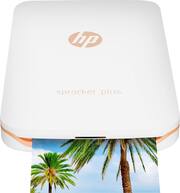
The Sprocket is a very versatile portable printer for pictures. This is an inkless printer the magic is in the picture itself using a new technology call zinc. Print time is approximately 40 seconds. The quality is very good for being a portable printer. Detail and color are pretty close to original picture. Overall, I am satisfied with the plus the portability makes this a winner. The quality is WAY better than the camera/printer all in ones. I like the fact that you have more control of your pictures and what setting you would like to print with over the all in one phone printer option This makes a great gift for kids/adults attached to their phones and have tons of pictures. Being able to print on the go in a winner in my book First you need to download the Hp sprocket app this app Bluetooth’s to your phone and printer. The app will let you edit and put filters on them, this I found to be very useful. The app was very easy to set up, and it recognized the printer immediately. I was printing within seconds. The size of the plus is about 6 inches by 3.5 inches and weighs less than ½ pound. It is very well put together, a very solid unit. I would purchase a protective case none the less. For transport. I took this unit to a birthday party and it was a hit!! I took multiple pictures and gave each person the picture to take with them. Infect 2 of the party goers now have their own Sprocket now. Charging is rather quick for the printer, if it runs low just hook it up to a charger ( cord included) You can print at the same time. I like this one so much I may run out and get another for my daughter to use with her Cheer Squad. I would recommend this to friends and family and those who love the portability printing option of the Sprocket.
Posted by Fordman9870
- Rated 4 out of 5 stars
Fun, Cool, And Easy To Use
I knew this printer was small but I was really surprised at just how small it is. The Sprocket Plus is like 3.5 x 5.5 x .75 inches so that means that is is smaller than a stack of 4 x 6 pictures! OK, so it is small but how does it work? It was incredibly easy to set up. I popped the cover off the top and inserted the pack of ten zink photo sheets, put the cover on and turned it on. After launching the Sprocket app on my phone, I was up and printing within about 1 minute. So portability and ease of use have been nailed by HP (oh and nice design too, I have the white and rose gold versions which is very nice). Now the REAL question is 'How good are the prints?'. If you are expecting gallery quality prints, heck if you are expecting full size inkjet quality prints, you will be disappointed. If you keep your expectations to the level of Polaroid instant prints, you will be happy with them. Colors and black and white both do well but it is very easy for a bright picture to appear washed out. Look, this is not a device for printing out a stack of pictures from your vacation in Europe. This is designed to get some of those cool selfie/ussies off your phone and into the hands of friends. Since the photo paper also doubles as a sticker when you peel the backing off, they are great for decorating at a party, in a scrapbook, or whatever. This is a great device to have at a party of any sort where you want your friends and guests to perhaps have a little memento of the fun they had but don't want to shell out for a full Photo Booth set-up. It would be great for a kid's b-day party or a school club function. The printer is pretty fast and can crank out each print in under 30 seconds so it would be easy to have everyone send you their best shots as they take them and send them off to the printer as you get them. In an age where genuine photos are becoming a rarity, sometimes it is cool to just have that small little picture that you can post at your desk, or your locker of a fun time that you would like to remember without having to whip out your phone and scroll through your photostream. If this is the kind of device you are looking for, I would actually give it an enthusiastic 5-stars for you but I hedged my bet and went with 4-stars just because, while it does that one thing well, that is about it and there will inevitably be something you wish it could do but can't. I would have done maybe 4.5 stars but that is not an option.
Posted by Wraith
- Rated 3 out of 5 stars
Good photo printer but it's not for everyone
Overall, this is definitely a nifty little gadget to have. Pairs up with the Bluetooth on your phone/tablet and worked perfectly on my Note 8. You need to download the Sprocket app in order to print images from your device so I doubt that should be an issue for most people. This comes with 10 sheets of paper and, I believe, 20 packs of the paper is around $10 or so. My main thing with this is that I'm not entirely sure who this would be suitable for. In this day and age, photos are almost a thing of the past. With images being directly loaded to FB, Instagram or other sites, I can't recall the last time I needed a physical print out of an image much less one that was pretty small. The prints are about 2x3 in size so they're not terribly large for hanging or anything; maybe for collages or something. The paper is not adhesive either so these pics can't be used as stickers. Also, I can't recall the last time I ever needed to print out an image on the spot for whatever reason. I guess this could be used for things like family gatherings or other social event where you don't see certain people that frequently? Either way, I still think this is a nifty gadget for some people, definitely not for everyone. I guess when you're at your next family get-together, you can whip this out and show it off to the family and give the grandparents some nice shots to hold onto or something. The picture quality is pretty good. While the pic doesn't show it, the image I printed out was a bit on the dark side. Fortunately, there is no ink you have to purchase for this printer; all you need is paper. It holds 20 sheets at a time and I believe you can get the paper in either 10 or 20 packs. This pic I printed out took around 5 seconds so it's fairly fast considering it's size. Size wise, it's definitely a pocket printer as it's quite small. The pic shows size differences between the printer and my Note 8 and PS4 controller. With this printer all you really need is to load some paper (maybe bring the included charging cable) and you're good to go for a day or so. Overall, nice little gadget and works much better than I had expected. However, I think this is something that you really have to have a need for. It's definitely not for everyone.
Posted by LouRevue
- Rated 4 out of 5 stars
Easy mobile printing with a compact printer
Years ago, when I was in high school, the big thing to do was have miniature photo albums to carry all your precious memories in. My friends and I would get prints of our photos and share them. Now, all photos are all digital. But what happens if you want a print out of really good photos that you take with your phone? Typically, you have to send the digital file to a photo lab like at Walgreens or Wal-Mart. It’s not a particularly difficult process, but sometimes you just want to print out photos at home. I’ve used standard printers before, but just haven’t been happy with the quality. One of the simplest solutions is to invest in a personal photo printer like this one from HP. The HP Sprocket Plus Printer is a compact printer for mobile photos. It’s designed to work directly with your smartphone and is just about the same size, too. The printer comes packaged with 10 sheets of HP Sprocket Plus Zink photo paper and a short (about 12 inches) Micro USB cable for charging/powering the printer. With the printer, you can print 2.3 x 3.4-inch photos directly from your phone in just a few seconds. Setup is easy. You download the Sprocket app for your mobile platform (iOS or Android) and connect to the printer using Bluetooth. When you start up the printer, you will get a notification on your phone (if you already have the app installed) that says that the app wants to connect to the printer. If you allow it, you will be able to see your Camera Roll and other albums in your Photo library. I have an iPhone 7 and didn’t have any issues connecting to it. You can also connect to Instagram, Facebook, and Google to print photos stored in Social Media accounts without having to download them first. The only thing I noticed that was a little slow was the app’s connection to my phone’s photo library. I would save a photo from a shared library and reload the app photo list and it would take a few seconds for the new photos to appear. Once you select a photo, you can edit it in the Sprocket app. You can do the ‘magic’ fix tool, which automatically adjusts brightness and color. You can also manually adjust brightness, contrast, and exposure. The Sprocket app has some built-in filters, too, and you have the ability to add text and drawings to photos. Once you make your edits, you simply send it to the printer. I tested this out with a few different photos. I found that the colors were not exactly what I had hoped for. The reds aren’t quite as vibrant as they show on the phone and even black and white photos have a purplish tint to them. Overall though, I’m happy with the prints. It’s a nice way to display memories without having to visit a photo lab. The Sprocket Plus Printer is easy to connect to and communicates well with the mobile app.
Posted by nickcal