Rating 4.7 out of 5 stars with 722 reviews
4.7- Ease of use (239)
- Compatibility (77)
- USB Type-C (54)
- Price (49)
- Performance (24)
- Cable Length (3)
Customer Images
The vast majority of our reviews come from verified purchases. Reviews from customers may include My Best Buy members, employees, and Tech Insider Network members (as tagged). Select reviewers may receive discounted products, promotional considerations or entries into drawings for honest, helpful reviews.
- Rated 4 out of 5 stars
Great Product-Just be sure it will fit your device
The card reader is fast and simple to use. It's appearance is sleek and the size is perfect for me. The only issue I had ( and it was my fault ), was the USB C would not fit my laptop USB port and I had to order an adapter. It's a good product and I would recommend it to anyone.
Posted by justjim
- Rated 5 out of 5 stars
Easy to use
Simple. Easy to understand directions and easily able to accomplish. Uploaded all my photos and videos off my GoPros sandisk card right onto my phone.
Posted by TheLasVegasMermaid
- Rated 5 out of 5 stars
Great little reader
I was in a trip to Chicago and needed an SD card reader for my Chromebook. This fit the bill! It worked perfectly with a decent transfer rate. If you need a card reader with USB-C connectivity, do not pass this one up.
Posted by MDSCVC
- Rated 5 out of 5 stars
Lightweight. Compact. Fast!
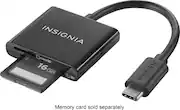
This is an excellent choice if you need a fast and reliable card reader on the go. It’s the latest USB-C type plug so it works on my MacBook Pro without needing any other connectors or adaptors. Fits SD and MicroSD cards. Easy plug and play right out of the box. I use it to transfer 4K footage from my cameras and Drone all of the time. Super fast and has been very reliable so far. Good value for the price. I would definitely recommend this to a friend.
Posted by Jason
- Rated 5 out of 5 stars
Affordable functionality for some modern devices
I like to use a real digital camera when I travel. Then I either examine my photos on a portable PC or tablet via the cloud service offered from the camera or, better still, this USB C memory card reader from Best Buy. My travels don't always take me to areas with reliable Wi-Fi or even cell service. This device allows me to remove the memory card from my camera, insert into the reader and view my pictures in detail. More and more, modern devices don't have SD card readers in the perpetual drive to reduce manufacturing costs and save tiny fractions of thickness and weight. This highly portable and reasonably priced card reader addresses answers those concerns.
Posted by RLon47