Rating 0 out of 5 stars with 0 reviews
0.0Customer Images
The vast majority of our reviews come from verified purchases. Reviews from customers may include My Best Buy members, employees, and Tech Insider Network members (as tagged). Select reviewers may receive discounted products, promotional considerations or entries into drawings for honest, helpful reviews.
- Rated 5 out of 5 stars
Insignia smart speaker
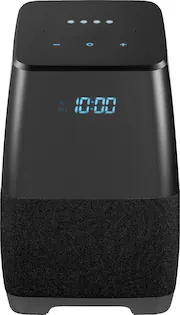
This box has a great sound. Good base and its portable. Large battery with Google Assit built in. I use it for my bed alarm clock and I sleep with the white noise on. Just say google play white noise. You can ask it for news, weather, sports and play music or a radio station. I love it.
Posted by Tony
- Rated 5 out of 5 stars
Nice addition to our smart home
This speaker has great sound and Google assistant, allowing me to do everything I can do with my Google home. Having a clock displayed is a big plus, for me anyway. The top of the unit is blank until you put your hand close to it, then the volume controls light up, nice touch. The only thing is, this speaker is rather large compared to the Google home. Since I bought it online and picked it up at the store, I wasn't aware of how large it actually is. No big deal, just be aware there is a difference in the footprint if your used to how small the Google unit is. (see pic) Highly recommended.
Posted by PWC01
- Rated 5 out of 5 stars
Best Buys at Best Buy
I don't know where to begin. This was a Super deal at My Super Store , Best Buy. It delivers Quality sound through Google Assistant , all the requested music types at your command ( time and temperature displayed ). It is truly a personal assistant on hand , unlimited resource to information. Then to top all that off, I purchased this at a Black Friday's Best Buy price, an unbelievable deal.
Posted by Sirdejay
- Rated 5 out of 5 stars
Very nice sound quality, plenty of bass
Works awesome I use it as my bathroom stereo, use it pretty much every day google assistant is nice but not even necessary just a pretty nice sounding Bluetooth speaker in itself. Everything else I consider to be a bonus
Posted by Squishysquashy1
- Rated 5 out of 5 stars
Bargain
I was able to buy this speaker for just 25 dollars during the weekend sale and it is awesome. The sound is very good, works fine as a google assistant and it's great to have a battery so you can unplug it and take it wherever you want.
Posted by Yasmany