JBL - LINK BAR 100W Soundbar with 4K Support and Google Assistant - Gray
- Key Specs
- Wireless Connectivity: Bluetooth, Wi-Fi (The manner in which a device sends data to another device over a short distance without the use of wires or cables.)
- Wireless Subwoofer Connectivity: true
- App Compatible: true (The product can be connected to a program or software application on a mobile device, which then receives collected data from the product.)
- Wall Mountable: true (The product is able to be secured to a wall. Some products are designed ready to mount, while others may require additional hardware/accessories for installation.)
- Works With: Google Home (Compatible with or able to be connected to other smart devices or applications.)
- Voice Assistant Built-in: Google Assistant (A digital assistant built into the device that uses voice commands to answer questions and control smart devices.)
- General
- Brand: JBL
- Model Number: JBLLINKBARGRYAM
- Product Name: LINK BAR 100W Soundbar with 4K Support and Google Assistant
- Color: Gray
- Audio
- Surround Sound Supported: Dolby Audio (Surround sound systems use multiple audio channels and speakers to create an immersive sound experience for the listener. There are also various proprietary technologies that imitate this kind of sound via a device's built-in speakers or soundbar.)
- Minimum Frequency Response: 75 hertz (Describes the maximum range of frequencies or musical tones a product can reproduce, from very low tones to very high treble tones. The minimum frequency or musical tone the speaker can reproduce. High treble tones have higher frequencies while low tones and deep bass have lower frequencies.)
- Maximum Frequency Response: 20 kilohertz (Describes the maximum range of frequencies or musical tones a product can reproduce, from very low tones to very high treble tones. The maximum frequency or musical tone the speaker can reproduce. High treble tones have higher frequencies while low tones and deep bass have lower frequencies.)
- RMS Power: 100 watts (The maximum amount of continuous power the device is able to handle.)
- Connectivity
- Wireless Connectivity: Bluetooth, Wi-Fi (The manner in which a device sends data to another device over a short distance without the use of wires or cables.)
- Wireless Subwoofer Connectivity: true
- Audio Only Inputs: 1 x Optical digital audio, 1 x 3.5mm audio
- Number of HDMI Inputs (Total): 3
- Audio/Video Inputs: 3 x HDMI 2.1 (The number and type of HDMI inputs the product has.)
- Audio/Video Outputs: 1 x HDMI 2.1 (The number and type of HDMI outputs the product has.)
- Network Connector(s): 1 x LAN
- Number of USB Inputs: 0
- Number of Optical Audio Inputs: 1
- Number of HDMI Outputs (Total): 1
- Features
- App Compatible: true (The product can be connected to a program or software application on a mobile device, which then receives collected data from the product.)
- Wall Mountable: true (The product is able to be secured to a wall. Some products are designed ready to mount, while others may require additional hardware/accessories for installation.)
- Speaker
- Subwoofer: Optional (sold separately)
- Number of Tweeters: 2
- Tweeter Size: 0.8 inches
- Number of Drivers: 6
- Number of Woofers: 4
- Dimensions
- Product Height: 2.36 inches (The out of box height of the item. Height is measured as the vertical distance from the bottom of the item to the top as it would be primarily used or placed.)
- Product Width: 40.2 inches (The out of box width of the item. Width is measured as the horizontal distance from one side of the item to the other as it would be primarily used or placed.)
- Product Depth: 3.66 inches (The out of box depth of the item. Depth is measured as the distance from the front of the item to the back as it would be primarily used or placed.)
- Product Weight: 5.51 pounds (The out of box weight of the item.)
- Included
- Remote Control Included: true
- Cable(s) Included: HDMI, Power
- Mounting Hardware Included: true
- Certifications Listings & Approvals
- ENERGY STAR Certified: false (Devices carrying the ENERGY STAR service mark, such as computer products and peripherals, kitchen appliances, and other products, generally use 20% to 30% less energy than required by federal standards.)
- Warranty
- Warranty - Parts: 1 year
- Warranty - Labor: 1 year
- Compatibility
- Works With: Google Home (Compatible with or able to be connected to other smart devices or applications.)
- Voice Assistant Built-in: Google Assistant (A digital assistant built into the device that uses voice commands to answer questions and control smart devices.)
- Other
- UPC: 050036352635
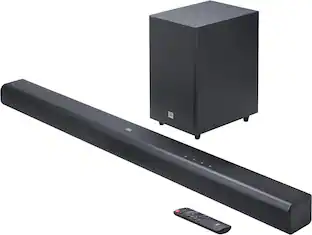
Enhance your home audio setup with this JBL LINK BAR soundbar. The three HDMI ports and HDMI ARC port create a 4K entertainment hub for immersive gaming or streaming, while built-in Android TV and Google Assistant support voice-activated controls for added convenience. This Bluetooth JBL LINK BAR soundbar uses a single cable to connect to your TV for a hassle-free connection.
- Voice-activated soundbar with Android TV and Google Assistant: Just start with "Hey Google" to quickly find the latest blockbuster movie, check the score of the big game, or control your smart home.
- Multiple 4K video HDMI inputs: Three HDMI inputs and one HDMI ARC output create a complete 4K entertainment hub for video or gaming devices.
- 100W maximum power: Provides quality sound for your favorite movies, shows, games, and music.
- Four 1.7" x 3.2" racetrack drivers with two 0.8" tweeters: Enhance the frequency range of audio playback to ensure crisp voices and dynamic soundtracks.
- Dolby Audio decoder: Reproduces multichannel audio to deliver a cinematic audio experience.
- PrivacySwitch™ for far-field microphone: Enables you to mute your soundbar microphones for extra privacy and security protection when not using the Google Assistant.
- Chromecast built in: Lets you instantly stream your favorite music, radio, or podcasts from your mobile device to your speakers.
- Wireless Bluetooth streaming: Makes it easy to enjoy high-quality sound and video from your smartphone or tablet.
- Curved body: Offers a sleek stylish complement to your existing home theater setup.
- Inputs: Includes Ethernet, Optical digital audio, AUX, and three HDMI ports.
- Outputs: Features one HDMI ARC output.
- Wall-mountable: Comes with the included brackets.
Whats Included
- JBL LINK BAR 100W Soundbar with 4K Support and Google Assistant
- Remote with two batteries
- Power cable
- HDMI cable
- Wall mount bracket kit
- Owner's manual
A: Sound is subjective, but I would say the JBL LINK Soundbar BY ITSELF is ONLY GOOD, a bit ABOVE AVERAGE and certainly not great; I'd score it as a 7.5/10 on sound quality, but I'm an audiophile with very high expectations(and a $5k audio system). I bought this soundbar a couple weeks ago because I want a more compact and convenient system for basic, casual listening, something which it works pretty well for, I can connect it to my phone using Bluetooth or directly to Wi-Fi and it works fine with both videos and music. Whether this will work well for you or not will depend on what you're using it for, if you're using it for TV and movies it should be pretty good, it's clear enough, has a nice mid-range sound(vocals sound good and natural on the songs I've listened to), decent soundstage and bass extension, and it will deliver the booms and oomphs in your movies and music, the subwoofer will add substantially to it however, and if you care a great deal about low end, the sub is worthwhile, BUT it's definitely NOT necessary and the soundbar alone has a good amount of bass of it's own, it will vibrate and slightly shake your floor and bother your neighbors if you live in an apartment building like I do, I've had to turn mine down many times. If you want really high sound quality for listening to music, especially large scale music, symphonic, choral, well, then you might be disappointed; you're not going to be blown away listening to the Star Wars main title through this soundbar(actually, it's definitely loud enough, but it doesn't handle large scale complex and congested music very well, it doesn't break up or anything like that, but the resolution of the inner parts is lacking), but if you listen to popular music, folk, rock, EDM, stuff like that, it's actually pretty good, it can get pretty loud, not crazy loud but pretty loud, and will thump the bass if that's what you want, the subwoofer does add low end but is a bit slow for music, it is great for movies though. In my experience, the Google assistant has worked pretty well most of the time, I'd say about 70% of the time it responds well to my voice commands, but sometimes there's a bit of a lag, I'd say about five seconds, maybe ten, and I have had some of the issues which you may have read about in reviews which can be frustrating. I do not use it as a Google smart home hub so cannot comment on that aspect, but I have seen video reviews on Youtube where it does turn off the lights and stuff like that after you get it set up. I haven't used it for Chromecast either. Value is also a very subjective thing. I bought mine on sale with the subwoofer included a couple weeks ago, and for the price I paid I'm generally satisfied with it(I paid $210), but if I were paying full price I'm not so sure it would be worth it, I surely wouldn't pay $700 for the system, but $400, that might be about right for the soundbar and sub, and honestly, the subwoofer isn't really necessary unless you really love deep bass, as I said, the soundbar alone will vibrate your floors at about 85/90% volume, and it's where the "brains" of the system is, the Google assistant, etc,, the sub really just adds a bit of low end. But ultimately, the only way you're really going to know if you're going to like it is by buying it and trying it out yourself, so if you can get a good price, I'd say to go for it, the setup isn't too difficult and the sound isn't bad at all. Hopefully that answers your question, I tried my best. Cheers
A: JBL Link Bar has 3 HDMI inputs and 1 HDMI ARC Output. It doesn't have a coaxial input. An HDMI cable is included upon purchase.
Q: can I add a wired subwoofer this soundbar,I have 3.5 plug from subwoofer Thanks
A: No, Only the optional JBL wireless sub can be added. Luckily, the subwoofer is included for free right now. Not sure how long the free subwoofer offer will last.........
A: Our JBL Link Bar cannot be paired with another speaker but it has a subwoofer which it can paired to for increased bass.
Q: What's the electricity voltage... 110 volts or 220 volts?
A: It uses 110 volts
Q: Can I plug in a personal cd player?
A: You can as long as the CD player has an option to connect via 3.5mm aux, optical, or HDMI. You'll be able to connect it. You'll need to set our Link Bar first to Google Home app before this happens.
A: HDMI ARC (Audio Return Channel) is not needed if all of the sources will come from the Link Bar. The TV will just serve as a display.
Q: It is compatible to use on a VizioTV?
A: Yes, you should be able to connect it to an HDMI (ARC) on your VIZIO TV, if your TV doesn't have an HDMI(ARC) input you can still connect via DIG OPT, if you have any issues setting it up, please contact our tech support line, we will be glad to help you set it up
People also viewed
 Black Friday in July Deal$199.99The price was $399.99
 Black Friday in July Deal$799.99The price was $899.99
 Black Friday in July Deal$399.99The price was $499.99
 $119.99The price was $159.99
 $649.99The price was $799.99
 Black Friday in July Deal$1,249.99The price was $1,999.99




Today's top picks
 Black Friday in July Deal$749.99The price was $1,199.99
 Black Friday in July Deal$199.99The price was $399.99
 Black Friday in July Deal$69.99The price was $129.99
 $249.99The price was $399.99
 Black Friday in July Deal$199.00The price was $419.00
 Black Friday in July Deal$199.99The price was $249.99
 Black Friday in July Deal$399.99The price was $899.99
 Black Friday in July Deal$169.99The price was $299.99