Rating 4.1 out of 5 stars with 129 reviews
4.1- Sound Quality (65)
- Battery Life (33)
- Comfort (33)
- Connectivity (16)
- Portability (10)
- Button Layout (8)
- Fit (3)
Customer Images
The vast majority of our reviews come from verified purchases. Reviews from customers may include My Best Buy members, employees, and Tech Insider Network members (as tagged). Select reviewers may receive discounted products, promotional considerations or entries into drawings for honest, helpful reviews.
- Rated 5 out of 5 stars
Great headset for the price
Sound quality is better. Bluetooth connection to my Fold5 is very strong. Range is good. Others hear me very well. Light weight. Battery lasts for 20+ hours easily. Good for long calls. Does not hurt the ears. Light weight
Posted by VenkatJ
- Rated 4 out of 5 stars
Snug Headset
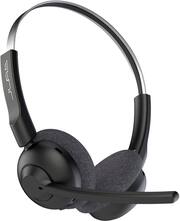
The JLab - Go Work Pop Wireless On-Ear Headset connects easily to a cell phone and/or devices for use. The setup didn't take long. Under about 1 to 2 minutes maximum. App was easy to find. While using the headset to contact families that I assist, I was told that my call came in clearly and that there was no feedback sound coming through. This was nice to hear since I have a fan turned on in the background while I am working. The side that has the rotating microphone is where your able to locate the buttons, that allow you to adjust the volume of the headset for answering calls and listening to music. When powered on the headset will let you know if the battery is full. This headset has the capability of lasting longer than 50 plus hours. A Type C charging cable comes with it. It is nice that there is a music mode and EQ Voice. Pros: • Cloud Foam Cusions with Fabric Earcups (Fits Nice and Snug) • Rotating Microphone • Rotating Earcups • Can connect to two devices • Excellent Sound (no feedback) • Buttons on the side for quick access • Has metal to provide durability. Cons: Could not locate a mute buttton. Not a deal breaker. I would recommend this product to others who want a headset to get the job done.
Posted by TayTay
- Rated 5 out of 5 stars
Simple and effective.
I work from home and was i need of a pair of headphones that could keep up with me and these look like they would suit my needs. On paper they are pretty good so lets have a look at what the Jlab Pop has to offer. :::Initial Impressions::: Upon removing them from the box this is as straight forward as it gets. You will find the headset itself and then the USB Type C Cable for charging. These are really lightweight and simple and I like that. SO far so good. :::General Thoughts::: Setup was pretty much effortless you have the volume rocker and power button. They came partially charged. I work from home and make quite a few phone calls throughout the day using a VOIP service. These headphones are comfortable and worked immediately in Windows when I set the headset for the first time. As far as comfort your mileage will vary because everyone has different sized heads. I find that for my use this fits perfectly and don't need much adjustment. The ear cups have a decent amount of padding and are comfortable and are the on ear type so you will not sweat after extended periods of use. These do not feel fragile but I would still treat them with care because anyone who has owned headphones like this know that if you treat them roughly they will not last long. Charging time as per manufacturer is rated at 2 & 1/2 hours. I found that my headset did not need that much time. As far as battery life goes I use it during a typical work week 9 - 5 five days a week. I found that I can get roughly a whole work weeks worth of battery life. Sound quality can vary as well depending on usage and your particular environment. I use two other Bluetooth devices a mouse & keyboard and they do not interfere with the audio which is good, I do not get complaints about not being heard. I can not speak for noise cancelling because I make calls and hardly receive them. I am soft spoken and this mic picks up my voice pretty well and I do not have to yell at the mic to be heard. I really appreciate that a whole lot. I also use Teams for work and when we have morning meetings go smoothly with these and my coworkers do not complain about me not being loud enough. :::Pros & Con's::: Pros: - Lightweight - Simple to use - Comfortable - Rotate mic upward to mute feature (pretty cool) - Long battery life I have not encountered anything that I dislike or find to be concerning during my use. :::Closing Thoughts::: I like these headphones they are simple to use, simple to setup, have good battery life, and work as intended. They also are not expensive so I appreciate that greatly. On paper these are pretty darn good and after using it a couple of weeks I found that they are great for working from home or those who do similar types of work as I do. :::TL;DR::: You need a headset for work and want something simple then have a look and consider these they work as intended and are easy on your wallet.
Posted by Johnnyboy84
- Rated 5 out of 5 stars
Great Work HeadSet
Great quality of sound and very comfortable. and easy to setup
Posted by ElvinCarr
- Rated 4 out of 5 stars
A Reliable and Affordable Wireless Work Headset
The JLab GO Work Pop is a good option for anyone looking for an affordable, reliable, and relatively comfortable headset. It has a modern design with a reasonably comfortable fit, and it delivers clear sound quality. The headband doesn’t have any additional padding on top, which would have added to the comfort. The fabric ear pads could definitely use a bit more cushion as well. The microphone is also decent, and it does a great job of picking up your voice in louder environments. I used this microphone in both Webex and Teams with no issues and paired it with my MacBook Pro without a problem. Battery life lasted me throughout my workday and is advertised at about 50 hours. I had no connection issues until I stepped well out of Bluetooth range when going to my garage for a soda. The sound quality was okay, but listening to music definitely demonstrated that this headset is better suited for meetings, spoken word, and audiobooks. There is a distinct lack of bass and the sound is a bit hollow. Please choose something else if you want to really get into music while working and having meetings. The “Music” mode setting did nothing to help its sound in my opinion. Overall, the JLab Go Work Pop is a budget-friendly headset that delivers everything a person would expect and maybe even a little more than it should for the price. I recommend this headset to anyone who doesn’t want to spend a lot but wants to feel like they did. Here’s a quick pros and cons list of the headset: Pros: Clear sound quality Fabric ear pads stay nice and cool Good microphone performance Long battery life Affordable USB-C charging Cons: The headset can be a bit tight on the ears Ear pads could be better padded. The headband would benefit from some padding as well. The microphone can pick up some background noise
Posted by KMed