Rating 4.2 out of 5 stars with 956 reviews
4.2- Sound Quality (449)
- Comfort (147)
- Battery Life (108)
- Price (76)
- Bass (49)
- Volume (12)
Customer Images
The vast majority of our reviews come from verified purchases. Reviews from customers may include My Best Buy members, employees, and Tech Insider Network members (as tagged). Select reviewers may receive discounted products, promotional considerations or entries into drawings for honest, helpful reviews.
- Rated 5 out of 5 stars
I am so impressed, I bought another one as a spare
I have been a JVC headphone fan since many years. But this was my first try with a JVC Bluetooth headphone. Excellent product and well built. Easy to pair, easy to charge, easy to use, and easy to store. Comfortable to wear for hours and the padding is perfect even though these are On-Ear-Headphones. These stay connected throughout our 800 sq foot apartment. MicroUSB port is easily accessible for connecting a third party magnetic charging adapter (see pic.) Some devices have their charging ports inside indents making them a pain to connect to such an adapter. The extra bass feature is noticeable and works will with music. I turn it off for TV watching though. The battery lasts for days and days before it needs a charge. This device broadcasts how much % the battery charge remains which we can see when it is connected to a Windows device. This is the only Bluetooth device that shows the % of battery charge on my Windows PC. I am so impressed with this product that I bought another one as a spare.
Posted by eastcoaster
- Rated 5 out of 5 stars
Just excellent.
I bought first the one with wire and loved the sound quality. Then I bought a 2nd piece this time wireless. Both are excellent! For a movie I prefer the one with wire, no wifi interuptions. Pretty comfortable also.
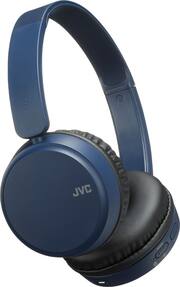
This review is from JVC - HA S35BT Wireless On-Ear Headphones - Black
Posted by Eunice
- Rated 5 out of 5 stars
Inexpensive Lightweight On-Ear Wireless Headphones
I’m happy with these on-ear headphones given the price. I like a balanced sound, so I’m surprised I prefer to leave Bass Boost on. I like the swivel fold flat design and the ear cups are soft and comfortable. They are lightweight but there is no padding on the adjustable headband. I can wear them for 3-4 hours before the top of my head begins to hurt. They fit snug on my narrow head so people with large heads might find them tight. Max volume is far too loud for my comfort so if you have hearing loss or don’t value your hearing, they can be plenty loud. They have a closed ear cup design which helps block ambient noise without an active noise cancelling feature. When used for phone calls, the sound is clear and most importantly you hear the caller in both ears. Unfortunately, you don’t hear yourself in the headphones during a call, so it has that “fingers-in-your-ears” feeling that makes you talk much louder than necessary. The headphones charge using a micro USB cable (included). The battery lasts about 17 hours and will charge from 0 to 100% in 3 hours. If no device is connected for 5 minutes the system turns off to conserve battery. When the battery is low an alarm will sound every 4 minutes. The HA S35BT uses Bluetooth 4.1 with a 33-foot (10 m) range and will pair with 8 devices. When paired with a 9th device it will forget the oldest (1st) device. I’m impressed with the real-world range of these headphones. I can stray quite far from the device before the audio begins to stutter. They are very easy to pair. When the headphones are OFF, press and hold the power button until the indicator light alternately flashes red and blue. Select “JVC HA-S35BT” from the device list and the indicator will slowly flash blue when the connection is complete. When you power on the headphones they will automatically connect to the previously used device (if available), with the indicator slowly flashing blue when connected. If the indicator light slowly flashes red, the connection was not established. This auto-connect feature is great if you mostly use them with one device, but it can be annoying when the last used device is in another room. The three control buttons are multi-function, and all located on the right side. The buttons could have better tactile feedback, but you quickly get used to them. +/- Volume: Towards the top of your right ear, near the headband, is the +/- volume rocker that doubles as the next and previous track buttons. Easy to reach with your index finger. The upper end of the rocker has a bump you can feel, and it controls the volume up (short press) and next track (long press). I expected a dimple or indentation on the lower end of this rocker that controls volume down (short press) and previous track (long press) but it is easy to get used to pressing slightly below the raised dot to press the lower end of the button. Power: On the lower end of the three buttons is the power button with an easy to feel raised “dash” in the center. Easy to reach with your thumb. This button also serves as the Bass Boost toggle and Bluetooth control. While on and connected a short press of this button will toggle Bass Boost, double tone = On and single tone = Off. Play/Pause: Slightly above the power button is the Play/Pause/Call/Assistant button. There really should be a raised dot on this important button. This is the middle button, but I mentioned it last because you must learn the location, slightly above the easy to feel power button. It is a good 1.75 inches below the bump on the + end of the volume rocker so there is no way you can confuse the two. Easy to press with your thumb once you memorize the location. While off, a 1-second press will turn the headphones on, and a 3-second press will turn the headphones off. While playing music, a short press will toggle the Play/Pause function. While receiving a call a short press of this button will answer the call and a long press will reject the call. During a call a long press will switch the call between the headphones and the smartphone. When not using the call function, a long press will enable the device assistant (Google, Siri, Etc.).
This review is from JVC - HA S35BT Wireless On-Ear Headphones - Black
Posted by bridaw
- Rated 5 out of 5 stars
Something for me
I’ve been waiting to get some headsets for a while to entertain my while I walk and or exercise. This was the perfect fit for me not too expensive with great quality
This review is from JVC - HA S35BT Wireless On-Ear Headphones - Black
Posted by Jess
- Rated 3 out of 5 stars
Ok
It fits really good but not as loud as i thought but still good enough for the price.
This review is from JVC - HA S35BT Wireless On-Ear Headphones - Black
Posted by KNUCKLES