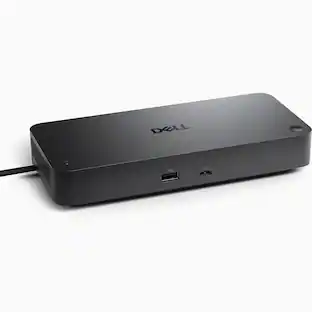
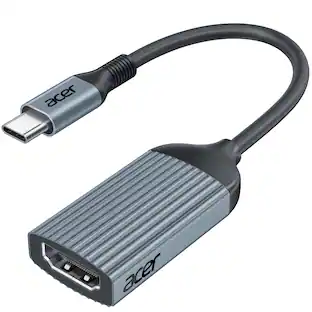
Kensington - SD7100T5 EQ Pro 19-in-1 Thunderbolt 5 Docking Station - for Notebook, MacBook, iPhone - Charging Capability
Reviews coming soon
About this product
Kensington SD7100T5 EQ Pro 19-in-1 Thunderbolt 5 Docking Station - for Notebook, MacBook, iPhone - Charging Capability - Memory Card Reader - SD, CompactFlash, microSD - 180 W - Thunderbolt 5 - 3 Displays Supported - 8K @ 60Hz, 4K @ 144Hz, 6K @ 60Hz, 5K @ 60Hz, 4K @ 120Hz, FHD @ 540Hz, QHD @ 240Hz - 7680 x 4320, 1920 x 1080, 3840 x 2160, 6144 x 3456, 5120 x 2880, 2560 x 1440 - 6 x USB Ports - 2 x USB Type-A Ports - USB Type-A - 2 x USB Type-C Ports - USB Type-C - 1 x RJ-45 Ports - Network (
Features
Boost and expand with the power of Thunderbolt 5
For users of MacBook M-Series models with Pro and Max chips, and high-performance Windows laptops, the SD7100T5 EQ Pro 19-in-1 Thunderbolt 5 dock delivers exceptional versatility. It supports dual 6K displays for Mac and triple 4K for Windows, offers fast 80Gbps data transfers, and provides 140W power through a single cable. With a lockable PCle M.2 SSD slot and dedicated iPhone backup buttons, this dock streamlines your workflow. No
Features include:
Data transfer speeds up to 80GbpsUp to 120Gbps Bandwidth Boost for video-intensive usageUp to Triple 4K @ 144Hz or Dual 8K @ 60Hz for WindowsUp to Dual 6K @ 60Hz for MacBook M-Series Pro and MaxThunderbolt 5, Thunderbolt 4, USB4®, and USB-C® devicesWindows 11 (23H2 or later) or macOS (14.5 or later)Up to 140W of dynamic power deliveryProductive 19-in-1 designBuilt-in and lockable PCIe M.2 SSD slotBuilt-in CF/SD/Micro SD card
1 x Thunderbolt 5 host
4 x USB-A 3.2 Gen2 10Gbps ports
3 x CF/SD/Micro SD 4.0 slots
Specifications
- Maximum Number of Displays Supported3Number of DisplayPort Outputs (Total)6Number of Thunderbolt Ports (Total)3
Reviews
This product doesn't have any reviews yet.
Compare similar products
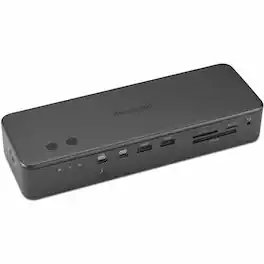
Kensington SD7100T5 EQ Pro 19-in-1 Thunderbolt 5 Docking Station - for Notebook, MacBook, iPhone - Charging Capability - Memory Card Reader - SD, CompactFlash, microSD - 180 W - Thunderbolt 5 - 3 Displays Supported - 8K @ 60Hz, 4K @ 144Hz, 6K @ 60Hz, 5K @ 60Hz, 4K @ 120Hz, FHD @ 540Hz, QHD @ 240Hz - 7680 x 4320, 1920 x 1080, 3840 x 2160, 6144 x 3456, 5120 x 2880, 2560 x 1440 - 6 x USB Ports - 2 x USB Type-A Ports - USB Type-A - 2 x USB Type-C Ports - USB Type-C - 1 x RJ-45 Ports - Network (
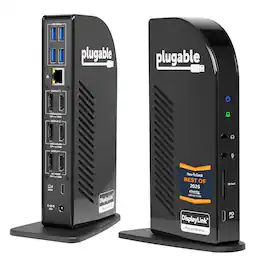
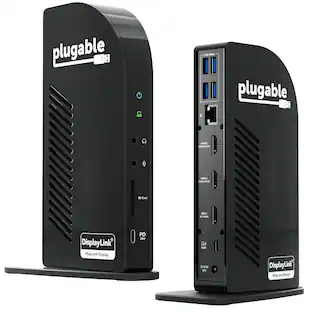
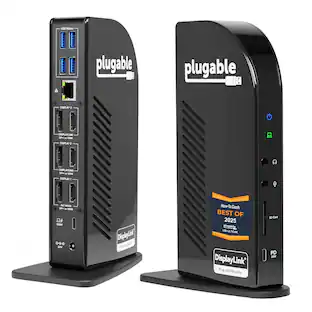
The Plugable UD-ULTC4K is a USB-C docking station designed for business and mixed-device environments. It supports up to three external displays through a combination of DisplayPort and HDMI connections, with up to 4K 60Hz resolution depending on host system capabilities. Named "Best Docking Station 2025" by How-To Geek. The dock includes 3 DisplayPort outputs and 3 HDMI outputs, allowing flexible monitor connections without requiring adapters for different display types. In addition to display connectivity, the dock features a front-facing USB-C port with up to 10Gbps data transfer and 20W charging for compatible accessories, 4 USB 3.0 ports with up to 5Gbps transfer speeds, an SD card reader, Gigabit Ethernet, and separate 3.5mm audio input and output ports. The host connection supports up to 100W USB-C Power Delivery, with 96W certified for supported laptops. The replaceable USB-C host cable can help simplify setup and maintenance in office deployments. Compatible with supported Windows, macOS, and ChromeOS systems. DisplayLink drivers are required for DisplayLink-based video outputs. HDCP is not supported, so protected content playback from some streaming services may be limited. Port configuration includes 1 USB-C host connection with up to 100W Power Delivery, 2 DisplayPort 1.2 outputs using DisplayLink, 1 DisplayPort 1.2 output using Alt Mode, 2 HDMI 2.0 outputs using DisplayLink, 1 HDMI 2.0 output using Alt Mode, 4 USB 3.0 ports, 1 USB-C port with 10Gbps and 20W charging, 1 SD card reader, 1 Gigabit Ethernet port, and 1 audio input.

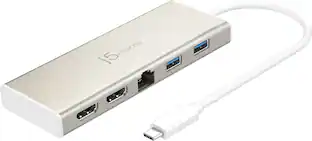
The USB-C Dual HDMI Mini Dock provides extra connectivity for your USB-C computer, featuring data transfer, power delivery and video displays. Easily add two additional USB computer peripherals, two HDMI monitors, and a Gigabit Ethernet connection through your USB-C port. When connected to a power source, the USB-C input charging port allows you to continue charging your laptop or smartphone. Its compact and lightweight design, making it great for use on the go.
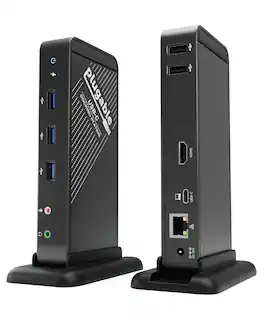
Streamline your workstation with the Plugable UD-CA1A USB-C Docking Station—a compact, versatile 9-in-1 solution that expands your connectivity through a single USB-C cable. This dock adds essential ports to your setup, including a 4K HDMI video output (up to 30Hz), Gigabit Ethernet, headphone and microphone jacks, three USB 3.0 ports, two USB 2.0 ports, and up to 60W of USB-C Power Delivery to charge your compatible device. The UD-CA1A is designed for a seamless setup experience. It offers driverless, plug-and-play functionality, meaning no additional software or drivers are needed to begin using it. Simply connect the dock to a compatible USB-C port on your device, and its full range of features becomes immediately accessible, including HDMI video output, USB ports, Ethernet, and audio connections. Its compact vertical stand, which can also be removed for horizontal use, provides flexible placement options to suit your workspace. This docking station is intended for laptops, tablets, and phones that support both USB-C Power Delivery and DisplayPort Alternate Mode (Alt Mode), which are required for video output and charging. Compatible systems include MacBook Air and Pro (M1, M2, M3), iPad Pro, iPhone 16 models, Dell XPS, HP Spectre, Lenovo ThinkPad, and other Alt Mode and Power Delivery-enabled devices. It is important to note that the UD-CA1A supports only a single HDMI display output and is not compatible with DisplayPort monitors or systems that lack Alt Mode or Power Delivery, such as many legacy USB 3.0 laptops. For setups requiring dual HDMI outputs, a different Plugable dock may be more suitable. The HDMI port provides native-level video output, supporting up to 4K resolution at 30Hz or 2560x1600 and lower resolutions at 60Hz. This makes the dock well-suited for productivity tasks and everyday use, though it is not recommended for high-frame-rate gaming or applications that require fast refresh rates. With up to 60W of USB-C Power Delivery, the dock helps keep your device charged during use. However, devices that require more than 60W may charge more slowly or not at all. If full-speed charging is critical for your setup, consider one of Plugable’s docking stations with higher power delivery support. Included in the box are the UD-CA1A docking station, a stand, a 1-meter USB-C cable, an 80W power adapter with a US plug, and a quick start guide. The dock is TAA compliant and backed by Plugable’s 2-Year Warranty and lifetime support from our US-based team.
| Pros for Kensington - SD7100T5 EQ Pro 19-in-1 Thunderbolt 5 Docking Station - for Notebook, MacBook, iPhone - Charging Capability | |||
|---|---|---|---|
| There were no pros for this product— | There were no pros for this product— | Ease of use, HDMI, Overall Performance, Size, Connectivity | There were no pros for this product— |
| Cons for Kensington - SD7100T5 EQ Pro 19-in-1 Thunderbolt 5 Docking Station - for Notebook, MacBook, iPhone - Charging Capability | |||
| There were no cons for this product— | There were no cons for this product— | Compatibility, Heat | There were no cons for this product— |
Specs
Be the first to ask a question.
We’ll try to get your question answered within 24 hours by a Best Buy customer or brand representative.
Customers often buy these together


More to consider
Explore tech essentials Sponsored
 Techtober Deal$89.99The price was $109.99
 Techtober Deal$22.49The price was $24.99
 Techtober Deal$44.99The price was $49.99


Keep exploring
 Techtober Deal$49.99The price was $59.99
 Techtober Deal$37.99The price was $45.99