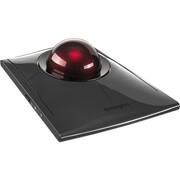
Kensington - SlimBlade Pro Trackball - Optical - Cable/Wireless - Bluetooth/Radio Frequency - 2.40 GHz - Rechargeable - Wired - Black
Reviews coming soon
About this product
Kensington SlimBlade Pro Trackball - Optical - Cable/Wireless - Bluetooth/Radio Frequency - 2.40 GHz - Rechargeable - USB Type C, USB Type A - Trackball - 8 Programmable Button(s) - Symmetrical
Wired + Wireless Triple Connection Capability
Includes choice of Bluetooth, 2.4GHz wireless and wired connection options for maximum flexibility.
Rechargeable Battery
Provides 4 months of battery life with single charge via USB port.
Precision Movement with Twist Scrolling
Large 55mm trackball lets you scroll up and down web pages and documents with quick precision via a simple twist.
Ambidextrous Design with Sleek, Low-Profile Footprint
Low-profile shape allows all-day comfort for both right-handed and left-handed users. The trackball takes up less desk space than what is needed to operate a mouse and is more comfortable during extended use because it requires less arm and wrist movement.
Superior Optical Tracking Technology
Dual sensors accurately track the large 55mm ball, giving you better cursor control that requires less hand and wrist movement. Provides highly accurate and responsive cursor tracking and scrolling.
- Number of Buttons (Total)8Connection TypeWired, Wireless
Reviews
This product doesn't have any reviews yet.
Compare similar products

Kensington SlimBlade Pro Trackball - Optical - Cable/Wireless - Bluetooth/Radio Frequency - 2.40 GHz - Rechargeable - USB Type C, USB Type A - Trackball - 8 Programmable Button(s) - Symmetrical

Features | PC and Mac CompatibleEffortlessly supports Windows 7 or later (32-bit/64-bit), Windows 11 (64-bit only), and macOS 10.14 or later. Recycled MaterialsThe plastic in this trackball is composed of at least 47% post-consumer recycled (PCR) plastic. *Excludes Printed Circuit Board (PCB) assembly, rechargeable battery and charging cable. Wired + Wireless Triple Connection CapabilityBluetooth®, wireless 2.4GHz Nano receiver, and wired connection options provide maximum flexibility, enabling you to easily work across multiple setups. Rechargeable BatterySupports up to 4 months of productivity with a single charge. Includes USB-A (male) to USB-C® (male) cable for charging and wired connection. Provides USB-A (female) to USB-C® (male) adapter to accommodate different connections. Ambidextrous Design with Low-Profile FootprintThe low-profile design ensures all-day comfort for both right- and left-handed users. The trackball operates in less desk space than a mouse and promotes greater comfort during extended use by minimizing arm and wrist movement. Superior Optical Tracking TechnologyDual sensors accurately track the large 55mm ball, providing highly accurate and responsive tracking with minimal hand and wrist movement. Customization OptionsPlug & play or personalize your experience via Kensington's intuitive and free configuration software - enabling the assignment of functions to up to 8 sets of programmable buttons. This flexibility empowers you to customize your trackball to fit your unique workflow, enhancing productivity and efficiency with just a few clicks.128-bit AES EncryptionGovernment-grade 128-bit AES encryption provides secure wireless connectivity.3-Year Limited WarrantyEnjoy peace of mind knowing you are covered by Kensington with a 3-year limited warranty.

The MX Ergo S Plus is Logitech’s most advanced ergonomic trackball mouse yet, with a 20-degree tilt angle and a 10-degree detachable wedge, and precise thumb control - user-tested and certified by United States Ergonomics. The MX Ergo S wireless ergonomic mouse is sculpted to fit the palm of your hand while keeping it relaxed, and it tilts 20 to 30 degrees for 27% less muscle activity in the forearm, providing elevated comfort throughout your day. Work faster with 6 customizable buttons and a DPI button to effortlessly switch between speed and high-precision tracking. Now with 80% quieter clicks. For even more control that's tailored to your needs, assign time-saving shortcuts and Smart Actions using the Logi Options+ App. Connect your wireless mouse to 2 devices via Bluetooth or the included Logi Bolt receiver and switch between devices with a click of the Easy-Switch button.

Tackle complex tasks or browse documents effortlessly with this Orbit wireless mobile trackball. An ergonomic setup and ambidextrous design allow for comfortable use, while the touch operation provides accurate, efficient scrolling. Customize the two buttons using free downloadable software for even greater ease of operation. A wireless USB nano receiver makes it easy to connect this Orbit wireless mobile trackball to a PC or Mac device.
| Pros for Kensington - SlimBlade Pro Trackball - Optical - Cable/Wireless - Bluetooth/Radio Frequency - 2.40 GHz - Rechargeable - Wired - Black | |||
|---|---|---|---|
| There were no pros for this product— | There were no pros for this product— | Ergonomics, Overall Performance, Battery Life, Ease of Use, Connectivity | There were no pros for this product— |
| Cons for Kensington - SlimBlade Pro Trackball - Optical - Cable/Wireless - Bluetooth/Radio Frequency - 2.40 GHz - Rechargeable - Wired - Black | |||
| There were no cons for this product— | There were no cons for this product— | Weight | There were no cons for this product— |


![esc ~ ! 1 tab caps lock shift ctrl F2 Fl # 2 3 Q W A S Z start opt L F3 $ 4 E D X alt cmd3 ) FS F4 A % 5 6 R T F G V C logi 44 HI & F9 FID FB F7 F6 * ) - - & 0 8 9 7 O P U I Y K L H J > < N M 1 B PM + = { [ : I ; ? I alt cmd D 2 4 300 3 1 F12 . * page I insert home up clear backspace 8 9 + 7 page A pg up end down home } I delete ] / 6 4 5 4 enter 2 3 enter 1 dn Pg end shift = 0 del ins etrl fn opt](https://pisces.bbystatic.com/image2/BestBuy_US/images/products/6539/6539505_sd.jpg;maxHeight=232;maxWidth=233?format=webp)
![Esc F1 F2 F3 F4 F5 F6 F7 F8 F9 F10 F11 F12 Print Screen Scroll Lock Pause Break 1 2 3 4 5 6 7 8 9 0 - + = Backspace Insert Home H Page Up A Num Look 1 I Tab Q W E R T Y U I o P { [ } ] I I Delete End IN Page Down 7 Home 8 9 Pg Up Caps A Lock A S D F G H J K L ; : DE g Enter 4 5 6 Shift Z X C V N M < > ? I Shift 1 End 2 3 Pp Dn Enter Ctrl Alt Alt Ctrl 0 Ins Del](https://pisces.bbystatic.com/image2/BestBuy_US/images/products/a588d446-5678-40ae-86b8-1f15e0026e66.jpg;maxHeight=232;maxWidth=233?format=webp)


