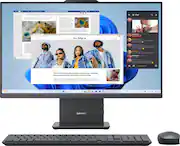
The clean lines and compact frame of the Lenovo IdeaCentre AIO encase a singularly performance-driven machine, with AMD Ryzen 5 Series processors for raw power and ultra-fast performance. And the tiny desk footprint of this quintessential family PC belies its entertainment features, including a wide three-sided narrow bezel FHD display and powerful stereo speakers by Harman.
Q: can this desktop play cd's?
A: Hey vons, This IdeaCentre AIO doesn't feature an optical drive, but you can use an external optical drive with this desktop if you'd like to read / write discs. Please feel free to reach out to us with any other questions!
A: Hey MNWFH, This IdeaCentre AIO 27 features an HDMI-in, which can be used to connect a system to the AIO to have it act as a monitor. In theory, if you connect your ThinkPad Dock to your work laptop, then have an HDMI cable go from the dock to the AIO's HDMI input, which will switch the AIO's display input to have it act as a second monitor. If you disconnect the HDMI cable from the dock with your work laptop, you can then use the AIO as a standalone desktop PC. Please feel free to reach out to us with any other questions!
A: Hey MNWFH, This would depend on the connection type your docking station uses. For example, if it relies on USB-C with a full-function USB-C port on the connected PC to enable video output, data transfer, and more, this IdeaCentre AIO's USB-C port will not support this. Please feel free to reach out to us with any other questions!
A: No, I've not heard anything. It's quiet and smooth.
Q: Can this handle two monitors?
A: Hey Sue, If you're wishing to use two external monitors with the system, natively, it features one HDMI output that could be used for monitor A, but for monitor B you'd need a USB to HDMI (or whatever port you may need) to connect the second display. Please feel free to reach out to us with any other questions!
Q: Hi.is there a way to shutdown the keyboard same way as the mouse? Keeps on all time
A: Hey Jose, There should be a switch for the keyboard as well, it's located either at the rear or side of the keyboard. Please feel free to reach out to us with any other questions!
Q: Which specific AMD processor is in the computer?
A: Hey Donald, This IdeaCentre features an AMD Ryzen 5 220 processor. Please feel free to reach out to us with any other questions!
A: Hey Natty, This will depend on the system requirements of the specific, individual titles you wish to play. We recommend you check the software publisher’s website for their recommended requirements to run their software, then compare those requirements to this system's configuration/specifications to help determine compatibility. This would also be beneficial for the driving accessories you wanted to use as well. If you'd like help with this process, you can post another question including more details and we'd be happy to assist you more precisely. Please feel free to reach out to us with any other questions!

The clean lines and compact frame of the Lenovo IdeaCentre AIO encase a singularly performance-driven machine, with AMD Ryzen 5 Series processors for raw power and ultra-fast performance. And the tiny desk footprint of this quintessential family PC belies its entertainment features, including a wide three-sided narrow bezel FHD display and powerful stereo speakers by Harman.

A family PC for all generations, the Lenovo IdeaCentre AIO seamlessly handles heavy multitasking sessions from demanding households with an AMD Ryzen 5 processor, in a compact space-saving design that looks good anywhere you put it. Watch shows with the family on a vivid IPS FHD touch-screen display with room-filling audio by Nahimic Audio Solutions

The clean lines and compact frame of the Lenovo IdeaCentre AIO encase a singularly performance-driven machine, with an AMD Ryzen 3 7000 Series processor for raw power and ultra-fast performance. And the tiny desk footprint of this quintessential family PC belies its entertainment features, including a wide three-sided narrow bezel FHD display and powerful stereo speakers by Harman.

The HP 27-inch All-in-One Desktop takes caring for the planet to the next level while also packed with everything to take on your day. Your home base for getting everything done.
| Pros for Lenovo - IdeaCentre 27" Full HD Touchscreen All-In-One - AMD Ryzen 5 220 - 16GB RAM - 512GB SSD - Luna Grey | |||
|---|---|---|---|
| Overall Performance, Ease of Use | Overall Performance, Screen Size, Ease of use, Speed, Design | There were no pros for this product— | There were no pros for this product— |
| Cons for Lenovo - IdeaCentre 27" Full HD Touchscreen All-In-One - AMD Ryzen 5 220 - 16GB RAM - 512GB SSD - Luna Grey | |||
| There were no cons for this product— | RAM, Connectivity, Webcam | There were no cons for this product— | There were no cons for this product— |
The vast majority of our reviews come from verified purchases. Reviews from customers may include My Best Buy members, employees, and Tech Insider Network members (as tagged). Select reviewers may receive discounted products, promotional considerations or entries into drawings for honest, helpful reviews.
Overall this is a good choice. Adequate speed, great resolution, and easy to use. Only drawback is no disc drive.
Posted by RichardM
This computer is a wonderful piece of equipment It works beyond my expectations uuuuuuuuuuuuuuuuuuuuuuuuuuuuuuuuuuuuuuuuuuuuuuuuuuuuuuuuuuuuuuuuuuuuuuuuuuuuuuuuuuuuuuuuuuuuuuuuuuuuuuuuuuuuuuuuuuuuuuuuuuuuuuuuuuuuuuuuuuu . . . . . . . . . . . . . . . . . . . . . . . . . . . . . . . . . . . . . . . . . . . . . . . . . . . . . . . . . . . . . . . . . . . . . . . . . . . . . . . . . . . . . . . . . . . . . . . . . . . . . . . . . . . . . . . . . . . . . . . . . . . . . . . . . . . . . . . . . . . . . . . . . . . . . . . . . . . . . . . . . . . . . . . . . . . . . . . . . . . . . . . . . . . . . . . . . . . . . . . . + + + + + +
Posted by MrTo
love love love.... i keep forgetting its touch screen... great pc for the price. im a MAC guy but love this windows pc. just pick it up and move it easliy.. A+++
Posted by JeepGuyFTLD