Rating 3.6 out of 5 stars with 204 reviews
3.6- Ease of use (24)
- Keyboard Quality (21)
- Size (15)
- Battery Life (13)
- Weight (13)
- Processor Speed (48)
- RAM (14)
- Storage (12)
Customer Images
The vast majority of our reviews come from verified purchases. Reviews from customers may include My Best Buy members, employees, and Tech Insider Network members (as tagged). Select reviewers may receive discounted products, promotional considerations or entries into drawings for honest, helpful reviews.
- Rated 4 out of 5 stars
Good computer for good price
For a cheapish $200 computer it actually works really well for school. It's a little slow when you first boot it up but that's expected for any computer. The battery life is really good, it can last me at least 2 hours. It also charges really fast which is really nice. Overall I really recommend it if you need a work computer but don't wanna spend a massive amount of money on one.
Posted by PaigeHupp
- Rated 4 out of 5 stars
IdeaPad1
good computer! a bit slow but gets the job done and is easy to use!
Posted by ShyD
- Rated 5 out of 5 stars
I like so much
This product met all my expectations, I love it, I use it to watch series, save my photos and for my social networks
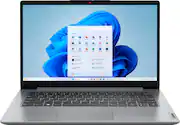
This review is from Lenovo - Ideapad 1 14.0" HD Laptop - Celeron N4020 with 4GB Memory - 64GB eMMC - Cloud Grey
Posted by ELENAC
- Rated 4 out of 5 stars
Laptop windows 11
They only way I review this laptop a 4 Star because it don’t have any sound bar ,to be able to listen music or watch videos is plugging your headphones
Posted by ShaniaG
- Rated 3 out of 5 stars
The Budget Computer that Could...
The Lenovo Ideapad 1 14” HD Laptop is a direct competitor with the budget Chromebooks and don’t let the price fool you. It’s a Windows computer. Running Windows 11 Home in S mode, a secure Windows mode that has increased load times and security from malware. So in essence, it’s a good computer for novices, students, and those that want a slimmed down, lightweight, portable computer. The Lenovo Ideapad 1 14 boasts a bare minimum Intel Celeron dual core N4020 processor with about 1 1ghz base speed and almost 3 ghz boost, 4GB of DDR4 2400 mhz memory, and 64GB of eMMC storage. This is definitely geared towards the budget and efficiency. About half of the storage is used by Windows. Fortunately this computer ships with a year of Microsoft Office that gives you an additional 1TB of space to store files, photos, and backup your computer. There’s also a nice perk for a few months of game pass ultimate. You can also use the SD card slot for photo transfers or additional storage. It comes with Intel UHD on-board graphics that suit the class of computer just fine. You won’t be playing games on this computer but it’s great for streaming movies, YouTube, or browsing the web. The display is a 1366x768 HD display that looks great. Brightness is 220 nits so it might not be a good idea in sunlight, but indoors or most other environments it’s more than enough. To compare, most gaming computers sit between 250 and 300 nits, with the higher end displays coming in at 400 to 500 nits. It’s super lightweight at just over 3 pounds and less than one inch thick. Length is right under 13 inches by 8.5 wide. This computer offers WiFi 6 technology so internet speeds should be quick. It comes with a webcam at 720p and surprisingly has a privacy shutter for security when you’re not using it. Ports included are type A USB 2.0, USB 3.2 and USB-C. It comes with a headphone jack and a 4-in-1 card slot for your SD cards. The keyboard is familiar, I’ve felt similar keyboards on other budget computers including chromebooks. It does include the 10-key even for its small size. For its class, this computer delivers a lot of bang for the buck. Setup Out of the box you have a light gray, 14” laptop with a power cable and a simple instruction book. I charged it up for about an hour and booted up. I went through about 20 to 25 minutes of setup and I was ready to see what this computer was all about. Apps It comes with your essentials pinned to the taskbar with a Lenovo Vantage app as well. I quickly signed up for a free year of Microsoft Office. This is a great value considering I used to pay about $100 a year. Office will also give you 1TB of space that you will need. Other options for space include external hard drives or memory cards. There’s a quick link to the Microsoft store that you can download additional apps, much like chromebooks. This computer is not suited for heavy duty apps, but you will find all the essentials for work, school, and entertainment. Microsoft Edge is the default browser and I would recommend using it. It uses the lowest amount of resources and is based on the chromium engine that Chrome uses. For a budget build, you want the lowest resource browser you can get, and after some research Edge leads in most tests. Performance Performance is a little slower being a budget computer. You will need to operate in a more efficient manner. I learned with this computer you can’t have a bunch of tabs open on your browser, you need to limit it to 3 or less. Also, with limited memory, you want to limit the amount of apps you have open at one time. Most apps load in about 15 to 30 seconds. Once they were open, they operated without much lag. There were a couple of apps that seemed to hang for a minute or two before opening. The Microsoft Office suite worked well so I can see this being a good budget laptop for students. The camera was very laggy at 720p, but once I lowered it to 360p it operated with a much smoother framerate. Battery life claims to be 11 hours and I didn’t need to charge it but every few days. I downloaded Prime Video from the app store, loaded up a movie and it played flawlessly. Color was good, and no noticeable lag either. It’s a great option for streaming movies. The CPU was often maxed out at 100% and Memory was often reaching 75 to 85% of capacity, but this didn’t seem to have an adverse effect on speed and the computer kept cool on my lap. Conclusion For a budget computer, it’s an impressive entry for students working in the MS office suite, simple web browsing, or those that want to sit back and stream a movie. The battery will give you plenty of charge as well. You will not be able to multitask, zip through apps, or play any significant games. It’s slim and portable, and it’s affordable. Ultimately, the affordability and feature set make this laptop an attractive option for those seeking a balance between functionality and a reasonable price. Pros Full Windows Computer in S Mode Full Keyboard including 10-key Long Battery Life Integrated webcam with Privacy Shutter 1 Year of Microsoft Office Include Cons Occasional lag during operation Budget power (limited processing power) Limited onboard storage capacity
Posted by NanoEthan