Rating 4.2 out of 5 stars with 144 reviews
4.2- Screen Size (44)
- Processor Speed (24)
- Performance (13)
- Ease of use (9)
- RAM (5)
- Fan Noise (6)
- Pen (5)
- Heat (4)
- Speakers (3)
Customer Images
The vast majority of our reviews come from verified purchases. Reviews from customers may include My Best Buy members, employees, and Tech Insider Network members (as tagged). Select reviewers may receive discounted products, promotional considerations or entries into drawings for honest, helpful reviews.
- Rated 5 out of 5 stars
Salazar's Yoga
This has been a great machine. I have really enjoyed the cell phone charging area because it cuts down on the amount of wires that I have. I will say that it took me a minute to get the right person to inform me on how I could get three (3) additional monitors hooked up. Ever since I was able to get that done, doing homework has been easier. I have a screen for the spreadsheets, the actual file, the instructions, etc...everything I need. The size of the monitor is perfect for the spreadsheet, I no longer have to increase or decrease the size to see all of what I need or did not need.
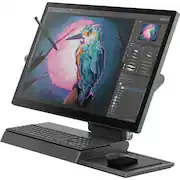
This review is from Lenovo - Yoga A940-27ICB 27" Touch-Screen All-In-One - Intel Core i7 - 16GB Memory - 1TB Hard Drive + 256GB Solid State Drive
Posted by Salazar
- Rated 5 out of 5 stars
Awesome Computer for an Awesome deal!
I was able to grab this when it was on sale. Really fast out the box. The processor is a good one with more than enough power. Plenty of ram to get the job done and the NVME SSD is way faster than the SATA SSD's I am used to. Video card helps more with graphic intensive applications than it is useful for gaming. However, I have played some games at 1080p settings with great frame rates. Lower settings of course. I had to manually set some applications to use the AMD card because the integrated Intel card is still active. You can delete the driver for the intel card though for an easy solution to this. I enjoy Windows 10. I haven't seen any software issues yet. The screen is bright and quality is awesome. The touch screen performance is great too. Plus thunderbolt 3! The Windows Hello camera works well. I love being able to unlock the computer with a face scan. The speakers sound great for computer issues. I am pleased that they connect via bluetooth as well. I play music with my phone all the time with the computer off. The wireless phone charger is a neat feature and fast charges my Note 9. I like the keyboard. The mouse works well and is all you really need. However, I prefer the shape and function of the Logitech MX Master 2S or the Microsoft Precision Mouse. The tilt on this thing is awesome! The little LED light bar at the bottom of the monitor is a nice feature and more useful when the screen is tilted. Movies look and sound great on this too. I wish the pen worked better. I swapped it for a Bamboo Ink. It can be frustrating using the pen. You can turn the touch off when using the pen via windows setting. However, if the pen moves more than half an inch away from the screen, the pen disconnects and the touch is active again. I find my palm creating lines all the time with regular drawing. I guess I need to adjust my form. It all works well when you do it right. My favorite feature is that you can swap and replace almost anything (You cannot upgrade the graphics card, and really don't want to given the current power supply and fan system). I replaced the main NVME SSD with a 512 GB Samsung 970 Pro and the secondary drive with a 1TB Samsung 860 Evo. I upgraded the wifi card to an Intel AX200 (wifi 6) card with bluetooth 5.0. New wifi card works flawlessly. Lenovo has a list of all the replaceable parts on its website and also has a manual that shows you how to replace most of them. I upgraded to 32 GB Ram. I also bought an the AORUS RTX 2070 Gaming Box, as this has eGPU support. It works really well and I can play on high settings with awesome frame rates now. Plus it helps a lot with photoshop, illustrator, and premiere pro. Sure, you can build a more powerful gaming PC for less. But it isn't just about power with this All-In-One. The overall design plus the 4K touch screen with pen support (not to mention processing power) really wins the race for me. I am really happy with my purchase.
This review is from Lenovo - Yoga A940-27ICB 27" Touch-Screen All-In-One - Intel Core i7 - 16GB Memory - 1TB Hard Drive + 256GB Solid State Drive
Posted by GeorgeF
- Rated 5 out of 5 stars
Excellent Machine for the Creative Professional
So far so good the machine itself is well built and feels solid. The display is beautiful and the way it moves into a canvas style position is very clever. The ability to just start sketching/painting all on one machine has been so great for my workflow(im an illustrator/graphic designer). So far only real hiccups I've faced is with Windows 10 (updates and processes inexplicably running at %100), but if you've ever had a windows machine your prob aware that this is par for the course(even though I feel windows 10 has improved a lot). I upgraded the memory to 32gb(through Amazon) so the machines extra snappy now. Photoshop runs well though at times fan gets pretty loud. Illustrator runs smooth and also Clipstudio, Sketchbook pro(windows app version runs much better then desktop version). The active pen provided is absolute trash(will shut off and on while drawing) so I def recommend buying another pen, I'm using bamboo ink and its been great. So to summarize: Pros: - Beautiful screen - Clever design, wireless charging trays awesome - Very fast machine for the creative apps ive used so far - touch is super responsive - the lenovo dial is genius, works with Photoshop, Illustrated, Lightroom, Sketchbook pro(desktop. app), word, excel too hope. they add more to the. lineup Cons: - A few windows 10 issues - active pen is garbage - smaller startup disk. 256gb (pcie ssd)
This review is from Lenovo - Yoga A940-27ICB 27" Touch-Screen All-In-One - Intel Core i7 - 16GB Memory - 1TB Hard Drive + 256GB Solid State Drive
Posted by Figz
- Rated 5 out of 5 stars
Great AIO Wacom Enabled PC
It is certainly an odd piece of tech on the outside. Big screen attached to a soundbar with a wireless charging pad glued to the side. I bought it on sale and open box so it was just too tempting versus a standalone Wacom screen. Powerful 6 core 12 thread i7, 16gb of ram, and I also upgraded the stock SSD. It is very fast and handles Adobe CC with east. The dedicated GPU is fine for medium quality 1080p gaming and is also able to be upgraded through an external gpu through thunderbolt. The knob on the side is very intuitive and can be programmed for a litany of functions in various apps. The screen is solid but does have a slight tint to it because of the Wacom AES tech in the screen. The pen works well with no complaints. The screen is massive. I would advise artists to use a drawing glove. Its not that pretty. Its kinda weird. A computer sitting on top of a sound bar with a wireless charging tray taped to the side. It is however fabulous in its execution. My cell phone and pen are always charged on a pc with great sound that also has a huge wacom screen it. Quirky but super functional device. I would caution anyone who upgrades the SSD and installs Windows fresh to download Lenovo's driver tool to update the drivers in combination with Lenovo's upgrade service. It installed many different drivers that fixed issues with sleep, wake, and screen color versus the stock Windows drivers.
This review is from Lenovo - Yoga A940-27ICB 27" Touch-Screen All-In-One - Intel Core i7 - 16GB Memory - 1TB Hard Drive + 256GB Solid State Drive
Posted by Ryan
- Rated 5 out of 5 stars
Absolutely Love this Computer!
I've had this computer a little over a month now, and so far I absolutely love it. I primarily use this computer for paying bills, occasionally working from home, editing personal photos, drawing, mindless computer games, and web browsing. COMPUTER = This computer starts up super quick and is extremely quiet. The setup was super simple, it was pretty much a plug & play event. When I first bought this computer, I had also purchased a 32GB memory card because I wanted it to be super fast when opening multiple high memory programs (i.e., Corel Paintshop Pro, quilting/embroidery software, and a very large database), but after using it a couple of times, I felt the 16GB was fast enough, so I ended up returning the 32GB memory card. I may expand the memory later, but for now, I don't think it needs it. There is no CD/DVD drive on this computer, which doesn't bother me at all since I pretty much download all my programs now anyway. Transferring the disc-loaded programs from my other computer was a bit of a challenge and I ended up getting a program called PCmover-Home, by LapLink, which worked pretty well and used our wireless network to transfer the programs and files from my old computer. It was pretty quick too. If this program is something you would be considering buying, I recommend that you purchase it directly from the website. PICTURE/SCREEN = The screen is the size of a small television and I think the picture quality is amazing; the colors are vibrant and the picture is very clear. I love how you can adjust the angle of the screen and use it like a drawing pad, which for me makes drawing and photo editing easier, more comfortable, and therefore more enjoyable. The only negative I have about the screen is that it is shiny, so it reflects some of the lighted objects in the background. This can be a little distracting and I generally don't see the background light when I'm focused on doing something, but every once in a while it will catch my eye. SOUND/SPEAKERS = I think the speakers are pretty good for being computer speakers. To me the sound is clear and it has a good tone, but I don't listen to stuff at a blaring decibel level, so I may not be the one to really ask about this. KEYBOARD/MOUSE = The keyboard is super thin, the keys are very low profile, it stays charged for a relatively long time, and I really like how it fits snugly on to the stand. At work, I type on about 3 to 4 different keyboards every day and I have to say this one is my most favorite to use. The mouse is also very comfortable and responds really well. I haven't had to make any tracking adjustments at all. The mouse pad tray thing is fantastic. It has a grove for the pen and is a nice storage area for the mouse when I'm not using it. The thing I like best though, is that it charges my phone, which I find super useful because it's just one less thing I have to have on my desk. PEN = I have not had any problems with using the pen and so far it has responded well for me. The only improvement I would recommend is to have some type of soft rubber cushion (like you find on the Pilot Dr. Grip pens) to make it a little bit more comfortable and not so slippy. It is a little heavy (due to the batteries), but that doesn't really bother me too much. I haven't used it for marking documents yet, but I'm sure it will work just fine. OVERALL = Is this computer worthy of being a professional graphics computer? Well, I have no clue because I'm not a professional graphic designer, but it's perfect for me and what I use it for. I think it's a great computer and have no regrets buying it.
This review is from Lenovo - Yoga A940-27ICB 27" Touch-Screen All-In-One - Intel Core i7 - 16GB Memory - 1TB Hard Drive + 256GB Solid State Drive
Posted by PudgeBucket