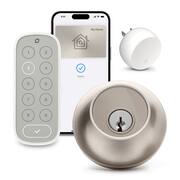
Rating 4.2 out of 5 stars with 68 reviews
4.2- Ease of use (24)
- Installation (19)
- Keypad (14)
- Design (13)
- Appearance (5)
- Battery Life (12)
- Security (6)
Customer Images
The vast majority of our reviews come from verified purchases. Reviews from customers may include My Best Buy members, employees, and Tech Insider Network members (as tagged). Select reviewers may receive discounted products, promotional considerations or entries into drawings for honest, helpful reviews.
- Rated 4 out of 5 stars
Bye Bye Keys
So many ways to unlock your door. The inconvenience is understated. I haven’t had to carry my keys in a while. I love being able to get into my house using my watch/phone
This review is from Level - Lock+ Connect with Keypad Smart Lock Bluetooth/Wi-Fi Replacement Deadbolt with App / Keypad / Key Access - Matte Black
Posted by MSibai
- Rated 5 out of 5 stars
The Grayman smart lock, I love it.
So, my first impressions were not great with this lock. I couldn’t get the cards for work and the battery kept on saying low in the iPhone(so I was thinking the battery life was absolutely horrendous), and lastly the touch to unlock didn’t seem to be working that well. I got different battery first, that didn’t do squat, still gave me a low battery alarm every time I opened the app on the iPhone, however, on my android I didn’t get the alarm, so I dug into the settings a little more and it says the battery is healthy. At this point I realized the iPhone app is the problem not the battery. The touch to unlock works perfectly for me and my android phone, but for my wife’s iPhone it was hit or miss but has started working consistently. I think this is the first time a product has worked better with android integration than iPhone integration especially when it has apple home integration but as a Google and Alexa user I’m completely happy with this turn of events. The paperwork says the battery will last a year and that it isn’t compatible with rechargeable batteries, now just to be clear as long as the voltage matches a rechargeable battery works just fine… However, a rechargeable battery will have a third of the capacity very often so you will not be happy with how long the battery lasts, Also, rechargeable batteries have a different capacity calculation so it will think your battery is full all the way till it is dead in all likelihood, which could cause you a problem. With the fact that a battery should last at least 6 months (if they promise a year) I’m not going to worry with rechargeable batteries and trying to use them to save a few pennies over the course of a several years. Granted I can only judge the battery life over the week I’ve had it, and it still shows as quite healthy (as it should if it should last a year). The physical install was interesting, this is the first lock that I had an issue with, it would lock but say it failed to lock, I ended up making the hole 1/16th of an inch bigger just in the back as I noticed it got tiny bit smaller and then it worked perfectly. I wouldn’t say it’s the locks’ fault, but it definitely wants a clear pathway more so than other locks. The other thing that took me a bit was figuring out what position the lock need to be in the properly lock and close, it took me a couple of tries and fiddling but I got it, and I would say that is my inexperience more so than the lock being difficult. Lastly the cards that unlock the door, are not like your work cards (I mean they use the same tech but they aren’t the same) I can get the cards to work every time, put your thumb on the blue square and put that directly over the key hole at a 45 degree angle and hold it for a few seconds, it will unlock. These are annoying and not worth the trouble in my mind. If it was like work and I tapped it and I was in that would be really cool, as is, it’s a gimmick that maybe they’ll master in a few generations. Now, all that semi negativity would make you think I’m not a fan, I love this lock set, I love that it looks absolutely normal (though I’m going to have to fill some holes from my last smart lock) and that the keypad is separate allowing it to be to out of site and out of mind. I love that when I walk up to the house, I can just twist on the outside of the lock area and it unlocks, no code no nothing. Basically, once you work out all the kinks, it just works. It works with both Alexa and Google, which somehow, I’ve ended up with both assistants at different areas of the house and car, so it is working with both which is awesome. This is by far my favorite lock; my wife loves the lock because it just unlocks for her and the few times it didn’t, she could easily use the number panel (when she takes longer than 3 min to go to the door). The kids love it as I was able to mount the number panel where they can easily reach it. I love that it has so many different ways of unlocking and locking the door, I don’t necessarily understand the auto unlock and why you’d want that, but to each their own and it’s cool that it is there. I love that when I touch it, it unlocks. Overall, setup and installation is decently simple and there are a few things to get used to, but once you’re used to them (how to use the card and time limit on touch to unlock to preserve the battery) it is by far the best lock for just looking normal and being extremely smart at the same time.
This review is from Level - Lock+ Connect with Keypad Smart Lock Bluetooth/Wi-Fi Replacement Deadbolt with App / Keypad / Key Access - Matte Black
Posted by Benb
- Rated 4 out of 5 stars
Stylish SMART blend of convenience & security
The Level Lock+ seamlessly replaced our Nest Yale lock on our iron entry front door, addressing our primary concern of maintaining the aesthetic beauty of our rugged iron door. Unlike many smart locks that are easily recognizable, the Level Lock+ resembles a standard deadbolt, discreetly concealing its smart features within the door without any bulky components inside or out. Opting for the matt black variation to match our oil-rubbed bronze door, the Level Lock+ exudes a sleek and unassuming appearance, seamlessly blending with the door's design. The straightforward installation process, detailed in the Level website's video, made the setup hassle-free. While the Level Lock+ impressed with its functionality, the non-matching silver components posed a minor aesthetic inconvenience. A quick fix with matte finish spray paint addressed this issue, highlighting the need for Level to include color-matching options in the future. Powered by a CR2 battery, the Level Lock+ offers convenience with a physical key as a backup for scenarios where the battery might die. Integration with the Level app and HomeKit was seamless after setup, with the added convenience of Home Keys for unlocking via iPhone using NFC. Despite initial hiccups with Home Keys, resolving the issue through reinstallation and Apple Home app setup proved effective. The Express Mode feature in Wallet app, along with various unlocking methods, including Siri, Home app, and key cards, showcased the Level Lock+'s versatility. The Level Lock+ demonstrated reliability and convenience, providing notifications, access logs, and automation options through the Home app. Sharing Home Keys within the Family setup was straightforward, offering easy access for family members. The combo pack, including the Keypad and Connect, enhanced the overall experience. Installation of keypad and connect was a breeze, and the illuminated keypads added a nice touch. While the 4 to 6 digit password for the keypad was functional, an option for an 8-digit password would enhance security. Overall, the Level Lock+ exceeded expectations with its sleek design and multifaceted functionality. The convenience of unlocking with a tap on the iPhone and the ability to manage access in various ways make it a valuable addition to our home security. Despite minor improvements needed, such as color-matching options and longer keypad passwords, we are thoroughly satisfied with the product's overall design and performance.
This review is from Level - Lock+ Connect with Keypad Smart Lock Bluetooth/Wi-Fi Replacement Deadbolt with App / Keypad / Key Access - Matte Black
Posted by TechGuru
- Rated 3 out of 5 stars
Trading Safety for Ease of Use?
While I love tech and tinkering with gadgets, I have put off protecting my house with Smart Locks for many years now. But, as more and more neighbors have begun to install various electronic locks on their doors, I have had to admit that they are wildly convenient. I was surprised at how excited I became when I heard about Level Lock+. I do not use Apple products - so I am not able to utilize the Home Key feature, but there are so many other convenient options utilized by this smart deadbolt that the product still appeared worth the rather high cost. Per usual, I continued watching tutorials, reviews, and reading articles about the product while I waited for it to arrive in the mail. Almost immediately after I had placed the order, I came across multiple videos showing examples of how poor the security of the lock really is. No, the lock was not shown to be vulnerable to high tech hacking style attacks, but rather susceptible to simple lock picks and bump keys. As it turns out, the company appears to have placed on their focus on flashy tech, and not much attention to how secure the lock actually is. Do a quick Google search of "Level Lock Security Issues" and you will instantly see many reputable sources pointing out the lock's weaknesses. Just as shocking as how easy the lock is to pick - is the companies generic and confidence shattering response that points only to "strength, durability, and finish" with no indication of working to improve its vulnerabilities. My confidence in the lock was immediately obliterated. After all, I am a person who makes sure that his door is ALWAYS locked - even when my family is home. I became so worried that I almost canceled the order. In talking to my son about the issue, he reminded me that we do have a security system - so, if somebody physically picked the lock, our alarm system would still go off - hopefully keeping us safe. His calm logic put me at ease and I did not cancel the order. So - before I talk about my experience with the product, I have to admit that I am still not confident in the Level Lock+'s ability to protect my home as well as a traditional deadbolt (within the same cost bracket). If you do not have a home security system, then I do not recommend this Smart Lock. The design of the lock is ingenious with all of the electronics sandwiched between the two halves of the housing and the battery actually inside of the cylindrical bolt. Installation was quite simple - although I ran into trouble at step 1 of the directions. If your deadbolt has any friction what-so-ever (against the doorjam), the deadbolt is not strong enough to lock/unlock - which was the case with my door. Luckily, I was able to use a screw driver to bend the tab located within the door knob's striker box. I now have to pull my door harder for the latch to seat, but this took all of the pressure off of the deadbolt. The other issue is that the deadbolt is completely round (because a round battery is literally placed inside). This means that the strike plate in the doorframe must be replaced. It was larger than my existing strike plate so I had to cut away some of the wood to make it fit. Once those issues were corrected, the deadbolt installation was a breeze. Admittedly, I love the convenience of this deadbolt. I can gain access with a hotel style keycard (which I can assign to a specific user), a traditional key, by using my phone (via wifi, or bluetooth), or by typing a password into the keypad. I appreciate also that I can set the deadbolt to automatically lock after a set time. For someone (like myself) who is paranoid about ensuring the door is always locked, this is great piece of mind. I also appreciate that I can check my phone to see if the door is locked. And, the app has a log of when and how the door was locked or unlocked. My favorite feature is touch to lock. When I leave the house, I don't need to take my key (or phone) out of my pocket. I can just tap the outside of the deadbolt with my finger, and the deadbolt will lock. If I forget, I can lock the door from the car (or anywhere else) using my phone. While I love the convenience, in the back of my mind I'm always worried about how easily a thief can apparently gain access. With absolutely 0 experience, I tried picking the lock and the deadbolt did not open. But, I can't forget the videos and the articles showing how weak the cylinder is (and without a locksmith - it does not appear as though the locking cylinder would be able to be swapped or replaced). At the end of the day, I can't help feeling as though this lock trades safety for ease of use. And, I still wonder if this lock is putting my family at risk by appealing to my laziness. So, I will continue to lock my door and make sure that my security system is armed as a back-up. Do you research and stay safe.
This review is from Level - Lock+ Connect with Keypad Smart Lock Bluetooth/Wi-Fi Replacement Deadbolt with App / Keypad / Key Access - Matte Black
Posted by TheDuke
- Rated 5 out of 5 stars
Best "Home Key" Lock Now Available
In 2021 when Apple announced Home Key, iOS/Watch OS “tap to unlock” integration for locks, I was super excited. I had “smart locks” before and found them empty promises of convenience, not to mention ugly so this was a game changer. When Home Key compatible locks finally shipped the notorious supply chain disruptions made finding one nearly impossible. I got lucky and found one made by a Level Lock+ competitor in stock. It wasn’t my first choice, but it was my only choice at the time. It’s HomeKit and Home Key functionality is a joy but its “Airbnb rental” aesthetics not so much especially with its smaller feature set compared to the Level Lock+. So, with the Level Lock+ now readily available I grabbed the new “Level Lock+ Connect with Keypad” bundle. It includeds the Level Lock+, the Level “Connect” Wi-Fi hub, and the Level keypad. I’ll refer to the lock separately as the “Lock+” and the other bundle products by their name. I won’t keep you in suspense – the Lock+ is exactly what I want in a smart lock: Unassuming looks, Home Key integration and flexible access sharing options. For me it’s such a great convenience to come home, both arms full of whatever, and just tapping my Apple Watch to the unlock rather than fumble with keys or codes. I’ll get into more details about various opening methods later. This is just a taste. ABOUT THE “CONNECT” Wi-Fi HUB and “SMART” PLATFORM COMPATIBILITY The Lock+ also works with Amazon Sidewalk and Alexa and Google Home with the included Wi-Fi “Connect” hub. It’s looks like a small button, similar to a night light, that sits in a power outlet. HomeKit users who don’t own an Apple Wi-Fi hub device such as an Apple TV, HomePod, or iPad that doesn’t leave home will also benefit from the Connect. Having a hub allows out of home access to the Level+. I could not properly test the “Connect” hub since I have multiple Apple TVs so I won’t comment on the Connect further, but it is a “must have” if you don’t use one of Apple’s hub devices above. As a HomeKit user, I also don’t use Amazon’s Alexa or Sidewalk or Google Home or Android I can’t comment on the Lock+’s reliability with those platforms. I assume it’s similar but there are always differences between platforms. IN THE BOX, BUILD QUALITY AND INSTALLATION Everything you need to install and use the Lock+ is included -- a lithium CR2 battery, door hardware in common sizes, two physical keys, and two programmable key cards. The lock itself looks and feels solid similar to any other name brand residential lock sold at hardware stores. Its lock cylinder fits Schlage’s SC1 key for easy rekeying or swapping. Many brands other than Schlage use this key blank. Security is good too, boasting ANSI’s top residential grade 1 certification. Let’s be honest though, if someone wants to get into your home they’ll get into your home. No lock will stop them, maybe just slow them down for a second…literally. I can’t test battery life but Level says the Lock+’s CR2 battery will last up to 6 months. If true that will be a huge savings over the battery eating competition. My other smart lock exhausts 4 Energizer Max AA batteries every 2.5 to 3 months. If you can use a screwdriver installation should be a snap. All the required hardware is included for common door thicknesses. The only snag might that the strike plate is thick so have a chisel or flathead screwdriver handy in case you need to dig out your door jamb a bit. There is also a little fiddling and patience required when installing any deadbolt. It took me maybe five minutes. Be sure not to overtighten any of the screws as that can cause the lock’s motor to slow or stall. ACTIVATION, UNLOCKING METHODS (including sharing w/ guests) Now the fun part. Pop in the battery and activate. If you have an iPhone you can add to the Home App and skip the Level app if you wish. However, you won’t be able to use any of the Level+’s entry sharing features. You can share entry codes in Home if that is enough for you. I installed the Level app. Activating with the Level app requires a free account. The guided process was quick, but perhaps because I already had other Home Key locks installed Home Key did not immediately work for me. I finally solved the problem by deleting all locks the re-adding the Level+, confirming Home Key worked, then re-added my other locks. My guess is this glitch was on Apple’s end and I only mention it in case you have a similar multi-brand situation. When Home Key is added you’ll be asked if you want Express Mode. If enabled the Level+ will lock or unlock when the iPhone hovers over the lock’s face without further authentication. The cool thing about this feature is that if your phone’s battery conks out before you get home NFC will still have enough juice to get you in the door. No worries about getting locked out. Express Mode is enabled by default on the Apple Watch since the watch is always unlocked when on your wrist, so this is how I lock and unlock the Level+ If Express Mode is not activated you must open the Home Key card similar to other Wallet/NFC transactions. It also means you can’t use “Hey Siri,” to unlock the door either. I do not have Express Mode enabled on my iPhone because if I ever lost my phone or it was stolen my house potentially becomes and open target. Also Apple Watch is more convenience since I don’t have to dig it out of a pocket. Once activated there are access features to configure in the Level app: auto lock, auto unlock, and touch to unlock. To enable these you must agree to Level’s privacy policy since they rely on geofencing to work. I passed on all, first, because I don’t care to have yet another company following me around town, but also with Home Key’s simplicity and HomeKit’s remote access I find them redundant. One excellent and unique app feature I will use is the ability to send people “keys”, either on a permanent or temporary basis. This is an almost perfect solution for situations where you want to schedule specific day/time access to someone: house cleaners, pet walkers, etc. “Almost perfect,” because its involved, requiring the recipient to have a Level account and install the Level app on their device. I can understand if people don’t want app clutter on their device for just one client and wish there was a simpler solution. These invites are supremely flexible though. For example, if your dog walker comes every Monday and Thursday at 4pm and returns at 5pm you can set access to those days and hours only. There is also a similar function called “party pass” which can be used to send an invite to multiple people in your contacts simultaneously. If you want to grant 24/7 entry access the Lock+ has simpler solutions. Obviously, there is the included traditional keys, but better is the key card, similar to what you get at a hotel. Two are included but you can buy extras. The cards are simple to program with “start” and “stop” dates via the app. Access is a single time block unlike an “invite” where you can specify specific times or days. When your guests leave erase the cards for reuse at another time. But wait there’s more. If none of those access methods suit you there is the Level Keypad. It came included in my bundle. It relies on Bluetooth and AA batteries so you can attach it near the door or hide it near the door. It’s also a good option for contractors and such because you can assign unique codes for each recipient. That way you’ll know who entered the house and when. The keypad’s operation is straight forward. Set the code in the app and the person you assign the code to just taps it in the keypad. Like with the other electronic sharing methods, you can cancel the code at any time. I mentioned hiding the keypad near the door because, honestly, I feel having a keypad attached to the door is counter to what the Level Lock is about – a smart lock that is invisible. But keypads are handy to have, so being not part of the lock is a feature in itself, though, at a cost. Also diverging with the Lock+ is the keypads build quality. It’s a blob of plastic, although waterproofed. I wouldn’t mind as much if it was color matched the lock, but it’s off-white with a black lock. Ugh. On the plus side the keys are backlit for easy view at night. It uses AA batteries. CONCLUSON The Level Lock+ is the Home Key enabled smart lock to have. It’s both more functional than its chief competitor and also not obnoxious looking. It works flawlessly with Apple HomeKit and Home Key. Installation may or may not be painful in your situation but ultimately if it is it’s totally worth it. I love tapping my Apple Watch – even through my jacket or sweater – to open my door. Also going on a quick run without a physical key is a bit of a thrill too. Besides the Level Lock Plus’s looks, it’s numerous (and in many cases flexible) unlocking and sharing options makes it unique to the point you really don’t need to consider any other smart lock unless you require a color Level doesn’t make, like aged/Venetian bronze. The next question is, is this Level Lock+ Connect with Keypad bundle for you or are you good with just the Level Lock+. That will depend on the platform you use and other devices you own. But basically, if you own one of Apple’s Wi-Fi hub devices and don’t need a keypad then the Level+ lock only is all you need. Everyone else will want to strongly consider the Level Lock+ Connect with Keypad bundle.
This review is from Level - Lock+ Connect with Keypad Smart Lock Bluetooth/Wi-Fi Replacement Deadbolt with App / Keypad / Key Access - Matte Black
Posted by TechO