Rating 4.7 out of 5 stars with 15 reviews
4.7Top Mentions
- Picture Quality (6)
Customer Images
The vast majority of our reviews come from verified purchases. Reviews from customers may include My Best Buy members, employees, and Tech Insider Network members (as tagged). Select reviewers may receive discounted products, promotional considerations or entries into drawings for honest, helpful reviews.
- Rated 5 out of 5 stars
Positioning Versatility with a 4K Display
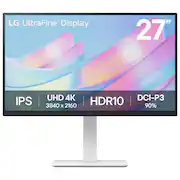
The LG UltraFine 27” is a 4K monitor that provides a stunning, vivid display at a moderate price. While it has a few drawbacks, it provides what most desire in a monitor: a good display, a solid foundation, and position versatility. What’s included? Unboxing and putting the monitor together took less than 5 minutes. The monitor includes a white HDMI cable and white power cable. The monitor includes 2 HDMI ports, a Display Port, and a headphone jack. Construction/Build The monitor is adjustable in height, rotates horizontally, and tilts up and down. Lowering and raising it is smooth, and it stays put perfectly in whichever position it is set at. It has a wide degree of horizontal rotation and, surprisingly, can be lowered all the way down, which not many monitors allow. The stand and arm are both made with hard plastic. The stand is pretty large at almost 10" long and 10.5" wide, inconveniently taking up more desk space than I'd like. Also, the monitor is stable but does easily wobble when touched. Display The 27” 4K display provides a wonderful nearly borderless picture with beautiful vivid color. Text is crisp with absolutely no fraying. LG provides an app, called LG Switch, which simplifies changing display profiles based on activity, along with other settings that control the picture without the need to open the control center. I really like that there is a reader profile for reducing eye strain. Sound Something that took me by surprise is that the monitor makes a beeping sound when it is turning on and getting ready to go into sleep mode. Because of this noise, the volume control on the monitor's menu, and the fact that my PC also detects the monitor as a speaker, I thought that it did have speakers. I tried troubleshooting to get sound out of it until I thought to double check the product description and confirmed it didn't. My kids find the beeping annoying because it will do it repeatedly if the PC has something running, but the sound can be muted. I’m not sure why it’s included at all. Conclusion Overall, I think this is a great budget monitor. The most important part of a monitor, the display, is wonderful, full UHD and nearly borderless. My main issue with it is the stand size and the wobble when it is touched. I still recommend it for anyone wanting a 4K monitor without stressing over budget.
Posted by Akire
- Rated 5 out of 5 stars
Great Looking Monitor with an Amazing Picture!
I was looking for a smaller thin, low profile monitor in white for a white stand-up desk. I use the desk as a work station for cleaning things and tinkering on electronics ect. I wanted to watch YouTube videos, podcasts and play a retro gaming system on it. The LG - UltraFine 27" IPS UHD 60Hz Monitor with HDR10 NAILS IT!!! Some things to consider though, There are only two HDMI ports. In my case that was perfect. One port for a Fire stick and the other for my retro gaming system. The retro gaming system doesn’t work so great on my 75” tv in the main living room area because of the length of cables… I also am loving how the smaller 27” scree feels more like the CRT version I had when I played these games back in the day! Except…The 4K picture quality is phenomenal! As a Tv with my fire stick, the HDR10 jumps the video off the screen. I also love just how thin the bezel is! It works perfectly as a streaming platform. BUT… note that it does not have internal speakers! I like that! I wanted the smallest foot print on my desk (see pics) and I have a Bose speaker that I plug into the audio plug and bam…Bose sound quality with LG’s amazing video Quality! Note: if you are using headphones… they must also be plugged in. This unit does not have Bluetooth. I really love the base. The screen is tilt and swivel and up and down. It is butter smooth, easy to move and stays put when I get it where I like it. It’s also very easy to switch between the two HDMI ports. I would have liked to have Bluetooth for my headphones but it’s a small gripe. I also plan to plug in my laptop on occasion and the 27” is perfect! Overall, This monitor checks off all the marks… Simple (not cluttered up with a bunch of ports I did not want), absolutely gorgeous 4K picture with HDR10 and a way to get sound in and out! I also really love the sleek look on my desk/work station! Can’t go wrong with this one if the spec fit what you need!
Posted by JC1503
- Rated 5 out of 5 stars
Fantastic everyday monitor for any type of work
This is my second LG monitor with the first one being an ultra-gear gaming monitor. I currently have both of these connected to the same computer and they both look fantastic. Even though the ultragear cost more, the ultrafine looks better in certain circumstances. When I'm using word or reading documents the ultrafine looks better and crisper. The ultrafine monitor is perfect for everyday work/computer needs and even playing some games. If you are strictly looking at gaming with this, I would look at the ultragear lineup. If you are doing excel, word, powerpoint, photoshop, or just general internet browsing the ultrafine is a great monitor. LG does a wonderful job with their monitor stands. The ultrafine comes with a stand that can tilt side to side or up and down, rotate horizontal to vertical, and you can raise and lower the height of the screen as well. The stand makes it really easy to find a comfortable viewing area. If you remove the LG mount it has holes (screws included) to allow for a vesa mount. I opted for the VESA mount as it takes up less space on my desk, but I honestly prefer the included LG stand. The screen can get pretty bright, but the colors do not look washed out and are still vibrant. I would recommend downloading the LG Onscreen Control as it allows you to make adjustments to your new monitor. It really helped dial in the ultrafine to be a good everyday monitor. You can also use the built in joystick at the bottom of the monitor to change input, adjust settings, and turn off the screen. You can use all three inputs on the back two HDMI's and one display port. I hooked up a google tv one of the inputs and use the screen to watch TV. You will need to have a separate hook up for sound as the monitor does not have built in speakers. It works great and is great for watching TV while working. The only downside I found to this monitor is the plug. The cable for the plug is a little short, and the plug itself is bulky and takes up two spots on my surge protector. It is not a huge issue, just wish the cable was a little longer, but I made it work.
Posted by apalmo
- Rated 5 out of 5 stars
great buy
excellent buy for the money son loves the size a d the picture quality
Posted by MelindaB
- Rated 5 out of 5 stars
Recommend
Love the 4k quality with all the features I needed like hight adjustment, swivel, pivot!
Posted by SukwonK
Customer reviews from lg.com
See all lg.com reviewsSyndicated rating, 4.571429 out of 5 stars with 7 reviews on lg.com.
4.6(7 reviews)