Last-Minute SavingsLimited quantities.Shop now

Main Content

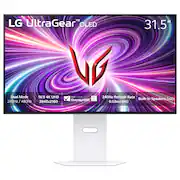
LG - UltraGear 32" OLED Dual Mode (4K UHD 240Hz,FHD 480Hz), 0.03ms NVIDIA G-SYNC, AMD Freesync Pro Gaming Monitor (HDMI, DP) - White

Model: 32GS95UV-W.AUS
SKU: 6595425
Clearance
$979.99
Save $420
Comp. Value: $1,399.99
or
$40.84/mo.
suggested payments with24-Month Financing
Show me how
Finance OptionsView your offers
Special OffersOn related products
Standard Geek Squad Protection
Availability
Fulfillment Options
Order now for pickup on Fri, Dec 26 at
Sold by Best Buy

Highlights

  • Key Specs
    • Refresh Rate: 240Hz (The number of frames per second the device can produce natively without enhancement. Higher rates help produce smooth, seamless pictures.)
    • Maximum Resolution: 3840 x 2160 (Maximum resolution refers to the highest number of pixels that a screen can process and display. Higher resolution signals produce more detailed images.)
    • Response Time: 0.03 milliseconds (The speed at which pixels can change colors is called response time. It is measured in milliseconds (ms).)
    • Panel Type: Not Applicable (Technology that affects response time and image quality.)
    • Synchronization Technology: FreeSync Premium Pro (AMD Adaptive Sync), G-SYNC Compatible (NVIDIA Adaptive Sync) (Generally, these technologies allow syncing between a computer/console game's frame rate and the device's refresh rate for a smoother display without tearing.)
    • Screen Size: 31.5 inches (Size of the screen, measured diagonally from corner to corner.)
    • OLED Technology: Standard OLED
    • Display Connector(s): 1 x DisplayPort, 2 x HDMI (The number and type of connectors used to connect to an external display.)
  • General
    • Brand: LG
    • Model Number: 32GS95UV-W.AUS
    • Product Name: UltraGear 32" OLED Dual Mode (4K UHD 240Hz,FHD 480Hz), 0.03ms NVIDIA G-SYNC, AMD Freesync Pro Gaming Monitor (HDMI, DP)
    • Color: White
    • Operating System Compatibility: Not Applicable, Not Applicable, Not Applicable, Not Applicable, Not Applicable
  • Display
    • Refresh Rate: 240Hz (The number of frames per second the device can produce natively without enhancement. Higher rates help produce smooth, seamless pictures.)
    • Maximum Resolution: 3840 x 2160 (Maximum resolution refers to the highest number of pixels that a screen can process and display. Higher resolution signals produce more detailed images.)
    • Native Resolution: 3840 x 2160 (Native resolution of a screen refers to its single, fixed resolution. Sometimes screens must scale an image up or down in order to fit the native resolution. This can cause a loss of resolution or detail.)
    • Contrast Ratio: 1,500,000:1 (Measured difference between a displayed image's brightest whites and darkest blacks. The larger the first number, the more detail and color that can be displayed.)
    • Response Time: 0.03 milliseconds (The speed at which pixels can change colors is called response time. It is measured in milliseconds (ms).)
    • Display Type: OLED
    • Panel Type: Not Applicable (Technology that affects response time and image quality.)
    • Synchronization Technology: FreeSync Premium Pro (AMD Adaptive Sync), G-SYNC Compatible (NVIDIA Adaptive Sync) (Generally, these technologies allow syncing between a computer/console game's frame rate and the device's refresh rate for a smoother display without tearing.)
    • Aspect Ratio: 16:9 (The measurement of the width of a screen compared to the height of a screen, expressed as a ratio.)
    • Curved Screen: false
    • Pixel Density: 140 pixels per inch (The number of pixels present per inch on the device's display. Higher pixel density improves the clarity and sharpness of the displayed image.)
    • Brightness: 275 candela per square meter (A measure of the total light output.)
    • Screen Size: 31.5 inches (Size of the screen, measured diagonally from corner to corner.)
    • High Dynamic Range (HDR): true (An HDR-compatible 4K TV or other HDR-compatible product displays HDR video content when it's available from sources like 4K Ultra HD Blu-ray Discs and 4K streaming services.)
    • High Dynamic Range Format: HDR 10 (There are a few HDR formats that tell the TV or other HDR-compatible product how to best utilize its capabilities to display HDR content. HDR technology can support one or multiple formats, each with various benefits to picture quality.)
    • Horizontal Viewing Angle: 178 degrees (The maximum angle at which the display can be viewed with acceptable visual performance from either side.)
    • Vertical Viewing Angle: 178 degrees (The maximum angle at which the display can be viewed with acceptable visual performance from above or below.)
    • Touch Screen: false (Touch-screen devices make navigating more intuitive. Using a touch-screen display, you can do things such as tap to select, hold and drag to move items, swipe to scroll, and pinch to zoom.)
    • On-Screen Display Languages: English (The available language options for displayed text.)
    • Color Gamut (NTSC): 98.5 percent
    • OLED Technology: Standard OLED
  • Connectivity
    • Number of DisplayPort Inputs (Total): 1
    • Number of HDMI Inputs (Total): 2
    • Display Connector(s): 1 x DisplayPort, 2 x HDMI (The number and type of connectors used to connect to an external display.)
    • Number of USB Ports (Total): 3
    • USB Ports: 2 x USB-A 3.0 (The number and type of USB ports the product has.)
    • Headphone Jack: true (The device features an interface that allows for the connection of headphones.)
  • Compatibility
    • Wall Mountable: true (The product is able to be secured to a wall. Some products are designed ready to mount, while others may require additional hardware/accessories for installation.)
    • VESA Wall Mount Standard: 100mm x 100mm (VESA wall mount standards refer to the spacing of screw holes built into a TV in order to fit with standard TV wall mounts. These standards are implemented into most TVs and monitors.)
  • Features
    • Tiltable: true
    • Adjustable Stand Height: true
    • Anti-Glare: false (Product has features, such as a matte finish, that reduce the likelihood for screen glare.)
    • Eye Relief Features: None, None, None, None, None
    • Built-In Webcam: false
    • Integrated Speaker(s): true
  • Dimensions
    • Product Height With Stand: 24.4 inches
    • Product Height Without Stand: 16.2 inches
    • Product Width: 28.1 inches (The out of box width of the item. Width is measured as the horizontal distance from one side of the item to the other as it would be primarily used or placed.)
    • Product Depth (With Stand): 9.8 inches
    • Product Depth Without Stand: 2.6 inches
    • Product Weight: 21.6 pounds (The out of box weight of the item.)
    • Stand Included: true
  • Power
    • Power Consumption: 55 watts
    • Power Saving/Off Mode: 0.3 watts (This mode will turn the display and/or the device off, or into a standby mode, after a preset length of time with no activity to conserve power.)
  • Certifications Listings & Approvals
    • ENERGY STAR Certified: false (Devices carrying the ENERGY STAR service mark, such as computer products and peripherals, kitchen appliances, and other products, generally use 20% to 30% less energy than required by federal standards.)
    • EPEAT Qualified: false (The Electronic Product Environmental Assessment Tool (EPEAT) was designed to provide an environmental assessment tool for purchasers. In order to qualify for EPEAT, a product must meet all 23 required criteria.)
  • Warranty
    • Warranty - Parts: 2 years
    • Warranty - Labor: 2 years
  • Other
    • UPC: 195174098868

LG UltraGear OLED introduces the World’s First VESA Certified Dual Mode gaming monitor.¹ On the large 32" screen, Dual Mode allows PC gamers to experience graphics-driven games in detailed 4K/UHD at up to 240Hz or gamers can play super fast-paced games in Full HD at up to 480Hz with a quick press of a hotkey.² The OLED screen is also certified VESA DisplayHDR True Black 400 which enables gamers to experience HDR in games as developers intended with stunning, rich black levels and bright, deep color contrast to produce the on-screen visuals gamers crave. The sleek, white, 32GS95UV will be the centerpiece of your battlestation with a gorgeous, virtually bezel-less design, that's height, tilt, swivel and pivot adjustable along with built-in speakers. With plenty of connectivity options it's easy to see how this UltraGear is essential gear for an amped up battlestation.

  • Dual Mode: 4K UHD 240Hz or Full HD 480Hz: LG UltraGear OLED introduces the World’s First VESA Certified Dual Mode gaming monitor. This innovation allows gamers to experience graphically rich, story-driven games in 4K/UHD at up to 240Hz or switch to Full HD at up to 480Hz for fast-paced FPS, MOBA or racing games via hotkey.²
  • Leave Lag Behind with 0.03ms Response Time: Enjoy smoother scenes with less lag or ghosting thanks to LG UltraGear OLED's nearly instantaneous 0.03ms (GtG) response time.
  • NVIDIA G-SYNC Compatible and AMD FreeSync Premium Pro: Officially validated by NVIDIA as G-SYNC Compatible³ and equipped with AMD FreeSync Premium Pro means this UltraGear provides smooth, fast action that reduces screen tearing and stutter. Never miss a frame of the action as you clinch your victories.
  • VESA DisplayHDR True Black 400 & 1.5M:1 Contrast Ratio: VESA DisplayHDR True Black 400 certified means this monitor meets industry standards for brightness as well as deep, rich black color expression. With a 1.5M:1 contrast ration, the benefit for gaming impeccable color and image detail in dark scenes for a stunning visual experience.
  • Designed for the Win: Lose yourself in the game with a virtually borderless, ultra-thin design that optimizes space within your battle station. Easily make height, tilt, swivel and pivot adjustments to the display to be able to see and play exactly to your specs.
  • Anti-Glare / Low Reflection OLED: Play with less distractions thanks to an anti-glare screen that minimizes light reflections and lets you concentrate on winning.
  • Game Out Loud with Built-In Speakers: In addition to a 4-pole headphone jack, this UltraGear OLED display has two speakers.
  • Serious Connections for Serious Gamers: Enjoy smoother, vivid colors and high-resolution graphics thanks to HDMI 2.1 and DisplayPort 1.4. Both connections are supported on this display and let you experience up to 240Hz refresh rate.⁴
  • Amp Up Your Game Audio: This UltraGear OLED has built-in speakers as well as, DTS Headphone:Xwhich provides accurate spatialization and localization in games for 3D audio over headphones. Supports channel-based, scene based, and object-based audio. Plus, a 4-pole headphone jack lets you carry a stereo headphone signal and mono microphone signal with common ground.⁵
  • 2 Year UltraGear OLED Warranty: Game with peace of mind. This UltraGear OLED gaming monitor is protected by a two year limited warranty covering internal and functional parts and labor, including OLED Display Panel. See Warranty Information on this page for all warranty details.
  • Dual Mode: 4K UHD 240Hz or Full HD 480Hz: LG UltraGear OLED introduces the World’s First VESA Certified Dual Mode gaming monitor. This innovation allows gamers to experience graphically rich, story-driven games in 4K/UHD at up to 240Hz or switch to Full HD at up to 480Hz for fast-paced FPS, MOBA or racing games via hotkey.²
  • Leave Lag Behind with 0.03ms Response Time: Enjoy smoother scenes with less lag or ghosting thanks to LG UltraGear OLED's nearly instantaneous 0.03ms (GtG) response time.
  • NVIDIA G-SYNC Compatible and AMD FreeSync Premium Pro: Officially validated by NVIDIA as G-SYNC Compatible³ and equipped with AMD FreeSync Premium Pro means this UltraGear provides smooth, fast action that reduces screen tearing and stutter. Never miss a frame of the action as you clinch your victories.
  • VESA DisplayHDR True Black 400 & 1.5M:1 Contrast Ratio: VESA DisplayHDR True Black 400 certified means this monitor meets industry standards for brightness as well as deep, rich black color expression. With a 1.5M:1 contrast ration, the benefit for gaming impeccable color and image detail in dark scenes for a stunning visual experience.
  • Designed for the Win: Lose yourself in the game with a virtually borderless, ultra-thin design that optimizes space within your battle station. Easily make height, tilt, swivel and pivot adjustments to the display to be able to see and play exactly to your specs.
  • Anti-Glare / Low Reflection OLED: Play with less distractions thanks to an anti-glare screen that minimizes light reflections and lets you concentrate on winning.
  • Game Out Loud with Built-In Speakers: In addition to a 4-pole headphone jack, this UltraGear OLED display has two speakers.
  • Serious Connections for Serious Gamers: Enjoy smoother, vivid colors and high-resolution graphics thanks to HDMI 2.1 and DisplayPort 1.4. Both connections are supported on this display and let you experience up to 240Hz refresh rate.⁴
  • Amp Up Your Game Audio: This UltraGear OLED has built-in speakers as well as, DTS Headphone:Xwhich provides accurate spatialization and localization in games for 3D audio over headphones. Supports channel-based, scene based, and object-based audio. Plus, a 4-pole headphone jack lets you carry a stereo headphone signal and mono microphone signal with common ground.⁵
  • 2 Year UltraGear OLED Warranty: Game with peace of mind. This UltraGear OLED gaming monitor is protected by a two year limited warranty covering internal and functional parts and labor, including OLED Display Panel. See Warranty Information on this page for all warranty details.
Whats Included
  • Monitor
  • Power Cable
  • DisplayPort Cable
  • HDMI Cable
  • USB A to B Cable
  • Monitor
  • Power Cable
  • DisplayPort Cable
  • HDMI Cable
  • USB A to B Cable
Disclaimers
  • ¹World's First citation from vesa.org January 2024
  • ²Actual refresh rates may vary depending on computer graphics specifications and configurations.
  • ³NVIDIA G-SYNC Compatible supports variable refresh rate on GeForce GTX 10 Series and higher GPUs on Display Port, and GeForce RTX 30 Series and higher GPUs on HDMI 2.1.
  • ⁴Graphics card that supports DisplayPort 1.4 or HDMI 2.1 are required to achieve up to 240Hz refresh rate support. Graphics card sold separately.
  • ⁵Headphones sold separately. For DTS patents, see http://patents.dts.com. Manufactured under license from DTS, Inc. or its affiliates. DTS trademarks and logos are registered trademarks or trademarks of DTS, Inc. in the United States and other countries. ALL RIGHTS RESERVED.
  • ¹World's First citation from vesa.org January 2024
  • ²Actual refresh rates may vary depending on computer graphics specifications and configurations.
  • ³NVIDIA G-SYNC Compatible supports variable refresh rate on GeForce GTX 10 Series and higher GPUs on Display Port, and GeForce RTX 30 Series and higher GPUs on HDMI 2.1.
  • ⁴Graphics card that supports DisplayPort 1.4 or HDMI 2.1 are required to achieve up to 240Hz refresh rate support. Graphics card sold separately.
  • ⁵Headphones sold separately. For DTS patents, see http://patents.dts.com. Manufactured under license from DTS, Inc. or its affiliates. DTS trademarks and logos are registered trademarks or trademarks of DTS, Inc. in the United States and other countries. ALL RIGHTS RESERVED.

Q: What is the response time of the monitor?

A: The response time of the monitor is 0.03 milliseconds.

Q: How does the monitor switch between 4K 240Hz and FHD 480Hz modes?

A: Gamers can switch between 4K 240Hz and FHD 480Hz modes with a quick press of a hotkey.

Q: Does the monitor have built-in speakers?

A: This LG UltraGear monitor has built-in speakers.

Q: What is the maximum resolution supported by the monitor?

A: The maximum resolution supported by the monitor is 3840 x 2160.

Q: What are the dimensions of the monitor with and without the stand?

A: The monitor is 16.2 inches high without the stand and 24.69 inches high with the stand. The depth of the monitor is 2.56 inches without the stand and 10.47 inches with the stand.

Q: Can the monitor be adjusted in height, tilt, swivel, and pivot?

A: The LG UltraGear monitor features a sleek design and is height, tilt, swivel, and pivot adjustable.

Q: Does this monitor have 2.1 display port? Thanks

A: The DisplayPort on this LG UltraGear 32" OLED Dual Mode (4K UHD 240Hz,FHD 480Hz), 0.03ms NVIDIA G-SYNC® Compatible, AMD Freesync™ Pro Gaming Monitor - White, Model # 32GS95UV-W is a DisplayPort ver. 1.4 port...^Ivan.

Q: does it support Dolby Vision for the screen and Dolby Atmos for the built in speakers? i cant find any info about this.

A: Hi there, thank you for your question about the 32GS95UE-B.AUS model! Unfortunately, this TV does not support Dolby Vision for the screen or Dolby Atmos for the built-in speakers. You may access this link for more information, go to "All Specs": https://www.lg.com/us/monitors/lg-32gs95ue-b-gaming-monitor. If you have any further questions or need assistance with anything else, please feel free to send us a private message on Social Media @LGUSSupport, and we’ll be happy to help. We appreciate your patience and look forward to assisting you! —Avril

Sponsored

Compare similar products

LG - UltraGear 32" OLED Dual Mode (4K UHD 240Hz,FHD 480Hz), 0.03ms NVIDIA G-SYNC, AMD Freesync Pro Gaming Monitor (HDMI, DP) - White

LG UltraGear OLED introduces the World’s First VESA Certified Dual Mode gaming monitor.¹ On the large 32" screen, Dual Mode allows PC gamers to experience graphics-driven games in detailed 4K/UHD at up to 240Hz or gamers can play super fast-paced games in Full HD at up to 480Hz with a quick press of a hotkey.² The OLED screen is also certified VESA DisplayHDR True Black 400 which enables gamers to experience HDR in games as developers intended with stunning, rich black levels and bright, deep color contrast to produce the on-screen visuals gamers crave. The sleek, white, 32GS95UV will be the centerpiece of your battlestation with a gorgeous, virtually bezel-less design, that's height, tilt, swivel and pivot adjustable along with built-in speakers. With plenty of connectivity options it's easy to see how this UltraGear is essential gear for an amped up battlestation.

ASUS - ROG Swift 32" Dual Mode (4K 240Hz, FHD 480Hz) OLED 0.03ms Gaming Monitor with FreeSync and HDR (DisplayPort, HDMI) - Black

The ROG Swift OLED PG32UCDP is a 32-inch WOLED gaming monitor with a groundbreaking dual-mode feature that lets you switch between 4K @ 240 Hz or FHD @ 480 Hz visuals. Third-generation ROG OLED technology delivers vibrant colors, the deepest black hues, and the brightest highlights. And a 0.03ms gray-to-gray (GTG) response time ensures blur-free action, even during intense gameplay. Plus, a new AI Assistant improves gaming experience an advanced custom heatsink provides exceptional passive cooling performance to reduce the risk of burn-in, helping ensure longevity of the OLED panel.

LG - UltraGear 34" OLED Curved WQHD 240Hz 0.03ms FreeSync and NVIDIA G-SYNC Compatible Gaming Monitor with HDR400 - Black

Experience stunning performance with the vast 34” curved WQHD LG UltraGear OLED gaming monitor. Stay a step ahead of the competition with an ultra-fast refresh rate up to 240Hz and .03ms response time that will bring you into the game like never before¹. And with the steep and dramatic 800R curve, you’ll feel enveloped in the action from virtually all around you. This UltraGear's ultra-thin, bezel design, height, tilt and swivel adjustability along with impressive connectivity options and make this UltraGear, ultra-essential for your battlestation setup.

LG - UltraGear 32" OLED Dual Mode (4K UHD 240Hz, FHD 480Hz) 0.03ms G-SYNC Compatible, AMD FreeSync Premium Pro Gaming Monitor - Black

The UltraGear OLED 32GX870A is built for gamers who demand both visual precision and speed. Dual Mode refresh rate lets you switch between stunning 4K/UHD at up to 240Hz for graphics-driven adventures or Full HD at an ultra-responsive 480Hz for lightning-fast competitive play—all with a quick hotkey press.¹ The 32” OLED panel with VESA DisplayHDR True Black 400 brings HDR games to life as developers intended, delivering deep blacks, bright highlights—up to 1300 nits peak brightness—and rich contrast for immersive visuals that pull you in. NVIDIA G-SYNC compatibility and AMD FreeSync Premium Pro ensure ultra-smooth, tear-free gameplay. This UltraGear is loaded with connectivity options, including DisplayPort 2.1 for ultra-fast, high-bandwidth performance. Built-in speakers provide crisp, immersive audio without extra clutter. Designed to be the centerpiece of any battlestation, the virtually bezel-less 32GX870A is height, tilt, swivel, and pivot adjustable for the perfect setup.

Pros for LG - UltraGear 32" OLED Dual Mode (4K UHD 240Hz,FHD 480Hz), 0.03ms NVIDIA G-SYNC, AMD Freesync Pro Gaming Monitor (HDMI, DP) - White
Refresh Rate, OLED Quality, Picture Quality, Dual Mode, SpeakersRefresh Rate, Resolution, Color QualityThere were no pros for this productRefresh Rate, OLED Quality, Resolution, Overall Performance, Size
Cons for LG - UltraGear 32" OLED Dual Mode (4K UHD 240Hz,FHD 480Hz), 0.03ms NVIDIA G-SYNC, AMD Freesync Pro Gaming Monitor (HDMI, DP) - White
Brightness, Stand, Price, FinishStandThere were no cons for this productBrightness

Specs

Reviews

Customers are saying

Customers value the UltraGear 32" OLED monitor's exceptional picture quality, high refresh rate, and vibrant colors, frequently praising its immersive visual experience. The dual mode feature and surprisingly good built-in speakers also receive positive feedback. While some find the price high and have noted areas for HDR improvement, the overall response highlights the monitor's strengths.

This summary was generated by AI based on customer reviews.

Customer Images

The vast majority of our reviews come from verified purchases. Reviews from customers may include My Best Buy members, employees, and Tech Insider Network members (as tagged). Select reviewers may receive discounted products, promotional considerations or entries into drawings for honest, helpful reviews.

  • Rated 5 out of 5 stars

    For your eye health, and so you can GIT GUD.

    If you're in the market for a 1080P 480 FPS monitor, and a 4K 240 FPS monitor. You found it. I personally wanted a 4k monitor for my eye health. Clearer images, less strain. Not a doctor, but it makes sense to me. But, i was also in the market for a 480 FPS monitor, cause I'm a computer nerd with an RTX 4090 and an I9-13900k. Why wouldn't i want 480 FPS for wrecking people at Call of Duty? First things first. A 240 FPS 4k monitor will easily cost $899, if not more. The only 1080p 480 FPS monitor I've seen was about $699. Get this one for $1,299, and you can do both, with an extra $300 in your pocket. Or buy it on sale or used, and save even more. The monitor can display a 24" or 27" 1080p screen with black borders if you need to do that size for gaming. I wasn't sure i could even push 480 frames. I can, but at a lower resolution. The monitor is amazing. With Freesync on, displaying a 1080p image, but in game rendering at a lower resolution i can play shipment on MW2 at a steady 480 FPS. And the monitor is OLED. So amazing image quality, response time, and contrast. OLED truly displays the most beautiful images. No monitor tech ever before, was this good looking. (My opinion, backed up by all the OLED nerds) Caveats i have so far? The contrast can be rough on your eyes. My understanding, the localized brightness (because each pixel self illuminates in OLED screens, the reason it can achieve such high contrast) in high contrast scenes your eyes adjusting can cause blurring images, not ghosting, like other monitor types experience. More like ghosting your own eyes produces. Kind of like staring at a light, then looking at a dark place and seeing the outline/image of the light you were looking at. It's your eyes doing that. But it doesn't happen with other types of screens besides OLED. (Not that I've experienced at least) Next issue, more nitpicky i guess: On excel spreadsheets, and on black screens. Image is sometimes different brightness's. Only where the screen is the same color, In excel, where cells are empty, there will be spots of lower brightness, and where text is written, it will be uniform brightness, scrolling causes this to move/change. I have experienced this on (2) LG OLED monitors. I still use them both, because it isn't a defect. I believe this is something to do with the OLED brightness adjusting. Not sure, When you scroll cells, and the cells themselves end up in the same place (same image displayed) the lower brightness spots will be different shapes. So it isn't an individual pixel issue, like i said. More like the brightness adjusting on the monitor seems to create the effect. Buy this monitor. For your eye health, and so you can GIT GUD at your favorite games.

    This review is from LG - UltraGear 32" OLED Dual Mode (4K UHD 240Hz,FHD 480Hz), 0.03ms NVIDIA G-SYNC Compatible, AMD Freesync Pro Gaming Monitor - Black

    Posted by Jamesknowsgames

  • Rated 4 out of 5 stars

    Here's The Real Deal

    On it's own, this monitor is is among the best OLED options available. While it isn't perfect and does not have the features many of the competition do, it's sleek and professional. One feature that differentiates it, are the pixel sound speakers which allowed me to free up desk space for a minimalistic setup as they are quite good. It is a gaming focused monitor and excels in this area with quick response times, high refresh rates and vivid colors but it also has an SRGB good enough for professional editing work. I don't; use the 480hz often I admit but when I do it makes for very smooth sessions in call of duty. What I like most about this monitor is that its consistent. Ambient light doesn't ruin the picture at any point. Against the QD-OLED competition, it does not have the same level of color saturation out of the box but after testing this one against the AW3225QF for a few weeks I found the difference to be largely exaggerated in person. The color boost you get with QD-OLED is minimal and disappears once you turn on the lights on as QD-OLED lacks a polarizer and will turn magenta when overexposed. The matte finish on this screen is excellent at getting rid of reflections and unnoticeable unless you have a pure white background. However, for many a matte finish is a con. Side by side it was difficult for me to notice the glossy having a better image and I think claims of this are overstated. Despite this, the whites on the WOLED panels are superior to that of the QD-OLED panel which add a tinge of red to every image. In reality there are pros and cons to WOLED vs QD-OLED but when it comes to using a monitor for gaming and productivity, the WOLED panels with matte finish make more sense. ASUS makes a WOLED variant of this same panel which has more features (no speakers) but this panel is usually on sale and unless you need the extra ports coming out of your monitor, I recommend this it over the ASUS. That being said I withhold the 5th star because I feel that LG could have at least added a 90w USB-C port for Macbook users and such and also because the retail price at $1399 is not justified. I recommend this monitor whenever it goes on sale. As a bonus I did the wife test and she agreed I the LG was overall a better experience than the AW3225QF!

    This review is from LG - UltraGear 32" OLED Dual Mode (4K UHD 240Hz,FHD 480Hz), 0.03ms NVIDIA G-SYNC Compatible, AMD Freesync Pro Gaming Monitor - Black

    Posted by JEchev

  • Rated 5 out of 5 stars

    Great all around monitor

    This display checks all the boxes for me. -High refresh rate -4K & 1080P -Great image quality I'm a casual gamer that tends to watch a lot of a content on my PC. Playing shooters in 1080P while clearing 400+ FPS & being able to hit a button to up the scale back to native 4K for RPGs is amazing. Both resolutions running natively has been awesome. It has speakers, while not amazing sound, is a plus if it's your only option. Watching 4K HDR content through streaming has also been a fantastic experience. I bought it on sale and have not regretted it for even a second.

    Posted by WillyBMac

No content
Sponsored

Similar products from outside of Best Buy

sponsored

Finance Options

My Best Buy® Credit Card
Choose a benefit:
$40.84/mo.suggested payments with 24-Month Financing
Or
Limited time
20% back in rewardson your first day of purchases when approved for the My Best Buy® Credit Card. Offer ends 12/25/25.
Buy Now, Pay Later
8 payments starting at $122.50
Lease to own
Apply today with no credit needed and enjoy flexible payment options.

Special Offers

Included with Purchase
Free 6-month security software: $29.99 value