Rating 4.9 out of 5 stars with 10 reviews
4.9- Image Quality (8)
- Connectivity (4)
- Refresh Rate (3)
- Size (3)
Customer Images
The vast majority of our reviews come from verified purchases. Reviews from customers may include My Best Buy members, employees, and Tech Insider Network members (as tagged). Select reviewers may receive discounted products, promotional considerations or entries into drawings for honest, helpful reviews.
- Rated 5 out of 5 stars
Technically great! Personally? Still unsure.
The monitor is great technically speaking. The graphics are crystal clear, although I use mine for productivity and watching YouTube vids. I don't do gaming on it. It is very easy to connect to the computer. The settings are highly customizable so I won't go in depth on any of those. The colors are sharp, text is very defined, and the blacks are very black. I fit several windows on the screen at a time and still have room to add more. I have one issue and it is my own doing. The vertical height. I was looking for a curved monitor that had some height to it. I found one (45") that looked awesome but was a bit pricey. This monitor with its advertised size and price point was great. However, I think a want a 47" or so but a bit narrower screen. Personal opinion only--just don't "try these on" in the stores.
This review is from LG - UltraGear 37" VA 165Hz, 1ms, Monitor FreeSync Premium Pro Gaming Monitor with DisplayHDR 600 (HDMI, DP, USB-C) - Black
Posted by Mike57
- Rated 5 out of 5 stars
Best bang for buck monitor
This is now the second purchase of this monitor, it’s that good. It may be a little pricey, but the return on investment is huge. Excellent port selection, full usb-c power + video transmission, and excellent colors, contrast and performance. I have one setup at my work desk, and another exclusively for my ps5 pro for gran turismo 7, which runs like a dream. Just be super careful putting it together as it’s rather massive, and curved (see attached image for reference)
This review is from LG - UltraGear 37" VA 165Hz, 1ms, Monitor FreeSync Premium Pro Gaming Monitor with DisplayHDR 600 (HDMI, DP, USB-C) - Black
Posted by SEBASTIANK
- Rated 5 out of 5 stars
4k curved underrated monitor
Not to many people have this monitor but i do and its very under rated i use it for cinsole gaming and it is very crisp plus the colors pop in 4k im loving it
This review is from LG - UltraGear 37" VA 165Hz, 1ms, Monitor FreeSync Premium Pro Gaming Monitor with DisplayHDR 600 (HDMI, DP, USB-C) - Black
Posted by Techgerk81
- Rated 5 out of 5 stars
Great for work, Perfect for Play!
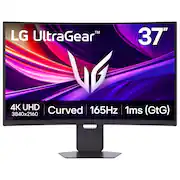
The LG UltraGear 37 monitor came packed more like a curved screen TV than a typical computer monitor, with a big, protective foam shell and everything locked down so it doesn’t shift around in shipping. The only thing I’d change about the packaging is the way the big styrofoam pieces fit so tightly in the box. Trying to pull it out by myself was a little challenging, and I kept thinking it would be nice if they added some kind of vent/air holes at the bottom so you could slide the foam out more easily. I really like what’s included in the box, it comes with the cables you actually want to have on day one, including HDMI, DisplayPort, and USB‑C, plus a quick start guide that’s enough to get you up and running without questions. Setup was super easy. The stand is simple to put together, and once it’s sitting on your desk, or wherever you decide to put it, it has that premium, stable feel that you want with a larger curved display. The stand itself is really great, you can swivel it left to right, raise and lower the height, and tilt it back and forward, and it all feels smooth and solid, not cheap or wobbly at all. This is exactly how a gaming monitor stand should be, especially at this size, because you’re going to want to fine tune the angle and height until it’s “just right,” and this one actually makes that easy. LG lists the stand as fully adjustable with tilt/height/swivel, and that matches the overall premium feel I’m getting from it. This is a 37-inch 4K UHD curved VA monitor, running up to 165Hz with a 1ms spec, and it absolutely delivers the kind of “wow” factor you want when you sit down in front of it. I’ve used this for gaming with my gaming computer, and I’m super impressed by how well everything pops out. The depth of contrast and the range of color look fantastic, and the 1000R curve really does help pull you into the image in a way that a flat screen just doesn’t. It feels more immersive, more enveloping, and it makes the whole experience feel bigger than it already is. Between the VA panel’s strong contrast and the HDR support, you get that extra punch in highlights and a lot of depth in darker scenes that makes games look more dramatic and “alive.” And for smoothness, of course it checks all the right boxes… 165Hz plus VRR support (including AMD FreeSync Premium Pro and VESA AdaptiveSync) is exactly what you want for fast, fluid gameplay without the distraction of tearing and choppiness. What I like about this monitor is that it isn’t only a “gaming-only” purchase, even though it’s clearly built for that. For productivity, the simple fact that you’re working with a 4K UHD 3840×2160 image on a larger screen means you’ve got a ton of usable space, and text and UI elements look clean and sharp. LG lists this as a 120 PPI display, and that’s a nice sweet spot where things look detailed without needing you to scale everything up so large that you lose the benefit of the resolution. Also, having 165Hz available for “work stuff” sounds like a gaming luxury, but once you get used to it, even basic scrolling and moving windows around can feel smoother and more premium than a standard 60Hz office monitor. Truly made for “work and play,” as LG has advertised. One huge plus for me is that it has built-in speakers. They’re not the most premium speakers I’ve ever heard, and they’re not going to replace a real external setup, but I’m just happy to get a gaming monitor that has speakers at all. In my opinion, all gaming monitors should have speakers built in, because sometimes you just want sound without dealing with equipment. Connectivity is another area where I’m really, really happy with it. You get dual HDMI 2.1, DisplayPort 1.4, and USB‑C with 65W power delivery, plus a USB hub. That’s a great mix because it covers PC setups, laptops with a single cable, and also makes it easy to hook up a gaming console and just leave it connected. And again, I appreciate that LG included the main cables in the box (HDMI, DP, and USB‑C), because it makes setup simple and saves you from having to buy extra stuff on day one. The on-screen menu system is also really well done. There are a lot of options in the menu, but it doesn’t feel like a mess, and navigating it with the little joystick on the back is quick and intuitive. You also get audio feedback for different actions when surfing the menu, which can be adjusted and turned off if you don’t like it. This is one of those small things that matters more than people realize, because if a monitor is loaded with features but the menu system is frustrating, you end up not using half of what you paid for. This one is easy. I do have two “wish list” items for LG going forward. First, I really wish a remote was included. I understand that most of the time, when you’re using a monitor like this, you’re sitting right in front of it and the joystick is right there. But this is a large enough monitor that it can easily be used a little farther back, especially with a gaming console hooked up to it, and a remote would make that whole experience feel more complete. Second, I honestly don’t understand why monitors in this premium category don’t just go ahead and include eARC support on at least one of the HDMI ports. I know that’s more of a TV feature, but this monitor is nice enough that it could be used like a TV in certain setups, and eARC would open up cleaner audio options with a single cable. To me, those are small additions that would push this from “really great” to “why would I buy anything else?” Overall though, I’m really happy with it. The image quality is top-tier for what this is, gaming looks immersive and vivid, the curve adds to the experience, the stand is excellent, the menu system is easy, you get strong connectivity, and I genuinely appreciate the built-in speakers. I highly recommend this monitor to anyone who wants a big, fast, 4K curved gaming monitor that can also handle everyday productivity without feeling like a compromise.
This review is from LG - UltraGear 37" VA 165Hz, 1ms, Monitor FreeSync Premium Pro Gaming Monitor with DisplayHDR 600 (HDMI, DP, USB-C) - Black
Posted by Orion
- Rated 5 out of 5 stars
A 4K curved monitor that grabs your attention
I got this monitor over the holidays and put it through its paces. I will say this monitor is quite a looker, not just in size and heft but also image quality that it produces. This is a 37” ultrawide 4K capable gaming monitor that operates at 165hz refresh rate is a gamers paradise. I always had a confusion on the frame rate vs monitor refresh rates. The reality is that the frame rate is the number of images your GPU generates, while the refresh rate is the number of times the monitor updates the screen per second. As a traditional FPS gamer, we all strive for the highest frame rate, however, our monitors are stuck at 60 hz refresh rates. With modern gaming monitors, the reality is that your frame rates can be synced with the refresh rate, thus it makes game play so much smoother. I didn't think I’d notice it, but really it's amazing to view the sync'd rate visuals, its so life-like. It does not really matter if you have AMD Freesync vs. Nvidia G-Sync, the reality is that they both work in similar ways to match monitor refresh rates to our GPU’s frame rates. If you are wondering why I gave a back story on the technology. Well it is because I didn't realize how much of a difference it makes, and how much the technology advancement improves your gaming performance. I will admit that the syncing of the frame rate and the refresh rate adds much more additional stress to the GPU. I originally planned to use this monitor as a replacement for my desktop that I use for 90% of work and light gaming, but quickly realized that the monitor was refreshing at 60hz and the GPU could not keep up with 4K gaming. I moved on to my gaming laptop with a nVidia 3060 which natively runs a 144hz gaming screen as a source for video but at 1080p. When the laptop was hooked to this monitor via USB-C, this made for a very playable experience, however the laptop got extremely hot running 165hz refresh rates at 4k resolution and frankly far too hot to touch (even with a laptop cooler). Since it was the holidays, the solution to the overheating GPU problem was that I got myself a new gaming desktop with the latest GPU and CPU combination that could take advantage of this fantastic monitor's capabilities. Now equipped with the latest and greatest iteration of the CPU and GPU on the market, the gaming experience has just got supreme. Frame rates were flying, blood spatter is so realistic you can smell it, and the overall image quality at 4k is just amazing. The monitor supports HDR, and with the additional shadow effects, I swear you are staring not at a game but real life. I’ve been playing a lot of Marvel Rivals, Baldur’s Gate 3 and Counter Strike, but even older games like Rocket League, DOTA2, Civilization VI look amazing! The reality is that 4K makes everything look so much better - that until you get to a game that does not support 4K resolutions. To live with this monitor does require some adjustments to your lifestyle. In my case, a new computer desk to go with the new computer and monitor was the solution. I understand not everyone can make that sacrifice, but it is one to consider if you want the best! The monitor does not seem that large when you unbox it, but it's humongous when you finally get it out of its cocoon and place it on your computer table. The monitor is packed extremely well and ideally a 2-person unboxing event. Assembly is simple and quick with only a couple of screws that need to mount the solid base. I had to put the monitor on my dining table, as the original location was too small, before finding a solution for it in my office. I love the fact that the monitor comes with a USB hub, along with HDMI and Display Port inputs. The built in monitor speakers are not tinny sounding but are plenty full range sounding to supplement if you don't have headphones on. The USB-C monitor connection can also charge a laptop, though more power hungry laptops probably should use a different video out. Just for kicks, because not everyone uses their gaming computers only for gaming, I did some office productivity work on this monitor. The monitor works fine for text at 4k, but understanding that this is a large monitor both in width and height, one needs to actually move your head around to position the mouse. While you can tilt, raise and lower the monitor to suit your needs, it is still a large monitor. That said, once you get used to the monitor, it's hard going back to a flat monitor for the most part. The image quality is great, however, because this is a VA monitor, there is a slight amount of color dithering going from side to side on a white background. Not an issue for general office work and internet surfing, but not recommended for any kind of color correcting work. This monitor works great for video editing, and I did enjoy looking at the entire timeline at once, but honestly I think this monitor is meant for gaming and should be used as such. So should you buy one? Yes, as a gamer, this is a must have. If you are an avid desktop application user, this is still very workable for everyday use. As a programmer, not the best monitor but it takes gets used to due to the perspective shift of how large and wide the monitor really is. Still this can be used as an everyday monitor, you have to get used to it, and it took me a few days. Pros: Amazing video image quality for gaming. Crisp colors and 4k details in games that show its vibrant artwork. Cons: To really take advantage, you need to have a GPU on your laptop or desktop that can sync 165 hz and play at 4k at the same time without overheating! It's super heavy and sort of awkward to unbox and move around. Def a 2 person unboxing job.
This review is from LG - UltraGear 37" VA 165Hz, 1ms, Monitor FreeSync Premium Pro Gaming Monitor with DisplayHDR 600 (HDMI, DP, USB-C) - Black
Posted by TheStigenator
Customer reviews from lg.com
See all lg.com reviewsSyndicated rating, 4.3333335 out of 5 stars with 3 reviews on lg.com.
4.3(3 reviews)