Rating 4.7 out of 5 stars with 137 reviews
4.7- Sound Quality (95)
- Volume (10)
- Connectivity (7)
- Portability (5)
- Power (5)
- Battery (3)
- Port Availability (3)
Customer Images
The vast majority of our reviews come from verified purchases. Reviews from customers may include My Best Buy members, employees, and Tech Insider Network members (as tagged). Select reviewers may receive discounted products, promotional considerations or entries into drawings for honest, helpful reviews.
- Rated 5 out of 5 stars
Quality sound!!
I had purchased one last year, and I love it!! Purchased this updated one this year for my son, and he absolutely loves it!! Great product, great quality sound, it’s loud and fantastic!!
Posted by JennyC
- Rated 5 out of 5 stars
Excellent Sound Crystal Clear
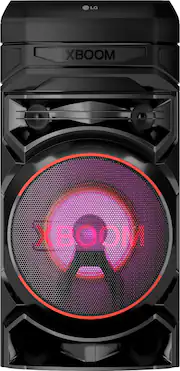
Very nice Bluetooth speaker the sound is high quality amazing. Sound is Crystal Clear I really love it so worth the money. The changing lights are fun and pretty. So glad I choose this model and brand very great quality.
Posted by JessicaS
- Rated 5 out of 5 stars
Functional and great Sound
Great Sound and portability. I like being able to easily transport the speaker. Its a great party speaker and karaoke device.
Posted by JermaineL
- Rated 5 out of 5 stars
Great
I love this speaker! It pairs easily with my phone and has amazing sound. It was definitely a great purchase, I recommend it 100%.
Posted by HenerA
- Rated 5 out of 5 stars
Definitely recommend
Good speaker! Needed something for my home gym and this works really well. Good clear sound, good bass, happy with this product
Posted by ChrisP