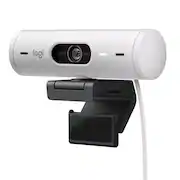
Rating 4.6 out of 5 stars with 296 reviews
4.6- Image Quality (174)
- Privacy Feature (39)
- Setup (32)
- Ease of Use (14)
- Field of View (13)
- Mounting (14)
- Connectivity (11)
- Compatibility (5)
- Cable Length (4)
Customer Images
The vast majority of our reviews come from verified purchases. Reviews from customers may include My Best Buy members, employees, and Tech Insider Network members (as tagged). Select reviewers may receive discounted products, promotional considerations or entries into drawings for honest, helpful reviews.
- Rated 5 out of 5 stars
Great camera for video calls
Love the manual shutter, easy to close and open without moving the camera. Great sound and video quality, no complaints.
This review is from Logitech - Brio 500 1920x1080p Webcam with Privacy Cover - Graphite
Posted by JAMESM
- Rated 3 out of 5 stars
Good quality, poor design
PROS: The quality of the picture is very good. I like the lens cover, which is easy to employ. CONS: The double-sided adhesive pad that attaches the device to the monitor failed after just a couple weeks. Mine was a new monitor with no dust on the top or back. So now I have to duct-tape it to the monitor. Very disappointed.
This review is from Logitech - Brio 500 1920x1080p Webcam with Privacy Cover - Graphite
Posted by JavaMom
- Rated 5 out of 5 stars
Amazing
Camera has been overall amazing nothing to really pick at mount works well has a ton of adjustment and the customization in the logitech software for the fov of the camera and the quality presets are awesome for anyone that is not so savy with cameras. I know the price is what may stop some people from buying it. And if you are going to do any type of streaming with this camera on twitch i or any platform I definitely recommend it i have it mounted on my ultrawide also so if you are worried that the mount would not work for your ultrawife it definitely will
This review is from Logitech - Brio 500 1920x1080p Webcam with Privacy Cover - Graphite
Posted by Calli
- Rated 5 out of 5 stars
Good web camera
Old web cam snapped off, so I bought this upgrade to take part in online class, work discussions. Image is good, response rate is not glitchy. I didnt realize web cams were now this expensive, but it was important to me to not use poor performing equipment professionally.
This review is from Logitech - Brio 500 1920x1080p Webcam with Privacy Cover - Graphite
Posted by Paul
- Rated 5 out of 5 stars
Work from Home Delight!
So many of us work from home now but often forget that having the right equipment matters, especially a strong webcam since that is how we are viewed everyday. The Logitech Brio 500 has been a really strong webcam and makes a good impression! PROS: - Unboxing and setup is a breeze! The only thing in the box is the camera with connected chord and the mount. Thats it! And the camera connects to the mount via a magnet so no hardware required. Just plug it into your computer and it’s that easy. - On that note, I really like the magnetic mount it has! Its easy to rotate the camera from side to side, up mount it if you want to show something random in your office, and its nice and sturdy. - The Camera connects simply with a USB-C connection. I like the future proof USB-C connection for it! - It is not essential to use the camera, but I highly recommend downloading the “LogiTune” app. It is on Windows and just an easy way to do software updates, change camera settings, and video quality. - The Brio 500 is designed elegantly! It is simple and clean but I really like the rounded style of it. - The Privacy shade on it is fantastic! Love the rotated dial, the ease of use, and how its rotates inside of the camera and is not large and clunky. - The camera quality is exceptional! It produces a really clear image and the auto light adjustments because it makes the image look great during any time of the day or lighting in my room. - The Ultra Wide field of view is great too! The LogiTune software lets you change the zoom and angle placement if needed but overall I like the wider range so the camera is not so zoomed on my face. - The camera also has “RightSight” which will auto frame where ever you are sitting to the center of the frame. It’s a nice feature and has worked well for me, plus you can change how far it zooms out when it pans or how fast it pans too. - The Microphones are also an excellent feature! The people on my calls say I sound really crisp and that any background noise of my dogs barking is muted when I talk. - Lastly, I love how the Brio 500 is certified for Zoom, Google Meet, and Microsoft Teams! Covers all of the heavy hitters in the work realm. CONS: - The “Show Mode” hinge on my Brio 500 can present some issues. Since the hinge is stiff, it requires some force to tilt it down. But since the camera is attached to the hinge via magnets, sometimes the camera just pops off instead of the hinge moving. I like the idea, but it is hit or miss for me so far. - This camera does have HDR but does not have 4K. I know not everything supports 4K but it would be a nice future proof feature to add. It is also only 4 megapixels and would have been nice to be something more like 8-10 MP. - Lastly, there is no Windows Hello support for Face Recognition login. I feel like that should be standard on these cameras! BOTTOM LINE: - Looking good in video calls is important to make a good impression in the work from home era, and the Logitech Brio 500 has made me look the best I have on calls! It is packed with high end camera features, is very simple to use, and has Microphones that focus on your voice and nothing in the background. The Brio 500 is an easy choice to make for Webcams and will be used by me every day at work!
This review is from Logitech - Brio 500 1920x1080p Webcam with Privacy Cover - Graphite
Posted by Njuice