Rating 4.5 out of 5 stars with 511 reviews
4.5- Overall Performance (194)
- Video Quality (159)
- Ease of Use (66)
- Setup (29)
- Size (12)
- Field of View (10)
- Mounting Options (10)
- Focus (6)
- Design (4)
Customer Images
The vast majority of our reviews come from verified purchases. Reviews from customers may include My Best Buy members, employees, and Tech Insider Network members (as tagged). Select reviewers may receive discounted products, promotional considerations or entries into drawings for honest, helpful reviews.
- Rated 5 out of 5 stars
You should buy this one
Is really good, I love this one from logitech so far so good
Posted by Sarai
- Rated 5 out of 5 stars
ZOOM ZOOM
WORK ON WINDOWS 11 SINCE IT WAS THE ONLY ONE INSTCOK. AND IT IS TINY
Posted by Geeshhhh
- Rated 5 out of 5 stars
Adam
Thank you for your great product and your great service.
Posted by ADAMA
- Rated 3 out of 5 stars
Decent webcam, but not great
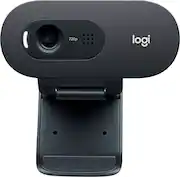
Due to the pandemic and work-from-home and school-from-home, webcams were a hot item for the first 9 months of 2020. Prices went through the roof, but are finally coming back down as the manufacturers catch up with demand. At this point, webcams are almost becoming a commodity as cheap models from China are flooding in the market. This Logitech C505 webcam is a good, basic webcam with a few caveats. First, the good: It’s a Logitech. Logitech is the gold standard for webcams. The build quality is solid, and compatibility seems to be excellent. No driver install is required – just plug into a USB port and Windows 10 identifies it and loads drivers automatically. Of course, this is true for most webcams these days – I own three other webcams, an old Logitech C905 and two no-name Chinese brands, and all three are automatically identified by Windows 10. According to Logitech, the C505 is also supported by MacOS but I don’t have a Mac so I couldn’t confirm this. It does work fine on a Chromebook I own. Resolution: Note that this webcam only has a 720p resolution (HD, but not full HD). This may or may not really matter for you – If you are planning on recording to YouTube or Vimeo, you probably want full HD 1080p. But if all you need is to Zoom or Skype to friends and family, or school, 720p is probably OK. In a smaller window you won’t notice the difference; if you go full-screen you will. View angle or ‘Field of View’: You have to dig sometimes to find this specification for webcams, but it is very important. When I refer to field of view (FOV) I’m describing how ‘wide angle’ the lens is. For this camera, the FOV is 60 degrees, which is actually quite narrow compared to most webcams on the market. Many webcams being sold have a FOV between 110 – 120 degrees. That wide angle is great if you will be using the webcam for a group of people at a conference table. However if you will mainly use the webcam for yourself, the narrower FOV works better - The really wide-angle lenses will also create a ‘fish-eye’ effect and shows everyone how messy your room is. Since I typically use my webcam for only myself, I prefer a narrower FOV. That being said, I found the 60 degree lens on the C505 a little too narrow; with it attached to my monitor and about 24” from my face, my head fills up about 80% of the vertical space in the image. I prefer the view angle on my older Logitech C905, which is about a 90 degree angle lens. For examples of the C905 vs. C505 view angles, see the photos I attached (I blurred out my face intentionally – that’s not the camera!). Both images were taken with the two webcams at the same approximate location relative to my face. Picture quality: One difference I did notice is the picture seemed slightly dark compared to my usual no-name brand webcam. I don’t think this is related to the 720p resolution; the difference is not dramatic but it is noticeable. Logitech offers software that lets you tweak the webcam settings which might let this be adjusted; unfortunately it doesn’t seem to be available for the C505 on their website yet. Side-by-side, my older Logitech C905 webcam (also 720p) has better picture quality (without any tweaking). Granted, that older C905 has a Carl Zeiss lens which the C505 does not, but still – the C905 is a 2007 product! Convenience: This webcam clips fairly securely to the top of your screen like most webcams these days do. Be aware that the webcam has an up-down adjustment, but cannot swivel side-to-side. So, it will work best if you have a screen directly in front of you so the camera can be mounted to aim directly at you (such as a laptop). In my case, I use dual monitors set at a shallow ‘vee’ angle, so the camera is always aimed a little off-center at me. Also note there is no tripod mount, which some people find useful – I like the flexibility of having one, even if I don’t use it much. Microphone: Typically I use a separate phone for audio on teleconferences, but I did test the microphone and it works pretty well – certainly better than the integral one in my laptop. Summary: This is a decent, solidly built webcam with excellent compatibility and good Logitech support. However, it is missing a few amenities (side-to-side swiveling, tripod mount) and the image quality is a little lacking. The field of view is on the narrow side, which can be a plus or a minus depending on how you plan on using it. There are better performing cameras for less money if you are willing to go with a lesser brand, but with the C505 you do get the peace of mind from the Logitech name behind it rather than a no-name brand. Whether that is worth the cost premium is up to you.
Posted by AverageDad
- Rated 4 out of 5 stars
Solid webcam with above average audio
There was really only one real surprise with the C505 webcam: It's really tiny! Otherwise, it's exactly what you'd expect from a Logitech webcam. I was not overly impressed with the 720p image in either direction. It wasn't outstanding, it wasn't bad. It had a little trouble with the lighting in my home office; it just couldn't get the exposure quite right but after some fiddling with curtains and lamps, it settled into something quite passable. The audio, particularly as I moved around the room, was very good and setup couldn't possibly have been easier: plug and play. There's no Windows Hello support either, but again that's expected for a webcam in this price range. The mount is great and had no trouble supporting the tiny little webcam in just about any configuration that makes any kind of sense. The bottom line is this: If you're looking for a tack-sharp webcam to really impress on those Zoom calls we're all in nowadays you'll want to spend the extra money and go for a higer-end, higher-resolution model. If you need an affordable, solid webcam that's light and easy to use the C505 is a good choice.
Posted by Kris1973