Rating 4.2 out of 5 stars with 1138 reviews
4.2- Ease of use (485)
- Setup (30)
- Compatibility (27)
- Features (12)
- Size (11)
- Touch Screen (86)
- Battery Life (52)
- Price (25)
- Ergonomics (17)
- Software (9)
Customer Images
The vast majority of our reviews come from verified purchases. Reviews from customers may include My Best Buy members, employees, and Tech Insider Network members (as tagged). Select reviewers may receive discounted products, promotional considerations or entries into drawings for honest, helpful reviews.
- Rated 4 out of 5 stars
Great functionality, not as fast as a remote
I'll start by saying that I love it. It has all the features of a remote control and more. However; I must say that there is a lot of getting used to before mastering this control. You need to go through a few swipes or menus to get where you want, but once you have the control set up to your specific preference, it works as a dream. So far so good. 4 stars because you have to connect the remote to your computer to perform any change on it.
Posted by Junior
- Rated 5 out of 5 stars
It's cool.
I like the remote, I'll looks cool, very customizable with up to 15 devices. Nice display, rechargeable. I'm not impressed with trying to switch from watching TV to a movie, it's going to turn off the devices that are already on. So you have to select each device, turn them on and use it like a basic all in one remote. But if everything is off and you choose the category you want, it turns everything you want on for that category. What I really like is my favorite channels are on the remote display with the channel icons and you can scroll through them very easily.
Posted by jhop
- Rated 5 out of 5 stars
Great programmable remote
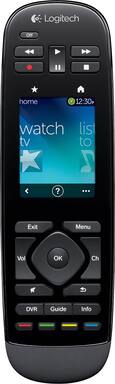
I have been a repeat customer of the Logitech Harmony programmable remotes because it is worth it to me to consolidate all my remotes and be able to hit one programmed button per application. I currently have the Logitech Harmony Ultimate One remote for my main video/audio multimedia entertainment system and I have recently purchased the Logitech Harmony Touch remote for my multimedia entertainment system in my workout room. There are two main differences between the Logitech Harmony Ultimate One and the Harmony Touch other than price (Touch is usually cheaper than the Ultimate). The Ultimate touch screen wakes up (comes out of sleep/power conserving mode) with motion versus having to touch the screen on the Touch. Also, the Ultimate has touch vibration feedback when you touch a button on the touch screen.and the Touch does NOT have this vibration feedback. Since I use a treadmill in my workout, I bought the Harmony Touch for the sole purpose it doesn't wake-up due to motion and you literally have to touch the screen to wake it up.The Harmony Ultimate remote will always stay on ( won't go in to sleep mode to conserve battery usage) when placed on the treadmill due to the vibration created from running on the treadmill.. Programming the Harmony Touch was pretty easy since I am familiar with programming the Harmony Ultimate. The Logitech Harmony Remotes are not cheap by no means, but if you can buy it on sale, then it is well worth consolidating multiple remotes (5 remotes in my case) into one Harmony remote and being able touch one programmed button to turn on all pertinent audio/video equipment and automatically set each piece of equipment to their corresponding settings. Prior to the Harmony remotes, my wife had problems when it came to using my audio/video entertainment system. If you want to make it easy for your wife, buy her a Harmony remote.
Posted by Alan
- Rated 5 out of 5 stars
Awesome remote.
I love almost everything about this remote. The setup is so easy. Their online database of compatible products is astounding. I have some really old components, made by some obscure brands, and even those can be found. And unlike traditional universal remotes, there's no need to repeatedly enter codes that might or might not work for each device. The real beauty of the Harmony line, compared to other universals, is the concept of "activities." For example, when I want to watch TV, I can tell the remote which devices need to be powered on, which input the TV needs to be set to, and since I use a soundbar for my audio, which input that needs to be set to. Then, I can tap one button on the touch screen, and everything starts up just how I need it. If anything ever gets out of sync, it's very easy to repair it using the on-screen help prompts. I bought this to replace a Harmony 650, and while the Touch doesn't add a whole lot of functionality, there are a few things that I like better. The underside is a rough texture that makes it easier to grip securely. I like that it uses a rechargeable battery, so I don't burn through so many AAs. And the touch screen interface really does make it more efficient to use, especially when scrolling through your favorite channels. If I had one tiny little criticism, I really wish there were physical buttons for page up and page down, which I use a lot when scrolling the guide on my cable box. Instead, I either have to press and hold the channel up/down buttons (which mess things up if I don't hold quite long enough), or swipe my way to a new screen to use the soft buttons. But now I'm nitpicking. In the big picture, this is a fantastic product. The convenience it adds to my entertainment experience makes it worth every penny and then some.
Posted by shortstop78
- Rated 3 out of 5 stars
Good remote but buttons are a little small
I bought this remote to replace my Harmony 1000. I found that I missed the "hard" buttons of my Harmony One and hated having to always look down at the 1000 to use it, (plus I started having battery issues after having the remote for a couple of years). This remote works much better for me. The only drawback to this remote, (and it is a fairly big drawback) is that the Play, Stop, FF and Rew buttons are so small and placed so closely together that I can't use my thumb to press these buttons as I normally would. I have to kind of awkwardly hold the remote with my fingertips and use my index finger to push the buttons. Not a complete deal breaker but I prefer to rest the remote in my palm and use my thumb. I tried the Harmony Touch to see if the button placement of that one would work better for me and unfortunately the shape of that remote is so awkward that it makes using the buttons at the top a chore so I returned the Touch and stuck with this one. Other than that the remote works great. The Harmony software simply ported all of my devices and activities from my 1000 so that I had the remote up and running in about 10 minutes. Very handy if you are replacing a previous Harmony remote with this one. The fact that you can also use a smartphone or a tablet to control your system is a nice little bonus but other than to test it out when I first got the remote I've never used that feature. If I had wanted to use a touch screen remote I would have stayed with the 1000.
Posted by darien87