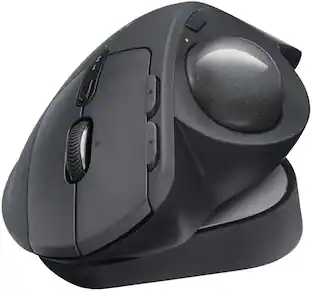
Logitech - MX ERGO Plus Wireless Trackball Mouse with Ergonomic design - Wireless - Graphite
- Key Specs
- Lighting Type: None
- Maximum Sensitivity: 440 dots per inch (Mouse sensitivity is measured in dots per inch (DPI). The higher the DPI, the more sensitive the mouse is and may be more useful for high-density pixel screens. Lower DPI typically means more precision and accuracy in mouse movement.)
- Number of Buttons (Total): 8
- Connection Type: Wireless
- General
- Brand: Logitech
- Model Number: 910-005178
- Product Name: MX ERGO Plus Wireless Trackball Mouse with Ergonomic design
- Color: Graphite
- System Requirements: Windows 10, 11 or later, macOS Mac OS X 10.8 or later, iPadOS 13.4 or later (The software that a product must have for it to be able to integrate with another product.)
- Features
- Mouse Type: Standard
- Lighting Type: None
- Performance
- Mouse Operation: Button(s), Scroll wheel
- Mouse Grip Style: Ergonomic (In comparison to many palm and claw grips, ergonomic grip mice are designed for a specific handedness and put the hand and wrist in a position to promote comfort. Customizable grips feature buttons/keys that can be configured to perform specific actions and may also have customizable calibration and sensitivity settings.)
- Handedness: Right-handed
- Tracking Method: Trackball (There are several types of computer mice, optical and laser being among the most common. Optical mice detect less detail and provide more precise and accurate movement. Laser mice detect more detail and can be used on a wider variety of surfaces, but are more sensitive to small movements.)
- Maximum Sensitivity: 440 dots per inch (Mouse sensitivity is measured in dots per inch (DPI). The higher the DPI, the more sensitive the mouse is and may be more useful for high-density pixel screens. Lower DPI typically means more precision and accuracy in mouse movement.)
- Minimum Sensitivity: 320 dots per inch (Mouse sensitivity is measured in dots per inch (DPI). The higher the DPI, the more sensitive the mouse is. Lower DPI typically means more precision and accuracy in mouse movement, but higher DPI may be useful for high-density pixel screens.)
- Number of Buttons (Total): 8
- Number of Thumb Buttons: 8
- Number of Programmable Buttons: 6
- Adjustable Weight: false
- Connectivity
- Connection Type: Wireless
- Wireless Connectivity: Radio Frequency (RF), Bluetooth (The manner in which a device sends data to another device over a short distance without the use of wires or cables.)
- Maximum Wireless Range: 32 feet
- Operating System Compatibility: Mac, Windows, Apple iPadOS
- Plug and Play Operation: true
- Power
- Mouse Power Source: Battery-powered
- On/Off Switch: true
- Rechargeable Battery (Mouse): true
- Wireless Charging: false
- Charging Interface(s): Micro-USB (The connection for transmitting power to charge the device.)
- Battery Chemistry: Lithium-polymer
- Included
- Mouse Pad Included: false
- Dimensions
- Product Height: 2 inches (The out of box height of the item. Height is measured as the vertical distance from the bottom of the item to the top as it would be primarily used or placed.)
- Product Length: 6.8 inches (The out of box length of the item. Length is measured as the longest dimension of the item.)
- Product Width: 3.9 inches (The out of box width of the item. Width is measured as the horizontal distance from one side of the item to the other as it would be primarily used or placed.)
- Product Weight: 164 grams (The out of box weight of the item.)
- Warranty
- Warranty - Parts: 1 year
- Warranty - Labor: None
- Other
- UPC: 097855133922
A new standard of comfort and precision. Logitech's most advanced trackball for trackball enthusiasts and consumers searching for alternatives to mice and touchpads. Delivers 20% less muscular strain compared to a regular mouse. MX ERGO PLUS features a unique adjustable hinge and extra 10° wedge for customized comfort and the latest tracking, scrolling and power management technology. Logitech FLOW enables effortless multi-computer control.
- Ergonomic design for more comfort: Smart adjustable hinge plus extra 10° wedge for customized hand position and greater comfort. Choose the best angle for you 0°, 20° or 30°.
- Precision scroll wheel with tilt: Featuring horizontal scrolling and a convenient middle click.
- Advanced tracking: Precision mode button lets you instantly switch between speed and high precision tracking.
- Multi-computer workflow: Easy-Switch and FLOW-enabled for effortless multi-computer workflow. Pair up to 2 computers and easily switch between them, copy and paste text, images and files.
- Long-lasting and fast rechargeable battery: Holds power for up to 4 months on a full charge. Quick charge: 1 minute of charge gives up to a day of use.
- Dual connectivity: Connect up to two Windows or mac OS computers via included USB Receiver or Bluetooth wireless technology. Up to 32.8 feet of wireless range.² ³
- Customize for your tasks: Work faster with customized shortcuts on up to 6 buttons with Logitech Options+ app.
- More sustainable: Uses FSC-certified paper for responsible packaging.
Whats Included
- Logitech MX ERGO Plus Wireless Trackball Mouse
- Unifying receiver
- Micro-USB cable for recharging
- User documentation
Q: What type of battery does this trackball mouse use?
A: This trackball mouse uses a Lithium-polymer, rechargeable battery.
Q: How do I connect the MX Ergo Plus to my computer?
A: You can connect to up to two computers via the included USB receiver or Bluetooth wireless technology.
Q: How long does the battery last on a full charge?
A: The battery in this trackball mouse can last for up to 4 months on a full charge.
Q: What is the maximum wireless range of the MX Ergo Plus?
A: The MX Ergo Plus trackball mouse has a maximum wireless range of up to 32 feet.
Q: Does this trackball mouse have a scroll wheel?
A: Yes, this trackball mouse features a precision scroll wheel with horizontal scrolling and a middle click.
Q: Can I use this trackball mouse with multiple computers?
A: Yes, this trackball mouse is FLOW-enabled and allows you to pair up to 2 computers, easily switching between them.
Q: Whats the difference between the Ergo (910-005177) and the Ergo plus (910-005178)?
A: from https://www.windowscentral.com/logitech-mx-ergo-plus-review Every MX ERGO ships with a metal plate that can be used to keep the device flat, or tilt it at a 20-degree angle. This sound a bit silly, but in use it's really comfortable. The MX ERGO Plus ships with a plastic wedge that provides for an additional 10-degrees of tilt, which is even better.
Q: Can you connect with only bluetooth? Do you need to use the unifying USB receiver?
A: You can connect with both, either Bluetooth or USB receiver if your computer does not have bluetooth.
People also viewed
 Black Friday in July Deal$44.99The price was $49.99
 Black Friday in July Deal$99.00The price was $159.99
 Black Friday in July Deal$99.99The price was $119.99
 $54.99The price was $59.99
 Black Friday in July Deal$24.99The price was $39.99
 $113.99The price was $119.99


Today's top picks
 Black Friday in July Deal$24.99The price was $29.99
 $33.99The price was $39.99