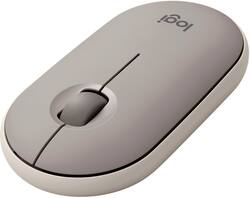
Logitech - Pebble M350 Wireless Optical Ambidextrous Mouse with Silent Click - Wireless - Sand
- Key Specs
- Lighting Type: None
- Maximum Sensitivity: 1000 dots per inch (Mouse sensitivity is measured in dots per inch (DPI). The higher the DPI, the more sensitive the mouse is and may be more useful for high-density pixel screens. Lower DPI typically means more precision and accuracy in mouse movement.)
- Number of Buttons (Total): 3
- Connection Type: Wireless
- General
- Brand: Logitech
- Model Number: 910-006658
- Product Name: Pebble M350 Wireless Optical Ambidextrous Mouse with Silent Click
- Color: Sand
- System Requirements: Via USB receiver: available USB port, Windows 8, 10, 11 or later, macOS 10.15 or later, Chrome OS, Linux Kernel 2.6+. Via Bluetooth Low Energy: Windows 8, 10, 11 or later, macOS 10.15 or later, Chrome OS, Android 8.0 or later, iPadOS 14 or later (The software that a product must have for it to be able to integrate with another product.)
- Features
- Mouse Type: Compact
- Lighting Type: None
- Performance
- Mouse Operation: Button(s), Scroll wheel
- Mouse Grip Style: Standard (In comparison to many palm and claw grips, ergonomic grip mice are designed for a specific handedness and put the hand and wrist in a position to promote comfort. Customizable grips feature buttons/keys that can be configured to perform specific actions and may also have customizable calibration and sensitivity settings.)
- Handedness: Ambidextrous
- Tracking Method: Optical (There are several types of computer mice, optical and laser being among the most common. Optical mice detect less detail and provide more precise and accurate movement. Laser mice detect more detail and can be used on a wider variety of surfaces, but are more sensitive to small movements.)
- Maximum Sensitivity: 1000 dots per inch (Mouse sensitivity is measured in dots per inch (DPI). The higher the DPI, the more sensitive the mouse is and may be more useful for high-density pixel screens. Lower DPI typically means more precision and accuracy in mouse movement.)
- Minimum Sensitivity: 1000 dots per inch (Mouse sensitivity is measured in dots per inch (DPI). The higher the DPI, the more sensitive the mouse is. Lower DPI typically means more precision and accuracy in mouse movement, but higher DPI may be useful for high-density pixel screens.)
- Number of Buttons (Total): 3
- Number of Thumb Buttons: 0
- Number of Programmable Buttons: 0
- Adjustable Weight: false
- Connectivity
- Connection Type: Wireless
- Wireless Connectivity: Bluetooth, Radio Frequency (RF) (The manner in which a device sends data to another device over a short distance without the use of wires or cables.)
- Maximum Wireless Range: 32.8 feet
- Operating System Compatibility: Mac, Windows, Apple iPadOS, Chrome, Linux, Android
- Plug and Play Operation: true
- Power
- Mouse Power Source: Battery-powered
- On/Off Switch: true
- Rechargeable Battery (Mouse): false
- Number of Batteries Required: 1
- Batteries Included: true (Indicates whether the product comes with the required batteries for its operation.)
- Included
- Mouse Pad Included: false
- Dimensions
- Product Height: 1 inches (The out of box height of the item. Height is measured as the vertical distance from the bottom of the item to the top as it would be primarily used or placed.)
- Product Length: 10.7 inches (The out of box length of the item. Length is measured as the longest dimension of the item.)
- Product Width: 4.2 inches (The out of box width of the item. Width is measured as the horizontal distance from one side of the item to the other as it would be primarily used or placed.)
- Product Weight: 100 grams (The out of box weight of the item.)
- Warranty
- Warranty - Parts: 1 year
- Warranty - Labor: None
- Other
- UPC: 097855178299
Own your space with Logitech Pebble M350 – a modern, slim, and silent portable mouse designed for your curated lifestyle. Make a statement with a slim mouse that can easily be scooped up and brought to the cafe or library. Silent clicking and scrolling means you can stay focused without disturbing those around you. And the Logitech Pebble stays powered for up to 18-months on a single AA battery so you don’t have to worry about losing power.
- Find your color: Own your space with a mouse that matches your aesthetic, whether you go fresh and vibrant or keep it minimalist.
- Modern, slim and beautiful pebble shape: Logitech Pebble has standout simplicity with a design that is nice to hold, feels great in your hand and is easy to carry around.
- Silent clicks and ultra-quiet scrolling: Enjoy an ultra-quiet experience with over 90% noise reduction on the click sound. Even the wide rubber scroll wheel glides in silence.¹
- Dual connectivity: Connect the way you like via Bluetooth wireless technology or the included tiny USB receiver.
- Long battery life: Logitech Pebble stays powered for up to 18 months on a single AA battery.²
- High-precision optical tracking: Logitech Pebble tracks fast and accurately where you want to use it.
- Versatile: Compatible with iPad OS via Bluetooth, Windows, macOS, Linux, ChromeOS, iPadOS, and Android operating systems; it is also a Works with Chromebook certified product.³
Whats Included
- Logitech Pebble M350
- USB wireless receiver
- 1 AA battery (pre-installed)
- User documentation
Q: Is this compatible with a MacBook Air 2020?
A: Hello Cin, yes, the M350 Bluetooth Optical Mouse is compatible with a Macbook Air. Just make sure your Bluetooth is on and you will be able to pair up with the M350 mouse.
A: Hello. The M350 Pebble mouse can switch between 2 devices: 1 via the USB receiver, and 1 via Bluetooth. You can switch between the 2 devices by short pressing the connect button on the bottom of the mouse. Blue signifies it is connected to Bluetooth, Green signifies it is connected to the USB. So to use it with an iPad and MacBook Pro, you will have to use the USB with the MacBook Pro and Bluetooth with the iPad.
Q: Is this also compatible with a desktop PC?
A: Dekay replied that it includes a Unifying dongle, and that is NOT correct! See my included picture (M355 dongle on left, actual Unifying dongle on right). It comes with a Logitech nano-receiver that isn't compatible with the Unifying series. The mouse itself can be paired to a Unifying dongle, but Unifying devices cannot be paired to the included one. It seems odd, but I just bought one and was surprised that the included USB dongle was not recognized by the Unifying software, until I noticed the dongle itself does not have the Unifying symbol on it (the mouse does). So I grabbed a Unifying dongle I have and tried to pair the mouse, and it worked. Now my keyboard and this mouse can be used together with just one dongle. Do note that once you pair it with a Unifying dongle, the included one seems to be useless. Unpairing it from the Unifying dongle will not get it to re-pair with the included one, and I have not found any other way to do it. Probably not an issue for most people, but I thought I should mention it.
Q: Will this mouse connect to an IPad 6th generation?
A: As long as your ipad has bluetooth capabilties, this mouse will be able to connect to your device.
Q: Does "work in silence" mean the buttons are silent?
A: Yes it is fairly silent, I had no issues with it in meetings or quiet spaces.
Q: what is the difference between this Logitech and the made by apple mouse?
A: You'll have more gesture options available with the apple mouse, mainly one/two fingers double-tap and left right swipes similar as on the trackpad, something you might get used to but not essential, some other Logitech mouses have forward and backward buttons can serve similarly. Apple mouse is rechargeable. Both are pretty flat, so they aren't ergonomic comparing to other Logitech mouses. I often hold the apple mouse in 45 degrees because of its shape and end-up right clicks a lot by mistake.
Q: How difficult is changing the battery?
A: It couldn't be easier. Just slide the button to off on the bottom. Pop off the cover off with your nail. Take the battery out effortlessly. The cover snaps right back into place.
Q: Does this mouse work without usb receiver
A: Hello, the M350 can be connected to your device via bluetooth.
People also viewed
 $36.99The price was $39.72
 $75.99The price was $79.99

Today's top picks
 $499.99The price was $749.99
 $199.99The price was $249.99
 $789.99The price was $1,049.99