Appreciation EventEnds Sunday. Limited quantities. No rainchecks.Shop now

Skip to contentGo to Product Search
Main Content

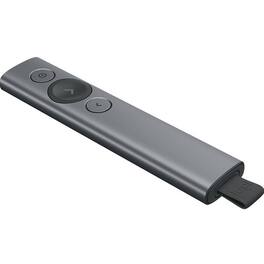
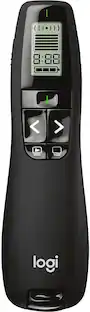
Logitech - Spotlight Presentation Remote with 100 ft Range and Quick Charging - Slate

Model: 910-004654
SKU: 5749105
Sold byBest Buy

Customers are saying

Customers have good things to say about the product's ease of use, impressive range, and excellent battery life. Its overall performance, design, and various features, including a great spotlight and Bluetooth connectivity, are also appreciated. However, some customers have noted concerns regarding its price and issues with software installation.

Generated by AI based on customer reviews.
Features
  • Highlight and magnify on screen

    Go beyond traditional laser pointing; set up your advanced presentation clicker with pointer that works in-person, virtually or a hybrid of both in Logi Options+ App.

  • Mouse-like cursor control

    Use the on-screen cursor to play and pause videos, open links, and enjoy a range of rich content interaction.

  • Smart time management

    Configure key timing milestones in Logi Options+ App and receive vibration alerts directly to Spotlight reminding you when it’s time to wrap up.

  • Dual connectivity

    Connect wirelessly to your computer via USB-A receiver or low energy Bluetooth Smart; a convenient, built-in dock stores the USB receiver into Spotlight when not in use.

  • Universal compatibility

    Spotlight is optimized to work with Windows, Mac OS and all leading presentation software including PowerPoint, Keynote, PDF, Google Slides, and Prezi.

  • Personalized experience

    Since you are the one in the spotlight when presenting, enhance and customize the effects to your needs in the Logi Options+ App.

See all features
Specifications
  • Brand
    Logitech
    Model Number
    910-004654
    Product Name
    Spotlight Presentation Remote with 100 ft Range and Quick Charging
    Color
    Slate
    Warranty - Parts
    1 year
    Warranty - Labor
    None
Sponsored

Reviews

Customers are sayingCustomers have good things to say about the product's ease of use, impressive range, and excellent battery life. Its overall performance, design, and various features, including a great spotlight and Bluetooth connectivity, are also appreciated. However, some customers have noted concerns regarding its price and issues with software installation.
This summary was generated by AI based on customer reviews.
  • Ease of use (184)
  • Range (164)
  • Battery Life (49)
  • Overall Performance (45)
  • Features (41)
  • Price (33)
  • Software (19)

Customer Images

The vast majority of our reviews come from verified purchases. Reviews from customers may include My Best Buy members, employees, and Tech Insider Network members (as tagged). Select reviewers may receive discounted products, promotional considerations or entries into drawings for honest, helpful reviews.

  • Rated 5 out of 5 stars

    Presenter's dream remote.

    Features are great for presentations going to multiple screens including downstage confidence monitors. The spotlight and "laser" pointer features add tools that experienced presenters can use to better communicate information. It is also simple enough for any presenter to handle well.

    Posted by WilliamM

  • Rated 5 out of 5 stars

    Spotlight Presentation Remote…. Great Tool

    Great tool for presenting! This is my 2nd Spotlight… the 1st was left behind at a client and I sorely missed using it. I’ll be more careful this time…. It has become essential.

    Posted by Webbfam4

  • Rated 5 out of 5 stars

    Outstanding product

    Simple to setup, straight forward and loaded with great features. Creates a wow effect. Highly recommended

    Posted by ProPresenter

  • Rated 5 out of 5 stars

    The spotlight feature-amazing.

    The features of this presenter brings it your presentation to life.

    Posted by ChazarraeF

  • Rated 5 out of 5 stars

    The Presentation Remote I've Been Waiting For!

    Seriously, you might think that the title of this review is overkill, but as someone who gives presentations to students and educators several times a week, I can tell you that it is not. I've been giving presentations with PowerPoint and such since I was a wee Cadet in the Air Force and I remember the days of not having the choice of staying next to the computer to flip slides or having to have a colleague flip them for you in an awkward exchange of nods or exclamations of 'next slide!'. Heck, sometimes I think it was easier doing presentations with ACTUAL SLIDES in a carousel and a 'remote' with a really long cord (actually did several of those too - Air Force tech in the 90's wasn't always up to snuff especially overseas). Recent remotes have done a decent job of flipping back and forth and giving you a pointer, and I've been pretty happy with it, though I always have to go back to the computer to click a link or alt-tab to another program. NO MORE! First off, let me just say that this is one sexy remote. I got the gunmetal gray version and it is nice, nondescript, sleek, and feels good in the hand. Button layout is perfect and it is easy to tell which of the three buttons you are on without looking down. Charging is super simple, you pull out the USB fob that you plug into your computer and then you can use the USB-C cable that comes with the device to plug it in to any USB charger or your computer. Charging is simple and fast. You get three hours of operation from one minute of charging. I did a full charge out of the box and it took less than an hour though I'm sure it had some charge already on it. Ok, let's get down to set-up and use. Set-up is easy. Download the software from Logitech and install. The configuration of the device is very intuitive and gives you some really good options for what you want the forward-back buttons to do in their 'alternative' press and hold mode. You have everything from fast forwarding through your slides, to bringing up a blank screen, to controlling the volume, to doing a custom button press. I opted to not set up an alternate press for the main button out of fear of accidentally setting it off (not an expected fault of the remote but of mine). For the back button I set up a programed button press of Alt-Tab so that I can switch programs, and that combined with the on-screen pointer that works through magic to move on the screen, I can switch programs and start all kinds of additional programs that I can't embed in my PowerPoint. For the 'pointer', you have all kinds of options from darkening the screen with a window of light that you want people to focus on, to magnification, or just a plain Circle which I consider to be the basic-laser pointer alternative. I really like the Highlight feature. It does a much better job of focusing viewers on what you want than any pointer could ever do. You get two options though and so I have Highlight as my main option with a double click just bringing up the Circle. Either way you also have option of enabling a cursor which allows clicking on on-screen items and such. You also get an option on how big you want the circles to be, which is nice. The way it works for highlighting is that once you press the button it brings up the highlight in the center and then seems to use a gyroscopic function to move it around from there. The great thing is that you don't have to point the remote at the screen, you can keep you hand down if you want and just move your wrist there and the cursor still moves. It's magic! Some other options that are also embedded in the remote is a vibration warning when you are down to 5 minutes left in your established presentation time (which you set through the menu), as well as a notification when time is up. You can turn this feature off through the advanced settings. Some other advanced settings for the Spotlight remote allow you to control pointer speed, alert intensity, battery alert, and the ability to change from the USB receiver to Bluetooth if you so desire. I'm sticking with the USB receiver since it seems to have incredible range and is easy. I don't know what more I can say about the Logitech Spotlight. This does everything I could want when I'm out there giving presentations and is going to make my life A LOT easier and I think it will make my presentations better. Yes, it may be a it on the pricey side but I have already dropped a ton of money on fancy laser pointers that don't give me a quarter of the functionality of this thing. I know my boss is going to be insanely jealous of this thing and I'm going to have to guard it with my life! If you give presentations on a routine basis, the Spotlight will be an awesome addition to your presentation toolset.

    Posted by Wraith

Compare similar products

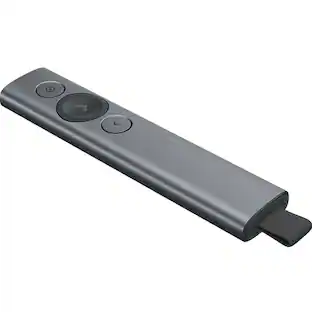
Logitech - Spotlight Presentation Remote with 100 ft Range and Quick Charging - Slate

Meet Spotlight. A game-changing presentation remote. Spotlight allows you to simply navigate slides and interact with on-screen content from up to 100 feet away. The customizable timer sends vibration alerts directly to hand – and the advanced pointer system allows you to highlight and magnify areas of focus in pixel-perfect detail.

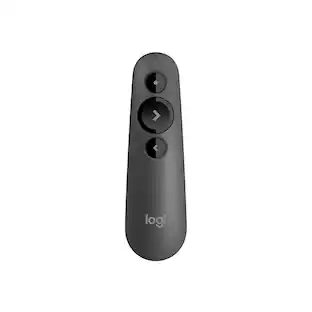
Logitech - R500s Presenter Bluetooth and USB Remote Control - Graphite

Introducing the R500s, a plug-and-play presentation remote that allows you to navigate slides and laser point from up to 20 meters away. Deliver your presentation with ease and confidence thanks to the unmistakable three-button design and R500s' comfortable, secure fit in hand. The R500s is optimized for most devices and popular presentation software – and you can customize buttons, check battery life, and set an on-screen timer in the Logitech Presentation App.

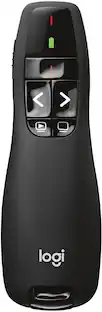
Logitech - R800 Professional Presenter - Black

Take your presentation to the next level with this wireless presenter that features a green laser pointer and intuitive slideshow controls for smooth navigation. The 2.4GHz wireless technology allows you to enjoy up to a 100' range, so you can move around the room and interact with your audience.

Logitech - R400 Presenter Remote Control - Black

Use the convenient controls of this wireless presenter to help you make your point. Intuitive buttons are easy to find by touch and feel great in your hand for better control. Laser pointer allows your audience to see exactly what you're pointing to. The 2.4 GHz wireless allows you to enjoy the freedom to move around the room and mingle with your audience for greater impact. Battery indicator lets you know how much power is available with just a glance. Plug-and-play wireless receiver requires no additional software to install.

Pros for Logitech - Spotlight Presentation Remote with 100 ft Range and Quick Charging - Slate
Ease of use, Range, Overall Performance, Battery Life, FeaturesEase of use, Overall Performance, Connectivity, USB, CompatibilityEase of use, Laser Pointer, Range, Overall Performance, TimerEase of use, Overall Performance, Laser Pointer, Range, Size
Cons for Logitech - Spotlight Presentation Remote with 100 ft Range and Quick Charging - Slate
Price, SoftwareLaser PointerPrice, USB, Button Placement, ConnectivityConnection, Delay

Specs

Questions & Answers
  • Can I use this presentation remote with a Mac?

    Yes, this presentation remote is optimized to work with Mac OS.

    This question and answer was generated by AI based on customer and product data.
  • Does this presentation remote have a laser pointer?

    Yes, this presentation remote has an integrated laser pointer.

    This question and answer was generated by AI based on customer and product data.
  • What kind of battery does the presentation remote use?

    The presentation remote uses a lithium-polymer battery.

    This question and answer was generated by AI based on customer and product data.
  • Are batteries included with the presentation remote?

    Yes, batteries are included with the presentation remote.

    This question and answer was generated by AI based on customer and product data.
  • Does this presentation remote have mouse functions?

    Yes, this presentation remote has integrated mouse functions.

    This question and answer was generated by AI based on customer and product data.
Ask a question
No content
Sponsored

Similar products from outside of Best Buy

sponsored
Ask BlueAI
Logitech Spotlight Presentation Remote with 100 ft Range and Quick Charging Slate 910-004654 - Best Buy

Finance Options

My Best Buy® Credit Card
Buy Now, Pay Later

Special Offers

Included with Purchase

Finance Options

My Best Buy® Credit Card
Buy Now, Pay Later

Special Offers

Included with Purchase