Rating 4 out of 5 stars with 11 reviews
4.0- Battery Life (5)
- Bluetooth Range (4)
- Weight (3)
- Sound Quality (8)
- Bass (4)
Customer Images
The vast majority of our reviews come from verified purchases. Reviews from customers may include My Best Buy members, employees, and Tech Insider Network members (as tagged). Select reviewers may receive discounted products, promotional considerations or entries into drawings for honest, helpful reviews.
- Rated 5 out of 5 stars
Stylish frames, comfortable, decent sound
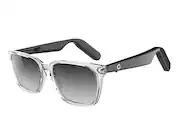
This is my second pair of Lucyd Lyte Bluetooth audio sunglasses, as I got one of their original titanium frames about 2 years ago. The Eclipse Square style frames are from their 2.0 collection, and have clear acetate rims and thick chunky arms. The glasses come with a fold-flat collapsible leather case, a drawstring fabric pouch, microfiber cleaning cloth, magnetic dual charging cable, and AC wall charger. It uses Bluetooth 5.2 featuring a wireless range of 100-feet and ultra-low latency. The glasses weigh 40 grams, or around 1.4 oz, so aren’t the lightest but are still surprisingly lightweight for carrying electronics inside. The glasses have the following dimensions: 52mm lenses, 18mm bridge, 145mm temple length, and 135mm overall width. The hinges don’t flex outwards though, and the nose pads are also fixed and cannot be adjusted. However, I found them to be pretty comfortable for all day wear. They are IP56 waterproof rated so can get a little wet which is suitable for active and outdoor use. When ordering, you can customize the lenses with a number of colors/shades, including blue light filtering, and fit them with prescription lenses. The lenses I have are UV400 polarized with a black gradient tint. They provide decent darkening when viewed straight-on, though looking through the upper or lower part of the lens will darken or lighten your view accordingly. This color change was a bit distracting for me, however, especially when tilting my head up or down. Non-prescription lenses can be swapped by hand if you want to change up the color. When not in use, you can store them in the soft drawstring bag or in the semi-hard foldable case, which unfolds into a pyramid shape. The case is lined with felt on the inside to prevent scratches, and the instructions note to store them upside-down with the lenses facing away from the front. When collapsed, the case is flat enough (about a ½ inch) to slip into a pocket. For charging, you’ll need to use their proprietary charging cable which has two magnetic connectors, allowing you to charge both arms (“earpieces”) of the glasses simultaneously as they have separate batteries. The magnets are pretty strong and adhere firmly to the charging contacts without shaking loose easily which is an improvement over the original pair that I own. While charging, the status LEDs, now found on the interior of the arm versus the exterior, are red. I like this placement better as it is more discreet. When the batteries are fully charged the LEDs shut off. Disconnecting the arms from charging turns them on automatically; similarly, when connecting the cable, they will power off. You can manually turn the frames on and off by holding the silver multi-function button towards the front for several seconds on the underside of each arm. Once both sides are powered on they will pair with each other then enter Bluetooth pairing mode to connect to your source device, indicated by the flashing blue/red lights. You’ll select the device named Lucyd Lyte directly in your device’s Bluetooth menu. The functionality of the frames is like that of any Bluetooth headphones. You can stream audio from your phone as well as make hands-free calls with its dual noise-cancelling microphones. The multi-function buttons are your playback controls for volume control, play/pause, and track skipping using single, double, or triple taps respectively. You’ll also be able to launch a voice assistant like Siri, Alexa, or Google by holding either button for 2 seconds until you hear a tone. These frames have multiple output speakers: one located on the underside of the curved part of the arm so the sound is directed into your ears, one on top of the arm just in front of your ear, and on the outer frame just behind the top of your ears. This allows the sound to envelop your ears and sound more three dimensional and less flat. Since there is nothing in or on your ears, you can listen to both your media and your environment for better awareness of your surroundings. The audio quality is pretty good for an open-ear design in such a small package. While there isn’t much bass response, the sound is mostly smooth and rounded, though a little distant with crunchy trebles; however, they don’t sound overly tinny or boxy. At higher volumes, the audio distorts only a little bit, but even at low volumes there is enough bleeding that someone within a few feet of you may be able to make out what you’re listening to. Regardless, they can output a good amount of sound if you don’t mind other folks listening in, and the audio syncing with video is pretty spot on. Watching video with sunglasses on isn’t ideal, but if you get transition, clear, or Rx lenses, that wouldn’t be a problem. There is a Lucyd mobile app, however, it’s not what you’d expect. It doesn’t offer control of the glasses’ functions or music and media playback. Instead, it’s a portal for chatGPT services, allowing you to ask the chatbot questions via text chat or voice. If you have an iOS device, you can interact with the bot completely hands-free using the glasses by first activating Siri then using a wake word for the Lucyd app. Android users will need to manually launch the app on to use it. The batteries for these glasses are rated to last 12 hours, though this may vary depending on your listening volume, and I was able to get all day listening at low/moderate volumes without a problem. The glasses don’t tell you the amount of battery remaining when you turn them on, however, do let you know when the power is low. Overall, these frames are great combination of function and style at an affordable price point. The open ear design won’t give you the best immersive audio experience; however, the sound quality is fairly decent for music, podcasts, audiobooks, and hands-free calling while preserving your environmental awareness. With swappable lenses, transitions, or even prescription ones, you’d even be able to use them indoors or for everyday wear.
Posted by ReviewedByPhil
- Rated 3 out of 5 stars
Poor Audio,decent sunglass. Use air bud
This is a new product category for me. I absolutely love these in theory. In practical usage i find it nice being able to listen to audio surreptitiously, without feeling disrespectful if I have air buds in my ears during conversation. While there is a lot to like about these Lucyd stereo glasses; simple no brainer charge, setup, initial pairing, super fast near instaneous Bluetooth 5.2 connections, stylish good looks, passable audio quality, I struggle to see beyond the novelty of sunglasses that play music and receive phone calls. These Lucyd Smart glasses do everything they claim, actually better than I expected, in real world usage I found myself over the past month reaching in my pocket for air pods to audio, and using the glasses as standard sunglasses, which they look fantastic. The few occasions I was without air pods on my person, I’ll readily admit these Lucyd glasses felt like a lifeline; giving me personal music space and not drawing attention to myself in public. It’s easy to enjoy and keeps me feeling connected to the outside world, something I worry about when disassociated by AirPods blocking out outside environmental sounds. Pros + stylish + functional + battery life + visual clarity + great concept + hidden technology + dark sunglasses tint + quick BT pair process + easy access usability + sound quality above + + look like std sunglasses Cons -not as comfortable as hoped -volume level at max is too low -sub par audio quality for ver 2 product -not appropriate wearing eyeglasses -bass inexcusably inadequate -prefer app operational functionality Conclusion There’s nothing wrong with these whatsoever, however for dedicated music listening I tend to prefer dedicated headphones (wired and wireless) as my top prospect. Working in the yard I prefer AirPods Pro bc of the exceptional sound, surprisingly deep bass response, and snug fit inside the ear canal. Integration with Siri commands is a bonus. The best use case I find wearing these is if AirPods aren’t readily accessible, or I prefer to obscure the fact I’m listening to music while supposedly engaged in conversation. Recommended : buy if you’re in the market, pass if you have dedicated air buds.
Posted by TechReviews
- Rated 4 out of 5 stars
They are pretty good
The Lucyd Lyte Bluetooth Enabled Sunglasses are pretty good. The look of the sunglasses is decent. They feel comfortable on your ears. After charging, I was able to get them connected to bluetooth without any problems. Download the app and it worked flawlessly. The sunglesses speakers are on the arm of the glasses. This is where I had to give 4 stars versus 5, because the sound can be hard to hear if there is background sound around me. With quiet around me the sound is much better. Overall the sound can only be reviewed as "ok". You can listen to music and more & make phone calls. The functions for control are on a button on each arm. Getting used to those 'presses' is a bit cumbersone at first. Hold button for " 2 seconds to intiate voice assistant"....Hold " 7 seconds to power off". That type of button function can get maddening. I like buttons without hold specfic times to activate a given function. The voice assistant feature allows you to speak certain actions. Here I found that it worked fine at times, not as well other times. Again it seemed when there was background sound it didn't respond to my voice assistant requests every time. That is a bit odd as the sunglasses are equiped with noice cancelling mirophone. That should mean that voice commands should always be heard. However, that is not the case. While on the phone, the person I called said, the sound quality was good. When this function works there are many cool things you can do with the voice assistant. A charge lasted a little more than 6.5 hours for me. It comes with excellent soft and hard cases for use and a charger and charger cable. Sunglasses are said to be "prescription adaptable". Overall they are pretty good. I do recommend them.
Posted by AFASOX
- Rated 5 out of 5 stars
See and Hear the Lucyd Sunglasses Difference
Fresh looks and technologically packed; these sunglasses are no ordinary pair from Lucyd eyewear. When synced to your smart phone (tablet, laptop etc) via Bluetooth 5.2 with a “range of 100ft,” the Lucyd Lyte Eclipse Square Wireless Audio sunglasses allow you to hear your favorite tunes and still be aware of your surroundings. The music pumping out of the eyewear arms is crystal clear and enjoyable due to the amazing “4 Quadrasonic speakers.” These 4 (2 in each arm) speakers provide the audio that cuts through the ambient noises. I put on the Lucyd Lyte Eclipse and went for a walk around a nearby construction site. There were lots of machines and people working on site making the environment just plain noisy. In spite of all the ambient/direct noise, I could still easily hear my music coming through the Lucyd Lyte Eclipse. Now the audio is not going to sound like a 7.1 surround system, but it is easily heard cutting through the mix of outsides sounds, yet small enough to be in the arms of the Lucyd Lyte Eclipse. The lenses are special too! While on another journey walking, I was wearing the Lucyd Lyte Eclipse sunglasses. The UV400 sun protection and polarized gradient lenses helped me to see the landscape in front of me sharp and vivid. The gradient lenses are darker toward the top and gradually lighten the further you look down. This was completely handy when reading the time on my watch. Need another reason to get the Lucyd Lyte Eclipse? You can order them with your prescription. You give them your measurements and they can put in your specific prescription into the Lucyd eyewear. You can also choose from a ton of color combinations with the lenses and glasses alike, really cool features I have not seen before. Now that is a step beyond the norm, it’s actually visionary! The sunglasses are lightweight and sturdy that fit comfortably for a couple of hours. I had to get used how the sunglasses fit, because of the thicker arms (where all the technology is stored). It is not a big issue because you have the same fit issues with regular sunglasses as well. The Lucyd Lyte Eclipse comes with a firm carrying case (lenses toward front in the case for protection), charging pods, cleaning cloth, soft case and an in-depth information card providing all the instruction you need. When I first opened up the Lucyd Lyte Eclipse, it needed to be charged for around two hours or when the small red lights disappeared (located on the arms). There are two wires that come from the charging cable that magnetically adhere to the charging points on the arms. Once the charge is complete, I took off the charging wires and the Lucyd Lyte Eclipse immediately went into Bluetooth pairing mode (flashing red and blue lights on the arms) where I synced my smart phone. Twelve hours per charge is plenty of listening to music before you will need to recharge the Lucyd Lyte Eclipse again. You can also be active in these sunglasses. A snug fit (for me) kept them on my face, moving full speed ahead! Sweat was not an issue because the “IP-56 water/sweat resistant” range. Don’t drop them completely in the pool or water, they are not waterproof. That should pose no problem wearing as most people don’t drop their sunglasses anyway. Counting on getting a phone call? No problem with the Lucyd Lyte Eclipse and its powerful “noise canceling microphones.” The mics cut down on the outside noise and allow you to hear everything word being said. I was really impressed with the call quality and clear sound hearing every comment that was said in the conversation. After the call, the Lucyd Lyte Eclipse conveniently go right back to playing music! Buttons! Each arm has a button near the temple of your face. Using the buttons will unlock more features for these special sunglasses. Every completed tap once, twice or three times in a row activate everything from phone calls, music and a voice assistant. That’s a lot of options. I found the easiest way to use the taps for music is a little trial and error. One arm (referring to the arm on the glasses) tap will increase the volume while the opposite arm tap will decrease the volume. If you want to play or pause music, tap twice using the right or left arm. Want to change the song selection? Triple tap! The right arm tap moves you to a new song. The left arm tap (triple) will take you back to a song. The assistant can be accessed by hold either tap down for two seconds. There is a list of words that the assistant will answer to. You do need to ask the assistant in certain phrases or lingo that it will only respond to. “What time is it?” “Check my messages….” When you get used to the other features, in my opinion, voice prompts should probably be the last one because it is the most difficult to master. Overall, this is a giant step into the future, right now. Just look at all the features and benefits that these sunglasses possess: music clarity, the open-air sound of safety, phone call quality, comfortable fit, prescription lenses option, tons of color and shapes of sunglasses at your disposal and a special safe case for protection of the Lucyd Lyte Eclipse lenses. Check these all the Lucyd styles and lenses that you can personalize to your specific taste all while jamming to your favorite songs!
Posted by stoptheclocks
- Rated 4 out of 5 stars
Solid based upon what they claim to do.
Having spent some quality time with the Lucyd - Lyte Wireless Connectivity Audio sunglasses, I've developed a genuine appreciation for what this product aims to achieve. While it's not without its imperfections, it admirably fulfills its intended purpose. Typically, when reviewing products, I prioritize functionality over style, but in this case, fashion plays a notable role. These sunglasses are undeniably sleek. As someone who doesn't usually don shades, the added functionality of these glasses has made me see the appeal of sporting sunglasses more often. What sets this product apart right from the start is the inclusion of a charging brick in the box—a rarity in today's market. Coupled with a charging cord that boasts impressive length, it covers the essentials. Beyond that, the Lucyd - Lyte Wireless Audio Sunglasses come with two cleaning cloths for maintaining the glasses and a rather stylish carrying case. Setting up the sunglasses was a breeze, just like connecting any modern Bluetooth device. I managed to link them to my phone without needing any instructions. Now, let's talk about the audio performance. I evaluated it in two scenarios: media consumption (music and videos) and phone calls. For media consumption, it holds up decently. There's a minor distortion when heavy bass hits at high volumes, but it's worth noting that you don't need to crank up the volume to the max, thanks to the speaker placement. In fact, these glasses can get impressively loud, which suits my music preferences, making the bass issue a minor drawback. When it comes to taking calls, these glasses truly shine. You don't need to max out the volume, ensuring your conversations remain private. Initially, I was concerned that taking calls on these glasses would be akin to putting someone on speakerphone, but in reality, it's more like holding a phone to your ear. Even at moderate volume levels, conversations remain clear. The glasses excelled at capturing my voice, with some callers remarking that it sounded better than when I use regular earbuds or headphones for calls. In summary, the Lucyd - Lyte Eclipse Square Wireless Connectivity Audio Sunglasses are a commendable product that I'd easily recommend to others. They offer solid audio on the go while also providing protection from sunlight—an ingenious way to address two needs with one stylish solution.
Posted by Bruce