Rating 4.9 out of 5 stars with 27 reviews
4.9- Picture Quality (14)
- OLED Quality (9)
- Refresh Rate (6)
- Black Level (5)
Customer Images
The vast majority of our reviews come from verified purchases. Reviews from customers may include My Best Buy members, employees, and Tech Insider Network members (as tagged). Select reviewers may receive discounted products, promotional considerations or entries into drawings for honest, helpful reviews.
- Rated 5 out of 5 stars
Great QD-OLED monitor with excellent image quality
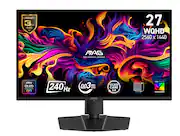
I’ve been using the MSI MAG 271QP QD-OLED X24 and it’s been excellent so far. The 1440p/240Hz combo feels super smooth, motion clarity is great, and the picture quality is a huge upgrade from a standard IPS panel. Blacks look truly black, colors look rich, and HDR in games is a noticeable improvement.
Posted by MahyarZ
- Rated 5 out of 5 stars
Love it
[Employee of bestbuy] Looks fantastic. Very good color. It’s so tuff. The blacks are fantastic. Very smooth frame rate.
Posted by Jome
- Rated 4 out of 5 stars
Great text clarity, slightly blurry picture
So i was initially trying to decide between an lg ultragear oled 34” with the 800r agressive curve and this monitor, and honestly they both have their flaws. The LG has a much crisper picture for gaming but msi has much crisper text for say productivity. For some reason this monitor on default produces a slightly blurry picture in general when it comes to fine details in gaming, and when you turn the sharpness up to try and correct it it makes it choppy. I had the lg and this monitor right next to eachother and tested them for a couple days hand in hand, and the LG just looks way better which is weird because qd-oled is supposed to have brighter colors, but thats just not the case with this monitor. I returned and decided on the LG for now, but might give an msi 4k monitor a chance at least in the future. The edges of the screen also have more dead space than normal because of the “pixel shift” feature which you cannot turn off, it slightly moves the picture while you use it and im not a fan. You can turn that feature off on the LG
Posted by ShakeyB
- Rated 5 out of 5 stars
Massive upgrade from old office monitor
This is a massive upgrade from my wife's office progress monitor. I also auditioned a 4k mini-led IPS monitor. It was nice. But I'm really glad I payed a little extra and got an oled. It's not quite as bright as the mini-led overall, but the colors are much brighter and more vibrant. And the contrast is fantastic. I was worried that glare would be an issue, but the photo daytime photo I included shows that's just not a big concern. My wife warned me she didn't think she was going to be impressed. Then she fired up her game of Hogwarts Legacy and gasped. If you've been thinking of making the upgrade to Oled for gaming, I think this is a great choice.
Posted by BenH
- Rated 5 out of 5 stars
Love this OLED monitor!
Configuration of this was easy and quick to start and the text clarity is the best, picture image quailty just incredible. Every color is just so vibrant and the true black as expected for the oled. Love it!
Posted by GBuyer