Rating 4.6 out of 5 stars with 111 reviews
4.6- Performance (26)
- Ease of use (14)
- Connectivity (11)
- BIOS (10)
- Price (5)
- M.2 Slot Access (4)
Customer Images
The vast majority of our reviews come from verified purchases. Reviews from customers may include My Best Buy members, employees, and Tech Insider Network members (as tagged). Select reviewers may receive discounted products, promotional considerations or entries into drawings for honest, helpful reviews.
- Rated 5 out of 5 stars
High quality, couldn’t be happier
I got this for $140 in a bundle deal with an i7-14700k, which is nearly 50% off. That’s crazy. If I hadn’t gotten that discount, I’d still give this 5 stars though. It’s super straightforward to build with and, for what it’s worth, looks cool. It’s a perfectly good gen 5 board, the wifi 7 is whatever/a nice little bonus, but the biggest thing is it has similar connectivity hardware as similarly priced boards from competitors
Posted by Artem
- Rated 5 out of 5 stars
Good high end motherboard
I felt that this motherboard was simple to use. Has a lot of strong features. I like the wifi 7 and the BIOS is simple. Highly recommend.
Posted by CorsairFail
- Rated 5 out of 5 stars
Great price and features
Perfect motherboard. Easy to install and booted up with no issues. Lots of features especially flr NVME and wifi 7 is great.
Posted by JoeT
- Rated 5 out of 5 stars
Feels like Top of the Line at Entry to Mid Price
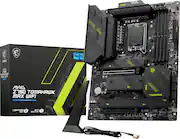
This board is fantastic and works great. There are mostly pros, with very few cons, which I'll list below. PROS: ++ Plenty of M.2 Ports ++ High DDR5 Max speed support ++ Easy BIOS flashing with button on back panel ++ Mounts easily to case ++ Integrated heatsinks for M.2 cards ++ Feels rugged ++ Included WiFi antenna with absolutely amazing range and speed (I use 1 Gbps down/up with Deco Mesh network. I get around 850Mbps over WiFi, 950 direct Ethernet, so pretty good speed. ++ LGA 1700 socket seems robust, nice tight fit when inserting the CPU. ++ RAM slots don't feel flimsy, they feel solid CONS -- Heatsink install for the M.2 can be confusing at first. -- No printed manuals, you need to view them all online, and they can be quite limited in nature -- Once you place your GPU (especially big bulky ones) you really can't access one of the M.2 slots... -- Mobo BIOS can be weird to navigate at first, but you get used to it -- One of the fan headers is in a weird location, but this only matters based on your case, if you have lots of front/top fans or bottom/back fans.
Posted by MarkW
- Rated 4 out of 5 stars
Solid Motherboard That Almost Reaches Perfection
First off, I've used MSI for sometime. As always, I find their BIOS screen to be fairly easy to navigate and configure, although the lack of a board explorer this time around was somewhat of a bummer. The other ding against is is the fact that the PCI-E port is shared with the main NVME drive, so if you want to take advantage of the 5.0 speeds, you'll have to make a sacrifice between one or the other. The GOOD news, however, is that there's still 3 other 4.0 drives (which are decidedly more common and find to work with) which will have no impact on this. The fact that they have solid heatsinks to keep them cool is also a bonus. In general, the board has a good strong and sturdy feel, and you can feel the heft. Despite the annoyance of the shared pci 5.0 slot, I have to give extra props to having top of the line features between WI-FI 7, PCI-E 5.0, and a 2.5Gbps ethernet port.
Posted by GrantC