Outlet EventEnds Oct. 26. Limited quantities. No rainchecks.Shop now

Main Content
product image

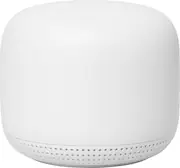
Nest Wifi - Add On Point with Google Assistant - Snow

Model: GA00667-US
SKU: 6382496
This item is no longer available in new condition. See similar items below
  • Key Specs
    • Wi-Fi Mesh System: true (A single wireless network consisting of a main router (connected directly to a modem) that connects to a series of satellite modules or nodes placed around the home. Routers with this capability promote stronger, faster wireless signals as well as increase Wi-Fi coverage by reducing interference and eliminating dead zones.)
    • Number of Wi-Fi Satellites Included: 1 (Quantity of Wi-Fi satellite modules/nodes for a Wi-Fi Mesh System that come with the product.)
    • Wi-Fi Speed: 1200 gigabits per second (The maximum rate at which data is transferred between a network device and wireless router.)
    • Works With: Google Assistant, Arlo, Wink, Hue, Nest, Ring, SmartThings (Compatible with or able to be connected to other smart devices or applications.)
  • General
    • Brand: Google
    • Model Number: GA00667-US
    • Product Name: Nest Wifi - Add On Point with Google Assistant
    • Color: Snow
  • Security
    • Data Encryption: false
    • Firewall Type: NAT (The method the firewall uses to filter and process data to increase network security, primarily by blocking malicious traffic requests while allowing legitimate traffic through.)
    • Security Features: Trusted Platform Module, WPA3 encryption, automatic security updates
  • Network
    • Band Technology: Dual (Refers to the number of frequency bands used to wirelessly transmit an internet signal. For example, dual-band devices may use one 2.4 and one 5 GHz band, while tri-band devices may use one 2.4 and two 5 GHz bands. Multiple bands also provide more flexibility for designating connected devices to specific band use.)
    • Ethernet Standard: 10/100/1000 (Each standard is a variation of the IEEE 802.3 set of computer networking technologies known as Ethernet. New versions evolved to include higher bandwidth, different physical media, and other new and improved features. Standards are often denoted by speeds (in Megabits per second). For example, a 10/100/1000 Ethernet port transmits at 10 Mbps, 100 Mbps, and 1000 Mbps (1 Gbps).)
    • Frequency Band: 2.4 GHz, 5.0 GHz, 6.0 GHz (Bands may be grouped into categories such as low- and high-band VHF (Very High Frequency), low- and high-band UHF (Ultra High Frequency), or certain frequency channels (measured in MHz or GHz). Generally, higher frequencies transmit information faster but have shorter range than lower frequencies.)
    • Wireless Networking Standard: Wi-Fi 6E (The wireless networking standard used by the device. Each iteration of the standard developed by the Wi-Fi Alliance corresponds to an existing IEEE 802.11 protocol; for example, standard 802.11ac (or AC) is termed Wi-Fi 5. Refers specifically to the standard the device is designed to use, but ultimately determines product interoperability and backward compatibility including previous versions.)
    • Wireless Standard: AC, N (The wireless networking protocol used by the device. Each iteration of the protocol is based on the 802.11 standard developed by the Institute of Electrical and Electronics Engineers (IEEE) Standards Association. Denoted by letters following 802.11 (802.11a, 802.11ac, etc.), each version, published in alphabetical order, encompasses all previous versions.)
    • Wi-Fi Mesh System: true (A single wireless network consisting of a main router (connected directly to a modem) that connects to a series of satellite modules or nodes placed around the home. Routers with this capability promote stronger, faster wireless signals as well as increase Wi-Fi coverage by reducing interference and eliminating dead zones.)
    • Number of Wi-Fi Satellites Included: 1 (Quantity of Wi-Fi satellite modules/nodes for a Wi-Fi Mesh System that come with the product.)
    • Number of Wi-Fi Satellites Supported: 1 (Maximum quantity of Wi-Fi satellite modules/nodes that are able to be connected to the main router in a Wi-Fi Mesh System.)
  • Certifications Listings & Approvals
    • ENERGY STAR Certified: false (Devices carrying the ENERGY STAR service mark, such as computer products and peripherals, kitchen appliances, and other products, generally use 20% to 30% less energy than required by federal standards.)
  • Features
    • App Compatible: true (The product can be connected to a program or software application on a mobile device, which then receives collected data from the product.)
    • App Name: Google Home app
    • Integrated Modem: false
    • Auto Detecting: true
    • Wireless: true
  • Ports
    • Port Type(s): RJ-45, Other (USB 2.0 connects external drives, gaming controllers, smartphones, MP3 players and other accessories.USB 3.0 transfers data faster than USB 2.0, but only when used with USB 3.0 devices.USB Type-C provides fast speeds and versatile power, featuring connectors with identical ends that plug in upside down or right side up. Adapters allow for video as well as backward compatibility.Thunderbolt provides ultra-high bandwidth for fast data transfer between devices featuring a Thunderbolt or MiniDisplayPort connection.HDMI allows you to connect a projector or display HD media on your HDTV or monitor.Media card slots allow you to transfer photos from your digital camera or camcorder.)
  • Speed
    • Wi-Fi Speed: 1200 gigabits per second (The maximum rate at which data is transferred between a network device and wireless router.)
  • Compatibility
    • System Requirements: Google Nest Wi-Fi router or a previous-generation Google Wi-Fi system (The software that a product must have for it to be able to integrate with another product.)
    • Bluetooth Enabled: true (The device is capable of communicating with another device via Bluetooth, provided they are within the required range of each other. A Bluetooth-enabled device must also be the same Bluetooth version or higher than the accessory it is intended to pair with.)
    • Works With: Google Assistant, Arlo, Wink, Hue, Nest, Ring, SmartThings (Compatible with or able to be connected to other smart devices or applications.)
    • Voice Assistant Built-in: Google Assistant (A digital assistant built into the device that uses voice commands to answer questions and control smart devices.)
  • Dimensions
    • Product Height: 3.34 inches (The out of box height of the item. Height is measured as the vertical distance from the bottom of the item to the top as it would be primarily used or placed.)
    • Product Length: 5.15 inches (The out of box length of the item. Length is measured as the longest dimension of the item.)
    • Product Width: 4.6 inches (The out of box width of the item. Width is measured as the horizontal distance from one side of the item to the other as it would be primarily used or placed.)
    • Product Weight: 1.3 pounds (The out of box weight of the item.)
  • Warranty
    • Warranty - Parts: 1 Year
    • Warranty - Labor: 1 Year
  • Other
    • UPC: 193575001586

Nest Wifi blankets your whole home in fast, reliable Wi-Fi.¹ With up to 1600 sq. ft. of coverage, it automatically updates itself to get new features and help your network stay safe. And Nest Wifi points have a speaker with the Google Assistant for extra help around the house.

See other products that work with this Wi-Fi networking product

  • Wireless-AC technology: Features two wireless bands (2.4GHz and 5GHz) and delivers combined speeds of up to 1200 Mbps for faster wireless performance.
  • Strong Wi-Fi coverage: Provides additional 1600 sq. ft. of fast, reliable Wi-Fi coverage for your home.¹
  • MU-MIMO (Multi-User Multiple-In Multiple-Out): Enables maximum client density deployments with no interference.
  • Advanced security over wireless: Protects and secures your wireless network with security features, including Wi-Fi Protected Access (WPA3), Trusted Platform Module, and automatic security updates.
  • Beamforming technology: Sends a targeted Wi-Fi signal to individual devices for stronger connection.
  • Built-in Google Assistant: Allows you to listen to news and music, control smart home devices, and access thousands of skills.²
  • Voice-controlled: Play music, manage your Wi-Fi network and more using your voice.³
  • Google Home app: Connect and manage devices in your network. Plus pause Wi-Fi to limit screen time for the kids.
Whats Included
  • Google Nest Wifi AC1200 Add-on Point Range Extender
  • Owner's manual
  • Power adapter

Q: I have Spectrum Wifi. Can I use this with Spectrum? If I want to use this, how does it work? Is there a monthly fee for it?

A: My google nest works very well with my spectrum wifi. There is no additional cost to connect the nest to the modem. Nest connects to modem via ethernet and then wirelessly to remote units. Installation is quick and easy. You need to download a free google home app to a mobile device, and the app will walk you through the setup process. You then use the app to manage the network.

Q: I have SPECTRUM cable and WIFI. WiFi signal doesn’t NOT reach my exterior NEST cameras on either porch, garage, or driveway. I have six Nest cameras. What extender would work with all? Compatibility? Help needed. Thank you

A: Google Nest Wifi is a Wi-Fi mesh system that connects to your modem provided by your internet service provider. Most Wi-Fi enabled devices including Nest cameras can connect to internet via Google Nest Wifi. Nest Wifi router and points provide reliable Wi-Fi coverage throughout your home. You can check the following link to see an estimate of how much Wi-Fi coverage you’ll get with a Google Nest Wifi system, so you can calculate how many Nest Wifi devices you need to cover all your Nest cameras: https://support.google.com/wifi/answer/7182840

Q: Will this work with a linksys router. If not will the cheaper nest extender work with linksys.

A: Google Nest Wifi is not compatible with 3rd party routers to create a mesh network. You can only use Nest Wifi routers, points, and Google Wifi points to create a Wi-Fi mesh network. We recommend setting up Nest Wifi router as your primary router directly hard-wired to your modem's WAN port with an Ethernet cable. If you still want to use your current router with Nest WiFi, you can use it as a downstream switch to Nest WiFi router. No, Google Nest Wifi point will not work with a Linksys router to create a Wi-Fi mesh.

Q: I am looking to add more coverage to my Google Nest Wifi setup. Currently I have 1 router and 1 point. Does it matter if I add a router or a point to extend the network?

A: Yes. We had the same 1 router/1 point and had a weak spot in the house. Added the extra point and now signal is great everywhere. House is 2800 sq ft.

Q: Do I HAVE to have the Google Nest router to connect this add-on point to my Google Fiber box (GFRG200)? To be clear, I do not want the router, the Fiber box is a router I just need a range extender that will directly connect with it.

A: Yes, Nest Wifi points can only be used with Nest Wifi router and Google Wifi point. It won't work with a 3rd party router. Although Google Nest Wifi system is compatible with Google Fiber. You can set up Nest WiFi router as your primary router hard-wired to your Google Fiber modem's WAN port. Google Fiber has a modem/router combo and you may need to disable its Wi-Fi functionality in order to avoid a Double NAT.

Q: I have a netgear modem/router. Would the Google nest replace the router component. Then I would add the extenders to create a mesh through out the house? Or would I need to buy a new modem? I dont want to continually pay for Comcast modem rentals.

A: You can definitely replace the current router with Nest Wifi router and create the Nest Wifi mesh by adding Nest Wifi points throughout your home. You don't need to buy a new modem, but you can't get rid of the current one, either as you need a modem with broadband internet to connect Nest Wifi router to. If you have the modem/router combo device, then you would need to turn off its Wi-Fi functionality by putting it in Bridge mode. You can find out more about Bridge mode here: https://support.google.com/wifi/answer/6240987

Q: I currently have the original Google WiFi router. To add additional coverage, should I purchase the new Nest router or WiFi point? I've read they are compatible, but what's the best option? Thanks in advance for any help.

A: My personal opinion I would invest in the newer if you have the extra cash. The coverage is better on the new Google Nest Wifi. You can get it with the extra access points. I believe from 1 up to 3 and you can always buy additional ones later. I bought the router w/2 access points on black friday for $249 and later bought 1 more access point. I have overkill on wifi now, BUT we do a lot of streaming and I have a metal shop about 75ft away from my back door that I had absolutely no wifi at all in. I placed my router in my livingroom and one access point in my kitchen, which is in between the router and the shop & one access point in the shop itself and now I have great wifi. I pay for 100mbps and when I run the fast test out there I am getting every bit of my 100mbps. Also, I dont know about the first gen, but with the nest wifi the access points also doubles as google nest home mini's and have good sound. I have also added the Google Home Hub Max which pretty much runs everything in my house and I can play music from it and it will play on all access points at the same time (if you set it up in the settings that way) it's like having your whole house on surround sound. You can also call between each access point, like an intercom. I love it..... no more running out in the cold to get hubby out of the shop..... Google does it for me now.....lol So, there are other benefits to upgrading to the newer version depending on your lifestyle & it does cover more square footage. I looked at both systems when buying and I am very happy with my decision. Happy Shopping LooneyGirl