Rating 4.5 out of 5 stars with 949 reviews
4.5- Ease of use (179)
- Speed (149)
- Coverage (145)
- Range (84)
- Setup (61)
- Price (17)
Customer Images
The vast majority of our reviews come from verified purchases. Reviews from customers may include My Best Buy members, employees, and Tech Insider Network members (as tagged). Select reviewers may receive discounted products, promotional considerations or entries into drawings for honest, helpful reviews.
- Rated 5 out of 5 stars
Enhanced my super fast internet.
I used to have Velop basic model only that can handle up to 100mbps since I upgraded my internet speed to 400mbps the velop doesn’t work on my new router that my ISP provided me. So I went shopping for router. Did my research and finally chose Netgear Orbi. I chose this over higher versions of Velop because of good reviews and I was hesitating that if I purchased another Velop it might not work on my new router. So far I had super fast internet. I like the app and it comes with 1 year free internet protection plan from Bitdefender. I’m so happy with this product. The product itself looks elegant design in my living room, kitchen and master bedroom. It has a wide range as well even in outdoor. Easy set up compared to Linksys Velop. It’s kinda pricey compare to Velop which has $100 off. This product has no discount. I don’t mind paying the full price as long as it delivers it’s features.
Posted by Ryan
- Rated 5 out of 5 stars
Orbi AC2200 far exceeded my expectations
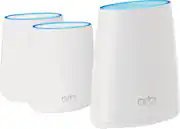
I didn't really want to buy the Orbi, primarily because I thought it looked like big air fresheners/deodorant sticks, but my friend who's a Geek Squad installer said these are the best in this price range. I'm glad I listened to him. The installation was ridiculously easy since I kept my previous network/password combination. Within minutes, the base unit found the satellites and I had 18 devices online. An unexpected bonus: my internet speeds increased dramatically -- nearly 4x faster download on my phone and laptop and about 10% faster up. And the Orbi App is superb.
Posted by ODH3
- Rated 5 out of 5 stars
Fast Internet Speed
Easy to set up with consistent internet connection through the house. The best part is being able to have a wired internet connection from the satellite for my work laptop at my desk without haven’t to run Ethernet behind the walls.
Posted by HappyNordicTrackOwner
- Rated 5 out of 5 stars
Solved all home wifi problems... almost
Great product and system. Not as large or unattractive as it appeared when shopping and comparing systems online (satellites smaller than main router). Easy set up. Eliminated weak signal coverage areas in my home. Helpful online (call) service that lead to identification of further internet service limitations slowing my network speed. However, I do not have what many would consider high speed from my ISP (<25 MB/s download and upload, but all I need)
Posted by 12345
- Rated 5 out of 5 stars
You have to see it to BELIEVE it..
OMG. I was planning to hardwire from my 1st floor to the 2nd floor as I was getting 7 - 10 Mbps in one of the rooms. There was severe interference from the concrete wall. All the other rooms had 250 Mbps. I accidentally stumbled upon this and took a chance and to say I am impressed is an understatement. I am getting 180 Mbps now in the problematic room and 580 Mbps in other rooms. Note: I was using a Netgear MODEM ROUTER device and here is what YOU SHOULD DO before setting this device. 1. Disable all the current wifi networks as your phone will try to connect to one of the networks. You can do this by selecting "forget this network" in iPhone Settings (or) change the WIFI password by logging onto the routerlogin.net. (I did the later). Refer the Before and After snapshot of speed :)
Posted by VatsanChetlur