Deals Worth GiftingShop now

Main Content

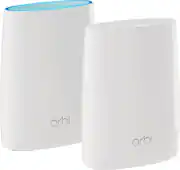
NETGEAR - Orbi AC3000 Tri-Band Mesh Wi-Fi System (2-pack) - White

Model: RBK50-100NAS
SKU: 10433635
$299.99
or
$25.00/mo.
suggested payments with12-Month Financing
Show me how
Finance OptionsView your offers
Availability
Fulfillment Options

$7.99 shipping to

Sold & shipped by
Global Mobiles Inc
(42)

More Buying Options

Highlights

  • Key Specs
    • Wi-Fi Range: 5000 square feet (The device will provide a Wi-Fi connection to this approximate area.)
    • Wi-Fi Mesh System: true (A single wireless network consisting of a main router (connected directly to a modem) that connects to a series of satellite modules or nodes placed around the home. Routers with this capability promote stronger, faster wireless signals as well as increase Wi-Fi coverage by reducing interference and eliminating dead zones.)
    • Number of Wi-Fi Satellites Included: 2 (Quantity of Wi-Fi satellite modules/nodes for a Wi-Fi Mesh System that come with the product.)
    • Number Of LAN Ports: 3 (Number of devices able to be connected to the Local Area Network (LAN). LAN ports allow wired connections to other networking devices (wireless access points, range extenders, etc.) in order to share the internet connection received through a WAN port.)
    • Wi-Fi Speed: 3 gigabits per second (The maximum rate at which data is transferred between a network device and wireless router.)
    • Works With: Amazon Alexa (Compatible with or able to be connected to other smart devices or applications.)
  • General
    • Brand: NETGEAR
    • Model Number: RBK50-100NAS
    • Product Name: Orbi AC3000 Tri-Band Mesh Wi-Fi System (2-pack)
    • Color: White
  • Security
    • Firewall Type: None (The method the firewall uses to filter and process data to increase network security, primarily by blocking malicious traffic requests while allowing legitimate traffic through.)
    • Parental Controls: true (Allows user to block unwanted content, signals, channels, networks, etc. from being received or accessed.)
  • Network
    • Band Technology: Tri (Refers to the number of frequency bands used to wirelessly transmit an internet signal. For example, dual-band devices may use one 2.4 and one 5 GHz band, while tri-band devices may use one 2.4 and two 5 GHz bands. Multiple bands also provide more flexibility for designating connected devices to specific band use.)
    • Ethernet Standard: 10/100/1000 (Each standard is a variation of the IEEE 802.3 set of computer networking technologies known as Ethernet. New versions evolved to include higher bandwidth, different physical media, and other new and improved features. Standards are often denoted by speeds (in Megabits per second). For example, a 10/100/1000 Ethernet port transmits at 10 Mbps, 100 Mbps, and 1000 Mbps (1 Gbps).)
    • Number of Antennas: 6
    • Frequency Band: 2.4 GHz, 5.0 GHz (Bands may be grouped into categories such as low- and high-band VHF (Very High Frequency), low- and high-band UHF (Ultra High Frequency), or certain frequency channels (measured in MHz or GHz). Generally, higher frequencies transmit information faster but have shorter range than lower frequencies.)
    • Wireless Networking Standard: Wi-Fi 5 (The wireless networking standard used by the device. Each iteration of the standard developed by the Wi-Fi Alliance corresponds to an existing IEEE 802.11 protocol; for example, standard 802.11ac (or AC) is termed Wi-Fi 5. Refers specifically to the standard the device is designed to use, but ultimately determines product interoperability and backward compatibility including previous versions.)
    • Wireless Standard: AC, N (The wireless networking protocol used by the device. Each iteration of the protocol is based on the 802.11 standard developed by the Institute of Electrical and Electronics Engineers (IEEE) Standards Association. Denoted by letters following 802.11 (802.11a, 802.11ac, etc.), each version, published in alphabetical order, encompasses all previous versions.)
    • Wi-Fi Range: 5000 square feet (The device will provide a Wi-Fi connection to this approximate area.)
    • Number of 2.4Ghz Streams: 1 (A router's streams are like lanes on a highway. The more streams a router has, the less traffic congestion. Because the 2.4 GHz band is used to transmit wireless signals to a wide variety of devices, there is often high amounts of traffic on that stream. But with multiple streams, each can be designated to a specific device for optimal performance. For example, if one 2.4 GHz stream is assigned to one device, such as a desktop computer, it leaves the remaining streams open for guest users, devices that use more data, or devices with specific band compatibility.)
    • Number of 5.0Ghz Streams: 2 (A router's streams are like lanes on a highway. The more streams a router has, the less traffic congestion. The 5.0 GHz band provides high speed, short-range data transmission and typically has less traffic than the 2.4 GHz band. With multiple streams, each can be designated to a specific device for optimal performance. For example, if one 5.0 GHz stream is assigned to one device, such as a streaming media player, it leaves the remaining streams open for guest users, devices that need less data, or devices with specific band compatibility.)
    • Wi-Fi Mesh System: true (A single wireless network consisting of a main router (connected directly to a modem) that connects to a series of satellite modules or nodes placed around the home. Routers with this capability promote stronger, faster wireless signals as well as increase Wi-Fi coverage by reducing interference and eliminating dead zones.)
    • Number of Wi-Fi Satellites Included: 2 (Quantity of Wi-Fi satellite modules/nodes for a Wi-Fi Mesh System that come with the product.)
    • Number of Wi-Fi Satellites Supported: 2 (Maximum quantity of Wi-Fi satellite modules/nodes that are able to be connected to the main router in a Wi-Fi Mesh System.)
    • Wired Backhaul: true (Also known as Ethernet backhaul or backbone, this capability can be enabled to directly wire a secondary router or satellite to the main router via Ethernet cable. This connection allows for faster and more stable data upload.)
    • Ethernet Switch: true (Connects multiple devices to expand the Local Area Network (LAN).)
  • Certifications Listings & Approvals
    • ENERGY STAR Certified: false (Devices carrying the ENERGY STAR service mark, such as computer products and peripherals, kitchen appliances, and other products, generally use 20% to 30% less energy than required by federal standards.)
  • Features
    • App Compatible: true (The product can be connected to a program or software application on a mobile device, which then receives collected data from the product.)
    • App Name: Orbi App
    • Beamforming: true (A signal processing technique that enables a router to focus a Wi-Fi signal in a specific direction. The router determines where a connected device in the network is located and projects a stronger signal in that specific direction. This can result in faster and higher quality data transfer as well as reduced signal interference.)
    • Integrated Modem: false
    • Wireless: true
  • Ports
    • Number Of WAN Ports: 1 (Number of devices able to be connected to the Wide Area Network (WAN). This type of port may simply be labeled "Internet," and it allows the device to share its internet connection with all devices connected to it via LAN ports.)
    • Port Type(s): RJ-45 (USB 2.0 connects external drives, gaming controllers, smartphones, MP3 players and other accessories.USB 3.0 transfers data faster than USB 2.0, but only when used with USB 3.0 devices.USB Type-C provides fast speeds and versatile power, featuring connectors with identical ends that plug in upside down or right side up. Adapters allow for video as well as backward compatibility.Thunderbolt provides ultra-high bandwidth for fast data transfer between devices featuring a Thunderbolt or MiniDisplayPort connection.HDMI allows you to connect a projector or display HD media on your HDTV or monitor.Media card slots allow you to transfer photos from your digital camera or camcorder.)
    • Number Of LAN Ports: 3 (Number of devices able to be connected to the Local Area Network (LAN). LAN ports allow wired connections to other networking devices (wireless access points, range extenders, etc.) in order to share the internet connection received through a WAN port.)
  • Speed
    • Wired Speed: 1000 megabits per second (The maximum rate at which data is transferred between a network device and router using an Ethernet cable.)
    • Wi-Fi Speed: 3 gigabits per second (The maximum rate at which data is transferred between a network device and wireless router.)
    • Gigabit Ethernet Speed: true (Supports the gigabit Ethernet networking standard, which has a data rate of at least one gigabit per second, or 1,000 Mbps.)
  • Compatibility
    • Bluetooth Enabled: false (The device is capable of communicating with another device via Bluetooth, provided they are within the required range of each other. A Bluetooth-enabled device must also be the same Bluetooth version or higher than the accessory it is intended to pair with.)
    • Works With: Amazon Alexa (Compatible with or able to be connected to other smart devices or applications.)
  • Dimensions
    • Product Height: 8.9 inches (The out of box height of the item. Height is measured as the vertical distance from the bottom of the item to the top as it would be primarily used or placed.)
    • Product Length: 3.1 inches (The out of box length of the item. Length is measured as the longest dimension of the item.)
    • Product Width: 6.7 inches (The out of box width of the item. Width is measured as the horizontal distance from one side of the item to the other as it would be primarily used or placed.)
    • Product Weight: 2 pounds (The out of box weight of the item.)
  • Warranty
    • Warranty - Parts: Not available
    • Warranty - Labor: Not available
  • Other
    • UPC: 606449116359

Orbi Whole Home WiFi System delivers up to 3.0Gbps high-performance WiFi. Sleek, modern design with high-gain internal antennas for up to 5,000 square feet of coverage. FastLane3 Technology creates a dedicated Tri-Band WiFi for seamless 4K streaming and gaming everywhere in your home. Keep a single WiFi name for uninterrupted connections as you move from room-to-room. Circle Smart Parental Controls runs on Orbi Routers for a smart way for families to manage content and time online, on any connected device. Provide internet access to guests without sharing your personal network password. Orbi is ready right out of the box and compatible with your ISP. Just use the Orbi app to get started with better WiFi, everywhere in minutes.

Find the perfect Wi-Fi solution

  • Supports high definition video conferencing (Zoom, Skype, WebEx, FaceTime, and more): Whether you work from home or want to connect with your friends and family you can video conference with crystal clear audio and video from anywhere in your home.
  • Whole Home WiFi Coverage: Orbi provides whole home WiFi coverage to prevent WiFi dead spots.
  • Latest technology for fast, reliable speeds: The dedicated WiFi backhaul ensures 4K HD streaming, gaming, and even browsing perform at fast speeds.
  • Single Network Name for easy setup: Enjoy the convenience of a single WiFi name for your whole home with a seamless connection as you move from room-to-room.
  • NETGEAR Armor: Built-in anti-virus and data theft protection for all of your smartphones and computers. Protects your connected home from internet threats. Free trial included. Covers unlimited devices.
  • Smart Parental Controls: Circle Smart Parental Controls lets you easily manage content & time online on any device.
  • 7 Gigabit Ethernet ports for flexible connectivity: With a total of 7 Gigabit Ethernet ports, you are able to easily create a direct connection with your home media center, game consoles, and home office devices.
  • Quick and Easy Setup with Orbi Mobile app: Use the Orbi app to setup whole home WiFi in minutes. The app enables you to share network credentials see connected device list, speed test, and more.
  • Performance with Style: Sleek, modern design with four high-gain internal antennas in the Orbi Router increases wireless range in hard-to-reach areas of your home.
  • Guest WiFi network: Provide internet access to friends and family without sharing your personal network password.
  • Ready Right Out of the Box: Compatible with your internet service provider (ISP). Just connect to your modem to create high-speed WiFi for your whole home.
  • Works with Amazon Alexa and the Google Assistant: Use voice commands to control your home network.
Whats Included
  • 2x 12V/3.5A power adapter
  • Ethernet cable (6.56')
  • Orbi Router (RBR50)
  • Orbi Satellite (RBS50)
  • Quick start guide

Q: does this replace my current router or work with it?

A: You can plug this into your current router. This can then become a "bridge" unit and the wireless remote satellite extends the range - they come as a kit - base and satellite. I found my existing router WIFI was slow, and rather than upgrade through the Verizon people, I just plugged this into my existing router I have as part of my package....wired speed from Verizon router is good, but WIFI speeds aren't great - this solves the problem. Great unit, not disappointing at all.

Q: Will this product cover a 2000 sq. ft., one level house with only one (1) WiFi Name? The reason for this question is I'm currently using an extension to my router which has given the front of the house a different wifi name from the back of the house.

A: The Orbi will cover up to 4000 sq ft and will use one wifi name. Orbi will automatically shift your device from each device depending on what gives the strongest signal.

Q: do you have to have an internet service before this will bring in the wi fi

A: The two answers claiming you need Internet service to use this device are nonsense - but they might be the right answer for what the person was trying to ask. NO, you don't need Internet service to use the device. When you brush aside all the hype, this is just a Wi-Fi Access Point, a Router (aka Network Switch) and a Wi-Fi Range Extender. You COULD set it up without any Internet connection and it would still work perfectly to connect your computers together in an ordinary Local Area Network. The computers will be able to share data over the network via either Ethernet or Wi-Fi. BUT they will only be able to access each other. This device will not magically create Internet access for your computers or other devices.

Q: I have Verizon Fios for services. It's good, but the only downfall is I can't replace there Gateway/router with my own that's better. Will the Orbit work be able to replace this and will it work with this fiberoptic service?

A: You don't have to use FiOS r router for wifi. I just connect my night hawk router via Ethernet to my FiOS router. Log in to FiOS router and turn off their wifi and use wifi on the better router instead. Thus goes for any better router not just orbi. I have used this setup for years. FiOS tries to sell you a better router for a monthly fee when all you need to do is hook up your own and turn off their wifi on theirs and only use their for hard wired routing.

Q: Can you use with comcast.

A: I'm currently using it on my comcast modem daisy chained to this router with on issues. I have heard that Comcast in bigger city's spiking the lines that would disable extended routers like these but I haven't had any issues or slow downs.

Q: So if it comes with two, I'm assuming you have one that internet is linked to by cable and the other is used as a extender? Or do you have to have both units hooked to cable?

A: The package comes with 2 units: 1 main router unit and 1 satellite unit (the "extender"). The router is connected to your cable modem via a standard ethernet wire. The satellite connects wirelessly to the router. Both units have a power adapter to connect to a power outiet.

Q: If you still have to have Internet service what do I need this thing for I already have a router

A: The Orbi system creates a WiFi mesh network for up to 4,000 sq. ft. of seamless WiFi coverage, eliminating the need for extenders and reducing the number of dead zones. It supports both the 2.4GHz and 5GHz bands and offers Beamforming as well as AC3000 capabilities for improved performance over all connected devices. If you’d like help deciding if the Orbi system is right for your specific needs, please email us at [email protected] and we’d be happy to help.

Q: Has anyone setup an ORBI system with Time Warner Cable and had any issues? I am looking to get the Orbi, but make sure that is can replace the delivered TWC modem.

A: Funny you should ask as I just set up mine this past week. Initially, I had the TWC Arris TG1672 Router and was getting very slow speeds from the Orbi so I got rid of the TWC router and, in its place, put in a Netgear CM600 modem. I've got quite the set up with the Modem connected to the Orbi and the Orbi is connected to a pretty serious network switch which has a printer, Hue hub, Iris hub, a Mac, a Digital Storm PC, Sonos system, Vonage (soon to be Ooma) VoIP phone system and, finally, a Sprint Airave box connected to the switch. On the wireless end, I've got three Smart TVs, two IPads, two IPhones, a Macbook and two cameras utilizing the Orbi Satellite. The speed from the Orbi router and Satellite blazes. I'm now getting an average of 117.5 Mbps download and 11-16 Mbps upload from both the Orbi router and the satellite. I have the TWC 100 meg package. The distance is impressive as well as I can connect to my home network three blocks away and this is in an older home with stucco walls which eats WiFi and cell signals for breakfast. So, to make a long answer longer, you shouldn't have any issues once you go through the set up. If you have phone service with TWC, make sure you keep the service until you port over your numbers with the new service.

Sponsored

Compare similar products

NETGEAR - Orbi AC3000 Tri-Band Mesh Wi-Fi System (2-pack) - White

Orbi Whole Home WiFi System delivers up to 3.0Gbps high-performance WiFi. Sleek, modern design with high-gain internal antennas for up to 5,000 square feet of coverage. FastLane3 Technology creates a dedicated Tri-Band WiFi for seamless 4K streaming and gaming everywhere in your home. Keep a single WiFi name for uninterrupted connections as you move from room-to-room. Circle Smart Parental Controls runs on Orbi Routers for a smart way for families to manage content and time online, on any connected device. Provide internet access to guests without sharing your personal network password. Orbi is ready right out of the box and compatible with your ISP. Just use the Orbi app to get started with better WiFi, everywhere in minutes.

NETGEAR - Orbi 370 Series BE5000 Dual-Band Mesh Wi-Fi 7 System (3-pack) - White

Orbi Wi-Fi 7 is in a class of its own, designed for a new era of entertainment, hybrid work, and smart home convenience. The Orbi 370 Series unlocks the power of Wi-Fi 7 with speeds up to 5 Gbps, 1.7X faster than Wi-Fi 6. In addition, the Orbi 370 brings exceptional 360° Wi-Fi coverage for whole-home connectivity.

NETGEAR - Orbi 260 Series BE3600 Dual-Band Mesh Wi-Fi 7 System (3-pack) - White

The Orbi 260 Series delivers uncompromising performance for families who need consistent, high-speed WiFi in every room, all at once. Wi-Fi 7 is in a class of its own, designed for a new era of entertainment, hybrid work, and smart home convenience. The Orbi 260 Series unlocks the power of Wi-Fi 7 with speeds up to 3.6 Gbps. In addition, the Orbi 260 brings exceptional 360° Wi-Fi coverage across every corner of your home, regardless of the layout, from the front door to the back yard. It includes a 30-day trial subscription of Armor, all-in-one security protection.

NETGEAR - Orbi 750 Series AX5200 Tri-Band Mesh Wi-Fi 6 System (3-pack) - White

Break free from limitations with strong, reliable, and lightning-fast Wi-Fi in every room of your home. From the top floor down to the basement, the NETGEAR Orbi 750 Series AX5200 tri-band mesh Wi-Fi 6 system brings you higher performance and simultaneous Wi-Fi streaming, gaming, and browsing on even more devices.

Pros for NETGEAR - Orbi AC3000 Tri-Band Mesh Wi-Fi System (2-pack) - White
There were no pros for this productOverall Performance, Coverage, Speed, Design, WiFi 7 PerformanceThere were no pros for this productOverall Performance, Speed, Coverage, Connectivity, Setup
Cons for NETGEAR - Orbi AC3000 Tri-Band Mesh Wi-Fi System (2-pack) - White
There were no cons for this productConnectivity, Port Quantity, Setup DifficultyThere were no cons for this productThere were no cons for this product

Specs

Reviews

Customer Images

The vast majority of our reviews come from verified purchases. Reviews from customers may include My Best Buy members, employees, and Tech Insider Network members (as tagged). Select reviewers may receive discounted products, promotional considerations or entries into drawings for honest, helpful reviews.

  • Rated 5 out of 5 stars

    It'll be Before and After Orbi - Best Mesh/Wi-Fi

    This product has restored my faith in Netgear and made me come back, I have been purchasing, configuring and using Routers since the early 90s I have also experimented with range extenders and routers in bridge mode etc through the years, trust me nothing has ever compared to Orbi when it comes to speed and range. It is truly amazing how I get full bars and almost no signal degradation whatsoever in every single room in the house and even outside, the dedicated 5GHz channel that the satellite device uses to communicate with the Orbi router is actually making the big difference here in my opinion, something that ONLY the Orbi has at the time of this review. The first thing you’ll notice when you are getting it setup is how simple it is for the average consumer to get this up and running, basically the system is pre-paired from the factory, the user basically only needs to name their Wi-Fi network and optionally register the product and that’s about it, you’ll be enjoying super-fast Wi-Fi throughout your entire house in no time. The software has been rock solid and stable so far, configuration has all the features that an advanced user would need such as Guest Network, Port Forwarding, Static routers/ IPs etc, it’s all in there with the exception of true QoS (Because there’s some basic sort of version of it included) and being able to name your 2.4GHz and 5GHz bands independently but I’m sure this will also be included in future firmware versions. The system is not without some minor issues though, I ran into a small problem when initially upgrading the software where it could not auto-update on its own, people who purchase this in the near future will not run into this problem as newer units will for sure come with more up to date/improved firmware, early adopters who get it now though (and I recommend you to do so) can just manually update the firmware by downloading it from the Netgear support site then going into the Orbi’s web interface and upgrade it manually. I also wish Netgear would improve their Mobile Apps, the current Android version of the app as of today 12/27/16 (This might not be the case a few months after I write this) is basically only good for setting up the Orbi for the first time, besides that it's virtually useless, also the Netgear Genie app for the PC is so dated, it really needs a facelift and I was disturbed to see that it has not changed GUI wise since the last time I had tried it like 5 years ago, after installing it I immediately removed it, it is really not good at all. Before having this up and running I was afraid I would need to purchase a second satellite because of the size of my home, no need at all, in fact I was able to get rid of two range extenders while still having full bars/speed in my entire house with just the main unit and the one included satellite that came included with the package, awesomeness! My home is totally made out of bricks and this is the first system that gives me consistent 90/MBps down 12MBps Up ALL the way from the front of the house to the backyard, I'm talking Internet speeds (which is more than what I pay Comcast for) the actual transfer speeds between devices is much more greater than that, I tell you try Orbi if you haven't yet and see for yourself, if you don't like it you can always return it, nothing to lose.

    This review is from NETGEAR - Orbi AC3000 Tri-Band Mesh Wi-Fi System (2-pack) - White

    Posted by EL305

  • Rated 5 out of 5 stars

    Awesome Product

    I bought this product in an attempt to increase the Wifi speeds and coverage in my house. This product exceeded my expectations. My house went from barely getting speeds of 50mbps to speeds of above 700mbps. And these speeds are constant throughout my house with a much more stable connection. I used to have to constantly use my mobile data connection in my bedroom because the Wifi was so bad but now I never have to use mobile data while I'm home. As far as setup goes, I have a Comcast cable modem/router all in one setup. I had to disable the routing functions on the cable modem and after that just connect the Orbi to the modem. Works flawlessly now.

    This review is from NETGEAR - Orbi AC3000 Tri-Band Mesh Wi-Fi System (2-pack) - White

    Posted by MrQ50

  • Rated 5 out of 5 stars

    Blazing Fast & Strong Signal

    I was looking for a solution to fix my poor internet speeds and coverage from my Apple Airport Extreme and Airport Extender. I would only get 15/10 speeds even when standing right next to the router. Those days are over. It took me maybe 20 minutes to set this Orbi system up. Everything went smoothly as instructed. The two units are pretty heavy and seem very well built. My only complaint is they have a narrow oval shape so they can tip very easily if bumped (I have a 2 year old) so I put them out of reach. My whole house now receives the same speed, no matter where I am. I have a 2000 sqft long and skinny home. I have the main router in the far forward bedroom upstairs and the satellite unit in the far back living room downstairs. I didn't think they would sync that far but I figured why not try so I could use an Ethernet cable (from the satellite unit) to my 4k Samsung and playstation in the living room. I was wrong and it had 100% signal. I was shocked! Now for the speed...I will let the attached photo of the speed test on my iPhone 6 show you the results. I'm getting these speeds everywhere in the house! Incredible product worth every penny.

    This review is from NETGEAR - Orbi AC3000 Tri-Band Mesh Wi-Fi System (2-pack) - White

    Posted by TomB

No content
Sponsored

Similar products from outside of Best Buy

sponsored

Finance Options

My Best Buy® Credit Card
Choose a benefit:
$25.00/mo.suggested payments with 12-Month Financing
Or
10% back in rewardson your first day of purchases when approved for the My Best Buy® Credit Card.
Buy Now, Pay Later
4 payments starting at $75.00
Lease to own
Apply today with no credit needed and enjoy flexible payment options.