Everything for Back to School — and then someShop now

Skip to contentGo to Product Search
Main Content

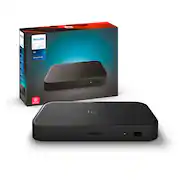
Philips - Hue Play HDMI Sync Box 8K​ - Black

Model: 579755
SKU: 6589719
Sold byBest Buy

Customers are saying

Customers consistently note that this product delivers exceptional performance, with users frequently praising its high-quality visuals, seamless synchronization, and effective support for HDMI 2.1 gaming features. While many appreciate the straightforward setup and immersive experience, some users have expressed concerns regarding the high price point and occasional connectivity issues with certain consoles. Additionally, a few customers have reported minor frustrations with the companion app and slight input lag. Overall, the device is highly regarded for its ability to enhance entertainment, despite these noted limitations.

Generated by AI based on customer reviews.
Features
  • Hdmi 2.1 Certified For The Highest Quality Content

    With an ultra-fast refresh rate, you can sync your Hue lights to the highest quality video content with 8K at 60 Hz and 4K at 120 Hz.​

  • Sync To Any Hdmi Device

    You can only sync with HDMI devices, not with TV apps. Connect up to 4 devices, including the latest gaming consoles and home theater devices.​

  • Personalize Your Settings

    Adjust the intensity of your lights to your liking with the Hue app.

  • Full Screen View

    Keep your eyes on the action with no cameras, wires, or other distractions dangling in front of your screen.​

  • Requires A Hue Bridge

    To use the Hue sync box 8K, you must connect it with a Hue Bridge. It unlocks the full potential of your Philips Hue system with automations, smart control, and much more.​

  • Connects With Smart Home Assistants

    The Hue sync box 8K is compatible with Alexa, Google Assistant, and Apple homekit. ​

See all features
Specifications
  • Works With
    Amazon Alexa, Google Home, Hue, SmartThings, Apple Home
Sponsored

Reviews

Customers are sayingCustomers consistently note that this product delivers exceptional performance, with users frequently praising its high-quality visuals, seamless synchronization, and effective support for HDMI 2.1 gaming features. While many appreciate the straightforward setup and immersive experience, some users have expressed concerns regarding the high price point and occasional connectivity issues with certain consoles. Additionally, a few customers have reported minor frustrations with the companion app and slight input lag. Overall, the device is highly regarded for its ability to enhance entertainment, despite these noted limitations.
This summary was generated by AI based on customer reviews.
  • Overall Performance (47)
  • HDMI (31)
  • Ease of use (11)
  • Immersion (7)
  • Sync (7)
  • Price (13)
  • Connectivity (12)
  • App (4)
  • Lag (4)

Customer Images

The vast majority of our reviews come from verified purchases. Reviews from customers may include My Best Buy members, employees, and Tech Insider Network members (as tagged). Select reviewers may receive discounted products, promotional considerations or entries into drawings for honest, helpful reviews.

  • Rated 5 out of 5 stars

    No more random black screen!

    If you are like me and own an Apple TV 4k and had it paired to the previous generation Hue Sync Box you probably had MANY issues with the previous version. Perhaps the most annoying was the fact that the screen would randomly go black for about a second and then turn back on whenever I was watching with the Apple TV 4K and the previous generation Hue Sync Box. I went online, read various forums and customer suggestions such as changing video quality settings but nothing worked. I simply gave up and plugged the Apple TV 4K directly to my tv without the previous generation Hue Sync Box and never saw the black screen come up. I patiently waited for the release of the Philips Hue Sync Box 8k to see if this issue was ever going to be resolved. Pre-ordered the new 8k Hue Sync box and boy was I not disapointed. It finally works with no issues with the same Apple TV 4k I used on the previous generation Hue Sync Box. Everything is working fine to include picture quality ans sound quality. I currently have it plugged directly into my Apple TV via the HDMI input and have the TV output from the Hue Sync Box plugged into my TV. I then have the eArc from my TV plugged into my AV receiver. I started watching movies in 4k Ultra HD and with Dolby Atmos and it looks and sounds amazing. Now I can finally use my Hue Play lights again!!! The cons is the price: This thing is not cheap! However, Philips Hue has the best light system out there when it comes to durability, compatibility, and quality. This thing makes the Goovee system look cheap. If you have the money I definitely recommend it.

    Posted by Fred

  • Rated 5 out of 5 stars

    Helpful Tips

    Upgraded from the 4k box to this 8k box. Here are some tips for a smooth setup: 1. You will not be able to use the separate "Hue Sync" app anymore. You need to setup the sync box with the same app you use to control your lights. Add it like you would a new light. 2. My FireTV stick worked fine when I plugged it in. My Apple TV gave me issues, it was flickering. Just restart your Apple TV from the settings menu and restart the hue sync box. Worked for me. 3. If you have high output devices, consider upgrading the HDMI cord that comes with the box. I upgraded to a "Ocean 48" AudioQuest HDMI Cable that can handle 8k and is 2.1 certified. 4. 1 have a LG C1 with this. If you're having issues, check the settings on your TV such as HDMI Deep Color, Dolby Vision, FreeSync, Instant Game Response; sometimes those settings can mess with the sync box. 5. I don't have my sound bar connected to the sync box, but if you do, make sure it's in HDMI 4 on the sync box and enable eAro bypass in the hue app under settings. Hope this helps and saves you the headache.

    Posted by James

  • Rated 5 out of 5 stars

    8k Sync Box

    Works great! So far no glitches, I will say it is a little high priced yet, but works like it should.

    Posted by Andrew

  • Rated 5 out of 5 stars

    Sync box

    Works great so much fun being able to have your lights in your room go to your favorite movies or video game.

    Posted by ChristopherC

  • Rated 5 out of 5 stars

    Movie at home

    Works perfectly, love the sync. Had to wait for the update box because the old version didn’t work. Easy to hook up and use

    Posted by KerryH

From the Manufacturer

Compare similar products

Philips - Hue Play HDMI Sync Box 8K​ - Black

The Hue Play HDMI sync box 8K adds premium surround lighting to your home theater by syncing your Hue smart lights with video games, movies, and music. Play, watch and listen with more excitement as your lights flash, dim and brighten with your screen. This sync box delivers real-time syncing with superior color accuracy. The effects are always in sync with your TV because the sync box receives data directly from the source before it reaches your screen, unlike devices that react to the screen itself. This gives you a premium ambient lighting experience with no delays or mismatched colors. Use the Hue app to personalize your settings, like brightness and speed of effects, or define a default setting. Control via the app, on-product control button, or by programming your TV remote with custom commands. Enhance your entertainment center with any combination of Hue color lights: Hue Play gradient light strips, light tubes, light bars, Hue bulbs and more. The Hue sync box 8K works only with Hue lights to ensure color consistency and the premium experience you expect from Hue. The Hue sync box 8K won't block your screen and is designed to fit discreetly on a shelf or cabinet near your TV and HDMI devices. The sync box stays out of the way so you can see the action on your screen with no distracting peripherals. Setting up surround lighting with the sync box is simple: 1) Download the free Hue app, 2) Connect your Hue lights and Bridge, 3) Connect up to 4 HDMI devices, 4) Follow the instructions to set up the sync box and start syncing. The Hue sync box 8K requires a Hue Bridge. Unlock the full power of Philips Hue smart home lighting with the Bridge and enjoy benefits like multi-room control, automations and smart control from anywhere in the world. Philips Hue is the smart lighting system that lights your home inside and out, all without straining your Wi-Fi.

Philips - Hue Bridge Pro - Black
5.0(5)

The next generation of the Hue smart hub. Powered by a chip that’s capable of running complex algorithms and AI-powered features, it’s faster and stronger than ever. Turn your lights into motion sensors with MotionAware™, use your security and lights together, and more.

Govee - AI Gaming & TV Sync Box Kit 2 with HDMI 2.1, 4K@144Hz, 4-in-1 RGBWIC Lighting for 55–65 inch TVs - Multi
4.2(60)

Immerse in Next-Gen entertainment. Elevate your gaming setup with Govee AI Gaming & TV Sync Box Kit 2, now equipped with HDMI 2.1 for seamless 8K visuals at 60Hz and 4K at 144Hz. Experience vibrant 4-in-1 RGBWIC lighting, AI-driven effects, and reduced lag with VRR and ALLM support. Upgrade to a new level of gaming and entertainment immersion today!

Philips - Hue Bridge - White

The Philips Hue Bridge is the brain behind the Hue system. With a secure and stable connection, the Bridge uses the Zigbee mesh to provide instant control of your Hue lights and accessories without putting a strain on your Wi-Fi. Get the full suite of smart lighting features, including automations, the ability to control up to 50 lights and accessories inside and outside your home, and smart control from anywhere in the world. Level up your home entertainment when you add a Bridge. Integrations with other smart home brands and products are made possible with the Bridge. Control your lights from anywhere that you have an internet or cellular connection. The Bridge lets you set geofencing that turns the lights on when you arrive home. When you add smart switches and sensors to your Bridge, you enjoy even more convenient ways to control your Hue lights in addition to using the app or your voice. The Hue Bridge supports Matter.

Pros for Philips - Hue Play HDMI Sync Box 8K​ - Black
Overall Performance, Ease of use, Immersion, HDMI, SyncThere were no pros for this productOverall Performance, Immersion, Color Accuracy, Lighting EffectsEase of use, Overall Performance, Compatibility, Connectivity, Setup
Cons for Philips - Hue Play HDMI Sync Box 8K​ - Black
Price, App, Connectivity, LagThere were no cons for this productThere were no cons for this productPrice, App, Range, Hub

Specs

Questions & Answers
  • can you use this on a 48" TV?

    Yes you just need to ensure you have HDMI inputs.

    Answered by Answered by Philips
    Answered by Philips response
  • What is the product weight of this sync box?

    The product weight is 2.49 pounds.

    This question and answer was generated by AI based on customer and product data.
  • What is the maximum number of devices that can be connected to the sync box?

    The sync box supports a maximum of four devices.

    This question and answer was generated by AI based on customer and product data.
  • Why won't the Philips Hue Play HDMI Sync Box 8K block my screen?

    The sync box is designed to fit discreetly on a shelf or cabinet near your TV and HDMI devices, it won't block your screen.

    This question and answer was generated by AI based on customer and product data.
  • Does the Hue Play HDMI Sync Box 8K work with other smart home assistants?

    Yes, it is compatible with Alexa, Google Assistant, and Apple HomeKit.

    This question and answer was generated by AI based on customer and product data.
Ask a question
No content
Sponsored

Similar products from outside of Best Buy

sponsored
Ask BlueAI

Finance Options

My Best Buy® Credit Card
Choose a benefit:Or
Buy Now, Pay Later
Lease to own

Finance Options

My Best Buy® Credit Card
Choose a benefit:Or
Buy Now, Pay Later
Lease to own