Everything for Back to School — and then someShop now

Skip to contentGo to Product Search
Main Content

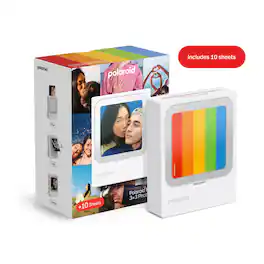
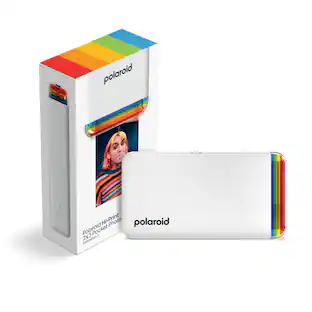
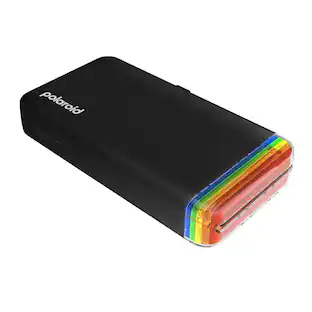
Polaroid - Hi-Print 3x3 Wireless Pocket Photo Printer - +10 Sheets (9196) - White

Model: 009196
SKU: 6675603
Sold byBest Buy

Customers are saying

Customers regard this product highly for its exceptional portability and impressive print quality, making it a convenient choice for users on the go. Many appreciate the intuitive companion app and the practical peel-and-stick design, which enhance the overall user experience. While the device offers seamless Bluetooth connectivity and rapid charging, some users noted that the lack of an included USB-C cable is a minor inconvenience.

Generated by AI based on customer reviews.
Features
  • Print square photos.

    Easily print your phone's photos in square format.

  • Doubles as a photo frame.

    Printer doubles as a photo frame.

  • Personalize prints in the Polaroid Hi-Print App.

    Creatively personalize your prints in the Polaroid Hi-Print App.

  • Square it, share it!

    Share the prints with your friends.

  • Create square 3x3 prints

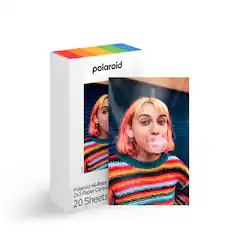
    Print vibrant 3 x 3 in. photos using Polaroid Hi-Print 3x3 Paper Cartridges.

  • Long Lasting Color

  • USB-C rechargeable.

  • Compatible with iOS & Android™

  • Wireless Bluetooth® printing

    Connect wirelessly to the Polaroid Hi-Print app via Bluetooth® to print photos directly from your phone.

See all features
Specifications
  • Networking
    Wireless
    Printer Type
    Printer
    Printer Resolution (Color)
    Not Applicable
Sponsored

Reviews

Rating 4.8 out of 5 stars with 25 reviews

96% would recommend to a friend
Customers are sayingCustomers regard this product highly for its exceptional portability and impressive print quality, making it a convenient choice for users on the go. Many appreciate the intuitive companion app and the practical peel-and-stick design, which enhance the overall user experience. While the device offers seamless Bluetooth connectivity and rapid charging, some users noted that the lack of an included USB-C cable is a minor inconvenience.
This summary was generated by AI based on customer reviews.
  • Portability (22)
  • Print Quality (17)
  • App Features (12)
  • Connectivity (6)
  • Design (6)
  • Included Accessories (4)

Customer Images

The vast majority of our reviews come from verified purchases. Reviews from customers may include My Best Buy members, employees, and Tech Insider Network members (as tagged). Select reviewers may receive discounted products, promotional considerations or entries into drawings for honest, helpful reviews.

  • Rated 5 out of 5 stars

    High Quality Prints with the Polaroid Spin

    This little dye-sublimation printer is fantastic. It’s been years since I had my last one, which had similarly great print quality. It’s just that like many other people, we moved away from standard prints for a while. That said, I’ve always been drawn to the fun, square prints from Polaroid… but their instant cameras always let me down. Even their newest cameras struggle to print anything that isn’t very vintage looking (washed out, muddied). Some people love and want exactly that, but for the rest of us, Polaroid made this awesome little printer. __ Design __ Compact and battery operated, it still feels like it fits the ethos of Polaroid’s spur-of-the-moment instant prints. It’s very easy to throw into a bag and take along to print a new or existing photo from your phone for a friend on the fly. It also sits on a desk well, acting as a cool little frame for the print of your choice when not in use. I love this feature, it’s playful and the industrial design on the printer allows it to be an effective way to keep it handy and top of mind. This design is very straightforward, Polaroid’s signature chromatic strip adorns the top short edge while a simple power button and cartridge bay are easy to manipulate on the long sides. Like mentioned above, keeping it a simple white box allowed it to serve double-duty as a frame as well. __ Ease of Use __ It’s extremely easy to use. I downloaded the dedicated Polaroid printer app and it found my new printer instantly. After a quick firmware update, I could easily pick one of their frame or grid options and pop in a photo from my camera roll. Editing is simple, with familiar cropping and filter options. The app does a great job of showing your end result in a very 1:1 way from start to finish, all the way down to rendering the color passes the printer is doing to your print in real time. My only gripe is that if you don’t like the frame you initially chose, you can’t change it without starting over from scratch, which includes having to hunt down any photo(s) you may have selected, again. Hopefully Polaroid will fix this with an app update soon after release (and provide a recent photo view or similar.) One additional nit is that the options for frames at launch are somewhat limited (about 50-60 styles total, over several categories - sounds like a lot, but doesn’t feel that way.) __ Print Quality __ If you’re unfamiliar, dye-sublimation is a great printing technology to get very professional-quality prints at home. It works by heating up separate layers of ink on film and transferring them to the print over 3-4 passes. The end result is an instant print that’s vibrant, with good color reproduction and sharpness and just as durable as the prints you used to get from the store. Polaroid’s prints from this printer are unique in that they're always square - a perfect size for sharing and placing around the home. I’d choose these over instant camera prints any day. There’s no comparison, these are far superior. __ Overall __ This printer is the first from Polaroid in a while to feel more like a well-thought product for everyone, and less like a toy for niche enthusiasts. Print quality is great, the app works well and very nicely captures the fun of one-button simplicity that Polaroid is known for, even if you have more options at your disposal.

    Posted by Scott S

  • Rated 5 out of 5 stars

    Photo Fun Here

    When I heard about the Polaroid Hi-Print printers, I was intrigued. There are several sizes of this diminutive photo printer, and this one produces 3X3 square prints. The thing is tiny. It is about the thickness of a paperback book, but not even as tall as my larger iPhone. It is a sleek monolithic device with almost no visible controls and openings other than an on and off switch, a USB-C port for charging and a slot on the top where your prints emerge. There is a plexiglass frame built into the front surface where you can display your favorite prints. What can it print? Any photos you have stored on the phone or in the cloud. through iCloud or Google Photos available to your device- whether taken 30 seconds ago or years in the past. The Hi-Print Photo app connects with the printer via Bluetooth. You must first charge the battery on the printer and download the latest firmware for proper operation. The download was quickly accomplished. Although not apparent at first blush, there is a side door on the printer that opens to allow installation of your print cartridge which holds 10 sheets. You just slide it in and shut the door. Using the software, you select the picture you want to print. You can then crop it and adjust the image as you please (or as you would with any other photo you were editing on your smartphone) by changing brightness, contrast, saturation and so forth to get the look you want. Then you press the print button. The print goes through several passes and partially emerges from the slot on the top of the printer on each pass. The technology is called dye-sublimation. The whole process takes less than a minute. To my eyes, this Polaroid produces prints of excellent quality, limited only by the source material you feed it. I was about to print a photo and got a a warning from the software that I might be disappointed with the results because the resolution of the photo was too low. Indeed, I remembered that the particular picture had been digitally zoomed in to fill the frame after I had snapped it on my smartphone. We are about to take a family trip in several weeks, and this printer will accompany us. It is simple and fun to use and produces quick prints that are instantly exchangeable among family members. A package of cartridges holding 30 sheets for printing runs about twenty five dollars, so each print will cost about 84 cents. Not cheap, but well worth the cost for the convenience and fun this printer offers. I highly recommend it.

    Posted by mobilelawyer

  • Rated 5 out of 5 stars

    Fun way to share memories

    This adorable Polaroid printer is so fun to use! It’s a bit of old school meets smart phone fun! Set up and pairing to my iPhone was very fast and easy. Charging the printer with a usb-c cable was quick (cable not included). The instructions are basic in the box are basic, but get you where you need to be ready to print pictures. Download the free Polaroid Hi-print app from your devices App Store and get ready to have a some fun. The printer comes with a 10 photo cartridge included in the box, which is a good start. (The replacement cartridges have 30 photo pages in those.) The pages are really nice sized 3x3 photos. I really enjoyed printing out some of my favorite pictures to put at my desk at work! I think there could be a few more frames and collage styles in the app, but there are enough to help create some cute visuals. The Polaroid photo printer does a really great job and the quality of prints are drastically better than an inkjet photo printer. The printer does a four stage print sequence of yellow, magenta, cyan, and then a protective layer. I’m not gonna lie, it is such odd therapy and a joy to watch the photos print. When they are done there is a little white strip at the bottom that makes it look like an old school Polaroid picture. The white strip is removable to give you a nice clean 3x3 photo keepsake, or fun little gift for someone else. I have a blast finding some of my favorite picture on my phone to print and have on my desk at work and to share with some of my favorite people. When the Polaroid printer is not in use and not charging, you can stand it up and use it as a photo frame which is a cute bonus! If you want a fun photo printer that doesn’t take up much space, this is it.

    Posted by CAPNDigital

  • Rated 5 out of 5 stars

    Easy to use with good print quality

    Polaroid hit a home run with this pocket-sized printer! I honestly thought that print quality would just be okay but nothing great. I'm glad I was 100% wrong and the print quality is actually really good! Setup was very easy, just download the Polaroid Hi-Print app and insert the printer paper cartridge. Then turn on the printer and have the app search for the printer. Once its setup for the first time I should remember the printer and auto connect whenever the printer is on. The app comes with some preloaded frames, a journaling collection, and collage templates. Just select the one you want to use, add your photo from your gallery or take a new one with your camera and click print. Once you add a photo you can also use the app to crop, add filters, FX effects, blur, or make adjustments. The app has pretty much everything you need to make some easy or fun edits before printing. The whole printing process takes about 30-40 seconds. The printer will first print a yellow layer, then magenta, then cyan, lastly it will put a protective cover on the photo. I'm assuming that there is no physical ink cartridge and it all relies on the paper that is used for printing. I like that I can easily print out some photos from my phone and use them to decorate my office, or easily give a photo to family members. I think it would be fun to travel with this little device and use it for group pictures so everyone can leave with a memento of the vacation!

    Posted by apalmo

  • Rated 5 out of 5 stars

    Tiny Printer, Big Memories 📷

    I couldn’t wait to get my hands on the Polaroid Hi-Print printer! I have thousands of photos on my phone, and for some reason I always put off printing them. Not anymore! The Polaroid Hi-Print makes it incredibly easy to print photos directly from your phone. To get started, you just download the app, which is user-friendly and straightforward. It also has fun customization options for your prints. The printing process is quick you’ll have your photo in less than 30 seconds. The film cartridges come with only 10 sheets, so I recommend buying the bundle packs since they’re a better value. I was really impressed with the print quality. Just keep in mind that low-resolution photos may not print, so you may need to improve the image quality before printing. The printer is compact enough to fit almost anywhere. One thing to note is that it doesn’t come with a charging cable, but it works with any USB-C cable. I also love that the printer doubles as a photo display when you’re not using it. This printer is perfect for scrapbooking, journaling, decorating, or creating fun memories with the kiddos. Overall, it’s a fun, convenient, and easy way to finally get those favorite photos off your phone and into your hands!

    Posted by Ivette0930

Compare similar products

Polaroid - Hi-Print 3x3 Wireless Pocket Photo Printer - +10 Sheets (9196) - White
4.8(25)

Your best moments deserve more than pixels. With the Polaroid Hi-Print 3×3 Photo Printer, turn your favorite shots into high-quality square prints: perfect for journaling, decorating your space, or sharing with friends. The printer even doubles as a frame, so you can display your latest favorite snap right on the device. Plus, personalize each print with templates, stickers, memes, and more through the Polaroid Hi-Print App. Get started straight away with everything you need to make 10 prints. Only compatible with Polaroid Hi-Print 3×3 Paper Cartridge. ​

Fujifilm - instax SQUARE Link Smartphone Printer - Midnight Green
5.0(21)

Expand your vision with the Instax Square Link Smartphone Printer with Bluetooth capabilities that not only fascinates - it connects you to your friends and family with the Instax Connect App feature. Using the free downloadable Square Link app easily share Instax Square images digitally from your Smartphone.
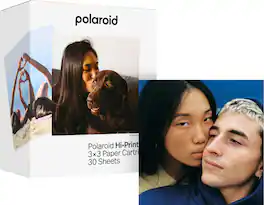
Polaroid - Hi-Print 3x3 Paper Cartridge - 30 Sheets (6646) - White

Print pixels to life. Turn your phone's photos into high-quality square prints that are perfect for journaling, decorating your space, or sharing with friends. Get 3 individually wrapped all-in-one cartridges for your Polaroid Hi-Print 3x3 Pocket Photo Printer, for 30 ready-to-print square sheets of photo paper.
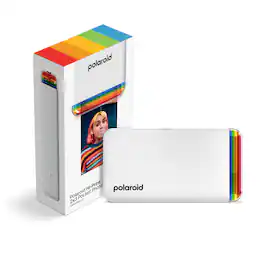
Polaroid - Hi-Print 2x3 Pocket Generation 2 Photo Printer - White
4.5(40)

Memories hit harder when they stick. With the Polaroid Hi-Print 2×3, it’s easy. The pocket-sized Bluetooth® printer turns your phone’s shots into high-quality prints that you can peel, stick, and share. Plus, get extra creative with the Polaroid Hi Print App: personalize your prints with frames, templates, memes, and more. Only compatible with Polaroid Hi-Print 2×3 Paper Cartridge

Pros for Polaroid - Hi-Print 3x3 Wireless Pocket Photo Printer - +10 Sheets (9196) - White
Print Quality, Portability, App Features, Connectivity, DesignEase of Use, Photo Quality, Overall PerformanceThere were no pros for this productPrint Quality, Ease of Use
Cons for Polaroid - Hi-Print 3x3 Wireless Pocket Photo Printer - +10 Sheets (9196) - White
Included AccessoriesThere were no cons for this productThere were no cons for this productThere were no cons for this product

Specs

Be the first to ask a question.

We’ll try to get your question answered within 24 hours by a Best Buy customer or brand representative.

No content
Sponsored

Finance Options

My Best Buy® Credit Card
Buy Now, Pay Later

Finance Options

My Best Buy® Credit Card
Buy Now, Pay Later