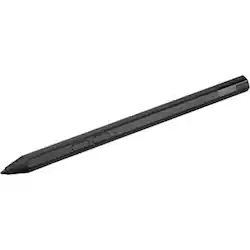
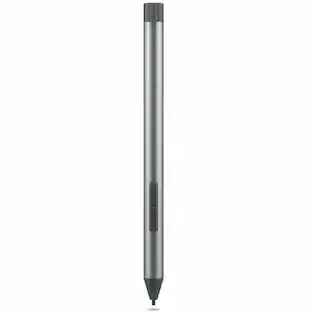
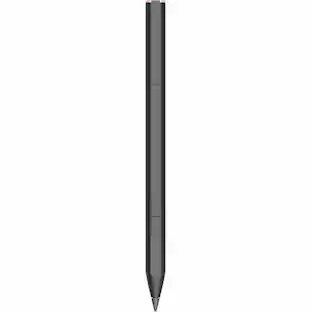
Precision Pen 2 (Laptop) - Lenovo Precision Pen 2 (Laptop) - Black
- Key Specs
- Model Compatibility: Lenovo
- General
- Brand: Lenovo
- Product Name: Lenovo Precision Pen 2 (Laptop) - Lenovo Precision Pen 2 (Laptop)
- Color: Black
- Compatibility
- Brand Compatibility: Lenovo
- Model Compatibility: Lenovo
- Features
- Replaceable Stylus Tip: true
- Dimensions
- Product Length: 9.685 inches (The out of box length of the item. Length is measured as the longest dimension of the item.)
- Product Diameter: 0.4 inches (The out of box diameter of the item, measured as a straight line passing from side to side of the item, through its center.)
- Product Weight: 0.24 ounces (The out of box weight of the item.)
- Warranty
- Warranty - Parts: Stylus Pen Tether
- Warranty - Labor: 1 year limited
- Other
- UPC: 195892053316
For those who need a versatile stylus to interact with designs, artwork, or documents, the Lenovo Precision Pen 2 (Laptop) is a welcome companion. With 4,096 levels of pressure sensitivity, traditional pens and pencils are no comparison. Plus with advanced tilt recognition, sketching and shading feel unbelievably natural and lifelike. Add up to 246 hours of battery life and two programmable buttons and you've got limitless creativity between your fingers
- Lenovo Precision Pen 2 (Laptop) - Lenovo Precision Pen 2: For those who need a versatile stylus to interact with designs, artwork, or documents, the Lenovo Precision Pen 2 (Laptop) is a welcome companion. With 4,096 levels of pressure sensitivity, traditional pens and pencils are no comparison. Plus with advanced tilt recognition, sketching and shading feel unbelievably natural and lifelike. Add up to 246 hours of battery life and two programmable buttons and you've got limitless creativity
A: undefined
A: Hey NAnderson, We're sorry to hear that your system missed a pen in the open-box unit. Lenovo Digital Pen 2 is compatible with the Yoga you mentioned, not this pen, the Precision Pen 2. We recommend, for the best experience, to use the Lenovo Yoga Pen that's designed for the system to enable the magnet pen attach, pen recharge, and better overall pen performance. Please feel free to reach out to us with any other questions!
Q: Does this work with lenovo Slim 7i 14 OLED Touchscreen
A: Hey KimberlyT, This pen will not work with Lenovo laptops that are not 2-in-1 devices, like the Slim 7i 14. Please feel free to reach out to us with any other questions!
Q: does pen work with Lenovo yoga 7 i 2 in 1 laptop
A: Hey kid, This Precision Pen 2 should work with the Yoga 7i 2-in-1 laptops, along with the Digital Pen 2 that's currently offered by Best Buy, which can be viewed here: https://www.bestbuy.com/product/lenovo-digital-pen-2-gray/JJGCYLHP39 | Please feel free to reach out to us with any other questions!
Q: Does this pen work with Lenovo Yoga ultra 9 laptop (Yoga Pro 9)? if yes, how can we pair it?
A: Hey Bill, The Yoga Pro 9 does not support pen input. Please feel free to reach out to us with any other questions!
A: Hey, We're sorry to hear that your pen has fallen short for you. The Precision Pen input devices are intended for Lenovo 2-in-1 laptops specifically. We wish to note that the Lenovo Tab Pen Plus is designed to deliver the highest pen experience for the entry level, Android Lenovo tablets. This problem could be a combination of outdated, ZUI software on your M11, as well as connectivity troubles with your Pen Plus. We recommend ensuring your tab is updated both with Android OS updates and Lenovo Zen UI updates, along with restarting your system after updates are applied to see if this improves your experience. Please feel free to reach out to us with any other questions!
Q: Can I use pen from a distance
A: undefined
People also viewed







Today's top picks
 $69.99The price was $99.00