Rating 3.8 out of 5 stars with 208 reviews
3.8- GPS (48)
- Screen Size (21)
- Ease of use (19)
- Sound Quality (11)
- Navigation (10)
- Battery Life (5)
- Startup Time (3)
- Weight (3)
Customer Images
The vast majority of our reviews come from verified purchases. Reviews from customers may include My Best Buy members, employees, and Tech Insider Network members (as tagged). Select reviewers may receive discounted products, promotional considerations or entries into drawings for honest, helpful reviews.
- Rated 4 out of 5 stars
Turn any car into a Hi-Tech Car
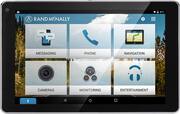
The Overdryve tablet is packaged very well. All the components are separated and protected. There is foam inserts to keep the tablet and the screen protected. In the box is the Overdryve tablet, Smart mount, bracket with suction cup, Car charger, USB Wall Charger, Dash mount disc, FM transmitter Antenna, AUX cable, and even an anti-glare screen protector which is nice. The mount is very easy to install, but you need to decide where you want it. In my case I have a velour dash mat so it wouldn't stick there, but thankfully they sell an optional Bean bag dash pad. It weighs about 2 pounds and the the dash mount fits right onto it. And it stays in place due to its weight. The Bean bag dash pad is optional and isn't included. Anyway for the install you just have to attach the 2 pieces of the mount together, then remove the film that covers the suction cup and secure it to the pad. Once you have the mount all installed and ready the tablet just locks into place via a magnetic connection. It self aligns and snaps into place with ease. I was surprised at how well it aligned. I didn't even have to look close to make sure it was in the right place. The strength of the magnets force it into perfect alignment. The tablets initial set up is also easy. There are 4 easy steps to get it going. 1) Connect to the internet. For me this was connecting to my T-Mobile Galaxy S7's hot spot. 2) Register the device. This allows you to get updates and support. 3) Connect to Bluetooth. Again I did this by connecting to my S7's Bluetooth connection. 4) Connect to the car stereo. There are 2 ways to do this. The recommended way is using the included AUX cable, but of course this depends on if you car has an AUX port. In my case I have a 2012 Honda Civic that as an AUX port. You connect the AUX cable to the Smart mount not the tablets input. But if your car does not have an AUX port you can connect through your cars FM stereo. To do this you connect the included FM antenna to the Smart mount. You then tap “Entertainment” on the screen, then “FM transmitter”. It will walk you through the connection steps. Its basically just choosing an open FM station, then connecting the Overdryve to that same station. That's it. You are now done with the initial set up and ready to go. The main screen has 6 options. Messaging, Phone, Navigation, Cameras, Monitoring, and Entertainment. I was able to test most of these. The only one I didn't test was monitoring because it requires another optional item to monitor the air pressure in your tires and a few other things. However I was able to make and receive calls and texts, test the Navigation, as well as play music via Bluetooth from my phone (you can also use an SD card with music files on it. They all worked but I had an issue with static that came through my cars speakers whenever I used the AUX cable. There was a constant static when there was no audio coming through. This went away almost completely when I was playing music or during calls. Im not sure if this was the cable, or my car. This didn't happen if I used the FM transmitter connection type. The Navigation worked very well. After connecting through my phone I was able to get the Overdryve's navigation app working, and transmitting audio through my cars speakers. Its a nice system with points of interest, exits, split screen junction, and built in maps. Which is nice since you don't have to worry about data that way. If you are connected to Wi-Fi you also have live features such as traffic, pit stops, etc. I also tested the voice assistant features. Since I am using a Samsung device the first time I used it it asked if I wanted to use Google Voice, or S Voice. I chose Google voice. All the normal Google voice features worked but there was about a 2 second delay when I would say something before it would recognize it, then a couple more seconds to respond. I'm sure this will all depend on the strength of the Bluetooth connection. You can also buy an optional wireless backup camera that can give you the backup view right onto the Overdryve's screen. And since it is wireless you don't have to worry about running wires all the way to the back of your car, or paying someone to do it. Its as simple as mounting the camera to the back of your car and connecting it to the Overdryve. I didn't have this option, but just wanted to mention it for anyone wanting reverse camera features. So to sum it up this device does everything it says it does and does it well. If your looking for a Hi-Tech car this is a much easier and less expensive way to go vs. buying a whole new car. Thank you for reading.
Posted by Nate34
- Rated 3 out of 5 stars
Good Product....BUT
I purchased this unit for many reasons but it came apparent that once mounted on the gel pad this was not going to work. It was heavy, and bounced around a lot. Could figure out how keep the map while still taking video while traveled down the road. That was one reason I purchased the unit was for protection against being sued in an accident...
Posted by Sonny
- Rated 5 out of 5 stars
Bring any car to the 21st century and a Powerful G
First, I always have to comment on the packaging, a lot can be said about the way a company packages their products. The Rand McNally Overdryve arrived in a great box, everything was safely separated and covered for maximum protection. Once I unboxed the unit, I looked at the booklets and noticed Rand McNally supplies a anti-glare screen protector. I proceeded to install it, and it went on with ease, very high quality. Now it was time to dive into the tablet. It was sent with 60% battery which was nice, I was able to set it up fully without plugging it in. The tablet asks you to connect to wifi, register, which is painless, and asks for no credit card info, which I like. Next I had to connect my phone via Bluetooth and accept some prompts that it was ok to read contacts and messages. After that, I set the audio output to AUX and was all done. Now, that I have a working setup, I started out by going through the easy to navigate menu and settings. It runs off Android, which is all I use, so nothing new for myself, but anyone will be fine. There is two screens on the front pages, Overdryve’s main page and a separate app page. There is still the traditional Android app drawer as well. It comes with installed apps for music and what I really was happy with, the Navigation. First off, the navigation is the best I have ever seen, better than any competitor out there I have used, period. I took it in the car and hooked it up to the supplied mount with the GPS antenna and went for a drive. The GPS is just spot on, I know without data, it is going to get me where I want. I took wrong turns on purpose and it changed my route faster than any other GPS unit I have used. If you want a great GPS unit and that's it, this is still a great unit. The GPS was scary spot on, it have to be within 10 inches, I have never seen a unit that perfect. Next, the dash cam was tried out. You can record in HD quality, with or without sound. It has a 5mp camera and it works very well in daylight. Night time is great in lit areas, but in dark areas it is decent, it is just a tablet camera. I have included a short video with my review(only can be viewed by this link https://youtu.be/F9E8QZi6zLs) of what it looks like during my ride home. I did not have the backup camera to try with the unit, I wish I did, I will be looking into it in the future as an add on for my other car. The built in phone and messaging apps worked as they should. I was able to read messages and respond via voice recognition. All the buttons are large and easy to read and hit so you can do it fast and keep your eyes on the road. The voice button is on the lower left corner for easy access and keeping your reach to a minimum. The bluetooth audio app works great via the AUX cord. The app displays the song and artist information very large and has big buttons to skip back, forward, and pause. Sound quality is great when used with the AUX cord. When switched to the FM Modulator, it cut down sound quality and max volume to about 60%, which made it hard to hear with the windows open. Also, the built in speaker was surprisingly loud. I tried it with music and a phone call, I had zero issues hearing the person I was talking to, I am very impressed. The points of interest seemed to work well once you setup a travel plan in the app, without, it kept asking for a wifi connection. This is one area where I felt they fell short. The unit would be great if you could slip in a sim card and have its own supplied data, instead of having to hit a wifi hotspot or using your phone. The travel planner also works well, you can set up an entire trip and where you want to stop and it will adjust your routes accordingly. You can add stops for many categories, from amusement parks to sports, to shopping, it's all there. The monitoring app is useful from what I can tell, I did not have the tire monitor setup to test, which I plan to add for my other car. For the performance section, it uses one of the best softwares in the industry, Dash Command, which is a well known name and just works, simple as that. The unit comes with a 10 minute trial and for $10, it unlocks it. You can have live performance results, use it as a code reader, and more. I have a OBD2 Bluetooth dongle already, so I gave the 10 minutes a whirl in my wife’s 2009 Traverse. It worked great for what I had time to use it for, so I plan to pay the $10 to unlock it. Now, to say some techy stuff that some will care about. The Overdryve does not include google play services on it. You cannot download apps from the play store, I did not like this personally but it does make the battery last forever, as google services do drain batteries fast. You must use one of the three app services Rand McNally recommends. I chose to download Amazon Apps. What is weird, some apps would work and some refused to install. I tried downloading the Gas Buddy app, which helps find the cheapest gas in the area you are in, needing data to do so, but it would not install. Overall, the Overdryve’s setup is one to look at, especially in a car without any of these features. I would highly recommend the unit to anyone wanting to bring their hot rod project into the 21st century without cutting their dash up, they would benefit so much from this unit. I plan on running this unit in my 1996 Camaro once I have it back on the road. I give the unit a 4.5 out of 5. The reason it is not a 5 is no built in data and not being able to download Google Play apps or having apps not install. I highly recommend the Overdryve to anyone wanting to bring their car up to date or just having a very powerful GPS.
Posted by ElectronicJunkie
- Rated 5 out of 5 stars
Overdryve Overachieves
The Rand McNally Overdryve 7 is a very strange and unique device. This device allows you the turn any car into a "connected car." There are so many features packed into this little device its not even funny. There is many things to break down with the Overdryve 7 but I will try my best to be brief which may be very hard to do... The Presentation: The black box is great very clear label brightly calling to you. Everything on the box makes it clear what the device is letting you know what it can do from every single feature. I applaud Rand McNally for being direct and to the point. Once you open the box you are greeted with most of the manuals and a quick start guide showing you how to set things up and of course all of the box contents. Rand McNally was kind enough to even drop a free screen protector inside for the "tablet" itself, THANK YOU! This is something most companies don't do. (Note: I used a iPhone 6 Plus and a Galaxy S6 Edge Plus on the device for Bluetooth Pairing.) Design: To me the Overdryve design is more of a 7 inch GPS then a basic tablet, Which lets be real here its nothing pretty. The tablet itself is small and compact but it feels extremely durable as well as weighted. I'm sure if you drop this on the ground nothing will break. There is grip material on the back that keeps it solid in the hand. Whats interesting is there are many speaker grills on the back. The sound from the Overdryve is down right phenomenal, You can hear this thing from so far away. People in the backseat will indeed be able to hear everything just from the tablet itself (I will talk about the sound more later.) There are a number of ports on the device for connection such as HDMI, USB, and Headphone jack. There is also a Micro SD slot to add even more storage (Love this feature personally because you can continuously record from the "dash cam.") The screen is 1280 x 800 which is not that bad to look at on the 7 inch device. Everything is readable and clear. Installation: Easy. There isn't much to be said. My review unit came with an coupon for installation for Best buy's Geek Squad but its surely wasn't needed. Its as simple as just placing the base down with the suction cups and connecting the ports. It isn't much to be done. Again you can use an AUX cord for the speakers, Use the speaker base, or use a radio station (which I do) to hear the device audio. They also sell an optional "Creascent beanbag dash pad." which securely hold the Overdryve in place. with the tablet being 7 inches it doesn't take up your flied of view when driving. Tablet OS (features): The OS is designed around driving but ultimately its Android no matter how you skin it. The Tablet / GPS is smooth when using with no slow downs or hiccups but you aren't doing much anyway. Lets get one thing out of the way, there is NO GOOGLE PLAY on this device, which means there is NO GOOGLE APPS INSTALLED. Instead what McNally have instead a place where you can get apps from with options of the app store. The best out of the bunch is clearly Amazon App store where you can download other / more apps and I highly recommend doing that. Another note, the device uses Nvidia chipset so also keep that in mind. The widget that sits on the first home screen is where the car features come in. Messaging - You can send messages with your voice without taking your hand off the steering wheel. I'm going to keep this short and sweet. The feature worked fine but you must speak clearly and loud for it to be flawless. Yes it worked with iOS just in a different way. Due to a limitation on iOS Apple requires you to Siri to send text...so all Overdryve does is activate Siri for messages. Please take note of that. Phone - Use any smartphone with Bluetooth you have. One of the best feature of the tablet and the calls was very clear coming from the device. It syncs your contacts so you don't have to input anything into the device. Maps / Navigation - Yep the maps are spot on and accurate want to know the best part? (and probably the main reason you are buying this device.) YOU DON'T NEED AN INTERNET CONNECTION to use it! I can't tell you how much I appreciate a dedicated GPS with the maps built in. They use "here" maps and its own data so everything is already perfect as far as accuracy. But as usual there is a little bit lag when using the maps application. The Smart Mount improves the GPS signal with the pin connectors on the back of the device you can reassure you will never get lost on the road and from my experiences it does the job. Remember none of the device have to be on a internet connection. Camera* - Uses the camera on the back of the tablet to record whats in front of you. It's pretty much a dash camera. The camera isn't of good quality but for what its suppose to do its awesome. and to have it on the device just make your life easier if an accident occurs. Monitoring* - Untested. *Rand McNally sells an optional Wifi Backup camera and Tire Pressure Monitoring System. Which I was unable to test since it was not supplied. Entertainment - You have a "Bluetooth player" which plays music from your smartphone, "Media" that you can put music on an SD card, and "FM Transmitter" which pushes sound from an FM station you set it to. Since its Android you can Sideload apps such as Netflix, Hulu, Spotify and so on for kids int he backset if you so choose. I side loaded Apple Music on to the device and it played pretty well. Not much outside of these features but for a connected car GPS tablet these features are great when used on the tablet. I wouldn't recommend playing any android games on this and it shouldn't even be thought. Sound: The sound on the Overdryve is amazing. Everything and I mean everything is loud and clear. There are many speakers on the back of tablet itself but the real shining star here is the smart dock. The speakers on the smart dock are extremely powerful where you can hear the conversation while driving with the window open. Rand McNally was smart to include the smart dock and all of its packed in features. Without this Overdryve wouldn't be even half as good as a product that it is. That's pretty much it as far as the Overdryve goes. Its not much here and that is a good thing. Overdryve is made for the cars and it excel at it. Sure they say you can use it as a standalone tablet but I personally wouldn't but as a device to turn your car into a connected car it does the job pretty well. I would certainly recommend it to people who don't have a connected car.
Posted by CrysisComplex
- Rated 5 out of 5 stars
An Awesome GPS/Dash/Tablet For Serious Travelers
Two days after I received my Rand Mc Nally OverDryve I took a car trip, which lasted 4 days to include stops at motels for 3 nights. I was excited to take my brand new, complimentary, OverDryve along and was completely surprised at all of its numerous features and how it astonishingly performed. I have had other expensive, major brand, GPS' units before with lots of 'whistles and bells', but this unit stands out as the most multi-functional and feature packed. Working just as a car GPS, OverDryve can be completely wireless operating from a full charge, thereby, eliminating the DC charger cord for most of my trip. It has an external antenna to enhance GPS reception, and, it is also an FM transmitter, which enables sound from the OverDryve to my car's radio for audible phone calls, music services, lane guidance, and other navigation assistance. The FM transmitter is a great feature, which also eliminates the use of another cord, an auxiliary sound cord. I drove approximately seven hours with no cords dangling out of my OverDryve before I finally needed to use the DC car charger. OverDryve notified me when my battery had only fifteen per cent left. Then, the unit automatically goes into 'battery saver' mode until it is connected to a DC or AC power source for recharging. Each day I drove approximately ten hours, and, eventually had to use the charger cord. But, since the majority of my car trips are usually five or less hours of driving time, I will rarely have cords draped over my dashboard. Look Ma, no cords. How cool is that? Now, I do need to explain that I did not use the Dash Cam feature, which requires more power then the way I configured my OverDryve to operate. The dash cam can be set-up to take high or low quality videos. The videos can be taken and saved in incremental segments from 1 to 10 minutes each for a maximum total of 15 segments. Total recording saved by dash cam is 2 hours and 30 minutes. The videos can include sound if you wish, and, can be stored internally, and, or, externally with a microSD card (up to 32GB), microUSB plugin, or USB auxiliary hard drive. Collision warning can be enabled in the collision warning settings in the 'cameras' widget on the home page. Not furnished is tire monitoring and back-up camera, but they can be purchased separately if needed and programmed for use through the 'monitoring' widget on the home screen. OverDryve contains all the maps of the US and Canada on board. Notable navigation features are the audible assistance for advanced lane guidance, turns, multiple map views, with split-screen junction view, interstate exits. Of course it displays trip information like total distance to destination, ETA, the current time, speed limits, your current speed, speed warnings, which you can adjust to suit your driving habits, POIs that are both nearby and along your trip, searchable categories for restaurants, gas stations, shopping, hotel & motels, government buildings, and numerous other categories, etc. You can also access live data to include fuel prices, weather, and traffic conditions. However, any live data category is only accessible through Wi-Fi. I connected my OverDryve to my I-Phone's 'Personal Hotspot' to find current gas prices and weather conditions in the areas I was traveling through on my trip. But, only used that feature sparingly. OverDryve is totally 'hands free' utilizing its on-board, Voice Assistant feature. It was simple to pair my I-Phone to the OverDryve through Bluetooth, and, Siri, made phone calls and sent text messages using my normal voice commands. My phone's contacts were displayed in the OverDryve, and, I designated my most frequent callers as 'favorites' in those settings. Rand Mc Nally OverDryve comes neatly packaged with its own car charger, A/C wall charger, smart mount, suction cup bracket, dash mount disk, FM transmitter/receiver antenna, auxiliary device cable, anti-glare screen protector, and a crescent beanbag dash pad. It also includes a “Quick Start Guide' to get you started. In 'settings' on the main home screen I accessed the Help Icon and It opened up my browser to the Rand Mc Nally OverDryve Support page. I found lots of tips and answers to some of my questions. I found it was easy to set-up and get familiar with OverDryve connected to my home's Wi-Fi first, and, then connect to my I-Phone's 'Personal Hotspot' for my actual trip. On my trip I played music from my I-Phone paired to OverDryve through Bluetooth to my car's stereo system. I can also play music or audiobooks from a microUSB, or, microSD card directly in OverDryve. It was at the motel the first night of my trip that I found out just how multi-functional and unique the OverDryve actually is. . This is the most impressive attribute about OverDryve – it is a thorough and accurate GPS, entertainment and communication device, but, also a tablet, which can substitute for a laptop, notebook, or I-Pad on trips. Take it along on a trip and remove it from its magnetic smart base on the car dashboard and bring it in to the motel room for use as a full-featured tablet. Although I brought my laptop with me, I never had to use it. The OverDryve as a Car-Dash Tablet did everything I wanted and needed to do instead. It has an Android browser, which allowed me to access the internet and I downloaded several apps from the thousands of available Android apps. There are games, productivity software, entertainment, news and sports, apps that can be downloaded through any Android app store like Amazon or APKPure, etc. I set-up my e-mail account, my favorite bookmarks for news and market reports, for shopping, and motel bookings. I even made a motel reservation on the OverDryve for the next night stay of my trip. And, since I was connected to Wi-Fi at the motel I checked out all of the nearby restaurants in the area too. WooHoo. As a tablet OverDryve features a 7 inch widescreen, 1280 x 800 resolution and 32 GB of storage. It is powered by a NIVIDIA Tegra 4, T40S CPU with a maximum clock speed of 1.70 GHz. and has 4 cores, which results in extremely efficient multi-tasking when compared to dual core processors. The tablet has dual microphones with noise canceling qualities for specific use in the car. The resolution and quality of the both cameras can be changed at any time in the settings in the 'cameras' widget on the home screen. It has a front facing camera of 2 megapixels, which also allows you to reverse the camera to the back and take stills in 2 down to 1 megapixels, or video, front or back, in HD 720P down to SD 480. The rear facing camera is 5 megapixels and can take stills in 5 down to 1 megapixels, or video in HD 1080P down to SD 480P. The OS is an Android 5.1 (Lollipop). It has a group of proprietary Rand Mc Nally apps as well as the flexibility to customize OverDryve and download thousands of Android apps. There is not another device on the market with as many awesome properties as is built into this Rand Mc Nally OverDryve. It is truly designed for serious travelers and combines two necessary devices, GPS and Tablet, for driving trips. I love it and highly recommend it for your own personal use, or, as a gift for a friend or family member, who is 'on the road' frequently.
Posted by pauldar