Cyber Monday is hereEnds Tomorrow.Shop now

Main Content

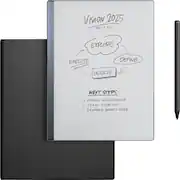
reMarkable - 2 - 10.3” Paper Tablet with Marker Plus and Premium Leather Book Folio - Black

Model: RM115/RM115M
SKU: 6523389
Cyber Monday Deal
Cyber Monday Deal
$599.00
Save $70
Comp. Value: $599.00
or
$29.39/mo.
suggested payments with18-Month Financing
Show me how
Finance OptionsView your offers
Special OffersOn related products
Availability
Fulfillment Options
Available for pickup today at a nearby store
Order now for pickup on Wed, Dec 3 at
Act fast - Only 3 left at nearby store!
Sold by Best Buy
Specifications
  • Screen Size
    10.3 inches
    Active Area
    10.2
    Total Storage Capacity
    8 gigabytes
    Battery Chemistry
    Lithium-ion
  • Key Specs
    • Screen Size: 10.3 inches (Size of the screen, measured diagonally from corner to corner.)
    • Active Area: 10.2 (The size of the screen area that a user interacts with, either by stylus and/or touch (if supported).)
    • Total Storage Capacity: 8 gigabytes
    • Battery Chemistry: Lithium-ion
  • General
    • Brand: reMarkable
    • Model Number: RM115/RM115M
    • Product Name: reMarkable 2 - 10.3” Paper Tablet with Marker Plus and Premium Leather Book Folio
    • Color: Black
    • Model Family: reMarkable 2
    • Year of Release: 2022
  • Display
    • Screen Size: 10.3 inches (Size of the screen, measured diagonally from corner to corner.)
    • Active Area: 10.2 (The size of the screen area that a user interacts with, either by stylus and/or touch (if supported).)
  • Storage
    • Total Storage Capacity: 8 gigabytes
  • Compatibility
    • System Requirements: Wifi (The software that a product must have for it to be able to integrate with another product.)
  • Connectivity
    • Interface(s): USB-C (Refers to the types of connections that devices use to interact and communicate with each other.)
  • Power
    • Charging Interface(s): USB-C (The connection for transmitting power to charge the device.)
    • Battery Chemistry: Lithium-ion
  • Dimensions
    • Product Height: 0.19 inches (The out of box height of the item. Height is measured as the vertical distance from the bottom of the item to the top as it would be primarily used or placed.)
    • Product Width: 7.4 inches (The out of box width of the item. Width is measured as the horizontal distance from one side of the item to the other as it would be primarily used or placed.)
    • Product Depth: 0.19 inches (The out of box depth of the item. Depth is measured as the distance from the front of the item to the back as it would be primarily used or placed.)
    • Product Weight: 1.05 ounces (The out of box weight of the item.)
  • Certifications Listings & Approvals
    • ENERGY STAR Certified: false (Devices carrying the ENERGY STAR service mark, such as computer products and peripherals, kitchen appliances, and other products, generally use 20% to 30% less energy than required by federal standards.)
  • Included
    • Stylus Included: true
  • Warranty
    • Warranty - Parts: 1 year
    • Warranty - Labor: 1 year
  • Other
    • UPC: 7090045251218

Replace all your notebooks and documents with a tablet that feels just like paper. Experience paper-like writing and reading on our thinnest and lightest design.

  • The Original Paper Tablet: Meet the paper tablet that redefines note-taking, reading, and reviewing documents, with a paper-like writing experience.
  • Designed To Help You Focus: Distraction-free by design. No notifications, pop-up ads, or social media. Just you and your thoughts, so you can find the focus to do your best work.
  • All Your Notes, Organized: Keep all your handwritten notes, to-do lists, PDFs, ebooks, and sketches organized and in one place — easily accessible on multiple devices and platforms.
  • Mobile And Desktop Note-Taking: Create, edit, and organize notes from your smartphone or laptop with the reMarkable apps. Build the workflow that works for you. Enjoy seamless note-taking across devices with unlimited cloud storage and sync with a Connect subscription.
  • Handwriting Conversion: Make your handwritten notes easy to reuse by converting them into typed text. You can then refine or expand your converted notes with the Type Folio keyboard cover (sold separately), upload them to cloud storage services, or send by email to share them instantly.
  • Google Drive, Dropbox, And OneDrive Integration: Access popular cloud storage services right from your paper tablet to improve your workflow. Browse stored files, copy them to your reMarkable, and upload documents directly to your chosen service.
  • Take Notes Directly On PDFs: Read and review reports and presentations on an eye-friendly display, and write your thoughts directly onto the page. Signing PDFs and annotating documents has never been easier.
  • Send Content To Your reMarkable: Save any web page, Microsoft Word document, or PowerPoint presentation to your paper tablet for when you have time to focus and read in-depth. All it takes is a click with our Read on reMarkable extension.
  • Share Your Screen Live: Stream your notes and ideas directly onto a bigger screen. Turn your reMarkable into the perfect digital whiteboard to write, draw, and demonstrate tricky concepts live in meetings.
  • An Eye-Friendly Reading Experience: With no backlight or glare, reMarkable lets you comfortably read PDFs and ebooks for hours on end. Get a paper-like reading experience without the need to print a page.
  • Two Weeks Of Battery Life: With up to two weeks of battery life and 90 days of standby time, reMarkable is always ready to come out of your bag and get to work.
  • Marker Plus: An exceptional digital writing instrument with a built-in eraser. Simply flip it upside down to erase, just like a regular pencil. Marker Plus is indispensable to reMarkable’s paper-like experience.
  • Book Folio: Smart and functional protection for your paper tablet. Book Folio is made from premium leather that ages beautifully over time. Built-in magnets snap your reMarkable in place so that you can keep it in its cover while you work.
  • Connect Subscription: All new Connect subscribers get a 100-day free trial. At the end of the free trial, the subscription automatically renews until cancelled. The current price is $4.99/mo to maintain all your work safely stored, up to date, and ready to use on your paper tablet and in our mobile and desktop apps. Cancel anytime.
  • The Original Paper Tablet: Meet the paper tablet that redefines note-taking, reading, and reviewing documents, with a paper-like writing experience.
  • Designed To Help You Focus: Distraction-free by design. No notifications, pop-up ads, or social media. Just you and your thoughts, so you can find the focus to do your best work.
  • All Your Notes, Organized: Keep all your handwritten notes, to-do lists, PDFs, ebooks, and sketches organized and in one place — easily accessible on multiple devices and platforms.
  • Mobile And Desktop Note-Taking: Create, edit, and organize notes from your smartphone or laptop with the reMarkable apps. Build the workflow that works for you. Enjoy seamless note-taking across devices with unlimited cloud storage and sync with a Connect subscription.
  • Handwriting Conversion: Make your handwritten notes easy to reuse by converting them into typed text. You can then refine or expand your converted notes with the Type Folio keyboard cover (sold separately), upload them to cloud storage services, or send by email to share them instantly.
  • Google Drive, Dropbox, And OneDrive Integration: Access popular cloud storage services right from your paper tablet to improve your workflow. Browse stored files, copy them to your reMarkable, and upload documents directly to your chosen service.
  • Take Notes Directly On PDFs: Read and review reports and presentations on an eye-friendly display, and write your thoughts directly onto the page. Signing PDFs and annotating documents has never been easier.
  • Send Content To Your reMarkable: Save any web page, Microsoft Word document, or PowerPoint presentation to your paper tablet for when you have time to focus and read in-depth. All it takes is a click with our Read on reMarkable extension.
  • Share Your Screen Live: Stream your notes and ideas directly onto a bigger screen. Turn your reMarkable into the perfect digital whiteboard to write, draw, and demonstrate tricky concepts live in meetings.
  • An Eye-Friendly Reading Experience: With no backlight or glare, reMarkable lets you comfortably read PDFs and ebooks for hours on end. Get a paper-like reading experience without the need to print a page.
  • Two Weeks Of Battery Life: With up to two weeks of battery life and 90 days of standby time, reMarkable is always ready to come out of your bag and get to work.
  • Marker Plus: An exceptional digital writing instrument with a built-in eraser. Simply flip it upside down to erase, just like a regular pencil. Marker Plus is indispensable to reMarkable’s paper-like experience.
  • Book Folio: Smart and functional protection for your paper tablet. Book Folio is made from premium leather that ages beautifully over time. Built-in magnets snap your reMarkable in place so that you can keep it in its cover while you work.
  • Connect Subscription: All new Connect subscribers get a 100-day free trial. At the end of the free trial, the subscription automatically renews until cancelled. The current price is $4.99/mo to maintain all your work safely stored, up to date, and ready to use on your paper tablet and in our mobile and desktop apps. Cancel anytime.
Whats Included
  • reMarkable 2 — the paper tablet
  • Marker Plus
  • Book Folio in premium leather
  • 100 Day Free trial Connect Subscription
  • 9x spare Marker tips
  • USB-A to C cable
  • reMarkable 2 — the paper tablet
  • Marker Plus
  • Book Folio in premium leather
  • 100 Day Free trial Connect Subscription
  • 9x spare Marker tips
  • USB-A to C cable
Disclaimers
  • *All new Connect subscribers get a 100-day free trial, at the end of the free trial the subscription automatically renews until cancelled. The current price is $2.99/mo to maintain all your work safely stored, up to date, and ready to use on your paper tablet and in our mobile and desktop apps. Cancel anytime.
  • *All new Connect subscribers get a 100-day free trial, at the end of the free trial the subscription automatically renews until cancelled. The current price is $2.99/mo to maintain all your work safely stored, up to date, and ready to use on your paper tablet and in our mobile and desktop apps. Cancel anytime.

Q: What is the battery life of the reMarkable 2 tablet?

A: The reMarkable 2 tablet offers up to two weeks of battery life.

Q: What is the screen size of this reMarkable tablet?

A: The screen size of this reMarkable tablet is 10.3 inches.

Q: Can I convert my handwritten notes to text on this tablet?

A: Yes, the reMarkable 2 allows you to convert your handwritten notes into typed text.

Q: How does the reMarkable 2 handle PDF files?

A: You can read and review PDFs on the reMarkable 2's eye-friendly display and even write directly onto the page.

Q: Can I use the reMarkable 2 tablet with my smartphone or laptop?

A: Yes, you can use the reMarkable apps to create, edit, and organize notes from your smartphone or laptop.

Q: Does the Marker Plus have an eraser?

A: Yes, the Marker Plus has a built-in eraser. You can erase by simply flipping it upside down.

Q: Does the reMarkable tablet allow note-taking with digital powers?

A: The reMarkable tablet allows note-taking with digital powers.

Q: Replacement tips? Why? At $600 a pop, why would the tips degrade?? I am guessing not because the company is incapable of building a long lasting pen, but for recurring income?

A: Hi there, Our Marker tips have been carefully designed to deliver paper-like resistance as you write on the high-friction canvas display. Similar to a regular pencil, swapping out a blunt tip for a fresh one helps keep your handwriting both smooth and precise, and keeps your writing experience as close to pen and paper as possible. The durability of your tip depends on your writing technique, but our best estimate for a person who writes on their reMarkable every day is around two months. Seeing that each Marker comes with 9 spare tips, you shouldn’t have to worry about replacements for well over a year. /Alice

Sponsored

Compare similar products

reMarkable - 2 - 10.3” Paper Tablet with Marker Plus and Premium Leather Book Folio - Black

Replace all your notebooks and documents with a tablet that feels just like paper. Experience paper-like writing and reading on our thinnest and lightest design.

reMarkable - 2 - 10.3” Paper Tablet with Marker Plus and Polymer Weave Book Folio - Gray

Replace all your notebooks and documents with a tablet that feels just like paper. Experience paper-like writing and reading on our thinnest and lightest design.

reMarkable - Paper Pro Move - 7.3" Paper Tablet with Marker Plus - Silver
4.2(24)

reMarkable Paper Pro Move: the paper tablet designed for work that happens anytime, anywhere, and with anyone. Be there in the moment while you capture your thoughts on the paper-like color display. With an ultraportable design and two weeks of battery life, it goes wherever work takes you.

reMarkable - Paper Pro - 11.8" Paper Tablet with Marker Plus and Premium Leather Book Folio - Black

Bring paper into your digital workflow with reMarkable Paper Pro. Ultraslim and portable, but with a full-size 11.8” color display, adjustable reading light, and an unmatched paper-like writing experience.

Pros for reMarkable - 2 - 10.3” Paper Tablet with Marker Plus and Premium Leather Book Folio - Black
Ease of use, Overall Performance, Note Taking, Writing Experience, OrganizationEase of use, Writing Experience, Note Taking, Organization, Battery LifePortabilityWriting Experience, Battery Life, Ease of use, Overall Performance, Color
Cons for reMarkable - 2 - 10.3” Paper Tablet with Marker Plus and Premium Leather Book Folio - Black
Price, Backlight, PenBacklight, Price, Connectivity, Speed, SecurityBattery LifeThere were no cons for this product

Specs

Reviews

Customers are saying

Customers praise the reMarkable 2 for its paper-like writing experience, long battery life, portability, and organization features. They appreciate the distraction-free environment it provides, allowing them to focus on their work. While some find the device expensive, many believe it is worth the investment.

This summary was generated by AI based on customer reviews.

Customer Images

The vast majority of our reviews come from verified purchases. Reviews from customers may include My Best Buy members, employees, and Tech Insider Network members (as tagged). Select reviewers may receive discounted products, promotional considerations or entries into drawings for honest, helpful reviews.

  • Rated 4 out of 5 stars

    "In the Dark!"

    The reMarkable 2's writing surface feels as close to actual paper as I have ever seen. The screen even provides physical feedback to the stylus, making it feel just like you're writing on paper. The differences between a ballpoint pen and a pencil are perfectly discernible. The device has a minimalist design and a long battery life. No one will argue against its main focus: to disconnect from social media distractions and really sit down to do something productive. The reMarkable 2 nails it. The backlight, oh, if there were only a backlight, it would be worth the $600+. I thought I could overlook that fact. I even told myself that if I were writing on a piece of paper, I wouldn't be able to see that in the dark, so how could I expect this tablet to be any different? However, it's a deal breaker. Now, if it were $100 cheaper, maybe, but probably not. You've heard this a thousand times if you've been reading reviews: they always say it comes down to preference. Well, my preference was not met. I am unbelievably sad and will be looking for something to replace that hole that returning this has left, for the rest of my days, or until they come out with this with a backlight.

    Posted by RobThePCGuy

  • Rated 5 out of 5 stars

    The most innovative note-taking gadget!

    I recently bought a Remarkable Tablet for my daughter, and she quickly fell in love with it, especially for taking school notes. However, her school has a strict no-electronics policy, and her head of school was initially firm about not allowing the tablet. Still, my daughter was eager to make it part of her daily routine, so she explained its unique benefits to her head of school, emphasizing its convenience. She argued that having all her notes in one lightweight, organized tablet saves her from carrying multiple notebooks all day. With unlimited pages, she never has to worry about running out of space, and it allows her to switch between different types of writing tools without the clutter of physical supplies. The tablet also offers dozens of customizable templates, so whether she needs graph paper for math or a checklist for her to-do list, she has plenty of options. When her head of school saw that the Remarkable tablet wasn’t a distraction but a tool that supported her education and organization, she approved my daughter’s use. However, this tablet isn’t just beneficial for students, I believe it’s a standout choice for anyone intrigued with a paper-like experience combined with digital versatility. It’s ideal for note-taking, sketching, and reading. It has an incredibly responsive e-ink display that makes writing feel remarkably (LOL) similar to pen on paper. What I love about the tablet is its distraction-free environment. Since there are no social media apps or web browsers, it is easy to focus entirely on work, which I’ve noticed from my daughter’s use, has helped her improve productivity and concentration. Also, the battery life is quite impressive, it lasts for a few weeks without needing to charge, so it’s quite reliable for long hours at school or work. Another thing that Remarkable also excels in is its file management, it’s so easy to organize and categorize notes, export files as PDFs, and sync documents across devices with the app. I highly recommend buying it if you are looking to get organized and productive with your workload!

    Posted by Deepinder

  • Rated 5 out of 5 stars

    Ok I LOVE this tablet!

    I am a designer & I am such a huge fan of this Remarkable 2 tablet after having it for a few weeks — it is magical! I have no idea how I didn’t know about this since it’s been out for a couple years already. The fact that I can sketch with pressure sensitivity on eink paper that feels like really sketching on paper is fantastic and it’s such a light and small tablet its way more convenient than my iPad - but the best is that you can save editable vector SVG files directly from the Remarkable tablet! It’s such a good addition to my workflow. I already have an iPad Pro and pencil I use for sketching and things BUT as a designer I usually need vector files and my ipad does great at some things of course but it does more to distract me than anything, where as Remarkable 2 is distraction free experience and perfect for sketching ideas and making notes with all the benefits of tech (editable/sharing) without the drawbacks (distraction). I even imported some technical drawings I sketched ideas over so precisely! It was a total impulse buy on my part too because I was at Best Buy picking up a power adapter and walked by the Remarkable display and was like “What’s this..” the moment I sketched on it I was hooked. Yeah I love this thing :)

    Posted by Emiliew

No content
Sponsored

Similar products from outside of Best Buy

sponsored

Finance Options

My Best Buy® Credit Card
Choose a benefit:
$29.39/mo.suggested payments with 18-Month Financing
Or
10% back in rewardson your first day of purchases when approved for the My Best Buy® Credit Card.
Buy Now, Pay Later
8 payments starting at $66.12
Lease to own
Apply today with no credit needed and enjoy flexible payment options.

Special Offers

Top Offers
Trending
Save $10 on controller w/ select devices
Included with Purchase
Free 6 months of security software