Rating 4.1 out of 5 stars with 423 reviews
4.1- Sound quality (157)
- Easy setup (63)
- Price (34)
- Bass (8)
- Wireless (19)
- Rear speakers (14)
- Volume (10)
- Instructions (3)
- Missing parts (3)
Customer Images
The vast majority of our reviews come from verified purchases. Reviews from customers may include My Best Buy members, employees, and Tech Insider Network members (as tagged). Select reviewers may receive discounted products, promotional considerations or entries into drawings for honest, helpful reviews.
- Rated 5 out of 5 stars
Great sound for a fair price
Sounds amazing and was super easy to set up. Samsung did a quality job on this product.
Posted by GrantK
- Rated 5 out of 5 stars
Fantastic purchase!
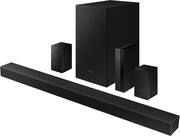
Very pleased with this purchase. Purchased it on sale, it is a very high quality speaker set. The sound bar is small but powerful. The rear speakers were a little soft, but I turned them up through the settings on the soundbar. Setup was very easy, I just plugged the receiver in and the rear speakers connected to the soundbar automatically. Soundbar sits perfectly on top of tv legs!
Posted by Josh
- Rated 5 out of 5 stars
Great sound for the price
Ok, so i hooked this up and it took my a bit to get it all set and working, and i must say, not bad for the price. I used it with my device and i do have dolby atmos so the sound it definitely two thumbs up for the size of this room. Later today ill be hooking it up to my tv. I am posituve it will give it the extra boost it needs. Happy with my product. Thank you.
Posted by Red01
- Rated 5 out of 5 stars
Good review
Great sound, easy to set up. A friend bought one after we set this up and loves it!
Posted by Terri
- Rated 5 out of 5 stars
Surround sound
This is a great system easy to install, wirelessly seamless with Great Sound.
Posted by LAKESIDE22