Main Content
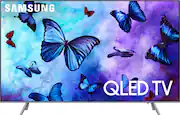
product image

Samsung - 55" Class - LED - Q6F Series - 2160p - Smart - 4K UHD TV with HDR

Model: QN55Q6FNAFXZA
SKU: 6202120
This item is no longer available in new condition. See similar items below
  • Key Specs
    • Display Type: LED
    • Resolution: 4K (2160p) (Refers to the number of pixels, both horizontally and vertically, used to capture video/images. The higher the resolution the finer the detail that can be seen.)
    • Screen Size Class: 55 inches (The group size measurement of a screen. This differs from a screen size measured diagonally from corner to corner.)
    • High Dynamic Range (HDR): true (An HDR-compatible 4K TV or other HDR-compatible product displays HDR video content when it's available from sources like 4K Ultra HD Blu-ray Discs and 4K streaming services.)
    • High Dynamic Range Format: HDR 10, HDR 10+, Hybrid Log-Gamma (HLG) (There are a few HDR formats that tell the TV or other HDR-compatible product how to best utilize its capabilities to display HDR content. HDR technology can support one or multiple formats, each with various benefits to picture quality.)
    • Backlight Type: Edge (Edge-lit: lights are on the edges of the display with ~10 zones of vertical LEDs. Direct-lit: lights are on the edges and behind the screen for more light uniformity than Edge-lit. Full array: direct-lit with local dimming for greater contrast with up to 100 zones of LEDs.)
    • Motion Enhancement Technology: Motion Rate 240 (Proprietary technologies produced in addition to the Refresh Rate that smooth out faster moving pictures to reduce blur and pixelation.)
    • Specific Manufacturer Technologies: QLED, Q Color powered by Quantum-Dots, 4K Q Engine, Q HDR, Q Style, Smart TV with Bixby Voice (This is technology that's specific to a TV brand (sometimes called proprietary technology). Here you'll see terms related to picture quality, brightness, processors and more.)
    • Smart Platform: Samsung Smart TV (Just like a computer, a smart TV needs an operating system (also called a smart platform) in order to access the Internet, connect with entertainment apps, and play streaming content. Some common TV smart platforms are; Roku TV, Android TV, and Chromecast.)
    • Works With: Bixby, SmartThings (Compatible with or able to be connected to other smart devices or applications.)
    • Voice Assistant Built-in: Bixby (A digital assistant built into the device that uses voice commands to answer questions and control smart devices.)
  • General
    • Brand: Samsung
    • Model Number: QN55Q6FNAFXZA
    • Product Name: 55" Class - LED - Q6F Series - 2160p - Smart - 4K UHD TV with HDR
    • Color: Eclipse Silver
    • Model Year: 2018
  • Dimensions
    • Product Height With Stand: 30.7 inches
    • Product Width: 48.3 inches (The out of box width of the item. Width is measured as the horizontal distance from one side of the item to the other as it would be primarily used or placed.)
    • Product Depth With Stand: 9.8 inches
    • Product Height Without Stand: 28 inches
    • Product Depth Without Stand: 2.2 inches
    • Product Weight With Stand: 39 pounds
    • Product Weight Without Stand: 37.9 pounds
    • Stand Width: 2.1 inches (The horizontal measurement of the stand/base, or the distance from the outside of one leg to the outside of the opposite leg, as it is attached to the product.)
    • Stand Depth: 9.8 inches
  • Display
    • Display Type: LED
    • Resolution: 4K (2160p) (Refers to the number of pixels, both horizontally and vertically, used to capture video/images. The higher the resolution the finer the detail that can be seen.)
    • Screen Size: 54.6 inches (Size of the screen, measured diagonally from corner to corner.)
    • Screen Size Class: 55 inches (The group size measurement of a screen. This differs from a screen size measured diagonally from corner to corner.)
    • High Dynamic Range (HDR): true (An HDR-compatible 4K TV or other HDR-compatible product displays HDR video content when it's available from sources like 4K Ultra HD Blu-ray Discs and 4K streaming services.)
    • High Dynamic Range Format: HDR 10, HDR 10+, Hybrid Log-Gamma (HLG) (There are a few HDR formats that tell the TV or other HDR-compatible product how to best utilize its capabilities to display HDR content. HDR technology can support one or multiple formats, each with various benefits to picture quality.)
    • Backlight Type: Edge (Edge-lit: lights are on the edges of the display with ~10 zones of vertical LEDs. Direct-lit: lights are on the edges and behind the screen for more light uniformity than Edge-lit. Full array: direct-lit with local dimming for greater contrast with up to 100 zones of LEDs.)
    • Curved Screen: false
    • Motion Enhancement Technology: Motion Rate 240 (Proprietary technologies produced in addition to the Refresh Rate that smooth out faster moving pictures to reduce blur and pixelation.)
    • Closed Captioning: true (The text version of spoken audio displayed on the screen. Devices that can display closed captioning typically have the option to toggle the feature on or off.)
  • Features
    • Remote Control Type: Smart, Voice control
    • Specific Manufacturer Technologies: QLED, Q Color powered by Quantum-Dots, 4K Q Engine, Q HDR, Q Style, Smart TV with Bixby Voice (This is technology that's specific to a TV brand (sometimes called proprietary technology). Here you'll see terms related to picture quality, brightness, processors and more.)
    • Smart Capable: true (Smart, or smart-capable devices are able to connect directly to your home network in order to stream content from the Internet, run Internet-based apps, or connect to other smart devices.)
    • Smart Platform: Samsung Smart TV (Just like a computer, a smart TV needs an operating system (also called a smart platform) in order to access the Internet, connect with entertainment apps, and play streaming content. Some common TV smart platforms are; Roku TV, Android TV, and Chromecast.)
    • Indoor Or Outdoor Use: Indoor (Indicates the appropriate environment product was designed to be used in.)
    • V-Chip: true (Feature that blocks television programming if it has a content rating outside of the acceptable rating(s) configured by the user.)
    • TV Tuner: Digital (The ATSC TV Tuner is a component built into conventional TV sets or other devices for receiving over-the-air broadcast TV without a cable/satellite box. Digital tuners may be purchased separately and connected to a device if it does not have one built in.)
  • Connectivity
    • HDMI Audio Return Channel (ARC): true
    • HDBaseT Receiver: false (An input that receives uncompressed HDMI signals over a category cable point-to-point, up to 100 meters, from a transmitter.)
    • RF Antenna Input: true (This input is used to connect devices such as antennas or cable boxes to a TV via a coaxial cable.)
    • Number Of USB Port(s) (Total): 2 (The total number of USB ports including all generations and versions.)
  • Compatibility
    • VESA Wall Mount Standard: 200mm x 200mm (VESA wall mount standards refer to the spacing of screw holes built into a TV in order to fit with standard TV wall mounts. These standards are implemented into most TVs and monitors.)
    • Works With: Bixby, SmartThings (Compatible with or able to be connected to other smart devices or applications.)
    • Voice Assistant Built-in: Bixby (A digital assistant built into the device that uses voice commands to answer questions and control smart devices.)
  • Audio
    • Built-In Speakers: true
    • Speaker Output: 40 watts
  • Power
    • ENERGY STAR Certified: true (Devices carrying the ENERGY STAR service mark, such as computer products and peripherals, kitchen appliances, and other products, generally use 20% to 30% less energy than required by federal standards.)
    • EPEAT Qualified: false (The Electronic Product Environmental Assessment Tool (EPEAT) was designed to provide an environmental assessment tool for purchasers. In order to qualify for EPEAT, a product must meet all 23 required criteria.)
    • Estimated Annual Operating Cost: 17 United States dollars (Predicted cost of operating the product under average conditions for one year.)
    • Estimated Annual Electricity Use: 138 kilowatt hours (Predicted amount of electricity needed to operate the product under average conditions for one year.)
  • Included
    • Stand Included: true
  • Box Dimension
    • Height: 33.4 inches
    • Width: 53.3 inches
    • Depth: 6.2 inches
    • CubicDimension: 11037 inches
  • Other
    • UPC: 887276260211

Upgrade your movie nights with this 55-inch Samsung television. The QLED screen has a 3840 x 2160 resolution to display every colorful detail, and its wide viewing angle lets you watch it from almost any position. This Samsung television has four HDMI ports to connect multiple gaming consoles or HD devices.

4K Ultra HD TV Buying Guide

Compare Samsung TVs

  • Q Color: Push the boundaries of color with Quantum Dots and a billion shades, reserved for this QLED TV.
  • Q HDR™: See colors in movies and shows pop, just as the director intended - in stunning High Dynamic Range.
  • Q Style™: A thoughtful design with a Clean Cable Solution® allows you to focus on a TV without the clutter.
  • Ambient Mode: You can elevate your living room with decorative content, useful information, your own photos, and even some background music. You won’t notice the TV on the wall as it blends perfectly with your decor.
  • Q Smart™ with Bixby Voice: Sync your TV to your compatible smartphone to access and control your content on the big screen.
  • 54.6" screen (measured diagonally from corner to corner): Large enough to provide an immersive experience for everyone in the room.
  • 2160p resolution for breathtaking HD images: Watch 4K movies and TV shows at 4x the resolution of Full HD, and upscale your current HD content to gorgeous, Ultra HD-level picture quality.
  • Watch High Dynamic Range (HDR) content on your TV: With an HDR-compatible 4K TV, you can enjoy HDR movies and TV shows, in addition to all your current content.
  • Smart TV with access to streaming services for countless entertainment options: Stream shows, movies, games and more with the TV's built-in Wi-Fi and integrated apps.
  • LED TVs perform well in all lighting conditions: They also deliver plasma-like deep blacks and rich colors.
  • Advanced 2.1-channel 40W TV sound: Two speakers and woofer, Dolby Digital Plus and DTS Premium Sound.
  • Dolby Digital Plus and DTS Premium Sound: Optimize the sound for TV from sources like Internet movies and music, connected PCs, smartphones and tablets.
  • Four HDMI inputs for home theater connection: High-speed HDMI delivers a 4K UHD 2160p picture and digital surround sound in one convenient cable. (HDMI cable not included.)
  • Motion Rate 240: Enjoy great motion clarity during fast-action moments.
  • Two USB inputs: Easily connect your digital camera, camcorder or other USB device.
  • Manage the viewing experience for your kids: The built-in V-chip lets you block content based on program ratings and check ratings of unfamiliar programs.
  • Q Color: Push the boundaries of color with Quantum Dots and a billion shades, reserved for this QLED TV.
  • Q HDR™: See colors in movies and shows pop, just as the director intended - in stunning High Dynamic Range.
  • Q Style™: A thoughtful design with a Clean Cable Solution® allows you to focus on a TV without the clutter.
  • Ambient Mode: You can elevate your living room with decorative content, useful information, your own photos, and even some background music. You won’t notice the TV on the wall as it blends perfectly with your decor.
  • Q Smart™ with Bixby Voice: Sync your TV to your compatible smartphone to access and control your content on the big screen.
  • 54.6" screen (measured diagonally from corner to corner): Large enough to provide an immersive experience for everyone in the room.
  • 2160p resolution for breathtaking HD images: Watch 4K movies and TV shows at 4x the resolution of Full HD, and upscale your current HD content to gorgeous, Ultra HD-level picture quality.
  • Watch High Dynamic Range (HDR) content on your TV: With an HDR-compatible 4K TV, you can enjoy HDR movies and TV shows, in addition to all your current content.
  • Smart TV with access to streaming services for countless entertainment options: Stream shows, movies, games and more with the TV's built-in Wi-Fi and integrated apps.
  • LED TVs perform well in all lighting conditions: They also deliver plasma-like deep blacks and rich colors.
  • Advanced 2.1-channel 40W TV sound: Two speakers and woofer, Dolby Digital Plus and DTS Premium Sound.
  • Dolby Digital Plus and DTS Premium Sound: Optimize the sound for TV from sources like Internet movies and music, connected PCs, smartphones and tablets.
  • Four HDMI inputs for home theater connection: High-speed HDMI delivers a 4K UHD 2160p picture and digital surround sound in one convenient cable. (HDMI cable not included.)
  • Motion Rate 240: Enjoy great motion clarity during fast-action moments.
  • Two USB inputs: Easily connect your digital camera, camcorder or other USB device.
  • Manage the viewing experience for your kids: The built-in V-chip lets you block content based on program ratings and check ratings of unfamiliar programs.
Whats Included
  • Samsung 55" Class - LED - Q6F Series - 2160p - Smart - 4K UHD TV with HDR
  • TV stand
  • Samsung OneRemote w/battery (TM-1850A)
  • Owner's manual
  • Samsung 55" Class - LED - Q6F Series - 2160p - Smart - 4K UHD TV with HDR
  • TV stand
  • Samsung OneRemote w/battery (TM-1850A)
  • Owner's manual

Q: what is the difference between a QLED and an OLED TV besides the price?

A: QLED is an LED. It is playing off OLED for marketing. It is their top of the line LED with a “full array” . LEDs get their light from a bunch of back lights, the more backlights (if you smashed your tv you would see a bunch of lights” a good LED vs a crappy one would have less lights. The more, the better contrast and bleeding, aliasing, etc. “Bleeding” is a term used define light that bleeds off a “pixel” (a dot on the screen that makes your whole image”. UHD 4K is 3840x2160 (4x more than 1920x1080 aka 1080p, a TV standard). With backlights if you have a big white circle in the middle of the black screen you will see bleeding, depending on how good the TV and how pro your eye is, will depend on how much. Look at the promos of a OLED vs LED (QLED) vs an OLED with Dolbyvision HDR. The contrast is not compatible to a professional colorist or VFX supervisor (which I am). LED if you don’t mind the less contest (the difference between blacks and whites) and that the white circle I discussed above bleeds a little white into the black (learn why by reading my OLED quick definition) then save money and get an LED but mind your remember to look at the images on the promos. The LED stuff shows all colorful and full screen stuff while the OLED stuff is always showing off black and white images and colors on blacks. In a word, OLED just look better when there are lots of blacks and lots of movement (especially with blacks). Contrast is not king of LEDs. Plasmas were as good or better than OLEDs but somehow lost out to LESs because I think the margin on the TVs was higher on LEDs and they are already low margins. So big nutshell, sorry, if LED looks just fantastic to you get it but... OLED is a pixel for pixel affair. In the above LED example on a 3840x2160 UHD LED, a full array I believe is 24 back lights, an OLED doesn’t have any. “Wait I thought you said more backlights is a better LED” and I did but OLED EVERY SINGLE PIXEL is lit on its own, like an iPhone X (not the 11) and pretty much all computer screens and ones like the Retina display have more pixels per inch than the standard 72dpi (dots per inch). On an OLED TV there are 3840x2160 backlights essentially but they are not backlights, they are the individual pixels on the screen and each one is its own color. You can have a perfectly white and perfectly black set of 30 pixels (or one) right next to each other and the light from one pixel WILL NOT bleed into the color or brightness of its neighbor giving you near perfect contrast and eliminating things like aliasing (the artifacts created by image. Also has to do with the CODEC (compressor/decompressor) of the image but I won’t get into that to keep it simpler. OLEDs are more like plasma and look smooth like plasma for this reason. It has HDR DolbyVision with near perfect contrast and to the more initiated eye, a much better image like one on a good computer screen. Final word, aside OLED being better for picture because every single pixel is its own backlight, because there are no backlights, the TV is light and small. Next time your shopping take your phone and put it on the side bevel of an OLED, it’s thinner than your phone and WAY lighter. Try to lift the OLED, you can lift an entire side with one hand. So the cons of each, if a pixel dies on an OLED, it is gone forever but there are millions of them and some WILL die over time and it is not cost effective to fix but even worse if an LED backlight dies, it will do significant damage to your TV and is fixable but also expensive but not prohibitively and usually covered for a year or two. I have a Sony Bravia 42” that is 14 years old 1080p and never hard a problem with it. I love LG but mine got grey lines because the mother board shorted or something and it’s not worth fixing because I can get a better TV than it for the less than fixing it if I got an LED. That said, the OLED dead pixels now go black by design because you rarely see an all white image and often are dark scenes or completely blacks screen hiding “dead pixels” remember there are literally millions of them. If you take millions of anything, something is bound to happen to one of them. Some people have 10s of dead pixels and have no idea. Hands down if money is not a factor and you want the best, OLED, and there is no subjectively here, it’s objectively better. BUT is the diet difference which is significant, especially today, you can get a quality 65” LED for $1000 while a quality OLED is $2100 for a 65” and if you want a 75-85, you’re talking $4k vs $1500 difference (approximations on both) and is it worth it to you. For me, the 65” price difference vs quality to price is worth the OLED but as I said I’m a VFX supervisor and I can see things many dont from 25 years at staring and judging images on a screen. It all depends on what you want to do. It should be noted that OLEDs are for all the reasons stated MUCH better in bright rooms because of the individual pixels having their own set of color, greyscale and light. I hope this helps. There is so much more to say but these are the main differences. I promise. Good luck and ask your friends who have both and have a look at the houses, the promos are obviously made to sell TVs and so it’s not the best to judge.

Q: What is the exact width between stands on a Samsung 55" QLed q6f tv?

A: The width between the stands of the TV is 38.3".

Q: What is the difference between this tv and the 55q6fam for 999 at Best Buy? Are the differences worth the extra couple hundred dollars?

A: There is a couple differences. The q6fn does not come with a one connect box whereas the fa does. Also the Q6FN comes with ambient mode and Bixby and what that means is itll be able to blend to your wall so u don't really see it. Go to your local bestbuy to see a demo. Also the Bixby is a more intuitive voice control and smart features. Also the Q6fn is going to have better dimming for your contrast which is your black and whites. Either one is a great deal but I would recommend goin with the q6fn over the q6fa. Q6fa is 2017 model and the q6fn is a 2018 model

Q: What is the width of the base? I will put this on a table 38” wide.

A: Its exactly 38" on the 55" version. I have mine on a 42" stand and it has a couple inches on each side. So you would be cutting it close. Added some pics. Hope that helps.

Q: I need the measurements between stand legs. I have a Bose sound bar that doubles as a TV stand. So I just need to know if the sound bar will still hold the TV on top of it, or will the sound bar fit in between the legs of the stand. Can anyone help?

A: The stand legs measure 38 inches from left to right and 9 inches from front to back, on 4 points. However, the legs canter inwards towards the center of the television (they area at an angle), so placing anything between them would have to be no more than 35 inches long and 3 nches tall. Ref: Sansung Q6f

Q: What is the Hz Rate for the Samsung Q6F?

A: True refresh rate of 120hz. Everything else is "sales fluff."

Q: is this TV able to be used with wireless headphones via blue tooth?

A: Yes it has Bluetooth. I used apple wireless earbuds and Sony wireless headphones with mine.