FREE shipping to
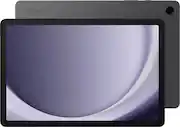
Meet your go to device for on the go family fun Galaxy Tab A9+. A bright, engaging 11" screen is perfect for every family member to do what they love. Whether they’re enjoying a show, unwinding with a game or catching up on schoolwork or day to day tasks, an upgraded chipset makes every experience feel smooth and easy. You can even open multiple apps at the same time and get all your everyday tasks done quickly. Use it for hours without worrying about power, and keep everything you love together with plenty of storage space. Plus, the preloaded Samsung Kids app provides a safe digital environment for your little ones to happily learn and play. Give your family a great all in one Tab that perfectly meets all their everyday needs without taking a bite out of your wallet Galaxy Tab A9+.
Q: Does the Samsung Galaxy Tab A9+ have a headphone jack?
A: Yes, this tablet does have a headphone jack.
Q: What is the battery capacity of this Samsung tablet?
A: The battery capacity of the Galaxy Tab A9+ is 7040 milliampere hours.
Q: What operating system does the Galaxy Tab A9+ use?
A: The Samsung Galaxy Tab A9+ uses the Android 13 operating system.
Q: What is the screen size of this Samsung tablet?
A: The Samsung Galaxy Tab A9+ has an 11-inch screen.
Q: How much storage space does this tablet have?
A: This tablet comes with 256GB of storage.
Q: Can I use this tablet to share files with other devices?
A: Yes, you can share files with other Android and iOS devices using Quick Share.
Q: Does the 256gb version have an expandable slot for additional memory (microsd)?
A: Greetings James, thank you for finding the time out of your day to ask us your question about the Samsung Galaxy Tab A9+. Yes, the Tab A9+ offers expandable storage capabilities, up to 1TB, when you add a microSD card to this device. If you have additional questions for us, feel free to reach out to Samsung Support at your leisure. Thank you for being a dedicated Samsung customer. - Debra
Q: can i do email with this tablet
A: We appreciate you coming to us with your question, Coco. We noticed that you are interested in using the Tab A9+ for emails. To access apps, send emails, or use certain features - like syncing data - on your phone or tablet, you need to sign into an account. Or, if you want to download that brand-new app from the Play Store, you will need a Google account. Luckily, you can add these accounts and more to your Galaxy device. You can add an email account and receive your emails through the Samsung Email app. Navigate to and open Settings, and then swipe to and tap Accounts and Backup. Tap Manage accounts, and then tap Add account. Select your email provider and then enter your account credentials. Depending on your provider, there may be additional requirements to complete the setup on your device. If needed, sign into your account via the internet, and then enable access to allow the use of the app. If you have any further questions or concerns, please reach out to us at Support. -Kelvin

Meet your go to device for on the go family fun Galaxy Tab A9+. A bright, engaging 11" screen is perfect for every family member to do what they love. Whether they’re enjoying a show, unwinding with a game or catching up on schoolwork or day to day tasks, an upgraded chipset makes every experience feel smooth and easy. You can even open multiple apps at the same time and get all your everyday tasks done quickly. Use it for hours without worrying about power, and keep everything you love together with plenty of storage space. Plus, the preloaded Samsung Kids app provides a safe digital environment for your little ones to happily learn and play. Give your family a great all in one Tab that perfectly meets all their everyday needs without taking a bite out of your wallet Galaxy Tab A9+.

Meet your go to device for on-the-go family fun Galaxy Tab A9+. A bright, engaging 11" screen is perfect for every family member to do what they love. Whether they’re enjoying a show, unwinding with a game, or catching up on schoolwork or day to day tasks, an upgraded chipset makes every experience feel smooth and easy. You can even open multiple apps at the same time and get all your everyday tasks done quickly. Use it for hours without worrying about power and keep everything you love together with plenty of storage space. Plus, the preloaded Samsung Kids app provides a safe digital environment for your little ones to happily learn and play. Give your family a great all in one Tab that perfectly meets all their everyday needs without taking a bite out of your wallet Galaxy Tab A9+.

Lenovo Idea Tab Plus is designed to fit your style and power your study. With a thin, lightweight build and a choice of three fresh colors, this tablet feels personal from the start. The 12.1" display with 800nits HBM brightness and 96% DCI-P3 color keeps everything sharp and vibrant, even outdoors. AI-powered study tools and the responsive Lenovo Tab Pen help elevate focus and make note-taking feel smooth and natural.

Meet your go to device for on-the-go family fun Galaxy Tab A9+. A bright, engaging 11" screen is perfect for every family member to do what they love. Whether they’re enjoying a show, unwinding with a game, or catching up on schoolwork or day to day tasks, an upgraded chipset makes every experience feel smooth and easy. You can even open multiple apps at the same time and get all your everyday tasks done quickly. Use it for hours without worrying about power and keep everything you love together with plenty of storage space. Plus, the preloaded Samsung Kids app provides a safe digital environment for your little ones to happily learn and play. Give your family a great all in one Tab that perfectly meets all their everyday needs without taking a bite out of your wallet Galaxy Tab A9+.
| Pros for Samsung - Galaxy Tab A9+ 11" 256GB - Wi-Fi - Graphite | |||
|---|---|---|---|
| There were no pros for this product— | |||
| Cons for Samsung - Galaxy Tab A9+ 11" 256GB - Wi-Fi - Graphite | |||
| There were no cons for this product— | There were no cons for this product— |
Customers consistently note the Galaxy Tab A9+ 11" 256GB - Wi-Fi's large screen size, fast performance, and long battery life as significant advantages. Many appreciate its ample storage and ease of use. However, some users have reported issues with slow charging speeds and less-than-stellar camera quality. A few also mentioned challenges with touchscreen responsiveness.
The vast majority of our reviews come from verified purchases. Reviews from customers may include My Best Buy members, employees, and Tech Insider Network members (as tagged). Select reviewers may receive discounted products, promotional considerations or entries into drawings for honest, helpful reviews.
My old Samsung Tablet (Galaxy Tab E, SMT560NU) was no longer compatible with some sports apps. It still works, so I gave it to my son. It was hard to find the microSD card to locate all my music files in the new tablet. Bought this mainly to use on the plane. I make 4-5 trips a year. Works perfect! Long battery life. Would recommend it.
Posted by ArubaOrBust
I got this tablet mainly for gaming and so I needed more storage and space it works and looks great and holds charge and power very well The things I disliked about it is the size It is very big and hard to hold As I do prefer smaller tablets but I wanted to stick with a brand I know and used before and the fact it doesn't come with a charging block adapter but the one i bought separately worked well and charges fast so all is well Anyway I do love this tablet and do not regret buying it In fact I will be buying another and I recommend this one to others it's a great tablet all around Im very happy and super satisfied with it
Posted by Nisha
The Galaxy Tab A9+ is a good budget tablet choice. You can comfortably do most tasks on it and it performs great. The screen/settings show it can hit 90hz refresh, but the framerate can look a little choppy at times when lots of apps are open or quickly scrolling websites and menus. However it seems to be "optimized" because it shows videos and low demand video games without any blur or frame stuttering. That being said, this is not great tablet for current gaming; but that's what you should expect at this price point. The speakers are surprisingly loud and the sound comes out clear and crisp. Don't expect any heavy bass, of course, from tablet speakers. The camera is passing, but I don't think the average tablet user is using it to take videos or excellent photos. In short: - Great for web surfing, shopping, reading, video streaming, light work and organization - Not great for heavy tasks like movie or music editing. - Struggles with modern/high graphics video games. Have to play them on lower settings if at all.
Posted by Tenkou
