Rating 4.4 out of 5 stars with 52 reviews
4.4- Storage (22)
- Speed (16)
- USB-C (16)
- Size (12)
- Compatibility (3)
- Build Quality (3)
- Heat (3)
Customer Images
The vast majority of our reviews come from verified purchases. Reviews from customers may include My Best Buy members, employees, and Tech Insider Network members (as tagged). Select reviewers may receive discounted products, promotional considerations or entries into drawings for honest, helpful reviews.
- Rated 5 out of 5 stars
10/10 recommend for easy cheap storage
Great Drive, plugs right into my phone for easy storage
Posted by NickT
- Rated 4 out of 5 stars
Great Speeds, Portable Size, Flimsy Design
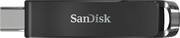
Like many people, I've owned countless flash drives with traditional USB-A connectors. Now that many computers and tablets are moving to USB-C, I've been looking for a decent high-capacity, USB-C flash drive that I can use between my laptops and iPad Pro. This SanDisk Ultra certainly fits the bill, though it's compact size comes with some trade-offs in terms of speed. PROS: - The small, compact size of the SanDisk Ultra makes it easy to travel with or throw in a pocket. The USB-C connector easily retracts for safe storage. - When this drive is on sale, it offers a great value for the amount of storage you receive. 256 GB in a drive this small is pretty incredible. Just a few years ago, this amount of storage in a flash drive would have cost significantly more. - Speeds are perfectly fine for general tasks and storage needs. Sequential write speeds range from 50 to 70 MB/s while read speeds peak near 165 MB/s. For small to medium sized files, these speeds are just fine. Photos and documents like PDFs and Word files open instantly. Even larger files such as videos seem to open almost immediately. Speed limitations are most noticeable when copying or transferring large amounts of data at one time (more on this below). - The drive is formatted to FAT32 for universal support across devices. My iPad Pro immediately recognized the drive and I can read and write to it via the Files app. CONS: - I appreciate the compact size, but the plastic design feels a bit flimsy. I worry that the retracting mechanism will eventually break and the drive might be stuck open or closed. As it is, it can sometimes feel difficult to retract the USB-C connector (it seems like a lot of force is required). - Speeds are very inconsistent when transferring a lot of data to or from this drive. While writing large amounts of data (300+ MB), speeds sometimes start out very high (~65 MB/s) but slowly fall into the 40-50 MB/s range. Other times, writing data starts off very slowly (~15 MB/s) but slowly increases to near 60 MB/s as more data is written. I suppose that is the nature of small flash drives like this. It's certainly not a deal-breaker, but could be an issue if you regularly work with large files (such as video editing). - The front of the packaging advertises SanDisk SecureAccess as a way to easily encrypt your files, but that software is not provided on the flash drive. A link to download it is included in the very tiny fine print on the back of the package. The software overall works well, though business users might prefer an easier or more universal solution such as BitLocker. OVERALL: Minor issues aside, this appears to be a great flash drive with a truly incredible amount of storage for the price. Speeds are more than acceptable for the vast majority of use cases. The USB-C connector allows you to access your files on virtually any modern computer or tablet. I wish SanDisk would have used a sturdier material rather than the cheap plastic, but if this model is anything like other SanDisk drives I've owned, it will last for years to come. Recommended!
Posted by ryanmcv
- Rated 3 out of 5 stars
Mediocre write speed. Get the model SDDDC3 instead
[Employee of bestbuy] With a 4GB test size and with the drive formatted as exFAT, the sustained sequential write speed is less than 20 MB/s. For comparison the SanDisk Ultra Dual Drive Go flash drive (Model: SDDDC3, SKU: 6421486) can do 38 MB/s sustained writes. I should have bought that instead even if it costed a bit extra.
Posted by EJTech
- Rated 4 out of 5 stars
USB-C Flash Drive with Many Uses!
I am sure we all have USB-A flash drives lying around in drawers. While they are still practical in today’s world, a USB-A flash drive won’t be as versatile as USB-C one. Now that many PCs in today’s world are being manufactured with a USB-C/thunderbolt port, there is never a better time to get a USB-C flash drive than right now. A USB-C flash drive will allow you to transfer files from your Android phone to your computer, and vice versa seamlessly. This flash drive is also sleek and tiny, although I do feel SanDisk could’ve added a bit more protection on the outside in case of drops, scratches, etc. Different materials such as ruggedized rubber would’ve been better. The plastic does feel flimsy and cheap. I did test the flash drive out using the thunderbolt port on my laptop so speeds may differ from others. I transferred about 5GB worth of files from my PC and noticed write speeds are fairly quick. It took about 2 and a half minutes to transfer 5GB worth of videos and files. I decided to compare this flash drive’s speed to a typical USB-A flash drive I had laying around. This one did take significantly longer to transfer 5GB worth of files. (about 13 minutes) Granted, the USB-A flash drive is older and cheaper but I do love how quicker data transfer speeds have gotten over the years! Transferring the files from the flash drive onto my phone was also a quick and easy process. The flash drive does come with the optional SanDisk Memory Zone apk that can be installed on your phone. This application allows you to easily move files from your phone’s internal storage to an external location such as this USB-C drive. The app also lets you organize your files, delete junk files, and create backups. I do enjoy the simple UI of the app so far but a recycling bin in the app would be a great addition in case of accidental deletion of files. Overall, this is a solid USB-C flash drive. It is swift and does its job exceptionally well. The only drawback was the flimsy and cheap plastic used. I do highly recommend you get this flash drive if you are wanting to transfer files from your phone to PC or vice versa.
Posted by BarackObama
- Rated 4 out of 5 stars
Fast speeds, Large Drive and Small Size
The Sandisk 256GB USB Drive has lightning speed and lots of space to transfer data (233GB to use)! That is half of my computer’s Hard Drive! Its size is incredibly compact, lightweight and looks great. The USB Drive is made of plastic which feels kind of cheap and not as sturdy as I would think for a USB Drive of this magnitude. With that being said, I had no issues with the plastic USB Drive. The Sandisk Ultra 256GB USB 3.0 Type C Flash Drive (backward compatible 2.0) can move files from one computer to another, topping out at 150MB per second which is extraordinarily fast. I was able to move large music files from my computer to the USB Drive. I never reached over 50MB per second. Then I took and plugged in the Sandisk USB Drive Type C to another computer and moved the music files. The Sandisk drive reached speeds topping 100MB per second on the transfer of music files! So under perfect circumstances you could achieve 150MB per second. Using different computers and other variables like processor speed or Hard Drive space will affect the speed. I still think that 50MB per second and 100MB per second is fast. I don’t think I have had such speed in any other USB Drives I have owned. Plug into your phone with the USB Type C connection to get the software app Sandisk Memory Zone. It provides Auto Backup, Aggregate and Free up Space. Once I had downloaded the software it was a cinch to help cleanup my phone and move data around. This USB Drive also offers SecureAccess software for protecting sensitive documents, pictures etc. This USB Drive really has great all around protection and reliable software for sorting your data. Whether you use the software or not, the Sandisk 256GB USB Type C acts just like any other USB drive. Drop and drag your data, documents, music, and pictures on the Sandisk USB Drive and transfer to another source. The only difference being, this new Sandisk 256GB USB Drive is much faster at transfer rates than other USB drives I have used up to this point. I am very pleased with the size and speed of the Sandisk 256GB USB drive. The only reason I gave this drive 4 stars is because it is made of plastic.
Posted by stoptheclocks