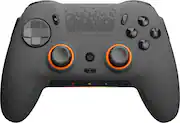
Rating 4.3 out of 5 stars with 1632 reviews
4.3- Overall Performance (241)
- Buttons (137)
- Ease of use (79)
- Customization (75)
- Ergonomics (55)
- Software (195)
- Stick Drift (81)
- Connectivity (19)
- Battery Life (18)
- Price (18)
Customer Images
The vast majority of our reviews come from verified purchases. Reviews from customers may include My Best Buy members, employees, and Tech Insider Network members (as tagged). Select reviewers may receive discounted products, promotional considerations or entries into drawings for honest, helpful reviews.
- Rated 4 out of 5 stars
Exceeding my expectations
After conscientiously evaluating this product over a two-week period, I am pleased to offer it a commendable four-star rating. Employed extensively in conjunction with my PC gaming pursuits, particularly with MW3, I embarked upon a comparative analysis with other leading brands and Scuf controllers. Without reservation, I can assert that none have rivalled the superiority of this particular model. One of its most striking features is the unparalleled level of customization imbued within the controller itself, elevating it to the upper echelons of gaming peripherals. Remarkably, even after protracted gaming sessions spanning over six hours, the controller remains impeccably ergonomic, ensuring sustained comfort and minimal fatigue. Furthermore, the setup process is admirably streamlined, affording users a hassle-free experience. Regrettably, the only minor drawback, and the sole reason for withholding a perfect five-star rating, pertains to the occasional software glitches encountered within iCue. These sporadic instances necessitate vigilance to prevent inadvertent alteration of settings. Despite this minor caveat, I am unequivocally content with the overall performance and functionality of this product. It has undoubtedly exceeded my expectations, affirming its status as a commendable addition to any discerning gamer's arsenal.
Posted by Glydes
- Rated 4 out of 5 stars
Scuf Envision Pro Review
This controller is built to last and is very comfortable. The mechanical triggers and back paddles are placed comfortably making it a seamless transition from previous controllers. It is high quality and customizable. However, navigating the iCUE software is a little confusing at times.
This review is from SCUF - ENVISION PRO V1 Wireless Gaming Controller for PC - White/Gray
Posted by Jeremy
- Rated 5 out of 5 stars
Great Controller, Be Mindful on Game Pass
I was extremely hesitant to purchase this controller with mixed reviews online. I had seen some horrible things about stick drift and sensitive triggers out of the box, as well as the iCue software being terrible. I have used this one controller on both my desktop that already had iCue installed, as well as a legion go that had a fresh install for just this controller. No software issues on either device. I have experienced no stick drift, and my triggers are great as well! Last. Scuf ihad was for the 360, and I’ve used an original Elite controller since 2017. Having the shape of an Xbox controller with the parallel joysticks to only a few hours too get used to, And the sane goes for the back button design. The side-Sax buttons don’t get in the way either. I’d say in the 20+ hours of gameplay, Ive accidentally pressed them three times tops. I will say that game pass does not recognize it as an Xbox controller, so certain games that require a controller will not work with this one.
Posted by KoleWheatBread
- Rated 5 out of 5 stars
Best controller I’ve ever owned
My favorite controller I’ve ever owned out of 10+ controllers. The mouse click triggers/buttons feel great, and all the bonus features such as custom lighting, macros, and fast wireless connection are great. Only wish the durability was a little better, with the back paddles breaking after quite a bit of use. I’d recommend getting the 2 year warrranty.
This review is from SCUF - ENVISION PRO V1 Wireless Gaming Controller for PC - White/Gray
Posted by PaytonT
- Rated 4 out of 5 stars
An honest review
In general the control is very good, here some details about my experience. The good: * Easy to configure * 2 Modes (USB / Wireless) * Good battery life * All buttons are like mouse clicks * Trigger can be switched between mouse click or real complete trigger travel. The Bad: * iCue integration The iCue software if ok when working, after a month of usage I start receiving error messages that the profiles in iCue didn't match the profiles on the device itself, only way I found to resolve that (before) was uninstalling and reinstalling the iCue software again + a factory reset on the controller. Update: To avoid having this problems with the iCue software you can setup the hardware mapping and close the icue app before start playing. Only issue with that is hardare mapping will not allow to customize the 5 action buttons below the sticks. I hope the iCue issue is resolved soon so I can start mapping my actions buttons again. Note: If you are using control freaks you are going to rub the face plate on the top left side of left stick, you may need to rotate the control freak until you find that sweet spot or sand one of the control freak clamp a little bit
Posted by Jorge